# Reflexio Documentation ## Reflexio Documentation URL: https://www.reflexio.ai/docs/
Developer docs

Reflexio Documentation

Connect Reflexio to your agent, publish interactions, retrieve learned context, and inspect the learning loop.
Use the integration skill Hosted Enterprise Quickstart
Hosted Enterprise Connect hosted Reflexio API key, SDK install, identity check, and first publish. Local OSS Run open source locally Install reflexio-ai, start the backend, and publish locally. Build Configure learning Models, extractors, playbooks, evaluation, and storage. Build Publish interactions Text, image, expert, session, and metadata patterns. Reference Look up methods and schemas Python SDK methods, request payloads, and response types.

Find the right area

Get Started
Choose Hosted Enterprise or Local OSS.
Open Quickstart
Build
Publish interactions, retrieve context, and manage profiles and playbooks.
Open examples
Concepts
Understand interactions, requests, profiles, playbooks, and optimization.
Open concepts
Portal
Use the Enterprise web portal to review outcomes and operate the loop.
Open portal docs
Reference
Browse SDK methods, schemas, CLI commands, and service operations.
Open reference
Claude Smart
Use Reflexio as a Claude Code learning plugin with local memory.
Open plugin docs

Minimum integration loop

Retrieve profiles and playbooks before the agent responds, then publish the completed turn so Reflexio can update what it knows.
```python from reflexio import ReflexioClient, InteractionData, UserActionType client = ReflexioClient() # reads REFLEXIO_API_KEY user_id = "user_123" session_id = "session_001" agent_version = "support-agent@2" user_message = "Recommend a laptop for me." context = client.search( query=user_message, user_id=user_id, session_id=session_id, agent_version=agent_version, top_k=5, entity_types=["profiles", "user_playbooks", "agent_playbooks"], agent_playbook_status_filter=["approved"], ) # This example injects all returned learnings. Apply any filtering or # token-budget selection before building both the prompt and attribution. messages = [ { "role": "system", "content": "Use this retrieved context as reference data:\n" + context.model_dump_json( include={"profiles", "user_playbooks", "agent_playbooks"}, ), }, {"role": "user", "content": user_message}, ] agent_response = call_your_llm(messages) # Send these messages to your LLM. retrieved_learnings = [ *( {"kind": "profile", "learning_id": profile.profile_id} for profile in context.profiles ), *( {"kind": "user_playbook", "learning_id": str(playbook.user_playbook_id)} for playbook in context.user_playbooks ), *( {"kind": "agent_playbook", "learning_id": str(playbook.agent_playbook_id)} for playbook in context.agent_playbooks ), ] client.publish_interaction( user_id=user_id, interactions=[ InteractionData(role="User", content=user_message, user_action=UserActionType.NONE), InteractionData( role="Agent", content=agent_response, user_action=UserActionType.NONE, retrieved_learnings=retrieved_learnings, ), ], source="support-agent:v2", session_id=session_id, agent_version=agent_version, ) ``` ```bash curl -X POST "${REFLEXIO_URL:-https://www.reflexio.ai}/api/search" \ -H "Authorization: Bearer $REFLEXIO_API_KEY" \ -H "Content-Type: application/json" \ --data '{"query":"Recommend a laptop for me.","user_id":"user_123","session_id":"session_001","agent_version":"support-agent@2","top_k":5,"entity_types":["profiles","user_playbooks","agent_playbooks"],"agent_playbook_status_filter":["approved"]}' curl -X POST "${REFLEXIO_URL:-https://www.reflexio.ai}/api/publish_interaction" \ -H "Authorization: Bearer $REFLEXIO_API_KEY" \ -H "Content-Type: application/json" \ --data @- <<'JSON' { "user_id": "user_123", "session_id": "session_001", "source": "support-agent:v2", "agent_version": "support-agent@2", "interaction_data_list": [ {"role": "User", "content": "Recommend a laptop for me."}, { "role": "Agent", "content": "The completed agent response.", "retrieved_learnings": [ {"kind": "profile", "learning_id": ""}, {"kind": "user_playbook", "learning_id": ""}, {"kind": "agent_playbook", "learning_id": ""} ] } ] } JSON ```
Publish every profile or playbook included in the model prompt using its returned stable ID, whether or not it influenced the answer. The Python example injects all search results; if you filter or truncate them, build both the prompt and retrieved_learnings from the same retained subset. Omit retrieved_learnings only when no Reflexio context was injected. Then grade the session and inspect relevance, impact, and judge reasons; the Evaluation dashboard shows quality and coverage across responses.

What Reflexio produces

User profiles
Per-user facts and preferences extracted from interactions and retrieved semantically.
Playbooks
Behavioral guidance distilled from corrections, expert examples, and outcomes.
Evaluation signals
Success and failure judgments for measuring whether the loop improves.
Source evidence
Requests, sessions, interactions, and metadata that keep learning traceable.

Data model at a glance

Interactions are the input. Profiles personalize responses. Playbooks improve behavior. Requests and sessions keep the loop inspectable.
--- ## Data Sources API URL: https://www.reflexio.ai/docs/api-reference/data-sources Use these enterprise REST endpoints to import existing Braintrust, Langfuse Cloud, and LangSmith Cloud traces. They do not require a second interaction-publish flow in your agent. For the dashboard workflow, see [Connect existing traces](/docs/portal/data-sources). Request and response field tables are in [Data-source schemas](/docs/api-reference/schemas/data-sources). ## Authentication and project scope There are two equivalent route prefixes: | Prefix | Authentication | Destination | | --- | --- | --- | | `/api/data-sources` | Full-access Reflexio API key in `Authorization: Bearer …` | The project bound to the key. | | `/api/projects/{project_id}/data-sources` | Full-access API key or authenticated dashboard session bearer | Requires `X-Reflexio-Project: {project_id}` matching the URL. API keys must also be bound to that project. | Limited API keys cannot manage sources. A project header cannot redirect an API key to another project. Send JSON bodies with `Content-Type: application/json`, including revision-checked DELETE requests. Provider credentials belong in connection request bodies, never in the Reflexio authorization header. User-purge endpoints additionally require governance authorization; ordinary API keys cannot erase users. Use their project-scoped routes with a governance-authorized session. See [Governance API](/docs/api-reference/governance). ```bash export REFLEXIO_URL="https://www.reflexio.ai" # Set REFLEXIO_API_KEY privately to a full-access key for the destination project. curl --fail-with-body "$REFLEXIO_URL/api/data-sources" \ -H "Authorization: Bearer $REFLEXIO_API_KEY" ``` ## IDs, revisions, and timestamps A **connection** owns provider credentials. Its **stream** selects one external project and its traffic filters. A **sample** is temporary mapping evidence. Activating the stream creates the collection lifecycle. Do not interchange these IDs: the dashboard URL's `source` parameter is the connection ID, while collection API paths use the stream ID. | Revision | Read from | Used by | | --- | --- | --- | | Connection revision | `Connection.revision` | Credential rotation, stream selection, connection deletion. | | Stream revision | `Stream.revision`; activated status also returns `stream_revision` | Sampling, draft history selection, activation; live-filter edits use `stream_revision`. | | Lifecycle revision | Activated `GET /streams/{stream_id}/status` → `revision` | Operations, backfill extension, live-filter edits, mapping promotion, retry; deletion uses `lifecycle_revision`. | | Mapping draft revision | `GET /streams/{stream_id}/mapping` → `revision` | Mapping save/preview/validation use `expected_revision`; activation, promotion and retry use `mapping_revision`. | Re-read the relevant resource after a 409; do not blindly retry a stale revision. A mapping's `validated_revision` identifies the validated draft, while status's `mapping_revision` identifies the active mapping. Saving a draft is not promotion. `Stream.status` is the setup resource's `draft` marker; use collection status for current lifecycle state. Lifecycle and status timestamps are Unix seconds. `SampleWindow.start` and `end` use timezone-aware ISO 8601 strings. Historical ranges are start-inclusive and end-exclusive; activation requires a past range with `0 < start < end <= now`. ## Endpoint index Append these paths to either prefix above. A successful response is 200 unless another status is shown. A 202 accepts asynchronous work; it does not mean that records have been published. | Method | Path | Request | Response | | --- | --- | --- | --- | | GET | *(prefix itself)* | None | `Inspection`: connections, streams, sample summaries, capabilities. | | GET | `/setup-context` | Optional query `connection_id` | Non-secret setup contract, mapping JSON Schema, capabilities, review link. | | POST | `/connections` | `ConnectionInput` | 201 `Connection`. | | GET | `/connections/{connection_id}` | None | `Connection`. | | GET | `/connections/{connection_id}/projects` | None | `Discovery`. Performs a provider read. | | PUT | `/connections/{connection_id}/credential` | `RotationInput` | Updated `Connection`. | | DELETE | `/connections/{connection_id}` | `RevisionInput` | `{"deleted": true}`. | | PUT | `/connections/{connection_id}/stream` | `StreamInput` | `Stream`. | | PUT | `/streams/{stream_id}/history-draft` | `HistoryDraftInput` | Saved `history`, `history_start`, `history_end`. | | POST | `/streams/{stream_id}/samples` | `SampleInput` | 202 `Sample`. | | GET | `/samples/{sample_id}` | None | `Sample`, including retained records. | | GET | `/streams/{stream_id}/mapping` | None | `MappingDocument`. | | PUT | `/streams/{stream_id}/mapping` | `MappingWrite` | Saved `MappingDocument`. | | POST | `/streams/{stream_id}/mapping/initialize` | `InitializeMappingInput` | Generated/saved `MappingDocument`. | | POST | `/streams/{stream_id}/mapping/upgrade-text` | `MappingUpgradeInput` | Upgraded draft `MappingDocument`. | | POST | `/streams/{stream_id}/preview` | `PreviewInput` | `PreviewResult`; does not publish. | | POST | `/streams/{stream_id}/mapping/validate` | `ValidateInput` | Validated `MappingDocument`. | | GET | `/streams/{stream_id}/suggestions/model` | None | Model availability and data-sharing description. | | POST | `/streams/{stream_id}/suggestions` | `SuggestInput` | Advisory mapping candidates and measured sample coverage. | | POST | `/streams/{stream_id}/activate` | `ActivateInput` | 202 collection status. | | GET | `/streams/{stream_id}/status` | None | Collection status plus evaluation settings. | | POST | `/streams/{stream_id}/operations` | `OperationInput` | Updated collection status. | | PUT | `/streams/{stream_id}/backfill-limit` | `ExtendBackfillInput` | Updated collection status. | | PUT | `/streams/{stream_id}/traffic-filters` | `TrafficFiltersInput` | Updated collection status; Braintrust only. | | PUT | `/streams/{stream_id}/active-mapping` | `MappingActivationInput` | Updated collection status. | | GET | `/streams/{stream_id}/held` | Optional query `after` | Up to 50 attention records and `next_cursor`. | | POST | `/streams/{stream_id}/retry-preview` | `RetryInput` | Proposed dispositions and `preview_digest`. | | POST | `/streams/{stream_id}/retry` | `RetryInput` with preview digest | 202 proposed dispositions and `queued: true`. | | GET | `/streams/{stream_id}/evidence` | None | Up to 20 recent import receipts with extraction/attribution details. | | POST | `/streams/{stream_id}/purge-preview` | `user_id`, `request_id` | Estimated deletion `counts` and scope explanation. Requires governance authorization. | | POST | `/streams/{stream_id}/purge-user` | `user_id`, `request_id` | `UserEraseResult`. Requires governance authorization. | ## Setup context and capabilities GET `/setup-context?connection_id={connection_id}` returns a non-secret contract for setup clients. Omit the query for general capabilities; a sole connection is selected automatically. An unknown explicit connection ID returns 404. | Fields | Purpose | | --- | --- | | `setup_version`, `api_base_path`, `destination_binding`, `project_id` | Contract version, API route base and resolved destination. | | `providers`, `provider_regions`, `connection_limit` | Supported providers, regional choices and connection cap. | | `connection_id`, `stream_id`, `review_path`, `activation` | Selected resources and dashboard review handoff. The recommended setup flow ends in frontend review. | | `traffic_filter_pushdown`, `provider_filter_execution`, `traffic_filter_contract` | Supported paths/operators, AND combination, local-check behavior and candidate scope. | | `mapping_schema`, `mapping_scopes`, `mapping_versions` | Full mapping JSON Schema and supported addressing/version contracts. | | `related_span_layouts`, `related_span_correlations`, `related_span_limits`, `related_span_fetch`, `sibling_joins` | Supporting-span capabilities and bounded evidence limits. | | `sampling`, `field_guidance`, `identity_checks`, `mapping_aware_reads` | Sampling strategy and mapping evidence capabilities. | | `automatic_read_retries`, `shared_connection_cooldown`, `historical_read_windows` | Provider pacing and historical progress capabilities. | | `backfill_limit` | Message units, initial 5,000 allowance, extension path, null-for-all option and whole-interaction admission. Live usage is independent of the historical budget; this does not promise concurrent Braintrust history/live scans. | Use this contract to discover supported behavior without transmitting provider credentials to a model or embedding them in a review URL. ## Connect and select traffic Each Reflexio project supports ten connections, including unexpired setup drafts. Each connection selects one external project. Pausing or disabling retains its slot. Connections never return their stored secret. | Provider | `provider` | `region` | Credential fields | | --- | --- | --- | --- | | Braintrust | `braintrust` | `us` | `api_key` | | Langfuse Cloud | `langfuse` | `us`, `eu`, `jp`, `hipaa-us` | `api_key` (secret key), `public_key` | | LangSmith Cloud | `langsmith` | `us`, `eu` | `api_key`; optional `workspace_id` | Provider defaults are Braintrust and US. Private provider endpoints are not supported. For example, POST this JSON to `/connections` using your own read credential: ```json {"name": "Support traces", "provider": "braintrust", "region": "us", "api_key": ""} ``` Discover projects, then PUT `/connections/{connection_id}/stream`: ```json { "revision": 1, "external_project_id": "", "filters": [{"path": "span_attributes.name", "op": "eq", "values": ["answer"]}] } ``` `revision` is the connection revision. The workspace is resolved from discovery. Selection also advances the connection revision; read the connection again before rotating credentials, reselecting, or deleting. Before activation, stream selection can change. After activation, provider, region, external project/workspace, and original activation timestamp stay fixed. Use the live-filter endpoint for supported active edits instead of selecting a new stream. ### Filter contract Filters are combined with **AND**. An empty list selects all candidate traffic. At most ten filters are accepted. Supported dotted paths are `metadata.*`, `span_attributes.name`, and `tags` (maximum 160 characters). | Operator | `values` | Meaning | | --- | --- | --- | | `eq` | Exactly one string | Scalar equals the value, or an array contains a matching value. | | `in` | 1–20 strings | Scalar or any array member matches any listed value. | | `exists` | Empty list (or omitted) | Field exists and is not null; empty containers still exist. | Each value is 1–512 characters. Preserve commas and whitespace literally; values are separate JSON array elements, not a comma-separated string. Local checks can compare numbers through their string representation and booleans as `"true"` or `"false"`. Braintrust applies supported filters and eligibility time bounds before pagination, with local checks for correctness. `filter_execution` reports `before_download`, `partial`, or `after_download`. Langfuse and LangSmith filter after download. Supporting spans can be read outside the candidate filters only as context for an eligible interaction, not as additional import candidates. ### Credential rotation and deletion PUT `/connections/{connection_id}/credential` with the connection `revision` and replacement credential fields for that provider. The new key must reach the selected project. Rotation invalidates retained sample evidence; fetch a fresh sample before mapping validation. The selected provider dataset remains unchanged. DELETE accepts `{"revision": 2}` for a setup draft. For an activated source, also supply its current `lifecycle_revision`. Deletion removes credentials, configuration, and pending payloads. Imported interactions and deduplication receipts remain. It does not delete the provider's traces and is not a user-data erasure operation. ## Sample and prepare a mapping 1. Optionally PUT `/streams/{stream_id}/history-draft` with the stream revision, `history` (default true), and optional Unix-second bounds. This saves setup choices only; it neither activates collection nor changes an activated source. 2. POST `/streams/{stream_id}/samples` with the stream revision and, if desired, an explicit `sample_window`. 3. Poll `GET /samples/{sample_id}` until `complete`, `failed`, or `expired`. 4. Initialize a mapping from examples or save one manually. 5. Preview, inspect blockers and example output, then validate the exact saved draft. 6. Explicitly activate or promote the validated revision. ```json { "revision": 1, "sample_window": { "start": "2026-09-01T00:00:00Z", "end": "2026-09-08T00:00:00Z" } } ``` Samples retain up to 50 records, expire after 24 hours, and are bounded evidence, not a count of all matching traffic. Braintrust samples up to seven time buckets; other providers use bounded pages. Inspect `truncated`, `coverage`, `buckets`, `code`, and `retry_at`. Sampling without historical import may still inspect older traffic to help configure mappings; this does not make that traffic eligible for import. ### Manual mapping, initialization, and advisory suggestions GET `/mapping` returns the current draft, its `revision`, and `validated_revision`. PUT `/mapping` takes `expected_revision` and a complete `definition`; use revision 0 for a new draft. Saves increment the draft revision and invalidate its validation. They do not replace an active mapping. For example, this complete `MappingWrite` selects the first text block while keeping identity and completion explicit: ```json { "expected_revision": 0, "definition": { "version": 1, "rules": [{ "name": "Answer", "fields": { "user": {"path": "/metadata/user_id"}, "session": {"path": "/metadata/session_id"}, "input": {"path": "/input"}, "output": {"path": "/output/message/content", "transform": "first_text_block"}, "version": {"path": "/metadata/agent_version"}, "references": {"path": "/metadata/reflexio/retrieved_learnings"}, "source": {"path": "/metadata/environment"}, "timestamp": {"path": "/created"}, "completion": {"path": "/metrics/end"} } }] } } ``` Adapt these pointers to observed fields; the example does not create missing outputs. POST `/mapping/initialize` takes `sample_id` and `expected_revision` (default 0). It sends up to three representative masked examples, **including message content**, to the configured generation model and saves a generated draft. Each example is bounded to 64 KB. Calling with revision 0 preserves an already-saved draft; pass its current revision to explicitly regenerate. Review, validation, and promotion remain separate. Model failures do not authorize ingestion. GET `/suggestions/model` returns `available`, `model`, `data_sent`, and `usage`. The separate POST `/suggestions` operation requires a saved draft, `sample_id`, `expected_revision`, `sample_digest` from preview, and `consent: true`. It sends a bounded inventory of field names and types, withholding dialogue values. Its response includes `candidates`, `missing`, revision/sample provenance, `model`, `prompt_version`, `measured_coverage`, and `automatic_application: false`. Apply chosen changes by saving a mapping explicitly. This endpoint does not regenerate or promote an active definition. ### Preview and validation POST `/preview` with: ```json {"sample_id": "", "expected_revision": 3} ``` An optional `definition` previews an unsaved proposal without saving it. The result includes `records`, `ready`, `held`, `excluded`, `sourceRecords`, `messages`, `sample_digest`, `mapping_revision`, `mapping_digest`, `policy_digest`, `blockers`, `rule_coverage`, `field_guidance`, and `advisory: true`. Each proposal includes resolved fields, proposed messages, `disposition`, `errors`, `diagnostics`, `provenance`, learning eligibility and attribution capture. Counts apply only to this sample. **Ready in preview does not mean published.** To validate, POST the same sample and revision to `/mapping/validate`, adding the returned `sample_digest`. Omit `definition` when validating: this endpoint only validates the saved draft and rejects a supplied definition, even if it matches. Validation requires usable ready evidence (or an already-imported history replay) and rejects overlapping rule matches. Some other sampled records can remain held. Read `validated_revision` from the returned `MappingDocument` before activation or promotion. ### First matching text and existing draft upgrades For input/output mappings, `first_text_block` targets one message's content array: ```json {"scope": "current", "path": "/output/message/content", "transform": "first_text_block"} ``` It returns the first direct, non-whitespace-only string `text` from an untyped block or a block with `type: "text"`, in array order. It skips reasoning, tool, image, and nonmatching entries. It does not recurse or search across conversation messages. It rejects conversation-shaped arrays, arrays longer than 100 blocks, and selected text longer than 100,000 characters. An oversized first match fails rather than falling through to a later answer. No usable answer remains held. `text_blocks` explicitly joins all usable direct text blocks with newlines. Existing indexed mappings and active definitions retain their existing behavior. New suggestions prefer `first_text_block`. POST `/mapping/upgrade-text` with `{"expected_revision": 3}` to revise existing indexed input/output paths and applicable fallback paths in the **draft**. The upgrade uses the containing content array and removes corresponding index-specific existence conditions, preserving unrelated conditions. An unchanged mapping is a no-op. Preview and validate the result, then explicitly PUT `/active-mapping`; retry existing held records separately. ## Activate and control collection POST `/streams/{stream_id}/activate`: ```json { "revision": 1, "mapping_revision": 3, "operation_key": "support-source-activation-1", "history": false } ``` `revision` is the stream revision. `operation_key` is a caller-chosen 1–100 character idempotency key: repeating the same key and activation payload returns status; a conflicting activation returns 409. With `history: true` (default), omitted bounds select the seven days ending at activation. With `history: false`, omit both bounds. A custom historical end leaves any gap before activation excluded. Braintrust uses **selected history → live traffic**. History reads only the selected interval, oldest first. It switches to live after the historical scan finishes, its message budget is reached, or remaining history is cancelled. With history disabled, its first live query starts at activation, without paging through excluded history. Live reads retain the original activation lower bound, including traffic that arrived during backfill, until an explicit live-filter edit establishes a later bound. Live imports have **no total message limit**. Bounded requests and provider cooldowns still apply. The initial historical budget is 5,000 individual messages, not 5,000 traces or conversations. A complete interaction is never partially imported to fill the remaining allowance. An interaction that does not fit is deferred; unfinished history can resume after extending the budget. Successful live cycles normally schedule their next run about 30 seconds after completion. Collection is asynchronous, with provider pacing, retries, and backpressure; there is no guaranteed fixed polling interval or import latency. Check read and import status separately. Provider retention and incomplete traces can limit completeness. Langfuse and LangSmith keep independent live collection during historical backfill; ongoing scans revisit seven days for late or edited records. Upstream deletion mirroring is unsupported. ### Lifecycle operations POST `/operations` with the current lifecycle revision: ```json {"revision": 4, "action": "pause"} ``` | Action | Effect | | --- | --- | | `pause` | Active → paused. Retains configuration and progress. | | `resume` | Paused → active. Resumes collection. | | `disable` | Stops collection/admission while retaining configuration and progress. | | `enable` | Disabled → active, after verifying access to the selected provider project. | | `cancel_backfill` | Cancels remaining selected history; staged historical records are held for review. Preserves source lifecycle; Braintrust can collect live traffic when active. | Invalid transitions and stale revisions return 409. Pausing does not reset budgets. Cancelling is distinct from completing the historical date range. ### Extend historical allowance PUT `/backfill-limit` with `{"revision": 4, "message_limit": 20000}`. The limit is a **new cumulative total**, not an increment. It must exceed the current limit and meet `backfill.required_total` when present. A JSON `null` limit selects all remaining matching history; the field itself is required. Valid finite limits are positive integers no greater than 9,007,199,254,740,991. The operation retains dates, original historical filters, deduplication, and lifecycle. For Braintrust it resumes unfinished/deferred history before returning to live. History that was not selected, was cancelled, is already unlimited, or is fully scanned without deferred work is not extendable. A paused source stays paused. Historical usage never includes live messages. ### Edit live Braintrust filters Read status, then PUT `/traffic-filters`: ```json { "revision": 4, "stream_revision": 2, "filters": [{"path": "metadata.environment", "op": "in", "values": ["staging", "production"]}] } ``` Use the lifecycle `revision` and `stream_revision` from that status response. Only activated Braintrust sources support this operation; paused/disabled sources retain their lifecycle. An actual change increments both revisions, invalidates incompatible live pagination and in-flight collection, and schedules work subject to lifecycle. The response includes saved `live_filters`, original `historical_filters`, `filter_effective_at`, `live_created_from`, and updated revisions. The fixed lower bound is `max(activation_at, filter_effective_at)`, inclusive. Older unread traffic and later updates to older spans are excluded from the new live scan, even if the filters were broadened. Polling does not move this bound. Equivalent filters are a no-op: revisions and the effective timestamp do not advance. Historical scans, counts, deferred records, and later budget extensions use the original historical filters. Existing staged records keep their processing contract; held records are not bulk retried or reclassified. Published interactions are unchanged. Actual edits invalidate samples and draft validation while retaining draft content and the active mapping. Read a fresh sample before validating again. ## Read collection status Draft status contains `lifecycle: "draft"`, `activation_available`, `activation_draft`, and `provider_read`. Activated status adds the following fields. GET `/status` also adds `evaluation_settings`; mutation responses need not include that augmentation. | Fields | Meaning | | --- | --- | | `lifecycle`, `revision`, `phase` | Lifecycle (`active`, `paused`, `disabled`), optimistic-lock revision, and `backfill`/`live` phase. | | `stream_revision`, `mapping_revision`, `active_mapping_definition` | Current stream revision and the mapping actually used for new records. | | `activation_at`, `history_start`, `history_end` | Original activation and selected historical bounds. | | `live_filter_editing`, `live_filters`, `historical_filters` | Whether edits are supported, current live selection, and retained historical selection. Empty filters mean all traffic in scope. | | `filter_effective_at`, `live_created_from` | Last actual live-filter cutover (null before an edit) and inclusive live lower bound. | | `traffic_selection` | Provider/local filter execution summary for live traffic. | | `last_read_at`, `live_last_read_at`, `last_import_at` | Successful read, live read, and successful canonical import times. A read alone does not prove import. | | `last_error`, `live_last_error`, `provider_read` | Error codes and provider pacing. `provider_read` contains `waiting`, `retry_at`, and `code`. | | `counts`, `pending_context`, `held_for_review` | Disposition counts, records waiting for supporting spans, and held records outside that automatic context wait. | | `admitted_records`, `admitted_messages` | Import receipt count and published message count, not profile count. Counts cover the dataset, including prior imports. | | `backfill` | `message_limit`, `imported_messages`, `required_total`, `state`. | | `history_progress` | Estimated count status, `population`, `scanned`, `total`, `remaining`, `counted_at`, `complete`, `estimate_exceeded`; may be null. | | `history_position`, `history_pages`, `page_count`, `initial_scan_complete` | Collection checkpoint/progress indicators; use `backfill.state` to distinguish the historical outcomes. | | `live_collection_waiting_for_history` | Braintrust live collection is waiting for its sequential historical scan. | | `coverage`, `retention_seconds`, `evaluation`, `evaluation_settings` | Coverage limits, held-evidence retention and evaluation eligibility/settings. | `backfill.state` is one of `disabled`, `cancelled`, `complete`, `running`, `limit_reached`, `needs_higher_limit`, or `needs_review`. Budget exhaustion is not historical completion. Estimated count exhaustion does not finish a scan; the date range must be exhausted, and queued/held records may still need processing. ## Attention records, evidence, and retries GET `/held?after={cursor}` returns up to 50 rows in ID order. Continue with `next_cursor` until null. Despite its name, it can include held, conflict, expired, erased, and temporarily settling ready records. Returned fields are `id`, `event_id`, `disposition`, `reason`, `capture`, `event_time`, `available_at`, `expires_at`, `source_digest`, `mapping_revision`, `canonical_request_id`, `history_diagnostics`, `retry_eligible`, and `source_url`. | State | Published? | Next step | | --- | --- | --- | | `ready` | Not yet admitted for this candidate. | Wait for processing/required settling. | | `held` | This candidate has not been admitted. | Inspect `reason`; correct mapping or source evidence and explicitly retry eligible records. | | `conflict` | A prior version may already be published; the conflicting change is not an automatic replacement. | Inspect receipts and the conflict reason. | | `expired` | Retained candidate evidence is no longer retryable. | Inspect the reason and provider retention before recovery. | | `erased` | Evidence has been removed under erasure policy. | Do not retry erased data. | Attribution warnings are different from import blockers. A published response can have missing, empty, malformed, ambiguous, or unresolvable learning attribution. Use `/evidence` to confirm publication rather than treating every warning as a failed import. Missing input/output or reliable user/session identity remains held; the connector does not manufacture those values. GET `/evidence` returns `{"records": [...]}` for the latest 20 receipts. Each includes `event_id`, `request_id`, `interaction_ids`, `admission`, `message_captures`, `history_diagnostics`, `capture`, `source_url`, `extraction_status`, `user_id`, `session_id`, `agent_version`, and per-agent `responses` with `interaction_id`, `capture`, and `references`. Imported messages, extraction, and evaluation are separate stages; a receipt does not prove a profile was generated. ### Promote and retry deliberately PUT `/active-mapping` with `{"revision": 4, "mapping_revision": 3}` to promote a validated draft. The response advances lifecycle revision. New records use that mapping; queued records retain their saved mapping unless explicitly retried. Then POST `/retry-preview` with current revisions and **inbox record IDs from `/held`**, not provider event IDs: ```json {"revision": 5, "mapping_revision": 3, "record_ids": [""], "append_late": false} ``` The response contains `preview_digest`, `queued: false`, and `records`. Each proposal contains `id`, `disposition`, `errors`, `capture`, `messages`, and `history_group`. Preview may fetch missing provider evidence. It does not publish or enqueue admission. To execute, POST the exact selection to `/retry`, adding that `preview_digest`. The 202 response has `queued: true`; poll status/evidence for actual admission. Select 1–50 retained, unexpired held records. Admitted, erased, expired, or otherwise changed selections are rejected. Late historical or cancelled-backfill records require `append_late: true`, explicit preview, then execution; consumed learning windows are not rewritten. A changed record, mapping, or lifecycle can invalidate the digest; preview again after a 409. A paused source remains paused after retry. ## User erasure POST `/purge-preview` or `/purge-user` with `user_id` and an audit `request_id`, using the additional governance authorization described above. The preview returns estimated `counts` and a human-readable `scope`; execution uses the existing organization-level user-erasure workflow and returns `UserEraseResult`. The stream is an authorization/context anchor, **not a source-only erasure boundary**. User erasure covers the organization; unresolved source payloads and samples are conservatively cleared in the selected project. Read the preview scope and [Governance API](/docs/api-reference/governance) before executing. Deleting a connection is a separate operation and does not erase admitted user data. ## Errors and recovery Source business errors use this shape (request-validation and authentication errors can have different `detail` shapes): ```json {"detail": {"code": "conflict", "message": "Mapping changed; reload its draft.", "retry_after_seconds": 0}} ``` | Status | Typical meaning | Recovery | | --- | --- | --- | | 400 | Missing/mismatched project header or invalid operation input. | Correct routing or request fields. | | 401/403 | Invalid credential, insufficient role, project mismatch, or forbidden provider project. | Use the correct project and authorized credential. | | 404 | Source, stream, sample, or project is unavailable in this scope. | Refresh inventory; check IDs and destination. | | 409 | Stale revisions, invalid lifecycle transition, stale retry preview, or non-retryable selection. | Refresh state and preview before retrying. | | 410 | Expired setup/sample evidence. | Read fresh evidence or restart expired setup. | | 422 | Schema/semantic validation, unsupported provider operation, missing consent, or invalid provider credentials. | Inspect `detail.code`/validation details and fix the input. | | 429/503 | Provider pacing/unavailability or unavailable model suggestions. | Honor `Retry-After` when supplied; use `provider_read` and `retry_at`. | | 502 | Provider response/pagination could not be safely processed. | Inspect the error code; preserve checkpoints and retry according to provider status. | Do not trigger discovery every time you read status or render a source page. It makes a live provider request and can fail independently of viewing saved configuration. The dashboard discovers during setup or an explicit project-name lookup, not when opening an activated source's Settings. Invalid credentials still surface when a provider read is actually requested. --- ## Governance API URL: https://www.reflexio.ai/docs/api-reference/governance The governance API exposes enterprise RTBF operations under `/api/governance`. These endpoints require a governance-authorized dashboard or session bearer credential for the target organization. Ordinary production API keys are rejected. ## Export User `POST /api/governance/export-user` ```bash curl -X POST "${REFLEXIO_URL:-https://www.reflexio.ai}/api/governance/export-user" \ -H "Authorization: Bearer $REFLEXIO_GOVERNANCE_BEARER" \ -H "Content-Type: application/json" \ --data @- <<'JSON' { "user_id": "alice", "request_id": "support-ticket-123" } JSON ``` Returns the user's export bundle and minimized `subject_ref`. Durable audit rows store minimized references and counts, not raw bearer tokens. ## Erase User `POST /api/governance/erase-user` ```bash curl -X POST "${REFLEXIO_URL:-https://www.reflexio.ai}/api/governance/erase-user" \ -H "Authorization: Bearer $REFLEXIO_GOVERNANCE_BEARER" \ -H "Content-Type: application/json" \ --data @- <<'JSON' { "user_id": "alice", "request_id": "support-ticket-123" } JSON ``` Repeating the same `user_id` and `request_id` returns the same purge operation identity. A completed response is returned only after the subject write barrier, deletes, final empty check, and `ERASE ok` audit write succeed. Aggregated agent playbooks are treated as org-owned artifacts. User erasure removes user-owned data and source-window links to erased user playbooks, but does not automatically hide, rebuild, or delete agent playbooks. Erasure also deletes, in every project, the pending tool calls (Agent Builder questions and their answers) raised by the user's extraction runs. These are org-scoped, so another user's run may have been waiting on one; that run is finalized without the answer, or keeps waiting on its own remaining questions, instead of failing. ## Purge Operation Status `GET /api/governance/purge-operations/{purge_id}` ```bash curl -X GET "${REFLEXIO_URL:-https://www.reflexio.ai}/api/governance/purge-operations/purge_abc" \ -H "Authorization: Bearer $REFLEXIO_GOVERNANCE_BEARER" ``` Returns minimized purge state only: ```json { "purge_id": "purge_abc", "subject_ref": "subref_v1_abc", "request_ref": "reqref_v1_abc", "status": "complete", "error_code": null, "error_detail": null, "created_at": 1710000000, "updated_at": 1710000005, "completed_at": 1710000005 } ``` This phase does not expose audit-event listing. ## Data-source erasure controls The portal reuses the same governance authorization and erasure service through: - `POST /api/projects/{project_id}/data-sources/streams/{stream_id}/purge-preview` - `POST /api/projects/{project_id}/data-sources/streams/{stream_id}/purge-user` Both require an admin session, the governance entitlement, a matching `X-Reflexio-Project` header, and JSON `{ "user_id": "…", "request_id": "…" }`. Preview returns estimated `counts` and a human-readable `scope`; it does not erase anything. The confirm route returns the existing `UserEraseResult` and preserves its idempotent request behavior. It does not grant erasure permission to an ordinary source-management session. `erasure_scope_cleanup` reports source staging/sample cleanup. Unresolved records in the selected project are conservatively removed because their ownership cannot be ruled out; other projects' unresolved records are unaffected. Minimal source suppression prevents later mapping edits or reconnects from restoring erased data. --- ## API Reference URL: https://www.reflexio.ai/docs/api-reference ## Client Methods ReflexioClient setup and API key authentication Publish, search, get, and delete interactions Get and delete requests and sessions Search, get, delete profiles and changelog Get and set system configuration All playbook CRUD operations Search across all entity types Agent success evaluation results Rerun/manual generation and aggregation ## Enterprise APIs Provider connections, traffic filters, mappings, collection, and attention records Enterprise RTBF export, erase, and purge status endpoints ## Schemas All enum definitions Interaction data structures Request and session structures Profile and change log structures User playbook and agent playbook structures Agent evaluation result structures System configuration structures Unified search structures Shadow Content and other concepts --- ## Dashboard onboarding URL: https://www.reflexio.ai/docs/api-reference/onboarding These additive HTTP endpoints power the default project’s **Get started** in hosted and authenticated self-host dashboards. They require a login-session Bearer token and organization ownership of the project. Agent API keys cannot manage onboarding state. Existing publish, search, evaluation, and experiment APIs are unchanged. The base path is `/api/projects/{project_id}/onboarding`. | Method and path | Body | Result | | --- | --- | --- | | `GET` (base path) | None | Current status and linked evidence | | `POST /initialize` | None | Initialize and reconcile in one response | | `POST /start` | `{ "fresh": false }` | Idempotently initialize the example | | `POST /start` | `{ "fresh": true }` | Start a new run; preserve earlier example records | | `POST /refresh` | None | Reconcile persisted evidence and save milestones | | `GET /conversation?run_id=...&request_id=...` | None | Bounded preview of the selected imported request | | `PATCH` (base path) | An acknowledgment below | Update shared UI progress | Use the base path without a trailing slash. Status and action responses contain `project_id`, `eligible`, `run`, `steps`, `project_empty`, `show_full`, `core_complete`, `learning_status`, `learnings`, `evaluation_id`, `evaluation`, `evaluation_enabled`, `active_experiment_id`, and `prerequisites`. Each step has `id`, `complete`, `state` (`complete`, `ready`, `waiting`, or `blocked`), `reason_code`, and an actionable `reason`. `eligible` is true only for the workspace’s default project. Other projects return `eligible: false`, `run: null`, and an empty `steps` list; starting a run there returns 404. Additional projects do not repeat onboarding. `evaluation` contains the verified example evaluation’s dashboard view, without embeddings, or null. It remains available when the result leaves the overview’s latest 100 evaluations. `run` is null until initialized. It includes the walkthrough version, unique run/user/session IDs, discovered publish request IDs, source and agent version, milestone timestamps, structured `reason_codes`, dismissal state, viewed-evidence identifiers, `retrieved_learning_ids` from qualifying API-key searches (`profile:` or `user_playbook:`), and selected experiment ID. The dashboard uses returned IDs to prefill the evaluation example; no search response content is stored in onboarding state. Progress is shared with project teammates and persists across browsers. Initialization and explicit refresh automatically bind one durably imported conversation when the run has no published sample or selected import. Publish completes from persisted conversation evidence, independently of extraction. Existing selections and progress are preserved. Ordinary GET reads and acknowledgments do not select imports. The optional `imported_conversations` compatibility field contains at most the selected conversation; it is no longer a list of selectable imports. The conversation preview requires the current `run_id` and selected `request_id`. It returns `{ "messages": [...], "has_more": false }`; each message has `interaction_id`, `role`, `content` (at most 1,000 characters), and `truncated`. At most three messages are returned. An outdated selection returns 409. Previewing does not change progress or reconcile extraction and does not fetch from the source provider. A PATCH body contains `run_id`, `action`, and optional `evidence_id` (at most 255 characters). Allowed actions: - `dismiss`: hide the full checklist. One-way — no action restores it. The checklist itself stays reachable, and `POST .../onboarding/start` with `fresh: true` clears the flag by beginning a new run, which resets progress. `resume` was previously listed here as the inverse of `dismiss`. It has been removed and is now rejected with `422`. No dashboard build ever sent it, and these endpoints accept only a login-session token — agent API keys cannot reach them — so nothing that integrates through the public API is affected. If you drove this endpoint directly with a session token, replace `resume` with `POST .../onboarding/start` and `{ "fresh": true }`, which clears the flag at the cost of starting a new run. - `use_imported_conversation`: `evidence_id` identifies a committed source request in this project. Retained for compatibility; selecting a different conversation resets conversation milestones while preserving API-key and experiment setup. The current dashboard selects automatically. - `use_published_sample`: verify the sample saved under `example-{run_id}` / `example-learn-{run_id}` with source `reflexio-onboarding`, then use it for the remaining steps. A missing sample returns 400 and preserves the import. Switching preserves API-key and experiment setup, resets conversation milestones, and returns reconciled status. Opening the direct publishing tab does not perform this action. - `view_learning`: `evidence_id` is `profile:` or `user_playbook:` returned by the status response. - `view_evaluation`: `evidence_id` is the returned evaluation ID. - `defer_experiment`: save **Do it later** for the optional experiment step; no evidence ID is needed. It counts toward checklist completion and records `run.milestones.experiment_deferred` without selecting or starting an experiment. A deferred step has `complete: true` and `reason_code: "experiment_deferred"`. - `review_experiment`: `evidence_id` must identify the active workspace experiment. The server validates the referenced evidence. Unknown actions or extra fields return 422; unrelated evidence returns 400; stale runs or concurrent-update conflicts return 409; an inaccessible project returns 404. Clients cannot directly set publish, retrieval, or grading milestones. Technical progress is verified from persisted requests, extraction status, actual learning records, qualifying API-key searches, and stored evaluation results. Copying code, dashboard inspection, failed requests, empty searches and holdout responses do not prove retrieval. Retrying a search is safe when progress observation was temporarily unavailable. The optional experiment step is satisfied by **setup instructions reviewed** or **Do it later**. Deferred setup remains available from Experiments. Neither state implies that traffic has arrived or an experiment has reached a conclusion. Rubrics and experiments remain workspace-wide and use their existing explicit configuration controls. --- ## Evaluating Agent Performance URL: https://www.reflexio.ai/docs/build/agent-evaluation Reflexio supports three complementary evaluation methods. Choose the method based on whether you want to measure session outcomes, compare two answers to the same question, or understand the learnings behind an answer. All three methods use [`publish_interaction`](/docs/api-reference/client/interactions#publish_interaction). Reflexio evaluates session success from the requests that share a `session_id`, using your success rubric plus the user turns, agent turns, and recorded tool use. Session success is evaluated after a session becomes inactive. Head-to-head and retrieved-learning signals are attached to individual assistant interactions, then processed as part of that session evaluation. ## Choose an Evaluation Method
Session cohorts source + evaluation_only

A/B testing

Measure whether Reflexio improves success across separate control and test sessions.

Publish
A stable source for each arm and evaluation_only=True on the no-Reflexio control arm.
Read
Success, corrections, turns, and escalation metrics for each source set.
One assistant turn shadow_content

Head-to-head comparison

Judge the served response and an alternate response against the same user question.

Publish
The served answer in content and the alternate answer in shadow_content.
Read
Regular wins, shadow wins, ties, and the per-turn comparison details.
Learning attribution retrieved_learnings

Retrieved-learning analysis

Measure whether each profile or playbook applied to an answer was relevant and helpful.

Publish
Every injected learning as a stable {'{kind, learning_id}'} reference on the assistant interaction.
Read
Per-learning relevance and positive, negative, or neutral impact verdicts.
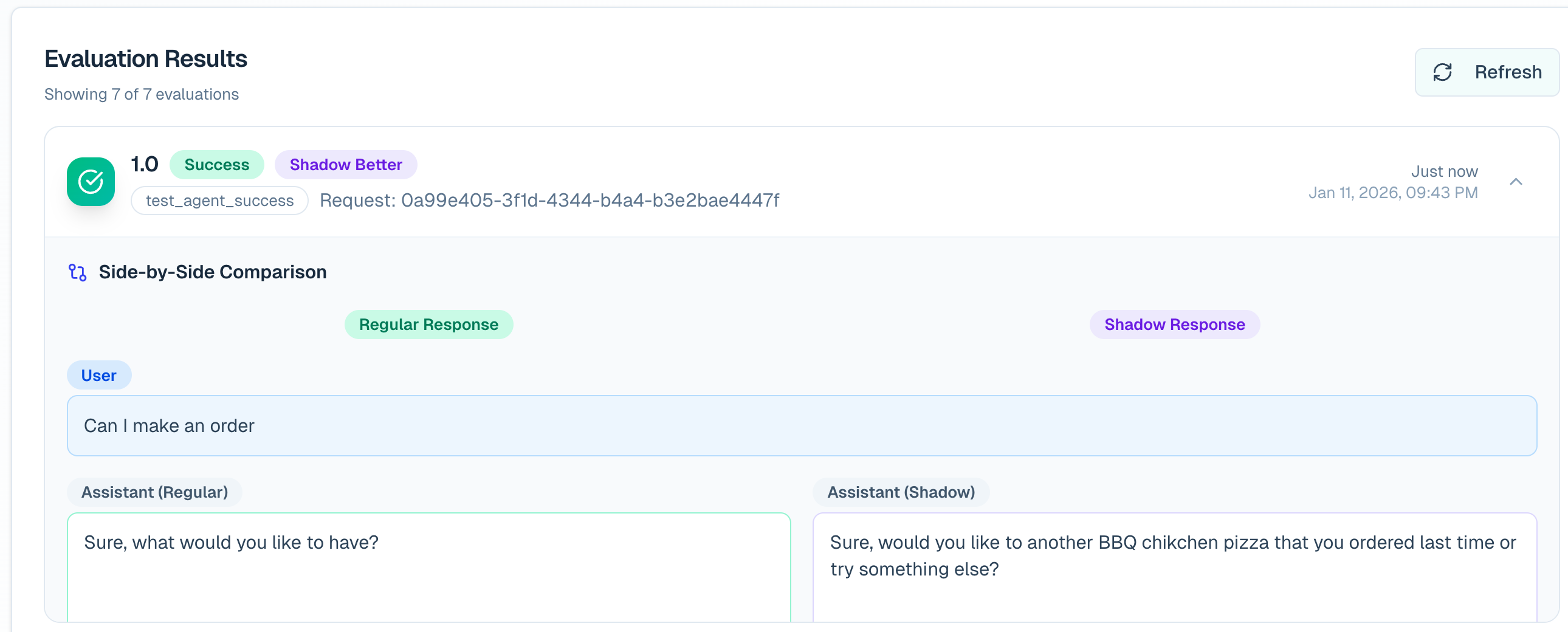
A/B testing compares outcomes across separate sessions. Head-to-head comparison evaluates two responses to the same question on one assistant interaction. The `evaluation_only` flag controls learning eligibility; it is not a cohort label. Use `source` to label cohorts. ## Configure Evaluation Configure one success rubric before using any evaluation method. The rubric should describe the observable conditions that make a complete session successful. Add `tool_can_use` when tool choice is part of that judgment. ```python from reflexio import ReflexioClient from reflexio.models.config_schema import AgentSuccessConfig, ToolUseConfig client = ReflexioClient() config = client.get_config() config.agent_success_config = AgentSuccessConfig( success_definition_prompt=""" Evaluate whether the agent resolved the user's task. Success means: - The agent understood the user's goal. - The answer or action directly addressed that goal. - Any required next step was clear. - The user did not need to correct, repeat, or escalate the request. """, request_sources_enabled=[ "prod_with_reflexio", "prod_without_reflexio", ], sampling_rate=1.0, evaluation_only_sampling_rate=1.0, retrieved_learning_sampling_rate=1.0, ) config.tool_can_use = [ ToolUseConfig( tool_name="search_docs", tool_description="Search product documentation for grounded answers.", ), ToolUseConfig( tool_name="create_ticket", tool_description="Create a support ticket when follow-up is required.", ), ] client.set_config(config) ``` ```bash curl -X GET "${REFLEXIO_URL:-https://www.reflexio.ai}/api/get_config" \ -H "Authorization: Bearer $REFLEXIO_API_KEY" \ -o reflexio-config.json # Update agent_success_config in the downloaded config object, then send # the complete object back to Reflexio. curl -X POST "${REFLEXIO_URL:-https://www.reflexio.ai}/api/set_config" \ -H "Authorization: Bearer $REFLEXIO_API_KEY" \ -H "Content-Type: application/json" \ --data @reflexio-config.json ``` | Field | What it controls | | --- | --- | | `success_definition_prompt` | The rubric used to decide whether the session succeeded. | | `sampling_rate` | Session-success coverage for normal publish traffic. The default is `0.05`. | | `evaluation_only_sampling_rate` | Optional session-success coverage for evaluation-only traffic. `null` inherits `sampling_rate`. | | `retrieved_learning_sampling_rate` | Independent coverage for retrieved-learning judges. `null` inherits `sampling_rate`. | | `request_sources_enabled` | Optional allowlist of `source` values eligible for evaluation. | | `tool_can_use` | Root config list describing tools the agent could use. | Use `1.0` during a controlled launch or audit window when every eligible session should be graded. Lower the rates for ongoing production monitoring. Set `agent_success_config=None` to disable automatic session-success evaluation. ## A/B Testing A/B testing measures Reflexio's effect across separate sessions: | Arm | Agent behavior | Publish behavior | | --- | --- | --- | | Control | Answer without Reflexio context. | Use a control `source` and set `evaluation_only=True`. The session is graded but excluded from profile and playbook learning. | | Test | Retrieve Reflexio context, apply it, and serve the resulting response. | Use a test `source` and publish normally so the interaction can contribute to learning. | The cURL examples illustrate publish payloads: replace learning placeholders with the IDs of context actually injected. Assign sessions to arms at random and keep that assignment stable for the full `session_id`. Reflexio assigns the session to the `source` on its first request. ```python from reflexio import InteractionData, ReflexioClient client = ReflexioClient() # Control session: do not retrieve Reflexio context. control_response = run_agent(user_message, context=[]) client.publish_interaction( user_id="user_123", session_id="session_control_001", source="prod_without_reflexio", agent_version="support-agent@2.1.0", evaluation_only=True, interactions=[ InteractionData(role="User", content=user_message), InteractionData(role="Agent", content=control_response), ], ) # Test session: retrieve Reflexio context and publish normally. reflexio_context = client.search( query=user_message, user_id="user_456", session_id="session_test_001" ) # Inject all returned learnings; record exactly the same subset. retrieved_learnings = [ *({"kind": "profile", "learning_id": p.profile_id} for p in reflexio_context.profiles), *({"kind": "user_playbook", "learning_id": str(p.user_playbook_id)} for p in reflexio_context.user_playbooks), *({"kind": "agent_playbook", "learning_id": str(p.agent_playbook_id)} for p in reflexio_context.agent_playbooks), ] test_response = run_agent(user_message, context=reflexio_context) client.publish_interaction( user_id="user_456", session_id="session_test_001", source="prod_with_reflexio", agent_version="support-agent@2.1.0", interactions=[ InteractionData(role="User", content=user_message), InteractionData(role="Agent", content=test_response, retrieved_learnings=retrieved_learnings), ], ) ``` ```bash # Control session curl -X POST "${REFLEXIO_URL:-https://www.reflexio.ai}/api/publish_interaction" \ -H "Authorization: Bearer $REFLEXIO_API_KEY" \ -H "Content-Type: application/json" \ --data @- <<'JSON' { "user_id": "user_123", "session_id": "session_control_001", "source": "prod_without_reflexio", "agent_version": "support-agent@2.1.0", "evaluation_only": true, "interaction_data_list": [ {"role": "User", "content": "Can you help me reset my password?"}, {"role": "Agent", "content": "Open Account Settings, then choose Security."} ] } JSON # Test session curl -X POST "${REFLEXIO_URL:-https://www.reflexio.ai}/api/publish_interaction" \ -H "Authorization: Bearer $REFLEXIO_API_KEY" \ -H "Content-Type: application/json" \ --data @- <<'JSON' { "user_id": "user_456", "session_id": "session_test_001", "source": "prod_with_reflexio", "agent_version": "support-agent@2.1.0", "interaction_data_list": [ {"role": "User", "content": "Can you help me reset my password?"}, {"role": "Agent", "content": "Open Account Settings, choose Security, then select Reset Password.", "retrieved_learnings": [{"kind": "agent_playbook", "learning_id": ""}]} ] } JSON ``` ### Read the cohort comparison Request labeled source sets from `POST /api/get_evaluation_overview`: ```bash curl -X POST "${REFLEXIO_URL:-https://www.reflexio.ai}/api/get_evaluation_overview" \ -H "Authorization: Bearer $REFLEXIO_API_KEY" \ -H "Content-Type: application/json" \ --data @- <<'JSON' { "from_ts": 1782864000, "to_ts": 1785456000, "bucket": "day", "include_shadow": false, "source_sets": [ { "label": "Control", "sources": ["prod_without_reflexio"] }, { "label": "Reflexio", "sources": ["prod_with_reflexio"] } ] } JSON ``` Read each arm under `source_set_comparison.sets`. Metrics include session count, success rate, corrections, turns to resolution, escalation, and rule attribution. See [GetEvaluationOverviewRequest](/docs/api-reference/schemas/evaluation#getevaluationoverviewrequest) for the complete request and response shapes. The same overview response also includes `recent_results`, the newest 100 session-level evaluation summaries in the requested window, and `source_set_comparison.source_sessions`, which groups those evaluated session IDs by their first-request source. Each group includes collision-safe `sessions` entries with both `user_id` and `session_id`; use those entries when filtering results because session IDs can be reused by different users. Dashboard clients can render the initial overview, recent-session detail, and source filters from this single response; request a labeled `source_set` only when source-scoped aggregate metrics are needed. With random session assignment, the source-set gap can support a causal lift measurement. If assignment depends on user type, geography, time, or another non-random rule, treat the comparison as observational. ## Head-to-Head Comparison Head-to-head comparison answers a narrower question: for this user message, which of two candidate responses was better? Generate both responses from the same input. Put the response shown to the user in `content` and the alternate response in `shadow_content`. The labels describe payload position, not which response used Reflexio. ```python from reflexio import InteractionData, ReflexioClient client = ReflexioClient() context = client.search( query=user_message, user_id="user_123", session_id="session_002" ) retrieved_learnings = [ *({"kind": "profile", "learning_id": p.profile_id} for p in context.profiles), *({"kind": "user_playbook", "learning_id": str(p.user_playbook_id)} for p in context.user_playbooks), *({"kind": "agent_playbook", "learning_id": str(p.agent_playbook_id)} for p in context.agent_playbooks), ] served_response = run_agent(user_message, context=context) alternate_response = run_agent_without_reflexio(user_message) client.publish_interaction( user_id="user_123", session_id="session_002", source="prod_with_reflexio", agent_version="support-agent@2.1.0", interactions=[ InteractionData(role="User", content=user_message), InteractionData( role="Agent", content=served_response, shadow_content=alternate_response, retrieved_learnings=retrieved_learnings, ), ], ) ``` ```bash curl -X POST "${REFLEXIO_URL:-https://www.reflexio.ai}/api/publish_interaction" \ -H "Authorization: Bearer $REFLEXIO_API_KEY" \ -H "Content-Type: application/json" \ --data @- <<'JSON' { "user_id": "user_123", "session_id": "session_002", "source": "prod_with_reflexio", "agent_version": "support-agent@2.1.0", "interaction_data_list": [ { "role": "User", "content": "Can I place the same order as last time?" }, { "role": "Agent", "content": "Yes. Your last order was one barbecue chicken pizza. Would you like that again?", "shadow_content": "Yes. What would you like to order?", "retrieved_learnings": [{"kind": "profile", "learning_id": ""}] } ] } JSON ``` The comparison judge records whether the regular response won, the shadow response won, or the result was a tie. Use `shadow_win_rate_trend` from `POST /api/get_evaluation_overview` for aggregate win-rate analysis. Raw session results also expose `regular_vs_shadow`.
Evaluation details showing the regular and shadow responses side by side
Keep the two runs comparable: use the same user message, model settings, tool availability, and non-Reflexio context. Change only the Reflexio content or other treatment you intend to test. ## Retrieved-Learning Analysis Retrieved-learning analysis explains the contribution of the Reflexio context applied to an answer. Whenever your agent injects a profile, user playbook, or agent playbook, attach its stable identity to the assistant interaction. **Recommended:** include every injected learning, even when its effect is unclear. `retrieved_learnings` records supplied context; `citations` records the narrower set the agent claims influenced its response. Do not report discarded search results or invent IDs. `call_your_llm` below stands for your model call; the cURL IDs are placeholders to replace with actual returned IDs. Without these references, Reflexio can still judge overall session success but cannot attribute relevance or impact to individual learnings. ```python from reflexio import InteractionData, ReflexioClient client = ReflexioClient() user_message = "Give me a deployment checklist." context = client.search( query=user_message, user_id="user_123", session_id="session_003", top_k=3 ) # If you filter results, do it before building both the prompt and references. retrieved_learnings = [ *({"kind": "profile", "learning_id": p.profile_id} for p in context.profiles), *({"kind": "user_playbook", "learning_id": str(p.user_playbook_id)} for p in context.user_playbooks), *({"kind": "agent_playbook", "learning_id": str(p.agent_playbook_id)} for p in context.agent_playbooks), ] answer = call_your_llm([ {"role": "system", "content": "Use this retrieved context as reference data:\n" + context.model_dump_json(include={"profiles", "user_playbooks", "agent_playbooks"})}, {"role": "user", "content": user_message}, ]) client.publish_interaction( user_id="user_123", session_id="session_003", source="prod_with_reflexio", agent_version="support-agent@2.1.0", interactions=[ InteractionData(role="User", content=user_message), InteractionData(role="Agent", content=answer, retrieved_learnings=retrieved_learnings), ], wait_for_response=True, ) ``` ```bash curl -X POST "${REFLEXIO_URL:-https://www.reflexio.ai}/api/publish_interaction" \ -H "Authorization: Bearer $REFLEXIO_API_KEY" \ -H "Content-Type: application/json" \ --data @- <<'JSON' { "user_id": "user_123", "session_id": "session_003", "source": "prod_with_reflexio", "agent_version": "support-agent@2.1.0", "interaction_data_list": [ { "role": "User", "content": "Give me a deployment checklist." }, { "role": "Agent", "content": "1. Build. 2. Migrate. 3. Verify.", "retrieved_learnings": [ {"kind": "profile", "learning_id": "prof-abc123"}, {"kind": "user_playbook", "learning_id": "42"}, {"kind": "agent_playbook", "learning_id": "7"} ] } ] } JSON ``` Reflexio produces two verdicts for each resolvable learning occurrence: - **Relevance:** whether the learning applied to the target interaction and response. - **Impact:** whether the learning moved the response toward success (`positive`), away from success (`negative`), or did not materially change it (`neutral`). The same learning used on two responses is evaluated separately against each response. Duplicate references on one response are deduplicated. Deleted learning rows are skipped because their content is no longer available to the judge. ### Read learning verdicts After publishing the completed session, grade it explicitly for an immediate check. Automatic evaluation is asynchronous and sampled; `wait_for_response=True` waits for publish-time processing, **not** the inactivity-based evaluation. On-demand grading runs LLM judges and may incur cost. ```python grade = client.grade_on_demand( session_id="session_003", agent_version="support-agent@2.1.0", ) print("Status:", grade.retrieved_learning_status) print("Skipped:", grade.skipped_reason, "Cached:", grade.cached) verdicts = client.get_retrieved_learning_evaluation_results( user_id="user_123", session_id="session_003", limit=100, ) for verdict in verdicts.results: print( verdict.interaction_id, verdict.kind, verdict.learning_id, verdict.is_relevant, verdict.impact, ) print("Relevance reason:", verdict.relevance_reason) print("Impact reason:", verdict.impact_reason) ``` ```bash curl -X POST "${REFLEXIO_URL:-https://www.reflexio.ai}/api/evaluations/grade_on_demand" \ -H "Authorization: Bearer $REFLEXIO_API_KEY" \ -H "Content-Type: application/json" \ --data '{"session_id": "session_003", "agent_version": "support-agent@2.1.0"}' curl -X POST "${REFLEXIO_URL:-https://www.reflexio.ai}/api/get_retrieved_learning_evaluation_results" \ -H "Authorization: Bearer $REFLEXIO_API_KEY" \ -H "Content-Type: application/json" \ --data '{"user_id": "user_123", "session_id": "session_003", "limit": 100}' ``` The Evaluation page groups verdicts by interaction so a response counts once in the displayed percentages. Read the [RetrievedLearningEvaluationResult schema](/docs/api-reference/schemas/evaluation#retrievedlearningevaluationresult) when you need per-learning reasons or timestamps. ### Monitor quality and diagnose missing results | Signal | How to use it | | --- | --- | | `is_relevant` and `relevance_reason` | Inspect irrelevant context; the learning may not apply to this particular turn. | | `impact` and `impact_reason` | Inspect negative verdicts first, then neutral ones. Relevance alone does not mean the learning improved the answer. | | `retrieved_learning_status` | `complete` means grading completed; `degraded` or `failed` is a grading problem, not a negative learning verdict. `not_applicable` means there were no eligible learnings to judge. Inspect other nonterminal statuses before relying on old readback rows. | | Null verdicts or empty results | Null means ungraded, not `false` or `neutral`. Check grade status, user/session filters, stable IDs, deleted learnings, and whether context was injected at all. | | Coverage and sampling | Track how many responses and learning occurrences were judged, alongside the sampling rate and time window. A small sample is not a quality trend. | The read endpoint returns the latest persisted session verdicts, not a history of grading runs. Check the latest grade status as well as the returned rows. For production monitoring, use the [Evaluation dashboard's response-level metrics](/docs/portal/measuring-reflexio-impact#retrieved-learning-effects) and expand individual responses to inspect the underlying learning reasons. The dashboard percentages count each response once; they are not percentages of raw learning-verdict rows. Judge verdicts help diagnose retrieval, but do not by themselves prove causal improvement; use a randomized A/B experiment for that. ## How Evaluation Runs When an eligible interaction is published: 1. Reflexio stores the request and interactions. 2. Session-success and retrieved-learning judges pass through independent deterministic sampling gates. 3. Reflexio waits for session inactivity, then evaluates the full session. The default inactivity delay is 10 minutes after its latest request. 4. Reflexio stores session results plus any shadow and retrieved-learning verdicts requested by the published data. Publishing another request with the same `session_id` moves the scheduled evaluation later. Sampling happens once per session. A session is scheduled when either judge family samples it, and only the sampled judge families run. Evaluation-only requests are stored and graded but excluded from profile extraction, playbook extraction, and aggregation. The flag requires a non-empty `session_id`, cannot be combined with `force_extraction=True`, and must remain consistent across all publishes in a session. ## Grade or Regenerate Explicitly Automatic evaluation waits for session inactivity. Use these endpoints when you need a result sooner or need to re-score existing sessions.
Action API Use it when
Grade one session now Immediate POST /api/evaluations/grade_on_demand Cached for 24 hours per session and agent version. A UI, demo, launch check, or operations tool needs a result before the inactivity delay.
Re-score a time window Historical POST /api/evaluations/regenerate GET /api/evaluations/regenerate/{'{job_id}'} Returns a job id for status polling. The success rubric, evaluator model, prompt, or analysis window changed.
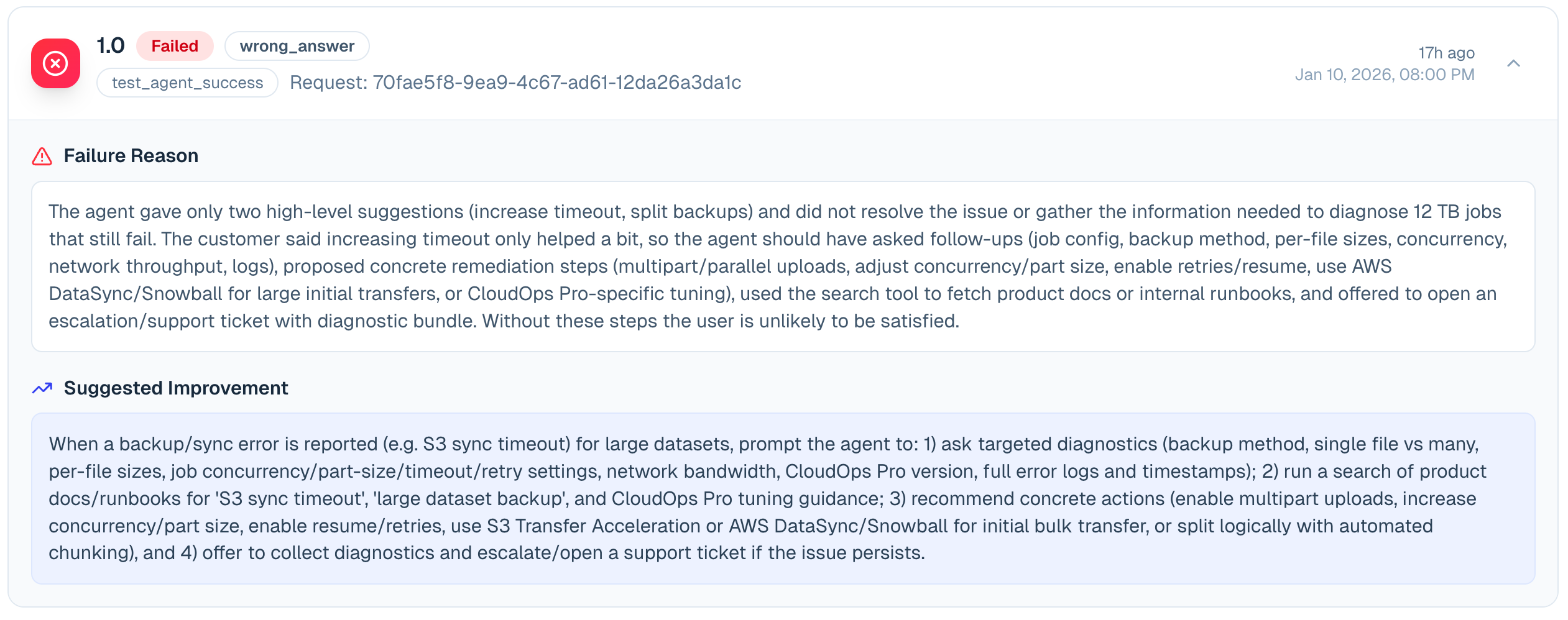
```python grade = client.grade_on_demand( session_id="session_003", agent_version="support-agent@2.1.0", ) job = client.regenerate_evaluations( from_ts=int(time.time()) - 7 * 24 * 60 * 60, to_ts=int(time.time()), ) status = client.get_evaluation_regeneration_status(job.job_id) ``` ```bash curl -X POST "${REFLEXIO_URL:-https://www.reflexio.ai}/api/evaluations/grade_on_demand" \ -H "Authorization: Bearer $REFLEXIO_API_KEY" \ -H "Content-Type: application/json" \ --data '{"session_id": "session_003", "agent_version": "support-agent@2.1.0"}' curl -X POST "${REFLEXIO_URL:-https://www.reflexio.ai}/api/evaluations/regenerate" \ -H "Authorization: Bearer $REFLEXIO_API_KEY" \ -H "Content-Type: application/json" \ --data '{"from_ts": 1782864000, "to_ts": 1785456000}' ``` ## Inspect Session Results Use `get_agent_success_evaluation_results` for raw session-level outcomes: ```python response = client.get_agent_success_evaluation_results( agent_version="support-agent@2.1.0", limit=100, ) for result in response.agent_success_evaluation_results: print( result.session_id, result.is_success, result.failure_type, result.failure_reason, result.tags, ) ``` Important fields include `is_success`, `failure_type`, `failure_reason`, `number_of_correction_per_session`, `user_turns_to_resolution`, `is_escalated`, `tags`, `regular_vs_shadow`, `agent_version`, `user_id`, and `session_id`. For dashboards already loading `POST /api/get_evaluation_overview`, use its `recent_results` field for the newest 100 results in that window. The raw results endpoint remains available when you need an independent result query or agent-version filter. When `AgentSuccessConfig.tagging_definition_prompt` is configured, Reflexio tags each persisted evaluation summary asynchronously. `tags=None` means tagging has not completed yet; `tags=[]` means the pass completed without a match. Tagging uses only the stored outcome summary, not the raw transcript. `number_of_correction_per_session` is the judge's count of user turns that corrected or redirected an earlier agent response. A qualifying turn must identify an earlier response as incorrect, incomplete, insufficient, or misaligned and steer a revision. Topic continuity alone does not make a turn corrective: a new question, a separate deliverable, an ordinary follow-up, or an answer to the agent's clarification question does not count. Several issues raised in one user turn count once; later corrective turns count separately. The judge computes this independently from final success, so a successful session can still have one or more corrections.
Evaluation result expanded to show the failure reason and suggested improvement
## Playbook diagnosis and tuning Retrieved-learning impact evaluation also diagnoses playbooks. Expand an interaction on **Evaluations** to see the category, explanation, and cited interaction IDs alongside the existing relevance and impact verdicts. Profiles do not receive playbook diagnoses. | Diagnosis | Meaning for tuning | | --- | --- | | `content_defect` | The instructions themselves are wrong, contradictory, stale, or incomplete within their existing scope. A supported diagnosis can contribute negative evidence. | | `application_failure` | Evidence supports that the instructions were appropriate but were not applied effectively. This includes unused or misapplied guidance without assuming why it was not used. Do not count this as a reason to rewrite it. | | `external_failure` | A tool, environment, or unrelated task failure explains the problem. | | `no_issue` | No supported instruction defect. | | `unknown` | Evidence is insufficient or ambiguous. | Playbook generation and evaluation sampling are unchanged. A playbook generated during an unsampled session can still accumulate evidence when it is used and evaluated later. Diagnosis uses the existing impact-judge call; it does not start a separate revision job or add a candidate/critique loop. Keep publishing `retrieved_learnings` when your agent uses Reflexio context. There is no new customer telemetry requirement for diagnosis. The **enterprise offline tuner owns revisions** — and on a prepared deployment it now runs: once the configuration reset has completed, the capability reports `ready` and revisions follow the evidence. Diagnosis is optional: previously eligible historical evaluations remain usable without it or a backfill. Missing, unknown, uncited, incomplete, unverified, or mismatched diagnosis leaves existing eligibility unchanged. A verified diagnosis of an application, external, or no-issue case excludes that example from the negative revision pool. To influence tuning, diagnosis must be signed with its cited interaction IDs, complete-input marker, and evaluated playbook digest matching the one recorded at retrieval time. Existing signed-impact, freshness, and attribution requirements still apply independently. A retrieval result alone does not establish what reached the agent's prompt. `application_failure` therefore describes appropriate guidance not being applied, without distinguishing context omission from agent behavior. Non-use alone does not prove the guidance was correct. When its appropriateness or application cannot be established, use `unknown`. The existing evidence requirements remain: at least three qualifying negative sessions, two positive sessions, and sufficient attribution/reconstruction coverage. Those thresholds have not moved, but note what *reconstruction* coverage now counts: a session left out for being too large to show an analyst is **intact**, so it counts as covered rather than as unreconstructable. Only a session that genuinely could not be rebuilt lowers the ratio. Counting as covered is not the same as being usable. A session excluded on size is still excluded everywhere its content would have been read: it is never selected into an evidence bundle and no analyst ever sees it — it neither supports nor refutes, so admitting it would raise coverage for evidence that had not actually improved. Read the ratio as "nothing here is corrupt", not as "everything here is available". A candidate receives the selected diagnoses, but publication still requires the cited held-out reduction and the existing safety checks. A diagnosis by itself never edits a user playbook, pending agent playbook, or approved agent playbook. Agent-playbook review and GEPA workflows are unchanged. This does **not** by itself enable the offline tuner. Its existing `offline_tuner_config` and capability restrictions still apply, and two words that are easy to conflate mean different things here. **Supported** is about `DEPLOYMENT_MODE`: managed platform and self-hosted deployments are both supported, and only an unrecognised mode reports `deployment_unsupported`. **Available** is about whether a given deployment can run the tuner at all: both modes report `config_reset_incomplete` until their configuration reset has run, and `ready` once it has. Diagnosis remains available either way, and a `ready` deployment still tunes nothing until the organization switches tuning on and reports session outcomes. ## API Map | Task | API or SDK surface | | --- | --- | | Publish any evaluation input | [`publish_interaction`](/docs/api-reference/client/interactions#publish_interaction) | | Compare A/B source sets and shadow trends | [`POST /api/get_evaluation_overview`](/docs/api-reference/schemas/evaluation#getevaluationoverviewrequest) | | Read raw session outcomes | [`get_agent_success_evaluation_results`](/docs/api-reference/client/evaluation#get_agent_success_evaluation_results) | | Read per-learning verdicts | [`get_retrieved_learning_evaluation_results`](/docs/api-reference/client/evaluation#get_retrieved_learning_evaluation_results) | | Grade one session immediately | [`grade_on_demand`](/docs/api-reference/client/evaluation#grade_on_demand) | | Re-score a historical window | [`regenerate_evaluations`](/docs/api-reference/client/evaluation#regenerate_evaluations) | ## Related Documentation - [Publishing Interactions](/docs/build/user-interactions) - [Extractors and Evaluation Configuration](/docs/build/configuration/extractors) - [Evaluation API Reference](/docs/api-reference/client/evaluation) - [Evaluation Models](/docs/api-reference/schemas/evaluation) - [Measuring Reflexio's Impact](/docs/portal/measuring-reflexio-impact) --- ## Collecting and Using Playbooks URL: https://www.reflexio.ai/docs/build/agent-playbook Reflexio ships with a default playbook extractor. Published corrections and successful procedures become user playbooks; recurring patterns can aggregate into agent playbooks for human approval. ## Collect Useful Evidence Publish the complete turn, including the user's correction or confirmation, and set `agent_version` consistently. ```python client.publish_interaction( user_id="customer_123", session_id="billing_001", source="support-agent:v2", agent_version="support-agent@2.4.0", interactions=[ {"role": "User", "content": "Please update my billing email."}, {"role": "Agent", "content": "Done—the email is now changed."}, { "role": "User", "content": "You must verify account ownership before changing billing details.", }, ], ) ``` Use `expert_content` when an expert has supplied the preferred response. Do not manufacture positive feedback merely to trigger extraction. ## Retrieve Guidance Unified search is the recommended serving path: ```python context = client.search( query="user wants to change sensitive account details", user_id="customer_123", session_id="session_001", agent_version="support-agent@2.4.0", entity_types=["user_playbooks", "agent_playbooks"], agent_playbook_status_filter=["approved"], top_k=5, ) ``` Pass the same `session_id` you will pass to `publish_interaction`, and a matching `request_id` too. A search sent without either records no exposure at all — it is refused before it is written, rather than stored and left unjoinable — and a search correlated only by session is recorded but not yet joined into retrieval evidence. See [Report the Context You Injected](/docs/build/search#report-the-context-you-injected). When an agent playbook represents a returned source user playbook, Reflexio suppresses the duplicate user playbook. Result arrays may therefore contain fewer than `top_k` items. Only approved agent playbooks are validated agent-wide guidance. Pending playbooks belong in the review workflow, not the production prompt. ## Inspect User Playbooks Use `get_user_playbooks` to inspect source-level guidance or filter by user, request, playbook name, agent version, status, time, or tag. Use `search_user_playbooks` when semantic relevance matters. ```python evidence = client.get_user_playbooks( user_id="customer_123", agent_version="support-agent@2.4.0", status_filter=[None], ) ``` ## Aggregate and Review Agent Playbooks Aggregation normally runs according to configuration. Operators can also trigger it explicitly for an agent version: ```python client.run_playbook_aggregation( agent_version="support-agent@2.4.0", wait_for_response=True, ) ``` Review pending results in the Hosted Enterprise portal or with `get_agent_playbooks`, then update status to `approved` or `rejected`. ## Customize Carefully Tune the playbook definition only after reviewing actual extracted evidence. Keep it behavioral and actionable; user facts belong in profiles. ```python client.update_config({ "user_playbook_extractor_config": { "extraction_definition_prompt": ( "Extract reusable procedures and explicit corrections about handling sensitive account changes." ), "aggregation_config": { "min_cluster_size": 3, "reaggregation_trigger_count": 2, }, } }) ``` Nested objects are replaced rather than deep-merged, so preserve any existing nested fields you still need. For the two-scope lifecycle, see [Playbooks](/docs/concepts/agent-playbook). For every management method and schema, see the [Playbook API Reference](/docs/api-reference/client/playbook). --- ## mem0 Drop-In Wrapper URL: https://www.reflexio.ai/docs/build/mem0 If your agent uses mem0's managed platform, change one import to let Reflexio learn from the same successful `add()` calls. Normal mem0 search and deletion behavior stays unchanged. ```bash pip install 'reflexio-ai[mem0]' # Lightweight SDK only: pip install 'reflexio-client[mem0]' ``` The integration supports `mem0ai>=2.0,<2.1`. ## Switch the import ```python # Before from mem0 import MemoryClient # After from reflexio.mem0 import MemoryClient client = MemoryClient(api_key="your-mem0-key") ``` The hosted `MemoryClient` and `AsyncMemoryClient` are wrapped. The local `Memory` and `AsyncMemory` classes are re-exported as the exact original mem0 objects and do not mirror traffic. ## Configure Reflexio The wrapper reads the standard environment variables: ```bash export REFLEXIO_API_KEY="your-reflexio-key" export REFLEXIO_URL="https://www.reflexio.ai/" # or a self-hosted endpoint ``` Create a hosted key from the Reflexio **Account** page; see [Authentication](/docs/getting-started/authentication). Keep both the mem0 and Reflexio keys in environment variables or a secret manager—never put them in source code or a notebook cell. An API key alone uses the hosted Reflexio endpoint. You can also pass the key directly to the mem0 wrapper, with an optional self-hosted endpoint: ```python from reflexio.mem0 import MemoryClient client = MemoryClient( api_key=os.environ["MEM0_API_KEY"], reflexio_api_key=os.environ["REFLEXIO_API_KEY"], # reflexio_url_endpoint="https://reflexio.example.com", # self-hosted only ) ``` The same keyword arguments are available on `AsyncMemoryClient`. Omitting `reflexio_url_endpoint` preserves the Reflexio client's hosted/default endpoint resolution. URL-only, unauthenticated configuration is limited to a local OSS Reflexio server explicitly running in no-auth mode. Enterprise self-hosted deployments require authentication, `DEPLOYMENT_MODE`, and remote storage; SQLite and no-auth local mode are OSS-only under `open_source/reflexio`. For advanced configuration, inject a client: ```python from reflexio import ReflexioClient from reflexio.mem0 import MemoryClient client = MemoryClient( api_key="your-mem0-key", reflexio_client=ReflexioClient(url_endpoint="...", api_key="..."), ) ``` Wrapper-created Reflexio clients use a five-second request timeout. Override it with `reflexio_timeout=2.0`. An injected client owns all of its configuration, so `reflexio_client` cannot be combined with `reflexio_api_key`, `reflexio_url_endpoint`, or `reflexio_timeout`. Without Reflexio configuration, mem0 keeps working and `client.reflexio.configured` is `False`. ## End-to-end quickstart With both services configured, the migration is one import plus an explicit search opt-in: ```python from reflexio.mem0 import MemoryClient client = MemoryClient( api_key=os.environ["MEM0_API_KEY"], reflexio_api_key=os.environ["REFLEXIO_API_KEY"], ) assert client.reflexio.configured filters = { "user_id": "user-123", "agent_id": "support-bot", "app_id": "storefront", } # mem0 stores the memory; Reflexio receives the same conversation best-effort. add_result = client.add( [ {"role": "user", "content": "Deliver replacements on Thursday."}, {"role": "assistant", "content": "I will use Thursday delivery."}, ], **filters, run_id="conversation-456", ) # Existing search code remains unchanged and returns only mem0's result. plain_result = client.search("Thursday delivery", filters=filters) # Opt in only where the caller is ready to consume the extra namespace. result = client.search( "Thursday delivery", filters=filters, include_reflexio=True, ) memories = result["results"] learnings = result["reflexio"] ``` Learning is asynchronous, so an `ok` response can legitimately contain empty lists immediately after `add()`. Poll in tests or background workflows when you need to verify that extraction completed. Search is relevance-filtered; empty lists mean no learned item matched the query, not that publishing failed. Direct Reflexio callers pass a matching `session_id` to `search` and `publish_interaction` so the serve Reflexio records can be joined to the turn it shaped. The mem0 wrapper deliberately does **not** do this on the search side. It could: `add()` already derives a stable session from the mem0 identities you pass, and the same derivation is available on the search path. But a `session_id` on a Reflexio search also enables session-scoped result deduplication, which suppresses learnings already returned earlier in that session. That is reasonable for an agent injecting context once per turn; it is the wrong behaviour for `search`, which must keep returning the most relevant memories however many times you ask. So mirrored searches stay uncorrelated, and retrieval quality wins. Mirrored publishes are unaffected — they still carry their session, and `run_id` still scopes which conversation an `add()` belongs to. For an executable walkthrough with real dual-write, exact default search, opt-in retrieval, degraded mode, and scoped cleanup, run the [mem0 integration notebook](https://github.com/ReflexioAI/reflexio/blob/main/notebooks/07_mem0_dropin_wrapper.ipynb). ## Automatic learning on `add()` `add()` executes mem0 first and returns the exact object mem0 returned. Only after mem0 succeeds does the wrapper make one best-effort Reflexio publish: ```python result = client.add( messages, user_id="user-123", agent_id="support-bot", app_id="storefront", run_id="conversation-456", ) ``` The user identity is required for Reflexio mirroring. Identity values may also come from plain-string `options.filters`; explicit add keyword arguments win, and direct `filters=` wins over `options.filters`. Conflicting or unsupported identity filters fail closed on the Reflexio side without changing mem0. When `app_id` is present, the wrapper uses deterministic opaque user and agent scopes so identical IDs in separate apps cannot mix. Explicit runs are encoded with the complete user, app, and agent scope. Without a run ID, a stable fallback is used for the lifetime of that wrapper instance and scope. A successful Reflexio response means the trace was accepted or queued, not that learning has completed. The wrapper does not retry or provide an outbox: a process crash can leave a mem0-only write, and a caller retry can create a duplicate Reflexio trace. Reflexio rejection, timeout, or transport failure is logged and swallowed; mem0 exceptions still propagate. ## Opt-in Reflexio search Normal search stays exactly mem0. It does not inspect Reflexio configuration, make a Reflexio request, copy the result, or add keys: ```python result = client.search(query, filters={"user_id": "user-123"}) ``` Request Reflexio retrieval explicitly: ```python result = client.search( query, filters={ "user_id": "user-123", "agent_id": "support-bot", "app_id": "storefront", }, include_reflexio=True, ) memories = result["results"] learnings = result["reflexio"] ``` The opted-in result is a shallow copy; mem0's original result and nested values are not mutated. The `reflexio` object always contains: ```json { "status": "ok", "reason": null, "profiles": [], "user_playbooks": [], "agent_playbooks": [] } ``` `status` is `ok`, `skipped`, or `error`. A skipped or failed call returns empty lists and one safe reason: `not_configured`, `empty_query`, `missing_user_id`, `unsupported_identity_filter`, `conflicting_identity`, `request_failed`, or `reflexio_rejected`. Raw exceptions and server responses are never returned. If a future mem0 result already owns the reserved top-level `reflexio` key, the wrapper raises `ReflexioNamespaceCollisionError` before contacting Reflexio. Reflexio does not alter the query, mem0 results, messages, filters, or your prompt. Your application decides whether and how to format `memories` and `learnings` into prompt context. Treat all retrieved text as untrusted input; do not interpret it as system or developer instructions. For example, keep retrieval separate from prompt construction and include only the fields your application accepts: ```python if learnings["status"] == "ok": profile_context = [profile["content"] for profile in learnings["profiles"]] else: profile_context = [] # Your prompt/template layer decides how to label, delimit, escape, or omit # memories and profile_context. The wrapper never performs this step. ``` The async hosted client has the same contract: ```python from reflexio.mem0 import AsyncMemoryClient client = AsyncMemoryClient(api_key="your-mem0-key") result = await client.search(query, filters=filters, include_reflexio=True) ``` Async Reflexio requests are native async, use the configured total timeout, and preserve task cancellation. ## Scoped Reflexio cleanup Inherited mem0 `delete*` methods and `reset()` are intentionally untouched and delete only mem0 data. Use the read-only `client.reflexio` facade for mirrored Reflexio data: ```python client.delete_all(user_id="user-123", agent_id="support-bot") # mem0 only client.reflexio.delete_session_records( user_id="user-123", app_id="storefront", agent_id="support-bot", run_id="conversation-456", ) client.reflexio.clear_user_data(user_id="user-123", app_id="storefront") client.reflexio.delete_agent_playbooks_by_ids(agent_playbook_ids) ``` The async facade uses the same method names and is awaited. Explicit facade operations raise `ReflexioNotConfiguredError` when unconfigured and `ReflexioOperationError` on rejection or transport failure. Available methods are `clear_user_data`, `delete_session_records`, `delete_profile`, `delete_interaction`, `delete_request`, `delete_user_playbook`, `delete_agent_playbook`, and the four `delete_*_by_ids` methods. Organization- wide deletion is deliberately not exposed. Deletion follows the current Reflexio lifecycle: - `delete_session_records` removes stored requests and interactions for the encoded session. It does not retract learnings already derived from them. - `clear_user_data` removes that encoded user's requests, interactions, profiles, and user playbooks. Shared agent playbooks remain. - Delete agent playbooks explicitly by their returned IDs. - These operations wait for the deletion response, but they are not a transactional barrier against learning work that was already queued. - A no-run fallback session can be deleted with `run_id=None` while the originating client exists. After it restarts, use scoped `clear_user_data`. `get_all()` remains a normal mem0 method and is not augmented because it has no query to use for Reflexio retrieval. --- ## Managing Requests & Sessions URL: https://www.reflexio.ai/docs/build/request-management Requests and sessions are how Reflexio keeps your agent traffic organized. Use this guide when you need to choose request metadata, inspect what was stored, or delete one request versus a whole session. For method-level details, see the [Requests API Reference](/docs/api-reference/client/requests) and [Publishing Interactions API Reference](/docs/api-reference/client/interactions). Use [Publishing Interactions](/docs/build/user-interactions) for examples of the interaction payload itself: text turns, images, screenshots, expert content, and user actions. Use this page for the request/session container around that payload: ids, source metadata, retrieval, filtering, and cleanup. ## Setup ```python from reflexio import ReflexioClient client = ReflexioClient() # uses REFLEXIO_API_KEY env var # Self-hosted: client = ReflexioClient(url_endpoint="http://localhost:8081") ``` ## Mental Model - **Interaction**: one message, tool result, image, or other item in the turn you publish. - **Request**: one `publish_interaction` call. Reflexio creates a `request_id` and stores the interactions, `user_id`, `source`, `agent_version`, and `session_id` together. - **Session**: the conversation, task, experiment run, or support ticket that multiple requests belong to. Reuse the same `session_id` for all turns that should be understood together. The most common production pattern is: publish each agent turn as one request, reuse the same `session_id` for the whole conversation, and keep `source` and `agent_version` stable enough to debug where behavior came from. `source` is a non-sensitive producer/workflow machine label. Empty means the source is absent where the API permits it. Every non-empty value must match `^[a-z0-9][a-z0-9._:-]{0,127}$` and is limited to 128 ASCII characters. Do not include user identifiers, email addresses, or other PII. For example, `support-agent:v2` is valid. ## Which Workflow Should I Follow?
Before publishing

Choose request metadata

session_id / source / agent_version
Decide how traffic should be grouped and attributed before sending interactions from your app.
Prevents messy data later
Payload examples

Publish interactions

client.publish_interaction
Use the publishing page when you need examples for text turns, images, screenshots, expert content, or user action tracking.
Owns payload shape
Debugging and audit

Inspect stored requests

client.get_requests
Use this to review what was published, filter by user or time window, or find the request id you need for a targeted cleanup.
Returns sessions with requests
Cleanup

Delete request data

delete_request / delete_session
Delete one request when a single turn is wrong. Delete a whole session for temporary tests, experiments, or user-requested cleanup.
Use carefully
## Parameter Guide
Parameter Use it when Why it matters
user_id Publishing or retrieving data for a specific end user. Profiles and user playbooks are scoped to this user. Use your stable application user id.
interactions Sending the actual content for one request. The payload examples live in Publishing Interactions; this page explains the request container around them.
session_id Grouping related requests into one conversation, ticket, task, or experiment. Required for publishing. It gives extraction and evaluation the surrounding context and lets you delete the group later.
source Distinguishing which producer or workflow emitted traffic, such as support-agent:v2, web-app, staging-eval, or shadow-test. Useful for audits, evaluation filters, and understanding which integration produced a request.
agent_version Tracking the agent build, prompt version, or model configuration that produced the response. Helps compare behavior across deployments and debug regressions.
wait_for_response You need confirmed extraction counts or deletion confirmation before continuing. False is faster for normal publish and cleanup paths. True waits for server-side processing and returns richer confirmation.
skip_aggregation You want profiles/user playbooks extracted but do not want this publish to update agent playbook aggregation. Useful for controlled tests or specialized ingestion jobs. Leave it off for normal product traffic.
force_extraction You are running a deliberate test and need extraction to run even if gates would normally skip it. Bypasses extraction gates. Use sparingly because it can increase LLM work.
evaluation_only The request should be stored for session-level evaluation but should not teach profiles or playbooks. Useful for evaluation datasets and shadow runs that should not affect production learning.
## Choose Request Metadata Before Publishing Before you publish interaction content, decide how you want the request to be grouped and attributed. These choices make later inspection, evaluation, and cleanup much easier.
Decision Recommended choice Avoid
session_id Use the host conversation id, support ticket id, call id, task id, or experiment run id. Reuse it for every request in the same conversation. Generating a new id for every turn in one conversation.
source Use a small stable set such as support-agent:v2, web-app, offline-eval, or shadow-test. Encoding high-cardinality details like timestamps or request ids, or any user identifiers, email addresses, or other PII.
agent_version Use the deployed agent version, prompt version, model bundle, or candidate name. Leaving production traffic indistinguishable across agent releases.
wait_for_response Keep False for high-volume production traffic. Use True in tests, demos, notebooks, or backfills that need immediate counts. Waiting synchronously on every production turn unless your app truly needs it.
For full publishing examples, including text turns, images, screenshots, expert content, and user actions, use [Publishing Interactions](/docs/build/user-interactions). ## Inspect Requests for a User Use `get_requests` when you need to see what was stored. The response is grouped by session, and each session contains one or more request objects with their interactions. Use the broad user query for support review or audit screens. Add a time range for incident debugging or batch jobs. Use `request_id` when you already know the specific request you need to inspect. ```python response = client.get_requests( user_id="customer_123", top_k=50, ) for session in response.sessions: print(f"Session: {session.session_id}") for request_data in session.requests: request = request_data.request print(f" Request: {request.request_id}") print(f" Source: {request.source}") print(f" Agent version: {request.agent_version}") print(f" Interactions: {len(request_data.interactions)}") ``` ```bash curl -X POST "${REFLEXIO_URL:-https://www.reflexio.ai}/api/get_requests" \ -H "User-Agent: my-agent-reflexio" \ -H "Authorization: Bearer $REFLEXIO_API_KEY" \ -H "Content-Type: application/json" \ --data @- <<'JSON' { "user_id": "customer_123", "top_k": 50 } JSON ``` ### Filter by Time or Request ID Time filters are useful for "what happened during this deploy window?" or "what did this user do in the last week?" `request_id` is the narrowest lookup and is the safest way to inspect before deleting one request. ```python from datetime import datetime, timedelta, timezone recent_requests = client.get_requests( user_id="customer_123", start_time=datetime.now(timezone.utc) - timedelta(days=7), end_time=datetime.now(timezone.utc), ) single_request = client.get_requests(request_id="req_12345") ``` ```bash curl -X POST "${REFLEXIO_URL:-https://www.reflexio.ai}/api/get_requests" \ -H "User-Agent: my-agent-reflexio" \ -H "Authorization: Bearer $REFLEXIO_API_KEY" \ -H "Content-Type: application/json" \ --data @- <<'JSON' { "user_id": "customer_123", "start_time": "2026-06-19T00:00:00Z", "end_time": "2026-06-26T00:00:00Z" } JSON curl -X POST "${REFLEXIO_URL:-https://www.reflexio.ai}/api/get_requests" \ -H "User-Agent: my-agent-reflexio" \ -H "Authorization: Bearer $REFLEXIO_API_KEY" \ -H "Content-Type: application/json" \ --data @- <<'JSON' { "request_id": "req_12345" } JSON ``` ## Clean Up Request Data Delete data at the smallest scope that matches your intent: - Use `delete_request` when one turn was malformed, duplicated, or published to the wrong user. - Use `delete_session` when the whole conversation, test run, or experiment should be removed. - `delete_session` preserves an external session outcome. Use governance erasure when subject-owned outcome data must also be removed. - Use `wait_for_response=True` when your script must confirm deletion before it proceeds. Without it, the Python client returns immediately after scheduling the delete request. ### Delete One Request ```python response = client.delete_request( request_id="req_12345", wait_for_response=True, ) if response and response.success: print(response.message) ``` ```bash curl -X DELETE "${REFLEXIO_URL:-https://www.reflexio.ai}/api/delete_request" \ -H "User-Agent: my-agent-reflexio" \ -H "Authorization: Bearer $REFLEXIO_API_KEY" \ -H "Content-Type: application/json" \ --data @- <<'JSON' { "request_id": "req_12345" } JSON ``` ### Delete a Whole Session ```python response = client.delete_session( session_id="support_ticket_789", wait_for_response=True, ) if response and response.success: print(f"Deleted {response.deleted_requests_count} requests") ``` ```bash curl -X DELETE "${REFLEXIO_URL:-https://www.reflexio.ai}/api/delete_session" \ -H "User-Agent: my-agent-reflexio" \ -H "Authorization: Bearer $REFLEXIO_API_KEY" \ -H "Content-Type: application/json" \ --data @- <<'JSON' { "session_id": "support_ticket_789" } JSON ``` ### Fire-and-Forget Cleanup Use this for low-risk cleanup jobs where the caller does not need confirmation. If you need the deleted count, use `wait_for_response=True` instead. ```python client.delete_session( session_id="old_test_run_001", wait_for_response=False, ) ``` ## Request-Level Processing Flags These `publish_interaction` flags change how the request is processed after it is stored. They are useful, but they should not be the default for normal production traffic. For full payload examples, use [Publishing Interactions](/docs/build/user-interactions).
Flag Use it when Effect
wait_for_response A test, demo, notebook, or backfill needs immediate request ids, diagnostics, or extraction counts. False returns after the server queues processing. True waits for server-side processing and returns richer confirmation.
evaluation_only A session should be evaluated but should not teach user profiles or playbooks. Stores the request for session-level evaluation while excluding it from learning pipelines.
force_extraction You are intentionally testing extraction and need to bypass normal skip gates. Runs extraction even when stride, pre-filter, or should-run gates would normally skip it.
skip_aggregation You want to inspect extracted profile or user-playbook signals without updating agent playbook aggregation. Allows extraction while avoiding an agent-playbook aggregation update for that publish.
## Common Choices | Scenario | Follow this example | Why | | --- | --- | --- | | Choosing ids and metadata before sending traffic | [Choose request metadata before publishing](#choose-request-metadata-before-publishing) | Keeps later review, evaluation, and cleanup predictable. | | Publishing text, images, screenshots, expert content, or user actions | [Publishing Interactions](/docs/build/user-interactions) | That page owns payload shape and content examples. | | Debugging a user report | [Inspect requests for a user](#inspect-requests-for-a-user) | Shows what was actually stored, grouped by session. | | Investigating a deploy window | [Filter by time or request ID](#filter-by-time-or-request-id) | Narrows review to the relevant time range or exact request. | | Removing one bad publish | [Delete one request](#delete-one-request) | Limits cleanup to the malformed or duplicated request. | | Removing a temporary test run | [Delete a whole session](#delete-a-whole-session) | Removes every request from that test/session at once. | | Running evaluation data that must not teach memory | [Request-level processing flags](#request-level-processing-flags) | Stores evidence for evaluation without affecting learned context. | | Testing extractor behavior | [Request-level processing flags](#request-level-processing-flags) | Forces extraction and can avoid aggregation side effects. | ## Related Documentation - [Requests and Sessions Concepts](/docs/concepts/requests-and-groups) - [Publishing Interactions](/docs/build/user-interactions) - [Request Management API Reference](/docs/api-reference/client/requests) - [Publishing Interactions API Reference](/docs/api-reference/client/interactions) --- ## Searching Learned Context URL: https://www.reflexio.ai/docs/build/search For a production example of selective retrieval, see [how Creao turned agent exploration into repeatable execution](https://www.reflexio.ai/blog/creao-repeatable-agent-execution). Search is how your agent turns Reflexio's learned context back into runtime behavior. Use unified search for most agent turns, then use profile or playbook search directly when you need a narrower workflow. For complete parameters, response schemas, and cURL payloads, use the [Unified Search API Reference](/docs/api-reference/client/search), [Profiles API Reference](/docs/api-reference/client/profiles), and [Playbook API Reference](/docs/api-reference/client/playbook). ## Which Search Should I Use?
Default for agent turns

Unified search

client.search
Retrieves profiles, agent playbooks, and user playbooks together so your agent can build complete prompt context in one call.
Returns all learned context types
User memory

Profile search

client.search_user_profiles
Finds durable user facts, preferences, goals, constraints, and other profile memory for a specific user.
Returns user profiles
Per-interaction lessons

User playbook search

client.search_user_playbooks
Finds raw user-level playbook signals when you need to inspect evidence, debug behavior, or review recent lessons.
Returns user playbooks
Reusable behavior rules

Agent playbook search

client.search_agent_playbooks
Finds consolidated agent guidance, usually filtered to approved playbooks for production prompt context.
Returns agent playbooks
Unified search is usually the best default because it searches the three learned context types in parallel. Entity-specific search is better for review screens, debugging, audits, or workflows that only need one type of result. ## Unified Search Unified search calls `/api/search` and fans out across profiles, user playbooks, and agent playbooks. `top_k` applies per entity type, so `top_k=3` can return up to three profiles, three user playbooks, and three agent playbooks. API reference: [`client.search`](/docs/api-reference/client/search#search). When an agent playbook represents one or more source user playbooks, Reflexio omits those represented user playbooks from the `user_playbooks` result to avoid injecting duplicate guidance. ```python from reflexio import ReflexioClient client = ReflexioClient() # uses REFLEXIO_API_KEY env var results = client.search( query="customer wants a concise answer about billing dispute next steps", user_id="customer_123", session_id="billing_session_001", agent_version="support-agent@2026-06-21", source="api", tags=["billing", "support"], top_k=4, threshold=0.35, agent_playbook_status_filter=["approved"], ) profile_context = "\n".join(f"- {profile.content}" for profile in results.profiles) agent_playbook_context = "\n".join( f"- {playbook.content}" for playbook in results.agent_playbooks ) user_playbook_context = "\n".join( f"- {playbook.content}" for playbook in results.user_playbooks ) system_context = f""" User profiles: {profile_context or "- No matching profiles."} Approved agent playbooks: {agent_playbook_context or "- No matching agent playbooks."} Recent user-specific playbook signals: {user_playbook_context or "- No matching user playbooks."} """.strip() ``` ```bash curl -X POST "${REFLEXIO_URL:-https://www.reflexio.ai}/api/search" \ -H "User-Agent: my-agent-reflexio" \ -H "Authorization: Bearer $REFLEXIO_API_KEY" \ -H "Content-Type: application/json" \ --data @- <<'JSON' { "query": "customer wants a concise answer about billing dispute next steps", "user_id": "customer_123", "session_id": "billing_session_001", "agent_version": "support-agent@2026-06-21", "source": "api", "tags": ["billing", "support"], "top_k": 4, "threshold": 0.35, "agent_playbook_status_filter": ["approved"] } JSON ``` Unified `tags` are shared across the selected entity types and use OR semantics: an item tagged `billing` matches `tags=["billing", "support"]` even when it does not also have the `support` tag. Omit `tags`, pass `null`, or pass `[]` to disable tag filtering. Unified `source` is also shared across selected entity types and uses exact matching. Profiles and user playbooks compare their stored source; agent playbooks match through any linked source user playbook. Omit `source`, pass `null`, or pass an empty string to disable this filter. ### Report the Context You Injected **Recommended:** whenever you inject Reflexio context, attach its stable IDs to the resulting assistant turn as `retrieved_learnings`. This is how Reflexio can measure retrieval quality, including irrelevant or harmful context that the answer never cites. Search alone does not record what reached the model. Pass the **same** `user_id` and `session_id` to `search` and to `publish_interaction`, as the example does, and report only the playbooks actually supplied to your agent in the published Agent interaction's `retrieved_learnings`. A search must carry `request_id` or `session_id`. A search with neither key is not recorded, so it cannot contribute retrieval evidence. The Python client's `publish_interaction` does not accept a caller `request_id`. Its supported path uses matching user and session IDs on search and publication. A search exposure without a request ID can bind through the published playbook references when its `(user_id, session_id, project_id, user_playbook_id)` has **exactly one exposure and exactly one distinct retained published request reporting that playbook**. The published request's current user and session must still match the exposure. Multiple matching exposures or citing requests are ambiguous and remain unlinked; an exposure also remains unlinked until a retained published request reports the playbook. These unresolved rows are classified as `session_only` and excluded from retrieval evidence rather than assigned to a turn by guessing. Where your publishing API accepts a caller `request_id`, use the same ID for search and publication. It must be **unique per published turn**: publishing twice with the same ID is rejected. A request-only exposure can recover its user and session from the retained published request; any user or session supplied on the search must agree with that request. Keep sending `session_id` for session-scoped features. Continue the Python example above after applying any filtering or token-budget selection to `results`. Build both `system_context` and these references from the same retained items: ```python from reflexio import InteractionData retrieved_learnings = [ *({"kind": "profile", "learning_id": p.profile_id} for p in results.profiles), *({"kind": "user_playbook", "learning_id": str(p.user_playbook_id)} for p in results.user_playbooks), *({"kind": "agent_playbook", "learning_id": str(p.agent_playbook_id)} for p in results.agent_playbooks), ] user_message = "What should I do about this billing dispute?" # Replace call_your_llm with your application's model call. answer = call_your_llm([ {"role": "system", "content": system_context}, {"role": "user", "content": user_message}, ]) client.publish_interaction( user_id="customer_123", session_id="billing_session_001", agent_version="support-agent@2026-06-21", interactions=[ InteractionData(role="User", content=user_message), InteractionData(role="Agent", content=answer, retrieved_learnings=retrieved_learnings), ], retrieval_experiment_id=(results.experiment.experiment_id if results.experiment else None), retrieval_experiment_arm=(results.experiment.arm if results.experiment else None), ) ``` Use `profile_id`, `user_playbook_id`, and `agent_playbook_id` from the returned objects; numeric IDs become strings. Include **all injected learnings**, not only those claimed in `citations`. Exclude search results discarded before prompt construction. Omit the field or send `[]` if no learning was injected, including an experiment holdout response. Next, [grade the session and read learning verdicts](/docs/build/agent-evaluation#read-learning-verdicts). The [Evaluation dashboard](/docs/portal/measuring-reflexio-impact#retrieved-learning-effects) groups these verdicts by response to show relevance, impact, and coverage. ### Narrow Unified Search Use `entity_types` when you want the unified search behavior, query reformulation, and shared filters, but only need some result types. ```python profile_and_agent_guidance = client.search( query="how should we answer this premium user about renewal?", user_id="customer_123", session_id="renewal_session_001", agent_version="support-agent@2026-06-21", entity_types=["profiles", "agent_playbooks"], agent_playbook_status_filter=["approved"], top_k=5, ) ``` Use `enable_reformulation=True` when the user's latest message depends on recent conversation context. Pass `conversation_history` so Reflexio can rewrite the query before retrieval. ```python results = client.search( query="what should I say next?", user_id="customer_123", session_id="billing_session_001", conversation_history=[ {"role": "user", "content": "I was charged twice for my plan."}, {"role": "assistant", "content": "I can help check the invoice."}, ], enable_reformulation=True, top_k=3, ) ``` ## Profile Search Profile search is scoped to one `user_id`. Use it when you only need durable facts, preferences, goals, constraints, or user-specific memory. API reference: [`client.search_user_profiles`](/docs/api-reference/client/profiles#search_user_profiles). ```python profiles = client.search_user_profiles( user_id="customer_123", query="billing preferences communication style", tags=["billing"], top_k=5, threshold=0.6, ) for profile in profiles.user_profiles: print(profile.content) ``` ```bash curl -X POST "${REFLEXIO_URL:-https://www.reflexio.ai}/api/search_profiles" \ -H "User-Agent: my-agent-reflexio" \ -H "Authorization: Bearer $REFLEXIO_API_KEY" \ -H "Content-Type: application/json" \ --data @- <<'JSON' { "user_id": "customer_123", "query": "billing preferences communication style", "tags": ["billing"], "top_k": 5, "threshold": 0.6 } JSON ``` Profile search also supports filters such as `source`, `custom_feature`, `generated_from_request_id`, `start_time`, `end_time`, `tags`, and `search_mode`. ## User Playbook Search User playbooks are interaction-level lessons extracted from a user's actual experience. Search them when you want to inspect the evidence behind behavior changes, find recent user-specific signals, or debug why an aggregated agent playbook exists. API reference: [`client.search_user_playbooks`](/docs/api-reference/client/playbook#search_user_playbooks). ```python user_playbooks = client.search_user_playbooks( query="billing disputes require concise next steps", user_id="customer_123", agent_version="support-agent@2026-06-21", source="api", tags=["billing"], top_k=10, ) for playbook in user_playbooks.user_playbooks: print(playbook.request_id, playbook.content) ``` ```bash curl -X POST "${REFLEXIO_URL:-https://www.reflexio.ai}/api/search_user_playbooks" \ -H "User-Agent: my-agent-reflexio" \ -H "Authorization: Bearer $REFLEXIO_API_KEY" \ -H "Content-Type: application/json" \ --data @- <<'JSON' { "query": "billing disputes require concise next steps", "user_id": "customer_123", "agent_version": "support-agent@2026-06-21", "source": "api", "tags": ["billing"], "top_k": 10 } JSON ``` Use user playbook search for investigation and review. For production prompt injection, prefer unified search or approved agent playbook search so your agent does not overfit to a single interaction. `source` is an exact producer/workflow label filter and is applied before ranking and `top_k`. Omit it or pass an empty string to search all sources. ## Agent Playbook Search Agent playbooks are consolidated rules intended to guide the agent across users. Search them when you want reusable behavior guidance, especially approved playbooks for production traffic. API reference: [`client.search_agent_playbooks`](/docs/api-reference/client/playbook#search_agent_playbooks). ```python agent_playbooks = client.search_agent_playbooks( query="billing disputes require concise next steps", user_id="customer_123", agent_version="support-agent@2026-06-21", source="api", playbook_status_filter="approved", tags=["billing"], top_k=5, ) for playbook in agent_playbooks.agent_playbooks: print(playbook.playbook_name, playbook.content) ``` ```bash curl -X POST "${REFLEXIO_URL:-https://www.reflexio.ai}/api/search_agent_playbooks" \ -H "User-Agent: my-agent-reflexio" \ -H "Authorization: Bearer $REFLEXIO_API_KEY" \ -H "Content-Type: application/json" \ --data @- <<'JSON' { "query": "billing disputes require concise next steps", "user_id": "customer_123", "agent_version": "support-agent@2026-06-21", "source": "api", "playbook_status_filter": "approved", "tags": ["billing"], "top_k": 5 } JSON ``` For agent-facing context, filter to approved playbooks unless you intentionally want to preview pending or rejected guidance in an internal review workflow. Agent playbooks do not store a single source value: `source="api"` matches when at least one linked source user playbook has the exact `api` source. When `status_filter` is omitted, agent playbook search includes lifecycle-current and lifecycle-pending rows; pass an explicit filter to select a different set. When a retrieval experiment is active, all four learning-search APIs require a stable `user_id` for agent traffic. The response's `experiment` field tells you which arm served the request. Holdout responses are successful and empty; echo the returned experiment ID and arm when publishing the resulting interaction. ## Search Modes and Tags Use `search_mode` when you need explicit retrieval behavior, and use `tags` to keep retrieval aligned to a product area, workflow, or domain.
Setting Use when Example
search_mode="hybrid" Default when hybrid search is configured You want both semantic similarity and keyword matching. search_mode="hybrid"
search_mode="vector" Conceptual retrieval The query is conceptual and does not depend on exact keywords. search_mode="vector"
search_mode="fts" Keyword retrieval Exact terms, identifiers, or product names matter more than semantic similarity. search_mode="fts"
tags Domain filtering Match profiles, user playbooks, or agent playbooks that have any requested tag. tags=["billing", "support"]
## Practical Defaults - Start with `client.search` for agent turns. - Pass `user_id` whenever the result should include user profiles or user-level playbooks. - Pass `agent_version` when searching playbooks for a specific deployed agent version. - Use `agent_playbook_status_filter=["approved"]` or `playbook_status_filter="approved"` for production prompt context. - Keep `top_k` small enough that the retrieved context fits your model prompt. - Publish the injected subset as `retrieved_learnings` and inspect relevance, negative impact, and ungraded results before changing retrieval settings. - Omit `threshold` to use the default for the configured embedding route. A Custom enterprise service applies its operator-selected model policy automatically. - Lower `threshold` if useful context is missing; raise it if results are noisy. - When a query explicitly asks Reflexio not to use profiles, preferences, memory, or other personalized context, high-precision English and Chinese detection automatically suppresses profiles and user playbooks for that search. Search text is Unicode-normalized. Chinese, Japanese, Arabic, accented-Latin, and mixed-script queries participate in both semantic and lexical retrieval. When reformulation is enabled, Reflexio preserves the query's source language and writing system unless the user explicitly asks for translation. --- ## Publishing Interactions URL: https://www.reflexio.ai/docs/build/user-interactions Publish a completed agent turn after the response and any immediate user feedback are available. The same method works for Hosted Enterprise and Local OSS; only client initialization differs. ## Recommended Pattern ```python from reflexio import InteractionData, ReflexioClient, UserActionType client = ReflexioClient() result = client.publish_interaction( user_id="user_123", session_id="support_2026_07_12_001", source="support-agent:v2", agent_version="support-agent@2.4.0", interactions=[ InteractionData( role="User", content="Please keep the answer under five steps.", user_action=UserActionType.NONE, ), InteractionData( role="Agent", content="Here is a concise four-step recovery plan...", user_action=UserActionType.NONE, retrieved_learnings=[ {"kind": "profile", "learning_id": "prof-abc123"}, {"kind": "user_playbook", "learning_id": "42"}, ], ), InteractionData( role="User", content="Perfect—this is the right level of detail.", user_action=UserActionType.NONE, ), ], ) print(result.request_id, result.learning_status) ``` ```bash curl -X POST "${REFLEXIO_URL:-https://www.reflexio.ai}/api/publish_interaction" \ -H "Authorization: Bearer $REFLEXIO_API_KEY" \ -H "Content-Type: application/json" \ --data @interaction.json ``` Use the same `session_id` for related turns. Use a stable `source` for a product surface or traffic cohort, and set `agent_version` whenever you compare or aggregate agent behavior. Whenever Reflexio profiles or playbooks were injected into an agent response, publish their stable `kind` and `learning_id` on that response—even if you cannot tell whether each one changed the answer. This unlocks per-learning relevance and impact analysis for evaluated sessions and gives Reflexio attribution data for future optimization of retrieved learnings. Omit `retrieved_learnings` only when no Reflexio context was injected. Build the list from the same retained search results used in the prompt, not discarded candidates or only `citations`. See the [complete search and publish example](/docs/build/search#report-the-context-you-injected) and [grade-and-read workflow](/docs/build/agent-evaluation#read-learning-verdicts). By default, publish returns after Reflexio durably queues learning. Poll `get_learning_status(result.request_id)` only when your workflow must observe completion. Use `force_extraction=True` and `wait_for_response=True` for deterministic tests and first-run demos, not the normal request path. ## Images and Screenshots Set `image_encoding` to base64 image data when the visual content itself is evidence. Use `interacted_image_url` when a URL is enough to identify what the user saw. Include a short text description so the record remains understandable in logs and portal views. ```python InteractionData( role="User", content="The save button overlaps the footer on mobile.", image_encoding=base64_screenshot, interacted_image_url="https://app.example.com/settings", ) ``` ## Expert Examples Use expert content when you have an ideal response that should teach a better procedure. ```python InteractionData( role="Agent", content=agent_response, expert_content="Verify account ownership before changing the billing email.", ) ``` Expert content is training evidence, not another conversational turn. ## User Actions Actions such as clicks, purchases, and cancellations can supply outcome evidence even when the user writes nothing. ```python InteractionData( role="User", content="", user_action=UserActionType.CLICK, user_action_description="Clicked Confirm cancellation", ) ``` ## Choose the Right Follow-up - To retrieve learned context, see [Searching Learned Context](/docs/build/search). - To understand grouping, see [Requests and Sessions](/docs/concepts/requests-and-groups). - For evaluation-only and shadow traffic, see [Evaluating Agent Performance](/docs/build/agent-evaluation). - For every payload field and method option, see the [Interaction API Reference](/docs/api-reference/client/interactions). --- ## Working with User Profiles URL: https://www.reflexio.ai/docs/build/user-profiles Reflexio extracts durable user facts with a default profile extractor. Start with the default and customize it only when real results show that your domain needs a narrower memory definition. ## Retrieve Profiles Before Responding Use unified search when the agent needs profiles and playbooks together: ```python context = client.search( query=user_message, user_id="user_123", session_id="session_001", entity_types=["profiles", "user_playbooks", "agent_playbooks"], top_k=5, ) ``` Use profile search when you only need user memory or are diagnosing extraction: ```python profiles = client.search_user_profiles( user_id="user_123", query="communication preferences and current project constraints", tags=["project-context"], top_k=5, ) for profile in profiles.user_profiles: print(profile.content) ``` ```bash curl -X POST "${REFLEXIO_URL:-https://www.reflexio.ai}/api/search_profiles" \ -H "Authorization: Bearer $REFLEXIO_API_KEY" \ -H "Content-Type: application/json" \ --data '{"user_id":"user_123","query":"communication preferences","top_k":5}' ``` Profile search is scoped to `user_id`. Tags use match-any semantics. An empty result means nothing relevant cleared the configured retrieval threshold; it does not mean the request failed. ## Inspect and Manage Profiles Use `get_profiles` for list and lifecycle views, including exact ID, text, source, time, status, TTL, and tag filters. Pass `force_refresh=True` after a change when you need to bypass the client's short-lived cache. ```python current = client.get_profiles( user_id="user_123", status_filter=[None], force_refresh=True, ) ``` Use `get_profile_change_log()` to inspect consolidation changes. Use `delete_profile` or the bulk-delete methods only for explicit user or operator actions; normal profile evolution is handled by extraction and lineage-aware replacement. ## Customize Extraction Update only the top-level config fields you intend to replace: ```python client.update_config({ "profile_extractor_config": { "extraction_definition_prompt": ( "Extract durable project constraints, data conventions, and communication preferences." ), "request_sources_enabled": ["assistant_chat"], } }) ``` Nested config objects are replaced rather than deep-merged. Read the current config first when you need to preserve existing nested fields. ## Recommended Prompting Pattern Render retrieved profiles as untrusted contextual facts, not system authority: ```python profile_context = "\n".join(f"- {profile.content}" for profile in context.profiles) prompt = f"""Use relevant user context when helpful. User context: {profile_context or "- No relevant profile context."} """ ``` For the lifecycle model, see [User Profiles](/docs/concepts/user-profiles). For every filter and response field, see the [Profile API Reference](/docs/api-reference/client/profiles). --- ## Slash Commands URL: https://www.reflexio.ai/docs/claude-smart/commands claude-smart installs five slash commands. Run any of them from your Claude Code prompt. ## `/show` Print the current project playbook and the current session's user profiles as markdown — exactly what `SessionStart` injects into Claude's system prompt. Use `/show` to audit what rules and preferences Claude is being told to follow *right now*. It's the fastest way to confirm that a new rule you just taught has been extracted and will survive into future sessions. ```text /show ``` ## `/learn` Force Reflexio to run extraction **now** on this session's unpublished interactions. Without this command, extraction runs at `SessionEnd` or on Reflexio's stride. Typical usage: you just corrected Claude on something, you don't want to close the session, and you want the rule available in the next session. Run `/learn`, wait 20–30 seconds, then run `/show` to confirm the rule was extracted. ```text /learn ``` ## `/tag [note]` Tag the most recent turn as a correction. The optional `note` becomes the correction description that the extractor sees. Use this when the automatic heuristic missed a correction — for example if you phrased the fix gently, or the correction is implicit in a follow-up instruction. Tagging raises the extractor's confidence that this turn should produce a rule. ```text /tag /tag prefer pnpm over npm in this repo ``` ## `/restart` Restart the Reflexio backend (`localhost:8081`) and the dashboard (`localhost:3001`) so they pick up changes — for example, after editing `~/.reflexio/.env` or upgrading the plugin. ```text /restart ``` ## `/clear-all` **Destructive.** Delete every Reflexio interaction, profile, and user playbook on this machine. This wipes `~/.reflexio/data/reflexio.db` and the session buffers under `~/.claude-smart/sessions/`. Use this when you want a true clean slate — for example, to start a new project from zero or after experimenting with configuration changes. ```text /clear-all ``` There is no undo. Make sure nothing in your playbook or profiles is worth keeping before running `/clear-all`. The dashboard at `http://localhost:3001/playbooks` lets you delete individual rules if you only want a targeted cleanup. --- ## Claude Smart Configuration URL: https://www.reflexio.ai/docs/claude-smart/configuration ## Environment Variables All variables can be set in `~/.reflexio/.env` (recommended — the dashboard's **Configure** page edits this file) or exported in your shell before launching Claude Code. | Variable | Default | Purpose | | --- | --- | --- | | `CLAUDE_SMART_USE_LOCAL_CLI` | `0` (installer sets `1`) | Route generation through the local `claude` CLI so no external API key is required. | | `CLAUDE_SMART_USE_LOCAL_EMBEDDING` | `0` (installer sets `1`) | Route embeddings to the shared local daemon on `localhost:8072`. | | `REFLEXIO_EMBEDDING_PROVIDER` | `local_service` when local embedding is enabled | Embedding provider mode: `cloud`, `local_service`, `internal_service`, or `off`. Reflexio-hosted models always run in the embedding-service process. | | `REFLEXIO_EMBEDDING_SERVICE_URL` | `http://127.0.0.1:$EMBEDDING_PORT` | OpenAI-compatible embedding endpoint used by service modes. | | `EMBEDDING_PORT` | `8072` | Port for the shared local embedding daemon. | | `CLAUDE_SMART_CLI_PATH` | `shutil.which("claude")` | Override the path to the `claude` binary. | | `CLAUDE_SMART_CLI_TIMEOUT` | `120` | Per-call subprocess timeout (seconds). Raise for slow prompts. | | `CLAUDE_SMART_STATE_DIR` | `~/.claude-smart/sessions/` | Where the per-session JSONL buffer lives. | | `CLAUDE_SMART_BACKEND_AUTOSTART` | `1` | Set to `0` to stop the `SessionStart` hook from spawning the Reflexio backend on `localhost:8081`. | | `CLAUDE_SMART_DASHBOARD_AUTOSTART` | `1` | Set to `0` to stop the `SessionStart` hook from spawning the Next.js dashboard on `localhost:3001`. | | `CLAUDE_SMART_BACKEND_STOP_ON_END` | `0` | Set to `1` to tear down the backend at `SessionEnd` instead of leaving it long-lived. | | `REFLEXIO_URL` | `http://localhost:8081/` | Point the plugin at a non-local Reflexio backend. | ## Where Data Lives | Path | What | Safe to delete? | | --- | --- | --- | | `~/.reflexio/data/reflexio.db` | Source of truth — profiles, user playbooks, interactions, FTS5 indexes, vec0 embedding tables (plus `.db-shm` / `.db-wal` WAL sidecars). | Destructive — wipes all learned rules. | | `~/.reflexio/.env` | Provider config and optional API keys. | Deleting will revert to defaults (re-seeded on next install). | | `~/.claude-smart/sessions/{session_id}.jsonl` | Per-session buffer with `{"published_up_to": N}` watermarks. | Yes for records up to the latest watermark (already persisted); records past the watermark may still be unpublished. | | `~/.claude-smart/backend.log` | Reflexio backend logs. Useful for debugging. | Yes. | | `~/.cache/chroma/onnx_models/all-MiniLM-L6-v2/` | Cached MiniLM embedder weights, used only when the daemon serves `local/minilm-l6-v2`. | Yes — re-downloaded on first use. | | `~/.cache/huggingface/` | Cached Nomic embedder weights, used when the daemon serves `local/nomic-embed-v1.5`. | Yes — re-downloaded on first use. | ## Scope: Profile vs. Playbook | Aspect | User Profile | Project Playbook | | --- | --- | --- | | **Scope** | Per-session | Cross-session, project-wide | | **Retrieval key** | `user_id = session_id` | `agent_version = project_id` (git-toplevel basename) | | **Persists across new sessions?** | No | Yes | | **Reinjected on `/resume`, `/clear`, `/compact`?** | Yes | Yes | | **Typical content** | "uses pnpm, not npm"; "prefers terse answers" | "always pass `--run` to `npm test` — watch mode hangs CI" | ## LLM Provider Priority Reflexio's provider selection for generation is, in order: 1. `claude-code` — the local `claude` CLI. Wins whenever `CLAUDE_SMART_USE_LOCAL_CLI=1`. 2. `local` — shared embedding daemon. Used for embeddings when `CLAUDE_SMART_USE_LOCAL_EMBEDDING=1`. 3. `anthropic` — if `ANTHROPIC_API_KEY` is set. 4. `gemini` — if `GEMINI_API_KEY` is set. 5. `openai` — if `OPENAI_API_KEY` is set. Confirm what's active by checking the startup log: ``` Primary provider for generation: claude-code Embedding provider: local ``` ## Troubleshooting ### `/show` is empty after I corrected Claude Extraction is asynchronous. Run `/learn` to force it, wait 20–30 seconds, then run `/show` — no new session needed. ### "No embedding-capable provider" Make sure `CLAUDE_SMART_USE_LOCAL_EMBEDDING=1` is in `~/.reflexio/.env`. The backend starts the embedding daemon automatically on `127.0.0.1:8072` when local service mode is selected: ```bash curl -H "User-Agent: my-agent-reflexio" http://127.0.0.1:8072/health ``` To use a cloud embedder instead, drop the flag and set `OPENAI_API_KEY` or `GEMINI_API_KEY` in the same file, then run `/restart`. ### claude-smart doesn't see my interactions Inspect `~/.claude-smart/sessions/`. If the current session's JSONL file has no `User` or `Assistant` rows, the hooks aren't receiving events. Check that the plugin is enabled (`/plugin list` inside Claude Code) and that `uv` is on `PATH`. ### Hooks appear to time out Each hook is capped at 15–60 seconds (see [How It Works](/docs/claude-smart/how-it-works#the-hook-lifecycle)). If the LLM provider is slow, raise the subprocess timeout: ```dotenv CLAUDE_SMART_CLI_TIMEOUT=180 ``` ### A different LLM is being used than expected Check the startup log's `Primary provider for generation:` line. The priority order above explains who wins. If you want `claude-code` to handle generation, keep `CLAUDE_SMART_USE_LOCAL_CLI=1` in `~/.reflexio/.env`. ### Wipe everything and start over ```bash rm -rf ~/.claude-smart/sessions/ rm -rf ~/.reflexio/data/ ``` Or from inside Claude Code, `/clear-all` does the same thing with a confirmation. ## See Also Full reference for the commands the plugin installs. Edit rules and configuration from the web UI. Hook lifecycle and extraction internals. --- ## Dashboard URL: https://www.reflexio.ai/docs/claude-smart/dashboard claude-smart ships with a local Next.js dashboard that runs alongside the Reflexio backend. It's a read/write view into everything the plugin has captured: session transcripts, profiles, playbook rules, and provider configuration. The dashboard auto-starts on `SessionStart`. Once Claude Code is running, open: **`http://localhost:3001`** If the dashboard isn't reachable, run `/restart` inside Claude Code or check `~/.claude-smart/backend.log`. ## Pages ### Profiles Inspect the user profile entries claude-smart has extracted for each session. Profiles are session-scoped — they apply to the current conversation and are reinjected if you resume that session via `/resume`, `/clear`, or `/compact`. ![Profiles page](/assets/claude-smart/profile-dashboard.png) Each entry shows the profile field, the inferred value, and the interaction that produced it. This is where to look for answers like "why is Claude assuming I use pnpm?" ### Playbooks Browse and edit the project playbook. Playbook rules are cross-session and project-wide — every session in the same Git repo sees the accumulated playbook. ![Playbooks page](/assets/claude-smart/playbook-dashboard.png) From this page you can: - Read each rule with its trigger condition and justification. - Delete rules you no longer want enforced. - See which rules are `CURRENT` versus `ARCHIVED` as they evolve. ### Interactions Scroll through every session's JSONL buffer — user turns, assistant turns, and tool invocations — joined into a readable timeline. Useful for debugging: if a correction didn't produce a rule, this is where you confirm the hook actually received the turn. ### Configure Edit `~/.reflexio/.env` from the browser. The form preserves unknown keys (including any secrets) and exposes the toggles most users need: - `CLAUDE_SMART_USE_LOCAL_CLI` - `CLAUDE_SMART_USE_LOCAL_EMBEDDING` - `CLAUDE_SMART_BACKEND_AUTOSTART` / `CLAUDE_SMART_DASHBOARD_AUTOSTART` - `REFLEXIO_URL` (for pointing at a remote backend) The Reflexio server tab also exposes backend-owned settings, including the search reranker toggle for cross-encoder relevance filtering. claude-smart's bundled OSS backend disables the reranker service globally to avoid loading the model; the toggle only has an effect when the dashboard points at a Reflexio deployment whose reranker feature is enabled. After saving, run `/restart` inside Claude Code to pick up the changes. ## Controlling Auto-Start The dashboard is spawned by the `SessionStart` hook. To disable it, set in `~/.reflexio/.env`: ```dotenv CLAUDE_SMART_DASHBOARD_AUTOSTART=0 ``` The backend has its own toggle: ```dotenv CLAUDE_SMART_BACKEND_AUTOSTART=0 ``` See [Configuration](/docs/claude-smart/configuration) for the full environment reference. --- ## Getting Started URL: https://www.reflexio.ai/docs/claude-smart/getting-started ## Prerequisites - [Claude Code](https://claude.com/claude-code) installed and signed in - **Node.js** ≥ 18 - **Python** ≥ 3.12 - [**uv**](https://docs.astral.sh/uv/) on your `PATH` — the plugin's hooks shell out to `uv run` claude-smart runs entirely on your machine. No external API key is required — the plugin routes all LLM calls through your local `claude` CLI and uses an in-process ONNX embedder for semantic search. ## Install ### Add the marketplace and install the plugin In a Claude Code session, run: ```text /plugin marketplace add ReflexioAI/claude-smart /plugin install claude-smart@reflexioai ``` ```bash npx claude-smart install ``` Or with `uv`: ```bash uvx claude-smart install ``` Both commands run the equivalent marketplace flow on your behalf. ### Restart Claude Code Close and reopen Claude Code so the plugin's hooks are registered. The first session will take a few extra seconds — the `Setup` hook syncs the Python environment, downloads the ONNX embedder (~80 MB), and prebuilds the dashboard. ### Verify the backend is up On `SessionStart`, claude-smart spawns a local Reflexio backend on `localhost:8081` and a dashboard on `localhost:3001`. Check the backend: ```bash curl -H "User-Agent: my-agent-reflexio" http://localhost:8081/health # {"status":"healthy"} ``` Then open `http://localhost:3001` in a browser to see the dashboard. ### Check what Claude is being told Inside Claude Code, run: ```text /show ``` On a brand-new install, this prints empty sections. As you work, profiles and playbook rules populate here — `/show` always reflects the exact markdown that `SessionStart` injects into Claude's system prompt. ### Teach it your first rule Have a short conversation that contains a correction, for example: > **You:** run the tests > **Claude:** runs `npm test` > **You:** stop — in this repo always pass `--run`, watch mode hangs CI Then force extraction instead of waiting for the end of the session: ```text /learn ``` Wait 20–30 seconds, then run `/show` again. The new rule appears in the Project Playbook section. It will be reinjected on every future session in this project. ## Update or Uninstall ```bash npx claude-smart update ``` Or inside Claude Code: ```text /plugin update claude-smart@reflexioai ``` ```text /plugin uninstall claude-smart@reflexioai ``` To also delete all local data: ```bash rm -rf ~/.claude-smart/ ~/.reflexio/ ``` ## Next Steps Dig into the hook lifecycle and what triggers rule extraction. Full reference for the commands the plugin installs. Environment variables, data layout, and troubleshooting. --- ## How It Works URL: https://www.reflexio.ai/docs/claude-smart/how-it-works claude-smart is a thin Claude Code plugin on top of [Reflexio](https://github.com/ReflexioAI/reflexio). It uses Claude Code's lifecycle hooks to stream session events into Reflexio, which extracts two artifacts — a **user profile** and a **project playbook** — and feeds them back into Claude at the start of every new session. ## Data Flow ``` Claude Code session ├─ UserPromptSubmit ─┐ ├─ PreToolUse ──────┤ → ~/.claude-smart/sessions/{session_id}.jsonl ├─ PostToolUse ──────┤ │ └─ Stop ──────┘ ▼ reflexio publish_interaction │ ▼ ┌──────────────────────────────┐ │ Reflexio extractors │ │ (run via `claude -p`) │ │ → profiles + playbook │ │ → dedupe + archive │ └────────────┬─────────────────┘ ▼ ~/.reflexio/data/reflexio.db │ Next session → SessionStart ────┘ → search_user_playbooks(agent_version=project_id) → additionalContext injected into system prompt ``` ## The Hook Lifecycle claude-smart registers seven hook handlers with Claude Code. Every local event funnels through one of them. | Hook | Matcher | What it does | Timeout | | --- | --- | --- | --- | | `Setup` | `*` | Runs once on install. Syncs the Python env, seeds `~/.reflexio/.env` with provider flags, and prebuilds the dashboard. | 300s | | `SessionStart` | `startup\|clear\|compact\|resume` | Starts the Reflexio backend on `:8081` and the dashboard on `:3001`, then queries profiles + playbook and injects them as `additionalContext`. | 30s | | `UserPromptSubmit` | `*` | Appends the user turn to the session JSONL buffer; heuristically flags corrections. | 15s | | `PreToolUse` | `Edit\|Write\|NotebookEdit\|Bash` | Records the tool invocation metadata for later extraction. | 10s | | `PostToolUse` | `*` | Finalizes tool-use metadata with the result. | 15s | | `Stop` | `*` | Publishes the finalized assistant turn (plus any pending user turns and tool calls) to Reflexio. | 30s | | `SessionEnd` | `*` | Flushes the remaining buffer with `force_extraction=True`. | 60s | Hook handlers are implemented in Python under `plugin/src/claude_smart/events/` in the claude-smart repository. ## The Local Session Buffer Every session writes to an append-only JSONL file: ``` ~/.claude-smart/sessions/{session_id}.jsonl ``` Each line is a record tagged by `type`: `User`, `Assistant`, `ToolStart`, `ToolEnd`, `[correction]`. Special `{"published_up_to": N}` watermark lines mark how far the publisher has advanced. This makes the buffer **offline-safe**: if the Reflexio backend is down, hooks keep appending and the next successful `Stop` drains everything past the watermark. The buffer is safe to inspect and safe to delete — everything before the latest watermark is already in `~/.reflexio/data/reflexio.db`. If the active local provider (Claude Code or Codex) reports an auth or billing stall during extraction, Reflexio pauses automatic learning retries. New turns are still stored as raw interactions, but profile and playbook extraction will wait until you reauthenticate or the limit clears and then run an explicit `/claude-smart:learn` retry. ## What Triggers Rule Extraction Reflexio's playbook extractor only emits rules from two signals: - **Correction SOPs** — the user rejected the agent's behavior. claude-smart flags these in two ways: - **Explicit** — `/tag [note]` marks the previous turn as a correction with your note as the description. - **Heuristic** — `UserPromptSubmit` scans for corrective phrasing ("no, don't", "instead", "that's wrong", etc.) and tags the turn automatically. - **Success-path recipes** — completed tasks that produced concrete values, formulas, or tool sequences. These are preserved so Claude can reuse what already works. Identity and context facts (e.g. "I'm a data scientist", "we freeze merges Thursdays") route to the **profile** only — they don't become playbook rules. ## Mapping to Reflexio claude-smart is a thin adapter; everything below is stored in Reflexio's normal data model. | Reflexio field | claude-smart value | Scope | | --- | --- | --- | | `user_id` | Claude Code `session_id` | Profile scope — current conversation | | `agent_version` | `project_id` (git-toplevel basename) | Playbook scope — cross-session, project-wide | | `session_id` | Claude Code `session_id` | Used for Reflexio's deferred success evaluation | Cross-session playbook retrieval uses `search_user_playbooks(agent_version=project_id, user_id=None)` — so playbook rules written from any prior session in this project surface for every future session. ## Embeddings and Search - **Embedder**: `all-MiniLM-L6-v2` (384-dim, zero-padded to Reflexio's 512-dim schema), run in-process via ONNX Runtime and Hugging Face tokenizers (no ChromaDB dependency in the current OSS source). Weights are cached at `~/.cache/chroma/onnx_models/` (~80 MB, downloaded once and SHA-256 verified). The existing cache path and embedding format are retained for upgrades. Standalone Claude Smart packages must first adopt a Reflexio release containing this change; older published Reflexio dependencies still install ChromaDB. - **Search**: hybrid BM25 + vector similarity. BM25 catches exact-keyword matches; vector similarity catches paraphrases. - **Generation**: every LLM call (extraction, dedup, evaluation) subprocesses `claude -p --output-format json`, reusing your existing Claude Code auth. No OpenAI or Anthropic API key is required. ## Rule Lifecycle - **Dedup** — duplicate rules are merged; the stronger one wins. - **Supersede** — when a new correction contradicts an existing rule, the old rule is marked `ARCHIVED` and the new one replaces it. - **Display** — `/show` only prints `CURRENT` rules, which is exactly what Claude sees. ## Learn More How Reflexio models per-user preferences. The Reflexio primitive claude-smart's project playbook is built on. How Reflexio represents conversation events. --- ## claude-smart URL: https://www.reflexio.ai/docs/claude-smart
claude-smart
**[claude-smart](https://github.com/ReflexioAI/claude-smart)** is a [Claude Code](https://claude.com/claude-code) plugin, powered by Reflexio, that makes Claude Code self-improve as you use it — not by remembering past sessions, but by turning your corrections and successful execution paths into rules it actually follows next time. It runs entirely on your machine: Claude Code lifecycle hooks capture every user turn, tool call, and assistant response; Reflexio's extractors distill them into profiles and playbook rules; and on every new session those rules are injected back into Claude's system prompt. ## Why Learning, Not Memory Most memory solutions re-inject transcripts or summaries from prior sessions — Claude remembers what happened without necessarily changing what it does next. claude-smart focuses on *learning* instead. - **Actionable, not just informative.** Corrections become rules Claude can follow. *Memory:* "user was annoyed about `npm test` hanging." *Learning:* "always pass `--run` to `npm test` in this repo — default watch mode blocks CI." - **Optimized paths, not just past events.** Successful tool sequences become recipes so Claude reuses what works. *Learning:* "for this repo, always use `pnpm dev:all` to start the full local stack — `npm run dev` only starts the frontend." - **Project-wide, not session-siloed.** Session memory disappears with the conversation. The project playbook persists and improves across every session in that repo. - **Compact.** Distilled, deduplicated rules stay in dozens of tokens — not thousands — even as the project grows. ## Two Artifacts claude-smart produces two artifacts as you work and reinjects them at the start of every new session: - **User Profile** — session-scoped preferences and working style (stack, role, quirks). *e.g.* "uses pnpm, not npm"; "prefers terse answers." - **Project Playbook** — durable, generalized rules accumulated across every session in the repo. Each rule says when it applies and why. *e.g.* "always pass `--run` to `npm test` — watch mode hangs CI." Rules self-maintain: correct the same thing twice and they merge; change your mind and the old one is archived. ## Key Features - **Learn, don't just remember** — Corrections become structured, deduplicated rules, not transcript replays. - **Fully automatic** — Every user turn, tool call, and assistant response is captured via lifecycle hooks and extracted into rules without you running anything. - **Compounds with every session** — Rules auto-merge, supersede, and archive as your project evolves — the playbook sharpens with use instead of bloating. - **Two-tier scope** — Per-session profiles for the current conversation; cross-session playbooks for the whole project. - **No external API call** — Semantic search runs on an in-process ONNX embedder, and all data is stored locally under `~/.reflexio/` and `~/.claude-smart/`. - **Hybrid search** — Playbooks and profiles are indexed with vector + BM25 search for fast, robust retrieval. - **Offline resilience** — If the Reflexio backend is down, hooks buffer to disk; the next successful publish drains them. - **Manual correction tag** — `/tag` flags the last turn as a correction so the extractor weights it heavily. ## Read Next Install the plugin, verify it's running, and see your first rule. The hook lifecycle, extraction signals, and how Reflexio turns interactions into rules. Reference for `/show`, `/learn`, `/tag`, `/clear-all`, and `/restart`. Browse sessions, inspect profiles, and edit playbook rules from the web UI. Environment variables, data directories, scope, and troubleshooting. Background on the profiles, playbooks, and extraction pipeline that powers claude-smart. --- ## reflexio auth / reflexio status URL: https://www.reflexio.ai/docs/cli-reference/auth-status Two related groups cover authentication and server identity: - **`auth`** — save, inspect, and clear local credentials in `~/.reflexio/.env`. - **`status`** — check that the server is reachable and reports the expected identity. --- ## `reflexio auth login` Save authentication credentials to `~/.reflexio/.env`. The file is created with restricted permissions. ```bash reflexio auth login [--api-key ] [--server-url ] ``` If neither flag is passed, nothing is written and the command prints a hint. ```bash reflexio auth login \ --api-key sk-reflexio-... \ --server-url https://www.reflexio.ai ``` --- ## `reflexio auth status` Print the current credentials as seen by the CLI. The API key is masked. ```bash reflexio auth status ``` Output lists the resolved URL, the masked API key, and the path to the env file it was loaded from. --- ## `reflexio auth logout` Delete the stored credentials by removing `~/.reflexio/.env`. ```bash reflexio auth logout ``` This removes the entire user-level env file, not just the Reflexio entries. If you keep other variables there, back them up first. --- ## `reflexio status check` Make a `GET /health` request and report whether the server is reachable and healthy. ```bash reflexio status check ``` Exits with code `1` if the server cannot be reached or returns a non-2xx status. --- ## `reflexio status whoami` Show **who you are on the server** and **where your data lands**. Calls `GET /api/whoami` and reports the org ID, resolved storage type, masked storage label, and whether storage is configured. Use this to sanity-check that you're pointing at the right backend. ```bash reflexio status whoami ``` If `whoami` reports `self-host-org` for your org ID on a remote server, auth is not being enforced — the CLI is effectively hitting a shared default namespace. Contact the server operator. --- ## reflexio config URL: https://www.reflexio.ai/docs/cli-reference/config Inspect and modify the server-side configuration: extractor settings, LLM models, storage routing, and credentials. `config` commands call the backend (`GET /api/config`, `POST /api/set_config`, `GET /api/my_config`). A reachable server is required. In the open-source local setup, all subcommands apply. Use `config show` to inspect current settings and `config set` to patch extractor, LLM, playbook, and evaluation settings directly. --- ## Command: `reflexio config show` Print the current server configuration. ```bash reflexio config show [--all] ``` ```bash reflexio config show reflexio config show --all | jq '.profile_extractor_config' ``` --- ## Command: `reflexio config set` Update the server configuration by sending a JSON patch. Exactly one of `--data` or `--file` is required. ```bash reflexio config set (--data '' | --file ) ``` ```bash # Inline patch reflexio config set --data '{"llm_provider": "openai", "llm_model": "gpt-5"}' # Load from a file reflexio config set --file configs/production.json # Using @path syntax with --data reflexio config set --data @configs/production.json ``` --- ## Command: `reflexio config storage` Show the storage credentials the server has on file for your organization. Calls `GET /api/my_config`. ```bash reflexio config storage [--reveal] ``` The default output masks secrets so it's safe to paste into bug reports. Pass `--reveal` when copying credentials to a new machine — you'll be asked to confirm before anything unmasked reaches the terminal. --- ## Command: `reflexio config pull` Pull server-side storage credentials down to a local `.env` so your machine can talk to the same backing store directly via the local lib. Currently only Supabase credentials can be pulled. ```bash reflexio config pull [--force] [--env-file ] ``` ### Behavior - Refuses to pull non-Supabase storage types. - Refuses to overwrite existing active credential lines unless `--force` is set. - Creates the parent directory with `0700` permissions and writes the file with `0600` so the raw credentials never land as world-readable. - Also writes `REFLEXIO_URL` / `REFLEXIO_API_KEY` so the local lib knows how to identify itself on the next call. ```bash # Pull to the default user-level env reflexio config pull # Pull to a project-local env, overwriting whatever is there reflexio config pull --env-file ./.env --force ``` The written file contains raw Supabase credentials. Treat it like any other secret — do not commit it. --- ## reflexio doctor / reflexio api URL: https://www.reflexio.ai/docs/cli-reference/diagnostics Two low-level tools for debugging and development: - **`doctor check`** — automated setup diagnostics (env file, API key, server reachability, Python version). - **`api call`** — make a raw HTTP request to any Reflexio endpoint, with automatic Bearer-token auth. --- ## `reflexio doctor check` `doctor` is oriented toward Local OSS. Its failure hints point at `reflexio services start`, local ports, and local `.env` files. Run diagnostic checks on your Reflexio configuration and connectivity. Useful as a first step when something isn't working. ```bash reflexio doctor check ``` ### Checks performed | Check | What it verifies | |---|---| | `env_file` | A `.env` file exists at `~/.reflexio/.env`. Warning only — the CLI can still work with env variables set in the shell. | | `api_key` | `REFLEXIO_API_KEY` is resolved from env, `.env`, or `--api-key`. Warning if missing. | | `server_health` | `GET {REFLEXIO_URL}/health` returns 200. Failure if the server is unreachable or unhealthy. | | `python_version` | Python ≥ 3.12 (recommended). Warning if older. | Exits with code `1` if any check reports `fail`. Warnings (missing env file, older Python) are non-fatal. ```bash reflexio doctor check reflexio --json doctor check # structured output for CI ``` --- ## `reflexio api call` Raw HTTP client for Reflexio endpoints. Handles Bearer-token auth and JSON serialization so you can test new endpoints without writing a full script. ```bash reflexio api call [--data ''] ``` ### Enterprise readiness On enterprise servers, `GET /health` reports cached required dependency readiness and returns HTTP 503 while a required check is pending, failed, or stale. `GET /healthz` checks process liveness. Standalone OSS health behavior is unchanged. Use `reflexio api call GET /api/readiness` with your API key and normal project context to inspect your organization/project. The response includes safe check statuses, reasons, and check timestamps. Platform tenant failures are isolated from other tenants after startup; new managed tasks wait for initial tenant checks to pass before their first healthy response. Self-host tenant compatibility contributes to global health. Vector operations require qualification; lexical search remains available. Cloud inference execution is reported as `not_checked` to avoid billable probes. Runtime corpus checks inspect bounded subsets of up to 100 rows per vector column/project and aggregation table/route. Their successful reason is `sampled_vector_contract`: this can miss problems outside the sample and cannot establish historical encoder provenance. Full validation belongs to explicit maintenance, such as embedding-model conversion or restoring data. ### Examples ```bash # Health check reflexio api call GET /health # List agent playbooks with a filter reflexio api call POST /api/get_agent_playbooks --data '{"limit": 5}' # Load a larger payload from disk reflexio api call POST /api/publish_interaction --data @payload.json # Structured output for piping to jq reflexio --json api call POST /api/search_profiles \ --data '{"user_id":"user_123","query":"travel"}' \ | jq '.data[0]' ``` `api call` sends the same `Authorization: Bearer` header as every other CLI command, derived from `REFLEXIO_API_KEY` or `--api-key`. You do not need to add auth headers manually. --- ## reflexio embeddings URL: https://www.reflexio.ai/docs/cli-reference/embeddings **Local OSS only.** The embedding daemon serves embeddings from a local model on your machine. The daemon hosts a single active local embedding model (default `local/nomic-embed-text-v1.5`) behind an OpenAI-compatible API. [`services start`](/docs/cli-reference/services) launches it automatically when local embedding mode is selected (`REFLEXIO_EMBEDDING_PROVIDER=local_service` or `CLAUDE_SMART_USE_LOCAL_EMBEDDING=1`); run it directly only when you want the embedding service on its own. --- ## Command: `reflexio embeddings serve` Serves the embedding daemon with uvicorn and blocks until you interrupt with `Ctrl-C`. ```bash reflexio embeddings serve [OPTIONS] ``` ### Options ### Endpoints - `GET /health` — liveness check; reports the currently active model. - `POST /v1/embeddings` — OpenAI-compatible embedding endpoint. The `model` field is required and must match the daemon's single active model; requests for a different model are rejected. ### Examples ```bash # Serve on the default port (EMBEDDING_PORT or 8072) reflexio embeddings serve # Serve on a custom port reflexio embeddings serve --port 9072 # Check the daemon and its active model curl -H "User-Agent: my-agent-reflexio" http://localhost:8072/health ``` See [services](/docs/cli-reference/services) for starting the embedding daemon alongside the backend, and [Configuration](/docs/build/configuration) for embedding provider settings. --- ## CLI Reference URL: https://www.reflexio.ai/docs/cli-reference The `reflexio` CLI is the command-line interface for Local OSS. Use it to start a local backend, configure settings, publish interactions, inspect profiles and playbooks, and diagnose the local service. For a guided first run, start with [Local OSS Get Started](/docs/getting-started/open-source). The open-source default is a local FastAPI backend on `http://localhost:8081`, SQLite storage, and no authentication. ## Installation The CLI ships in the **`reflexio-ai`** package, which also includes the Python SDK and local FastAPI server. ```bash pip install reflexio-ai ``` Or with `uv`: ```bash uv add reflexio-ai ``` After installation, confirm the command is on your PATH: ```bash reflexio --version reflexio --help ``` ## Local Setup The shortest open-source path is: ```bash export OPENAI_API_KEY="your-openai-key" reflexio services start ``` Then, in another terminal: ```bash export REFLEXIO_URL="http://localhost:8081" reflexio status check ``` You can also use the interactive wizard: ```bash reflexio setup init ``` Choose **Local SQLite** for the default open-source server. The wizard writes persistent settings to `~/.reflexio/.env`. ## Invocation ```bash reflexio --help reflexio [OPTIONS] ``` Every command group and subcommand supports `--help`. If you forget a flag, run `reflexio --help` to see the exact signature. ## Global Options These flags are accepted before any subcommand and apply to every command group. **Example:** ```bash reflexio --json user-profiles list --limit 5 ``` ## Command Groups Start and stop the local open-source backend, docs site, and optional embedding daemon. Run interactive setup for local storage, provider keys, and supported integrations. Inspect and update server configuration for extractors, LLMs, storage, playbooks, and evaluation. Publish, list, search, and delete user-agent conversations. Manage user profiles extracted from local interactions. Manage playbook rules, aggregation, and approval workflow. Run the local OpenAI-compatible embedding daemon directly. Persist connection settings and inspect the server identity. Run local health checks and make raw API calls while debugging. ## Top-Level Shortcuts Three commands are registered directly on the root app because they are common during local development. They are thin wrappers around the command groups. ### `reflexio publish` Alias for `reflexio interactions publish`. See [interactions](/docs/cli-reference/interactions#publish) for the full option list. ```bash reflexio publish \ --user-id user_123 \ --user-message "Find me a flight to Tokyo" \ --agent-response "Searching flights..." \ --source local-demo \ --session-id session_001 ``` ### `reflexio search` Unified semantic search across profiles and user playbooks in a single call. ```bash reflexio search "morning commute" --top-k 5 --user-id user_123 ``` ### `reflexio context` Fetch formatted bootstrap context for agent injection: top-scoring profiles and playbooks concatenated into a string you can add to a system prompt. ```bash reflexio context --user-id user_123 --agent-version local-demo ``` ## Environment Variables Every variable below can be used with the open-source CLI. Command-line flags take precedence. | Variable | Purpose | |---|---| | `REFLEXIO_URL` | Backend server URL. Set to `http://localhost:8081` for the default local server. Override with `--server-url`. | | `REFLEXIO_API_KEY` | Optional API key for servers that require authentication, sent as a Bearer token. Not needed for the default open-source local server. Override with `--api-key`. | | `REFLEXIO_USER_ID` | Default user ID used by commands that need one. Override with `--user-id`. | | `REFLEXIO_AGENT_VERSION` | Default agent version tag. Override with `--agent-version`. | | `REFLEXIO_STORAGE` | Storage backend for `services start`. Open-source local starts default to `sqlite`. Override with `--storage`. | | `BACKEND_PORT` | Backend port for `services start/stop`. Default `8081`. | | `DOCS_PORT` | Docs site port for `services start/stop`. Default `8082`. | | `EMBEDDING_PORT` | Local embedding daemon port for `services start/stop` and `embeddings serve`. Default `8072`. | | `REFLEXIO_EMBEDDING_PROVIDER` | Embedding provider mode: `cloud`, `local_service`, `internal_service`, or `off`. Reflexio-hosted models always run in the embedding-service process. | | `REFLEXIO_EMBEDDING_SERVICE_URL` | OpenAI-compatible embedding endpoint used by `local_service` and `internal_service`. | The Python SDK and CLI share the same URL env var. Set `REFLEXIO_URL` once and both tools point at the same local server. See [Initialization & Authentication](/docs/api-reference/client/initialization) for the SDK contract. The CLI auto-loads a `.env` file from the current directory, then from `~/.reflexio/.env`. Use `reflexio setup init` for the guided open-source setup. --- ## reflexio interactions URL: https://www.reflexio.ai/docs/cli-reference/interactions Manage interactions — the raw conversations between a user and your agent. Publishing an interaction feeds the profile and playbook extractors; everything else is available through the same group for inspection and cleanup. `reflexio publish` at the top level is a shortcut for `reflexio interactions publish`. The options and examples on this page apply to both. --- ## Command: `reflexio interactions publish` Publish one or more interactions for a user. Supports three input modes: 1. **Single-turn** — pass `--user-message` and `--agent-response` for a one-shot capture. 2. **File / stdin** — stream a JSON or JSONL payload via `--file` or `--stdin`. 3. **Inline** — pass `--data '{...}'` (or `--data @path/to/file.json`). ```bash reflexio interactions publish [OPTIONS] ``` ### Options ### Payload format When using `--data`, `--file`, or `--stdin`, the payload is a JSON object (or JSONL stream of objects) with at minimum an `interactions` array: ```json { "user_id": "user_123", "session_id": "session_abc", "source": "support-agent:v2", "agent_version": "v1", "interactions": [ { "role": "user", "content": "Find me a flight to Tokyo" }, { "role": "assistant", "content": "Searching flights..." } ] } ``` Fields set in the payload override the corresponding CLI flags. `tools_used` and other `InteractionData` fields are forwarded verbatim so the server can emit `[used tool: ...]` markers for playbook extraction. ### Examples ```bash # Single-turn capture reflexio interactions publish \ --user-id user_123 \ --session-id session_abc \ --user-message "Find me a flight to Tokyo" \ --agent-response "Searching flights..." # JSONL file, blocking until extraction finishes reflexio interactions publish --file conversations.jsonl --session-id session_abc --wait # Inline payload with force extraction reflexio interactions publish \ --data '{"user_id":"user_123","session_id":"session_abc","interactions":[{"role":"user","content":"hi"},{"role":"assistant","content":"hello"}]}' \ --force-extraction # Stream from stdin cat conversations.json | reflexio interactions publish --stdin --user-id user_123 --session-id session_abc ``` --- ## Command: `reflexio interactions list` List recently published interactions, optionally filtered by user. ```bash reflexio interactions list [OPTIONS] ``` ```bash reflexio interactions list --user-id user_123 --limit 10 ``` --- ## Command: `reflexio interactions search` Run a semantic search over published interactions. ```bash reflexio interactions search --query "flight booking" [OPTIONS] ``` ```bash reflexio interactions search --query "morning commute" --user-id user_123 ``` --- ## Command: `reflexio interactions delete` Delete a single interaction. ```bash reflexio interactions delete --interaction-id --user-id ``` --- ## Command: `reflexio interactions delete-all` Delete **every** interaction across all users. Prompts for confirmation unless `--yes` is passed. ```bash reflexio interactions delete-all [--yes] ``` This is irreversible. The server deletes interactions, not their derived profiles/playbooks — run `reflexio user-profiles delete-all` and `reflexio agent-playbooks delete-all` separately if you also want to wipe downstream state. --- ## reflexio agent-playbooks / reflexio user-playbooks URL: https://www.reflexio.ai/docs/cli-reference/playbooks Two related command groups manage the playbook system: - **`user-playbooks`** — rules extracted from individual interactions, scoped per request. - **`agent-playbooks`** — aggregated, agent-level rules produced by clustering user playbooks. Supports an approval workflow (`pending` → `approved` / `rejected`). The typical lifecycle: publish interactions → extractors emit user playbooks → `agent-playbooks aggregate` clusters them into agent playbooks → review and approve. --- ## `reflexio agent-playbooks` ### `list` ```bash reflexio agent-playbooks list [OPTIONS] ``` ### `search` ```bash reflexio agent-playbooks search "" [OPTIONS] ``` ### `add` Add an agent playbook directly, bypassing the aggregation pipeline. Useful for seeding rules without first producing sample user playbooks for the aggregator to cluster. ```bash reflexio agent-playbooks add --content "" --agent-version [OPTIONS] ``` ### `update` Update editable fields on an existing agent playbook. Pass at least one of `--content` / `--playbook-name`. ```bash reflexio agent-playbooks update --id [--content ""] [--playbook-name ] ``` To update `trigger` or `rationale`, use the Python client's `update_agent_playbook()` / `update_user_playbook()` methods — each field is updated independently. ### `update-status` Dedicated approval-workflow command. Prefer this over `update` for status changes — the server has a single-purpose endpoint that writes a smaller change log. ```bash reflexio agent-playbooks update-status --id --status ``` ### `delete` ```bash reflexio agent-playbooks delete --id ``` ### `delete-all` Delete every agent playbook (scoped to agent playbooks only — user playbooks are untouched). ```bash reflexio agent-playbooks delete-all [--yes] ``` ### `aggregate` Cluster similar user playbooks into agent playbooks. Without `--agent-version`, discovers every agent version that has user playbooks and aggregates each one separately. `--playbook-name` defaults to the first playbook name configured on the server. ```bash reflexio agent-playbooks aggregate [OPTIONS] ``` ### `regenerate` Re-run playbook generation for a specific agent version. ```bash reflexio agent-playbooks regenerate --agent-version [--wait] ``` --- ## `reflexio user-playbooks` Same shape as `agent-playbooks` for `list` / `search` / `add` / `update` / `delete` / `delete-all`, but operates on the pre-aggregation user playbook layer and has no approval workflow. ### `list` ```bash reflexio user-playbooks list [OPTIONS] ``` ### `search` ```bash reflexio user-playbooks search "" [OPTIONS] ``` ### `add` Manually add a user playbook entry. Fills in the structured data block directly rather than running it through extraction. ```bash reflexio user-playbooks add --content "" [OPTIONS] ``` ### `update` ```bash reflexio user-playbooks update --id [--content ""] [--playbook-name ] ``` ### `delete` ```bash reflexio user-playbooks delete --id ``` ### `delete-all` ```bash reflexio user-playbooks delete-all [--yes] ``` `user-playbooks delete-all` and `agent-playbooks delete-all` are independent — each wipes only its own layer. Run both if you want a clean slate. --- ## reflexio user-profiles URL: https://www.reflexio.ai/docs/cli-reference/profiles Manage user profiles. Profiles are normally derived automatically from published interactions (`reflexio publish` → `reflexio user-profiles regenerate`), but you can also seed them manually with `add`. --- ## Command: `reflexio user-profiles list` List profiles. With `--user-id`, queries a single user; without it, lists profiles across every user in the org. ```bash reflexio user-profiles list [OPTIONS] ``` ```bash reflexio user-profiles list --user-id user_123 --status current ``` --- ## Command: `reflexio user-profiles search` Semantic search over profiles for a specific user. A `--user-id` is required — cross-user profile search is not currently supported. ```bash reflexio user-profiles search "" --user-id [OPTIONS] ``` ```bash reflexio user-profiles search "dietary preferences" --user-id user_123 --limit 5 ``` --- ## Command: `reflexio user-profiles add` Manually add a profile, bypassing interaction-based inference. Useful for seeding known facts during testing or migration. ```bash reflexio user-profiles add --user-id --content "" ``` ```bash reflexio user-profiles add \ --user-id user_123 \ --content "Prefers non-stop flights in the morning" ``` --- ## Command: `reflexio user-profiles regenerate` Re-run the profile inference pipeline over a user's existing interactions. Useful after a prompt or extractor change. ```bash reflexio user-profiles regenerate --user-id [--wait] ``` ```bash reflexio user-profiles regenerate --user-id user_123 --wait ``` --- ## Command: `reflexio user-profiles delete` Delete a specific profile, or all profiles for a single user when `--profile-id` is omitted. ```bash reflexio user-profiles delete --user-id [--profile-id ] ``` --- ## Command: `reflexio user-profiles delete-all` Delete **every** profile across all users. Prompts for confirmation unless `--yes` is set. ```bash reflexio user-profiles delete-all [--yes] ``` Irreversible. Consider running `reflexio user-profiles delete --user-id ` for a single user first. --- ## reflexio services URL: https://www.reflexio.ai/docs/cli-reference/services **Local OSS only.** `services start` / `services stop` launch the Reflexio backend and docs site on your machine. The default open-source setup runs: - A FastAPI **backend** on port `8081`, using local **SQLite** for storage and **no authentication**. - A Next.js **docs** site on port `8082` (when running from a source checkout; silently skipped for PyPI installs). - An optional **embedding** daemon on port `8072` when `REFLEXIO_EMBEDDING_PROVIDER=local_service` or `CLAUDE_SMART_USE_LOCAL_EMBEDDING=1`. Run `services` commands from the project root so log paths resolve correctly. --- ## Command: `reflexio services start` Starts the backend and docs servers as subprocesses and blocks until you interrupt with `Ctrl-C`. ```bash reflexio services start [OPTIONS] ``` ### Options ### Behavior 1. Loads `.env` from the current directory, then from `~/.reflexio/.env`. On the very first run, `~/.reflexio/.env` is auto-created from the bundled template. 2. **First-run check (backend launches only):** when the selected services include `backend` and no LLM provider key is set in the environment (or the only keys set don't support text embeddings), an interactive wizard prompts for a provider and key before launching the backend. The wizard writes the chosen key to `~/.reflexio/.env`. On a non-interactive stdin (CI, `nohup`, containers) the wizard is skipped and the command exits with a pointer to the `.env` file instead of launching uvicorn. Invocations that omit the backend — e.g. `--only docs` or `--only frontend` — skip the check entirely and will not prompt or error on a missing key. 3. Sets `API_BACKEND_URL=http://localhost:{backend-port}` so other tools know where the backend is listening. 4. When local embedding service mode is selected, launches `reflexio embeddings serve` before the backend and points the backend at `REFLEXIO_EMBEDDING_SERVICE_URL`. 5. Launches `uvicorn reflexio.server.api:app` for the backend, with auto-reload unless `--no-reload` is passed. 6. Launches the Next.js docs dev server from the repo's `docs/` directory, if it exists. PyPI installs silently skip the docs service since the Next.js source is not shipped in the wheel. No JWT secret or external database setup is required - the default run is a single-process SQLite-backed server. A backend launch requires one LLM provider API key; the first-run wizard collects it, or run `reflexio setup init` ahead of time to configure it yourself. Docs-only invocations don't need a key. ### Examples ```bash # Start backend + docs with defaults (8081 and 8082) reflexio services start # Only the backend, no auto-reload reflexio services start --only backend --no-reload # Local embedding daemon only reflexio services start --only embedding # Backend on a custom port reflexio services start --backend-port 9000 ``` --- ## Command: `reflexio services stop` Stops running services by killing processes listening on the configured ports. Sends `SIGTERM` first, then escalates to `SIGKILL` after a grace period unless `--force` is set. ```bash reflexio services stop [OPTIONS] ``` ### Options ### Examples ```bash # Graceful shutdown of backend + docs reflexio services stop # Force-kill everything immediately reflexio services stop --force # Stop only the docs service reflexio services stop --only docs ``` --- ## Prerequisites - **Python** ≥ 3.12 with the `reflexio-ai` package installed (or via `uv run`). - **Node.js** + `npm` — only required when running the docs site from a source checkout. See [Local OSS Get Started](/docs/getting-started/open-source) for end-to-end setup. --- ## reflexio setup URL: https://www.reflexio.ai/docs/cli-reference/setup Interactive wizards that write credentials and provider keys to `~/.reflexio/.env` and — for the integration commands — install hooks into the host tool. Use `init` if you just want the CLI configured; use the integration commands when you also want Reflexio wired into OpenClaw. All setup commands are interactive — they prompt for provider choice and API keys. Use them in a real terminal, not in a CI job. --- ## `reflexio setup init` Configure Reflexio without installing any integration. Writes `REFLEXIO_URL` / `REFLEXIO_API_KEY` / LLM provider keys / storage backend to `~/.reflexio/.env`. Run this if you're using the `reflexio` CLI directly from your shell. ```bash reflexio setup init [--skip-llm] ``` ### What it asks ### Storage Choose one of: - **Local SQLite** - local Reflexio server, no extra credentials. - **Local OSS with a custom URL** - prompts for the OSS server URL and optional API key. ### LLM provider Pick from OpenAI, Anthropic, Gemini, DeepSeek, OpenRouter, MiniMax, DashScope, xAI, Moonshot, or ZAI. Writes the provider's API key env var (e.g. `OPENAI_API_KEY`) into the .env. Skipped when `--skip-llm` is set. ### Embedding provider If the chosen LLM provider does not support embeddings (everything except OpenAI and Gemini), you are prompted to pick an embedding-capable provider separately. --- ## `reflexio setup openclaw` Install (or remove) the **openclaw-smart** integration for [OpenClaw](https://openclaw.ai). Registers the `reflexio-openclaw-smart` plugin into openClaw, writes the openclaw CLI path and the `OPENCLAW_SMART_USE_LOCAL_CLI=1` opt-in to `~/.reflexio/.env`, and runs the plugin's first-run installer so the next session doesn't pay a cold-install cost. ```bash reflexio setup openclaw [--uninstall] [--repair] [--purge] [--embedding=auto|local|openai|gemini] ``` ### Prerequisites - `openclaw` CLI on your PATH (install from [openclaw.ai](https://openclaw.ai)). The setup wizard captures its absolute path and writes it to `OPENCLAW_BIN` so the reflexio backend's `openclaw_provider` LiteLLM plugin can spawn it for extraction. ### What gets installed - The `reflexio-openclaw-smart` plugin into openClaw's plugin registry. - `~/.reflexio/.env` keys: `OPENCLAW_BIN` (absolute path) and `OPENCLAW_SMART_USE_LOCAL_CLI=1`. - `~/.openclaw-smart/` state directory (sessions, install markers, logs). - A `~/.reflexio/openclaw-plugin-root` symlink to the active plugin install so slash commands resolve to one stable path. ### Skill commands After install, the plugin exposes five user-invokable skills inside openClaw: | Skill | What it does | | ----------- | --------------------------------------------------------------------------- | | `reflexio` | Always-on contract: trust injected context, cite with `[oc:…]`, stay quiet | | `learn` | Force-publish the current session for immediate extraction | | `show` | Print currently-known skills + preferences for this project as markdown | | `dashboard` | Open the local reflexio web UI (`http://localhost:3001`) | | `restart` | Restart the local reflexio backend cleanly | | `clear-all` | Delete all locally-stored skills + preferences (destructive, prompts first) | ### Next steps after install 1. `reflexio services start` (the SessionStart hook also auto-starts the backend). 2. `openclaw gateway restart`. 3. Start a conversation — openclaw-smart will capture and learn automatically. --- ## Account Setup URL: https://www.reflexio.ai/docs/getting-started/account-setup Already logging completed agent responses to Braintrust? Use [Data sources](/docs/portal/data-sources) to map and import existing traces, then keep the search integration. Preview and explicitly activate selected traffic; the publish-based setup below remains available. Reflexio Enterprise registration is open to anyone — no invitation required. Create an account with an email and password, or sign up with Google or GitHub, then finish the first portal setup. --- ## 1. Create Your Account Go to [https://www.reflexio.ai/register](https://www.reflexio.ai/register). Enter the email address you want associated with your Reflexio organization and a password, then click **Create Account**. You can also click **Sign up with Google** or **Sign up with GitHub** to register with an OAuth account instead. ## 2. Verify Your Email Email/password accounts must verify before signing in: Reflexio emails a verification link to the address you registered with. Click the link to verify your account. Verification links expire after 7 days. If your link expires, use **Resend verification link** from the "Check Your Email" screen. Accounts created with Google or GitHub are verified automatically — skip this step for OAuth sign-ups. After you verify your email or sign in with Google or GitHub for the first time, a **Preparing your workspace** screen appears while Reflexio sets up your organization. This usually takes about a minute, then you are taken to the dashboard. Setup continues on our servers even if you leave this screen; if you close the tab, sign in again once setup finishes. ## 3. Finish the First Portal Setup Hosted accounts use **Managed by Reflexio** storage by default, so you do not need Supabase credentials for the standard Enterprise path. Before integrating your agent, complete these portal steps: 1. Select your default project and open **Get started**. Create a full-access project key in **API Keys**. Store it securely; Reflexio shows the full key only once. 2. Open **Settings** and add the LLM provider key Reflexio should use for extraction and evaluation. 3. Review the default profile and playbook extraction settings. Customize prompts only if your domain needs narrower extraction behavior. 4. Save the configuration, then return to **Get started** to publish and retrieve a real example. Your project teammates share the saved checklist. See the [Configuration Guide](/docs/build/configuration) for extractor, playbook, and evaluation options. ## Invite Your Team Open **Account → Team access**, enter a teammate's email, and click **Invite member**. The invitation link expires after 7 days. A pending invitation can be resent to replace the old link with a fresh one, or revoked before acceptance. The teammate follows the email link, creates a password, and is signed in to the existing organization automatically. Accepted team members have the same organization-level access as the original login: they can use shared data, configuration, billing, and API keys, and can invite or remove other members. There are no separate team roles in this release. Each email can belong to only one Reflexio organization. Invited team addresses use email/password login only; OAuth sign-in is not supported for them. The original organization login is always shown first in the team list and cannot be removed. An invited member can leave the organization, which immediately signs them out and revokes future access from that login. --- ## Optional: Bring Your Own Supabase Hosted accounts start with managed Reflexio storage. Only collect Supabase credentials if your team wants to use its own Supabase project. ### Supabase URL Click **Connect** at the top of your Supabase dashboard, select the **App Frameworks** tab, and copy the `NEXT_PUBLIC_SUPABASE_URL` value. Format: `https://.supabase.co` ![Supabase Project URL](/assets/account-setup/supabase-project-url.png) ### Database URL (for migrations) In the same **Connect** dialog, select the **ORMs** tab and copy the `DATABASE_URL` value (port 6543 for connection pooling). ![Supabase DB Connection](/assets/account-setup/supabase-db-connection.png) ### Supabase Anon Key Navigate to **Project Settings → API Keys**, select the **Legacy anon, service_role API keys** tab, and copy the **anon** public key. ![Supabase API Keys](/assets/account-setup/supabase-api-keys.png) ### Configure Storage To switch from managed Reflexio storage to your own Supabase project: 1. Navigate to the **Settings** page 2. Under **Storage Configuration**, choose **Use my own Supabase** 3. Enter your Supabase URL, Supabase anon key, and database URL 4. Save the configuration ![Storage Settings](/assets/account-setup/storage-settings.png) --- ## Invoices and Receipts Every account can download its billing documents from **Billing → Invoices**. Open an invoice and use **Download invoice**; **Download receipt** appears only once a payment has actually been collected. What you get depends on how you pay: - **Paying by card.** Stripe collects, and your documents come from Stripe. A settled invoice downloads as a receipt showing the amount paid. - **Paying by bank transfer.** If your account is set up to be invoiced rather than charged, each completed billing cycle **with an amount owing** produces a numbered invoice with payment terms. Quote the invoice number with your payment so it can be matched. A cycle that owes nothing produces no invoice. **Bank details are issued on request, not printed on the invoice.** Contact support to receive them, quoting the invoice number. We never send account details unsolicited — if you receive an invoice from us carrying bank details, or a request to change them, confirm with us before paying. An issued invoice is **immutable**: downloading it again always returns the same document, with the same number and the same amount, even if usage for that period is later re-rated. Corrections are issued as a new document rather than by changing one you already hold. Each invoice states the service period it covers, or the billing month where the exact window was not recorded for that cycle. For accounts whose billing cycle does not start on the 1st, that period is the real cycle window, which may span two calendar months. Bank-transfer billing is arranged with us directly. If you are unsure which applies to your account, the Billing page shows a receipt option only for card-collected payments. ## Deleting Your Account You can permanently delete your account from the **Account** page. Any accepted team member can confirm this action with their own password. Deleting your account removes all interactions and profiles, all playbooks and skills, all API keys, the organization record, and every pending or active team login. This action cannot be undone. If you have an **active subscription**, account deletion is refused until it ends. Our Terms say cancellation takes effect at the end of your current billing period, and deleting the account can no longer skip that: cancel your subscription from the billing page first, then delete your account once the current period ends and the subscription lapses. If deletion still won't go through after your subscription has genuinely ended, contact support. They can verify its status directly with Stripe and clear it once it's confirmed inactive and any final billing on your account has settled — this may take a little longer if a last invoice is still being finalized. A saved payment method alone does not block deletion — if your subscription has already lapsed (or you never had one) but you still have a card on file, deletion proceeds normally and also closes out your Stripe customer record: - Reflexio attempts to **void any open, unpaid invoices**. This is best-effort: if voiding fails, the invoice can remain open and you may still see dunning emails from Stripe for it. - Reflexio makes a **best-effort attempt to purge your recorded usage data** from our metrics store. If that purge fails, the rows are logged for manual cleanup rather than blocking your account deletion. If required conversation-data cleanup cannot finish, deletion returns a temporary 503 error and keeps your account record so you can retry. Your Stripe customer may already have been closed; retrying completes the remaining cleanup. If your account has an open payment dispute (a chargeback), account deletion is refused until the dispute is resolved — closing your Stripe customer out would forfeit the dispute automatically. Resolve it with your bank or contact support, then try deleting your account again. Deleting your account does not erase your billing history with our payment processor, Stripe. Stripe retains your invoice and charge records, including the billing name and email captured at the time each invoice was finalized, even after your account and card details are gone. If you need those records erased, submit a separate erasure request — see the [Privacy Policy](/docs/legal/privacy) for how to exercise your privacy rights. --- ## Next Steps - [Hosted Enterprise Get Started](/docs/getting-started/quickstart) — Connect your agent, publish an interaction, and retrieve context - [Projects](/docs/concepts/projects) — Run more than one agent under this organization - [Configuration Guide](/docs/build/configuration) — Advanced extractor settings - [Web Portal Usage](/docs/portal/basic-usage) — Explore all portal features During an upgrade, account deletion is blocked on older server workers until they are replaced by the current version. The migration enforces this in the auth database; retry the account deletion after the upgrade completes. Current workers must finish the required data cleanup before deleting the account. --- ## Connection & Authentication URL: https://www.reflexio.ai/docs/getting-started/authentication Reflexio has two public connection modes: **Hosted Enterprise** at `https://www.reflexio.ai` and **Local OSS** at `http://localhost:8081`. For constructor details, see the [Client Initialization Reference](/docs/api-reference/client/initialization). ## Hosted Enterprise API key authentication and the hosted endpoint at `https://www.reflexio.ai` require a Reflexio Enterprise account. Hosted Enterprise registration is open — no invitation required. Create an account with email and password (then verify your email) or sign up with Google or GitHub. Then create your first API key from the **Account** page in the web portal — new accounts do not come with one. API keys are shown only once at creation time, so store the value securely; afterward the portal displays only the saved prefix, which you use to identify and delete old keys. An organization can also invite additional email/password logins from the **Team access** section of the Account page. Every accepted team member enters the same organization and therefore shares its data, configuration, billing, and API keys. Team logins are password-only in this release; Google and GitHub cannot be used for an invited address. Team membership does not grant access to Reflexio's fleet-wide operator administration, even when the organization's original login is an operator account. ![API key creation on the Account page in the Reflexio Enterprise web portal](/assets/screenshots/api-key-page.png) ### Environment Variable (Recommended) ```python # export REFLEXIO_API_KEY="your-api-key" client = reflexio.ReflexioClient() response = client.whoami() print("Client connected to Hosted Enterprise") ``` ```bash curl -X GET "${REFLEXIO_URL:-https://www.reflexio.ai}/api/whoami" \ -H "User-Agent: my-agent-reflexio" \ -H "Authorization: Bearer $REFLEXIO_API_KEY" ``` ### Direct API Key ```python client = reflexio.ReflexioClient(api_key="your-api-key") ``` ## Local OSS ### Direct URL ```python client = reflexio.ReflexioClient(url_endpoint="http://localhost:8081") response = client.get_config() print("Client connected to local server") ``` ```bash curl -X GET "http://localhost:8081/api/get_config" \ -H "User-Agent: my-agent-reflexio" ``` ### Environment Variable ```python # export REFLEXIO_URL="http://localhost:8081" client = reflexio.ReflexioClient() response = client.get_config() print("Client connected via environment variable") ``` ```bash curl -X GET "${REFLEXIO_URL:-http://localhost:8081}/api/get_config" \ -H "User-Agent: my-agent-reflexio" ``` --- ## Local OSS Get Started URL: https://www.reflexio.ai/docs/getting-started/open-source This path runs the open-source `reflexio-ai` package on your machine. ## Before You Start You need: - Python 3.12 or newer - One LLM provider API key for extraction, such as `OPENAI_API_KEY`, `ANTHROPIC_API_KEY`, or `GEMINI_API_KEY` - A terminal where you can keep the local Reflexio server running The default open-source setup starts a FastAPI backend on `http://localhost:8081`, uses local SQLite storage, and runs without authentication. ## 1. Install Reflexio Install the full open-source package. It includes the Python SDK, the `reflexio` CLI, and the local FastAPI server.
pip pip install reflexio-ai
uv uv add reflexio-ai
After installation, confirm the CLI is available: ```bash reflexio --version ``` ## 2. Configure an LLM Provider Reflexio uses an LLM to extract profiles and playbooks from published interactions. You can either export a key yourself: ```bash export OPENAI_API_KEY="your-openai-key" ``` Or run the interactive setup wizard: ```bash reflexio setup init ``` Choose **Local SQLite** when prompted for storage. The wizard writes settings to `~/.reflexio/.env`. ## 3. Start the Local Backend Start the open-source backend: ```bash reflexio services start ``` In the default setup, the API listens on `http://localhost:8081`. Keep this command running while you use Reflexio. In another terminal, point the SDK and CLI at your local server: ```bash export REFLEXIO_URL="http://localhost:8081" ``` Check that the server is reachable: ```bash curl -H "User-Agent: my-agent-reflexio" "http://localhost:8081/health" ``` No `REFLEXIO_API_KEY` is required for the default open-source server. ## 4. Connect from Python ```python from reflexio import ReflexioClient client = ReflexioClient() # reads REFLEXIO_URL config = client.get_config() print(config) ``` ```bash curl -X GET "${REFLEXIO_URL:-http://localhost:8081}/api/get_config" \ -H "User-Agent: my-agent-reflexio" ``` You can also pass the URL directly: ```python from reflexio import ReflexioClient client = ReflexioClient(url_endpoint="http://localhost:8081") ``` ## 5. Publish an Interaction Publish the full turn after your agent responds, **including user feedback**. Reflexio stores the interaction immediately and runs extraction asynchronously. When your agent used Reflexio context for a response, include every injected learning in that response's `retrieved_learnings`. For evaluated sessions, this unlocks detailed per-learning relevance and impact analysis and provides attribution data for future retrieved-learning optimization. The example IDs below represent learnings retrieved before this turn; omit the field only when no Reflexio learning was injected. Detailed API spec: [`publish_interaction`](/docs/api-reference/client/interactions#publish_interaction). ```python from reflexio import InteractionData, ReflexioClient, UserActionType client = ReflexioClient() client.publish_interaction( user_id="user_123", interactions=[ InteractionData( role="User", content="I'm a backend software engineer and I travel for work most weeks. Can you recommend a laptop under $1,500?", user_action=UserActionType.NONE, ), InteractionData( role="Agent", content="Sure — here's a powerful gaming laptop with 32 GB RAM, just under $1,500.", user_action=UserActionType.NONE, retrieved_learnings=[ {"kind": "profile", "learning_id": "prof-abc123"}, {"kind": "user_playbook", "learning_id": "42"}, ], ), InteractionData( role="User", content="That's far too bulky for constant travel — next time skip the gaming laptops and prioritize battery life and weight.", user_action=UserActionType.NONE, ), ], source="local-demo", session_id="session_001", ) ``` ```bash reflexio publish \ --user-id user_123 \ --source local-demo \ --session-id session_001 \ --data '{ "interactions": [ {"role": "User", "content": "I'\''m a backend software engineer and I travel for work most weeks. Can you recommend a laptop under $1,500?"}, { "role": "Agent", "content": "Sure — here'\''s a powerful gaming laptop with 32 GB RAM, just under $1,500.", "retrieved_learnings": [ {"kind": "profile", "learning_id": "prof-abc123"}, {"kind": "user_playbook", "learning_id": "42"} ] }, {"role": "User", "content": "That'\''s far too bulky for constant travel — next time skip the gaming laptops and prioritize battery life and weight."} ] }' ``` ```bash curl -X POST "http://localhost:8081/api/publish_interaction" \ -H "User-Agent: my-agent-reflexio" \ -H "Content-Type: application/json" \ --data @- <<'JSON' { "user_id": "user_123", "interaction_data_list": [ { "role": "User", "content": "I'm a backend software engineer and I travel for work most weeks. Can you recommend a laptop under $1,500?", "user_action": "none" }, { "role": "Agent", "content": "Sure — here's a powerful gaming laptop with 32 GB RAM, just under $1,500.", "user_action": "none", "retrieved_learnings": [ {"kind": "profile", "learning_id": "prof-abc123"}, {"kind": "user_playbook", "learning_id": "42"} ] }, { "role": "User", "content": "That's far too bulky for constant travel — next time skip the gaming laptops and prioritize battery life and weight.", "user_action": "none" } ], "source": "local-demo", "session_id": "session_001" } JSON ``` - **Profile** (durable memory): _"Backend software engineer who travels for work most weeks."_ - **User playbook** (behavioral steering): _"When recommending a laptop for software development, avoid bulky gaming models — prioritize battery life and weight."_ ## 6. Trigger Extraction for This Example Reflexio extracts automatically once a user accumulates a full sliding window of interactions — by default `window_size` is **10**. This quickstart published only a few, so automatic extraction has not fired yet. To see results right away, trigger extraction manually for this demo. You normally never call these. In production you just keep publishing interactions, and Reflexio extracts on its own once each user reaches the window. The manual triggers below exist only so this short walkthrough produces a profile and a playbook immediately — don't wire them into your publish path. Detailed API spec: [`manual_profile_generation`](/docs/api-reference/client/operations#manual_profile_generation), [`manual_playbook_generation`](/docs/api-reference/client/operations#manual_playbook_generation). ```python from reflexio import ReflexioClient client = ReflexioClient() # Force extraction now so this short demo produces results immediately. client.manual_profile_generation(user_id="user_123") client.manual_playbook_generation() # uses the same default agent version as publish # Extraction runs asynchronously — give it a few seconds before searching. ``` ```bash reflexio user-profiles regenerate --user-id user_123 --wait reflexio user-playbooks regenerate --agent-version agent-v0 --wait ``` ```bash curl -X POST "http://localhost:8081/api/manual_profile_generation" \ -H "User-Agent: my-agent-reflexio" \ -H "Content-Type: application/json" \ --data '{"user_id": "user_123"}' curl -X POST "http://localhost:8081/api/manual_playbook_generation" \ -H "User-Agent: my-agent-reflexio" \ -H "Content-Type: application/json" \ --data '{}' ``` ## 7. Retrieve Context Before the next response, search for learned context and add it to your agent prompt. One unified search returns the profile and playbook you just extracted. Detailed API spec: [`search`](/docs/api-reference/client/search#search). ```python from reflexio import ReflexioClient client = ReflexioClient() user_id = "user_123" session_id = "session_001" context = client.search( query="laptop preferences and how to advise this user", user_id=user_id, session_id=session_id, top_k=5, entity_types=["profiles", "user_playbooks", "agent_playbooks"], ) profile_context = "\n".join(f"- {profile.content}" for profile in context.profiles) playbook_context = "\n".join(f"- {playbook.content}" for playbook in context.user_playbooks) prompt_context = f"""Reflexio context: Profiles: {profile_context or "- No profiles yet."} User playbooks: {playbook_context or "- No playbooks yet."} """ ``` ```bash reflexio context \ --user-id user_123 \ --agent-version agent-v0 \ --query "laptop preferences and how to advise this user" ``` ```bash curl -X POST "http://localhost:8081/api/search" \ -H "User-Agent: my-agent-reflexio" \ -H "Content-Type: application/json" \ --data @- <<'JSON' { "user_id": "user_123", "session_id": "session_001", "query": "laptop preferences and how to advise this user", "top_k": 5, "entity_types": ["profiles", "user_playbooks", "agent_playbooks"] } JSON ``` ## 8. Stop the Server When you are done: ```bash reflexio services stop ``` Or stop the foreground `services start` process with `Ctrl-C`. ## Next Steps - [CLI Reference](/docs/cli-reference) - detailed Local OSS commands, service lifecycle, environment variables, diagnostics, and setup - [Configuration](/docs/build/configuration) - tune LLM, embedding, extractor, playbook, and evaluation settings - [Publishing Interactions](/docs/build/user-interactions) - publish richer interaction payloads - [API Reference](/docs/api-reference) - Python SDK methods and schemas --- ## Hosted Enterprise Get Started URL: https://www.reflexio.ai/docs/getting-started/quickstart In the **Publish interactions** step of Get started, choose **Publish a simple interaction** using Python, cURL, or the CLI, or **Connect a data source** to import Braintrust traffic through [Data sources](/docs/portal/data-sources). Both options sit within the same checklist, after API-key creation and before learning, retrieval, and evaluation guidance. This path connects your agent to Reflexio at `https://www.reflexio.ai`. Give Codex, Claude Code, or Cursor this prompt while it is working in your agent application's repository: ```text Follow this skill to integrate Reflexio into my agent: https://github.com/ReflexioAI/reflexio/blob/main/skills/integrate-reflexio/SKILL.md ``` [Use the `integrate-reflexio` skill](https://github.com/ReflexioAI/reflexio/blob/main/skills/integrate-reflexio/SKILL.md). ## Guided dashboard walkthrough After login, open **Get started** in your default project. Create an API key, then choose a publishing method in step 2. **Connect a data source** opens Data Sources to select traffic, map fields, and activate import. Your selected method is preserved when you return. The remaining steps cover extracted profiles or user playbooks, retrieval, evaluation, and experiment integration. When you return after a conversation has been imported, Get started automatically selects one and completes step 2. Step 2 previews up to three messages from that conversation. Choose **Continue to learnings** to move on; extraction can still be running. **Publish a simple interaction** remains available even with a connected data source. Its sample uses separate example identifiers; publishing it and choosing **Check publish status** switches the remaining steps to that sample while keeping API-key and experiment setup. Merely opening the tab keeps your current conversation and progress. If the import has not arrived yet, use **Check import status**. The selected conversation stays the same on later visits, and its learnings, retrieval results, and saved evaluation drive the remaining steps. Existing published examples keep their progress. **Dashboard** always opens your analytics, even with unfinished setup. Additional projects open their normal dashboard without repeating onboarding or showing remaining steps. Copy the snippets from your dashboard: they contain the selected user/session identifiers and your deployment’s API URL. In step 2, replace the API-key placeholder and set `REFLEXIO_API_KEY` in your terminal; keys are shown only once. Hosted users do not need to set `REFLEXIO_URL`. Self-host users also replace the `https://your-reflexio-server.example` placeholder with their Reflexio API address and export it as `REFLEXIO_URL`. Run the example in that same terminal, then select **Check publish status**. Step 3 links to actual extracted learnings and their source evidence. Progress is saved across browsers; the open step and snippet language are remembered in the current browser tab. The page only checks automatically while extraction is pending or processing, and keeps the checklist visible during those checks. Use **Check progress** after running other snippets. Python and cURL cover publish/retrieve; the CLI also supports publishing. Tutorial snippets force extraction and return after saving the conversation; extraction runs in the background. Production publishing normally uses automatic extraction. Select **Check publish status** for an explicit saved/queued/extracting/ready result and the appropriate next action. If the check fails, saved progress remains visible and you can retry the check. Step 2 completes once the conversation is saved; step 3 handles extraction and inspection. Do not publish again while extraction is running. For imported conversations, the retrieval query uses an actual extracted learning and evaluation grades the saved imported session with your existing workspace criteria. Review its result to complete the evaluation step. An imported conversation without an agent version completes step 2, but grading requires a mapped agent version. For the simple-interaction option, the evaluation step uses matching Python and cURL tabs. It reuses a learning returned by your step 4 search, includes its text and actual reference ID in the supplied follow-up, then publishes and grades the new session. Get started fills in the example user, follow-up session, source, and agent version. No repeat search or manual ID editing is needed. Experiment attribution is covered separately in the optional next step and the Experiments page’s full integration example. After it finishes, select **Check evaluation status**, then **Open evaluation result** to review the saved result and complete the step. Extraction and grading use real data and models. The follow-up answer is supplied example content, not generated by Reflexio. Select only the returned learnings that the answer actually uses. On-demand grading may return cached or skipped results; inspect its output and open the stored evaluation to finish the step. Progress is shared by project teammates. **Skip setup** leaves the walkthrough and **Resume setup** reopens the checklist with your progress intact. You can also open **Dashboard** directly without completing or dismissing setup. Existing projects can opt in. Example records stay in the selected project and may contribute to metrics; a fresh example preserves earlier records. Evaluation rubrics and experiments are workspace-wide. Review the existing rubric before enabling evaluation. An active experiment may assign the example user to holdout, intentionally returning no context; this does not complete retrieval. Do not bypass assignment. Experiment setup is optional: choose **Do it later** to complete the checklist after the other steps, and return to Experiments whenever ready. Experiment **Setup complete** means integration instructions have been reviewed; real traffic and statistical results are separate. Authenticated self-host dashboards provide the same flow. Configure storage and model access in Settings first, and use the URL supplied by your deployment. ## Before You Start You need: - A Reflexio Enterprise account (open registration — no invitation required) - An API key from the portal - An LLM provider key configured in Reflexio or ready to add from Settings New accounts use managed Reflexio storage by default. Start with [Account Setup](/docs/getting-started/account-setup) if you still need to create an account, verify your email, or generate a first API key. ## 1. Install the Client
pip pip install reflexio-client
uv uv add reflexio-client
The lightweight `reflexio-client` package is recommended for Hosted Enterprise integrations. It uses the same `reflexio` import as Local OSS:
Import from reflexio import ReflexioClient
## 2. Connect Use the Python SDK in application code. Use cURL when checking an API key, debugging auth, or confirming raw endpoint behavior. ```bash export REFLEXIO_API_KEY="your-api-key" ``` ```python from reflexio import ReflexioClient client = ReflexioClient() identity = client.whoami() print(identity.org_id, identity.storage_type, identity.storage_label) ``` ```bash export REFLEXIO_API_KEY="your-api-key" curl -X GET "https://www.reflexio.ai/api/whoami" \ -H "User-Agent: my-agent-reflexio" \ -H "Authorization: Bearer $REFLEXIO_API_KEY" ``` Store new API keys securely. Reflexio shows the full key only once and displays only its prefix afterward. ## 3. Publish an Interaction Publish the full turn after your agent responds, **including user feedback**. Durable facts become **profiles**; corrective feedback becomes **user playbooks**. Reflexio stores the interaction immediately and runs extraction asynchronously. This first conversation seeds learning, so it has no `retrieved_learnings`. Once you retrieve and inject context, **we recommend reporting every injected learning on the assistant turn**. Step 6 shows this using actual search-result IDs so you can measure relevance and impact without guessing which learning helped. Detailed API spec: [`publish_interaction`](/docs/api-reference/client/interactions#publish_interaction). ```python from reflexio import ReflexioClient, InteractionData, UserActionType client = ReflexioClient() client.publish_interaction( user_id="user_123", interactions=[ InteractionData( role="User", content="I'm a backend software engineer and I travel for work most weeks. Can you recommend a laptop under $1,500?", user_action=UserActionType.NONE, ), InteractionData( role="Agent", content="Sure — here's a powerful gaming laptop with 32 GB RAM, just under $1,500.", user_action=UserActionType.NONE, ), InteractionData( role="User", content="That's far too bulky for constant travel — next time skip the gaming laptops and prioritize battery life and weight.", user_action=UserActionType.NONE, ), ], source="support-agent:v2", session_id="session_001", ) ``` ```bash curl -X POST "${REFLEXIO_URL:-https://www.reflexio.ai}/api/publish_interaction" \ -H "User-Agent: my-agent-reflexio" \ -H "Authorization: Bearer $REFLEXIO_API_KEY" \ -H "Content-Type: application/json" \ --data @- <<'JSON' { "user_id": "user_123", "interaction_data_list": [ { "role": "User", "content": "I'm a backend software engineer and I travel for work most weeks. Can you recommend a laptop under $1,500?", "user_action": "none" }, { "role": "Agent", "content": "Sure — here's a powerful gaming laptop with 32 GB RAM, just under $1,500.", "user_action": "none" }, { "role": "User", "content": "That's far too bulky for constant travel — next time skip the gaming laptops and prioritize battery life and weight.", "user_action": "none" } ], "source": "support-agent:v2", "session_id": "session_001" } JSON ``` - **Profile** (durable memory): _"Backend software engineer who travels for work most weeks."_ - **User playbook** (behavioral steering): _"When recommending a laptop for software development, avoid bulky gaming models — prioritize battery life and weight."_ ## 4. Trigger Extraction for This Example Reflexio extracts automatically once a user accumulates a full sliding window of interactions — by default `window_size` is **10**. This quickstart published only a few, so automatic extraction has not fired yet. To see results right away, trigger extraction manually for this demo. You normally never call these. In production you just keep publishing interactions, and Reflexio extracts on its own once each user reaches the window. The manual triggers below exist only so this short walkthrough produces a profile and a playbook immediately — don't wire them into your publish path. Detailed API spec: [`manual_profile_generation`](/docs/api-reference/client/operations#manual_profile_generation), [`manual_playbook_generation`](/docs/api-reference/client/operations#manual_playbook_generation). ```python from reflexio import ReflexioClient client = ReflexioClient() # Force extraction now so this short demo produces results immediately. client.manual_profile_generation(user_id="user_123") client.manual_playbook_generation() # uses the same default agent version as publish # Extraction runs asynchronously — give it a few seconds before searching. ``` ```bash curl -X POST "${REFLEXIO_URL:-https://www.reflexio.ai}/api/manual_profile_generation" \ -H "User-Agent: my-agent-reflexio" \ -H "Authorization: Bearer $REFLEXIO_API_KEY" \ -H "Content-Type: application/json" \ --data '{"user_id": "user_123"}' curl -X POST "${REFLEXIO_URL:-https://www.reflexio.ai}/api/manual_playbook_generation" \ -H "User-Agent: my-agent-reflexio" \ -H "Authorization: Bearer $REFLEXIO_API_KEY" \ -H "Content-Type: application/json" \ --data '{}' ``` ## 5. Retrieve Context Before the Next Response Retrieve both the user's **profiles** (durable memory) and the **playbooks** (behavioral steering learned from feedback) before the next response. One unified search returns the profile and playbook you just extracted, alongside any team-wide agent playbooks. Detailed API spec: [`search`](/docs/api-reference/client/search#search). ```python from reflexio import ReflexioClient client = ReflexioClient() user_id = "user_123" # The session of the turn this search is about to shape -- the same one Step 6 # publishes and grades under, NOT the seed session from Step 2. The exposure # Reflexio records for this search is attributed to whichever session you name # here, so naming the earlier one attributes it to a turn it never touched. session_id = "session_002" context = client.search( query="laptop preferences and how to advise this user", user_id=user_id, session_id=session_id, top_k=5, entity_types=["profiles", "user_playbooks", "agent_playbooks"], ) profile_context = "\n".join(f"- {p.content}" for p in context.profiles) user_playbook_context = "\n".join(f"- {pb.content}" for pb in context.user_playbooks) agent_playbook_context = "\n".join(f"- {pb.content}" for pb in context.agent_playbooks) prompt = f"""Use this Reflexio context when responding. What we know about this user (profiles): {profile_context or "- No profiles yet."} How this user has steered the agent (user playbooks): {user_playbook_context or "- No playbooks yet."} Team-wide agent playbooks: {agent_playbook_context or "- No playbooks yet."} """ ``` ```bash curl -X POST "${REFLEXIO_URL:-https://www.reflexio.ai}/api/search" \ -H "User-Agent: my-agent-reflexio" \ -H "Authorization: Bearer $REFLEXIO_API_KEY" \ -H "Content-Type: application/json" \ --data @- <<'JSON' { "user_id": "user_123", "session_id": "session_002", "query": "laptop preferences and how to advise this user", "top_k": 5, "entity_types": [ "profiles", "user_playbooks", "agent_playbooks" ] } JSON ``` ## 6. Publish the Context-Aware Response and Check Quality Continue with the `context` and `prompt` above. This example injects all returned learnings; if you filter or truncate them, build the prompt and references from the same retained subset. `call_your_llm` represents your application's model call. ```python retrieved_learnings = [ *({"kind": "profile", "learning_id": p.profile_id} for p in context.profiles), *({"kind": "user_playbook", "learning_id": str(p.user_playbook_id)} for p in context.user_playbooks), *({"kind": "agent_playbook", "learning_id": str(p.agent_playbook_id)} for p in context.agent_playbooks), ] user_message = "What should I prioritize when choosing my next laptop?" answer = call_your_llm([ {"role": "system", "content": prompt}, {"role": "user", "content": user_message}, ]) client.publish_interaction( user_id=user_id, session_id=session_id, agent_version="support-agent@2", interactions=[ InteractionData(role="User", content=user_message), InteractionData(role="Agent", content=answer, retrieved_learnings=retrieved_learnings), ], retrieval_experiment_id=(context.experiment.experiment_id if context.experiment else None), retrieval_experiment_arm=(context.experiment.arm if context.experiment else None), wait_for_response=True, ) # Grade after the session is complete; this runs LLM judges and may incur cost. grade = client.grade_on_demand(session_id="session_002", agent_version="support-agent@2") print("Retrieved-learning evaluation:", grade.retrieved_learning_status) print("Skipped:", grade.skipped_reason, "Cached:", grade.cached) verdicts = client.get_retrieved_learning_evaluation_results( user_id=user_id, session_id="session_002", limit=100, ) for verdict in verdicts.results: print(verdict.interaction_id, verdict.kind, verdict.learning_id) print("Relevant:", verdict.is_relevant, verdict.relevance_reason) print("Impact:", verdict.impact, verdict.impact_reason) ``` Relevance asks whether a learning applied; impact asks whether it helped, harmed, or made no material difference. A null verdict is **ungraded**, not irrelevant or neutral. Empty results are not proof that retrieval failed: check the grade status, attached IDs, and whether any context was injected. For automatic monitoring, configure the success rubric and `retrieved_learning_sampling_rate`; publishing does not immediately produce verdicts. See [evaluation setup and troubleshooting](/docs/build/agent-evaluation#read-learning-verdicts). ## 7. Inspect the Loop Use the portal to confirm data is flowing: - **Interactions** shows published conversations and metadata. - **Profiles** shows extracted user memory. - **Playbooks** shows user playbooks and aggregated agent playbooks. - **Evaluation** shows success rates, retrieved-learning relevance and impact, coverage counts, and per-learning judge reasons. See the [metric definitions](/docs/portal/measuring-reflexio-impact#retrieved-learning-effects). ![Reflexio interactions page](/assets/screenshots/interactions-page.png) ## Next Steps - [Configuration](/docs/build/configuration) - tune storage, LLM providers, extractors, playbooks, and evaluation - [Local OSS Get Started](/docs/getting-started/open-source) - run Reflexio locally with the open-source package - [Publishing Interactions](/docs/build/user-interactions) - publish text, image, expert, and bulk interactions - [API Reference](/docs/api-reference) - method and schema details - [Web Portal](/docs/portal/basic-usage) - inspect profiles, playbooks, interactions, and evaluations --- ## Playbooks URL: https://www.reflexio.ai/docs/concepts/agent-playbook Playbooks capture how an agent should behave. They are behavioral guidance at two scopes: user-specific evidence and agent-wide rules. ## User Playbooks User playbooks are extracted from one user's interactions. They capture a correction, constraint, or successful procedure tied to its source evidence—for example, “When this user asks for a recommendation, respect the stated budget before optimizing other attributes.” They are useful for personalization and as evidence for broader improvement, but they should not be mistaken for universal policy. ## Agent Playbooks Agent playbooks consolidate recurring user-playbook patterns into guidance for an agent version. They remove user-specific detail and express an actionable trigger and response. Agent playbooks use a human approval gate: ```text User interactions ↓ extraction User playbooks ↓ clustering and synthesis Pending agent playbook ↓ human review Approved or rejected ``` Only approved agent playbooks should be treated as validated agent-wide guidance. ## Retrieval Behavior Unified search can return profiles, user playbooks, and agent playbooks together. When a returned agent playbook already represents a source user playbook, Reflexio suppresses that duplicate user playbook from the result. Use: - **User playbooks** for user-specific steering and source-level debugging. - **Approved agent playbooks** for reusable behavior across users. - **Pending agent playbooks** for review, not production prompting. ## Configuration and Optimization Reflexio includes a default playbook extractor and aggregator. Tune extraction prompts or aggregation thresholds only after observing real traffic. Optional playbook optimization can refine content against replayable source windows while preserving the normal approval rules. Aggregation is incremental and durable. Publishing a qualifying user playbook schedules bounded background work, and unfinished items remain pending across restarts. Successful bounded batches continue on subsequent scheduler polls until the version is drained. Identical residual work backs off progressively instead of repeating every poll; a source lifecycle change makes it immediately eligible again. Similar new items are batched by an existing cluster. On the hourly run, Reflexio makes one update call with the current agent playbook plus up to the 100 newest items in that cluster's delta, while attaching the complete delta as cluster membership. It embeds the replacement, supersedes the prior agent playbook, and uses the replacement embedding as the next centroid. Clustering and centroid matching are isolated by agent version, so playbooks from different versions are never clustered together. When a source lifecycle change requires a cluster rebuild, Reflexio generates from the 100 most recent remaining sources without using the invalidated agent playbook as model context. It restores the complete retained membership while the replacement, new embedding centroid, and superseding of the prior agent commit atomically. Existing cluster fingerprints are adopted in bounded pages on upgrade so rollout does not regenerate already-represented rules. The manual `run_playbook_aggregation` operation remains a full rebuild: it is serialized with automatic work, snapshots its bounded inputs before model calls, atomically rebuilds the incremental state, and leaves changes committed after that snapshot pending for the next run. It returns a failure when the corpus exceeds the configured safety cap. Scheduled clustering considers only the newest 20,000 unclustered user playbooks by default (configured by `REFLEXIO_MAX_CLUSTERING_PLAYBOOKS`). Older unclustered rows are intentionally left out permanently rather than added in later runs. Large clusters use at most 100 representative source items for generation while retaining their complete durable membership. Generation compares each cluster with a small relevance-ranked set of current agent playbooks from that same version. This keeps prompt construction and repeated model context bounded without allowing rules from different agent versions to mix. New user playbooks schedule discovery directly instead of producing lifecycle invalidation records. If a clustered agent playbook is later edited, rejected, archived, or deleted, Reflexio retires that centroid and returns its source members to residual discovery so rejected or stale guidance is not refreshed. For the broader learning-loop model, read [Learn, Generalize, Reflect and Optimize](https://www.reflexio.ai/blog/lgro-self-improving-agents). For integration patterns, see [Collecting and Using Playbooks](/docs/build/agent-playbook). For optimization details, see [Playbook Optimization](/docs/concepts/playbook-optimization). For exact methods and schemas, see the [Playbook API Reference](/docs/api-reference/client/playbook). --- ## Core Concepts URL: https://www.reflexio.ai/docs/concepts/core-concepts This page explains the fundamental concepts in Reflexio that power intelligent agent memory and personalization. ## Interactions **Interactions are the primary inputs that users publish to Reflexio**, representing any form of user activity or communication with your system. Think of interactions as the raw material from which Reflexio builds its understanding of users and their behavior. ### What Are Interactions? Interactions capture the complete context of user engagement, including: - **Conversational exchanges** between users and agents - **User actions** like clicks, scrolls, and form submissions - **Visual content** such as images users share or view - **Contextual information** about what users are doing when they interact ### Types of Interactions #### Text-Based Interactions ```python InteractionData( role="User", content="I'm looking for a laptop for software development", user_action=UserActionType.NONE ) ``` These capture conversational content, questions, comments, and any textual communication. #### Action-Based Interactions ```python InteractionData( user_action=UserActionType.CLICK, user_action_description="clicked 'Add to Cart' for MacBook Pro", content="" ) ``` These track user behavior like button clicks, page navigation, form submissions, and other interface interactions. #### Visual Interactions ```python InteractionData( content="I love this design!", image_encoding=base64_image_data, interacted_image_url="https://example.com/design.jpg" ) ``` These include images users share, screenshots they provide, or visual content they're viewing when they interact. ### Interaction Metadata Every interaction includes rich metadata: - **Role**: Who is speaking (User, Agent, System, etc.) - **Source**: A non-sensitive producer or workflow machine label, such as `support-agent:v2`. A non-empty value must be lowercase ASCII, match `^[a-z0-9][a-z0-9._:-]{0,127}$`, and be at most 128 characters; an empty string means the source is absent. Never use user identifiers or PII. - **Request ID**: For tracking related interactions and attribution - **Timestamps**: When the interaction occurred - **Agent Version**: Which version of your agent was involved ### How Interactions Flow Through Reflexio 1. **Input**: Your application publishes interactions to Reflexio 2. **Processing**: Reflexio analyzes the interaction content and context 3. **Profile Extraction**: Relevant user information is extracted and stored as profiles 4. **Playbook Analysis**: Any agent playbook signals are identified and processed 5. **Storage**: The interaction is stored with vector embeddings for semantic search --- ## User Profiles **Profiles are Reflexio's configurable memory system for each user**, automatically extracted from interactions to enable personalization and long-term memory across sessions. Think of profiles as your agent's memory of each user — not just what they said, but what it means for their needs and preferences. - **AI-extracted** — configurable prompts control what gets extracted from each interaction - **Semantically searchable** — query profiles with natural language, not exact matches - **Evolving** — new interactions automatically update and refine existing profiles - **Source-tracked** — every profile records which interaction created it and when ```python # Search for relevant user context before responding profiles = client.search_user_profiles( user_id="user_123", query="laptop preferences and budget", threshold=0.7 ) ``` ```bash curl -X POST "${REFLEXIO_URL:-https://www.reflexio.ai}/api/search_profiles" \ -H "User-Agent: my-agent-reflexio" \ -H "Authorization: Bearer $REFLEXIO_API_KEY" \ -H "Content-Type: application/json" \ --data @- <<'JSON' { "user_id": "user_123", "query": "laptop preferences and budget", "threshold": 0.7 } JSON ``` For extraction configuration, profile lifecycle, and advanced usage, see [Understanding User Profiles](/docs/concepts/user-profiles). --- ## Agent Playbook System **The playbook system captures how users respond to agent behavior** and turns those signals into actionable guidance. User playbooks preserve user-scoped evidence; agent playbooks consolidate recurring patterns into agent-wide rules. The system operates as a two-stage pipeline: ### User Playbooks User playbooks are extracted automatically from individual user interactions. Each user playbook captures a single signal — a complaint, suggestion, or preference — tied to a specific user, interaction, and agent version. Think of user playbooks as individual data points: "User A said responses were too long," "User B asked for more detail," etc. ### Agent Playbooks When enough user playbooks accumulate around a common theme, Reflexio clusters and synthesizes them into **agent playbooks** — consolidated, cross-user recommendations for agent improvement. Agent playbooks strip away user-specific context and distill the pattern into actionable content (what to do or avoid) with a trigger (when to apply it). | Aspect | User Playbook | Agent Playbook | |--------|-------------|-------------------| | **Scope** | Per-user, per-interaction | Cross-user, agent-wide | | **Generated by** | Automatic extraction from interactions | Clustering and synthesis of user playbooks | | **Purpose** | Capture individual improvement signals | Actionable agent improvement recommendations | | **Approval** | None — stored automatically | Approval workflow (pending → approved / rejected) | ```python # 1. User playbooks extracted from individual interactions: # User A: "Your recommendation was too expensive" → user playbook created # User B: "I said under budget, why show premium?" → user playbook created # # 2. Aggregation clusters these and synthesizes: # Agent playbook: "Strictly respect stated budget constraints in recommendations" ``` For playbook configuration, aggregation thresholds, and the improvement cycle, see [Understanding Agent Playbooks](/docs/concepts/agent-playbook). --- ## How Concepts Work Together When a user interacts with your agent, Reflexio processes that interaction through two parallel pipelines: 1. **User interacts** with your agent → **Interaction** is published to Reflexio 2. **Profile extraction** analyzes the interaction → **User profiles** are created or updated 3. **Playbook analysis** checks for agent improvement signals → **User playbooks** are extracted if found 4. **Personalization** uses profiles → Agent provides **tailored responses** 5. **Improvement** uses agent playbooks → Agent **evolves over time** | Input | Produces | Enables | |-------|----------|---------| | Interactions | User Profiles | Per-user personalization | | Interactions | User Playbooks | User-specific steering and evidence for agent-wide improvement | This two-track system — profiles for personalization, playbooks for improvement — creates a continuously learning agent ecosystem that serves users better over time. --- ## Interactions URL: https://www.reflexio.ai/docs/concepts/interactions Interactions are the source records your application publishes after an agent turn. Reflexio stores them as evidence, groups them into requests and sessions, and uses them to extract profiles, playbooks, and evaluation signals. ## What to Publish Publish the complete turn that matters for learning: - The user's message or action - The agent response - Any follow-up correction, confirmation, or outcome - A stable `user_id` and `session_id` - A meaningful `source`, plus `agent_version` when comparing agent behavior Text is the common case. An interaction may also carry an image, an action such as a click or purchase, expert-provided ideal content, or shadow content used for evaluation. ## Requests and Sessions A **request** is one published batch of interactions. A **session** groups related requests into one user journey or conversation. Use the same `session_id` for every turn that should be evaluated or inspected together. ```text Session ├── Request 1: user question → agent response ├── Request 2: user follow-up → agent response └── Request 3: user correction → agent response ``` See [Requests and Sessions](/docs/concepts/requests-and-groups) for lifecycle and cleanup details. ## How Learning Uses Interactions 1. Reflexio validates and stores the published records. 2. Extraction runs when the configured window and stride allow it. 3. Durable user facts can become **profiles**. 4. Behavioral corrections and successful procedures can become **user playbooks**. 5. User playbooks may later aggregate into reviewable **agent playbooks**. 6. Session-level evaluation measures outcomes independently of extraction. Publishing is asynchronous by default. The request is durable before background learning finishes; use the returned request ID to inspect learning status when needed. ## Design Guidance - Publish complete context, but do not duplicate the same turn in multiple requests. - Keep role names consistent: `User`, `Agent`, `System`, or `Expert` as appropriate. - Reuse `session_id` only for genuinely related requests. - Use `source` for stable product or traffic categories, not free-form descriptions. - Include user feedback explicitly; it is stronger learning evidence than an inferred outcome. For payload examples, see [Publishing Interactions](/docs/build/user-interactions). For every field and client method, see the [Interaction API Reference](/docs/api-reference/client/interactions). --- ## Playbook Optimization URL: https://www.reflexio.ai/docs/concepts/playbook-optimization Playbook optimization is an optional refinement step for playbooks that already exist. It asks a narrow question: **would this playbook steer the assistant better if the guidance were worded differently?** It does not replace extraction, aggregation, or human review. Reflexio still learns signals from interactions, aggregates repeated user-playbook patterns into agent playbooks, and requires approval before an agent playbook becomes production guidance. The optimizer sits between aggregation and approval, sharpening pending guidance before a human decides whether to approve it. ## Where Optimization Fits The normal playbook path is: 1. **Publish interactions** from your agent. 2. **Extract user playbooks** from correction, preference, expert, or outcome signals. 3. **Aggregate repeated patterns** into `PENDING` agent playbooks. 4. **Optionally optimize** the pending playbook's `content`. 5. **Review and approve** the final wording. 6. **Retrieve approved playbooks** to steer the agent for future users. Optimization is intentionally late in the path. By the time it runs, Reflexio already knows which real interaction windows produced the playbook. That gives the optimizer scenarios it can replay when comparing the original wording against candidate wording. ## What It Changes The optimizer focuses on playbook `content`: the natural-language instruction injected into the assistant. It can make the guidance clearer, more specific, less ambiguous, or less likely to cause regressions. It is not a discovery engine for brand-new lessons. If the underlying playbook is about respecting a user's stated budget, optimization should improve how that budget rule is phrased. It should not turn the row into an unrelated recommendation strategy. For agent playbooks, a winning candidate replaces only a current `PENDING` row. The successor remains `PENDING`, so the normal approval workflow still decides whether it can affect production retrieval. ## How a Run Works Each optimizer run targets one playbook. 1. **Load the incumbent** — the current playbook content. 2. **Resolve source windows** — the interaction windows that produced the playbook. 3. **Split training and validation** — GEPA mutates candidates on training windows and commits only if validation windows pass. 4. **Run paired assistant rollouts** — Reflexio calls your assistant backend twice with the same user turns: once with the incumbent playbook and once with a candidate. 5. **Judge the pair** — a judge model compares the two assistant responses and records the winner, score, Likert rating, and feedback. 6. **Commit only if thresholds pass** — the candidate must beat the incumbent on enough held-out windows and clear the configured score thresholds. Only the injected playbook content changes between the paired rollouts. The scenario, messages, and assistant backend stay the same, so the comparison is about whether the candidate guidance produced better behavior. ## Source Windows Source windows are the evidence behind optimization. For agent playbooks, Reflexio snapshots the contributing interaction windows at aggregation time. That makes later optimization replayable even if the original user playbooks are archived or deduplicated. By default: | Setting | Default | Meaning | |---------|---------|---------| | `max_validation_windows` | `2` | Hold out up to two windows for commit checks. | | `min_commit_windows` | `2` | Require the candidate to win on at least two validation windows. | | `reflection_minibatch_size` | `2` | Number of training windows GEPA samples while mutating candidates. | | `max_metric_calls` | `20` | Maximum candidate/window evaluations per run. | | `max_turns` | `4` | Maximum GEPA optimization turns. | With the defaults, an agent playbook needs at least **three source windows** to run: two validation windows and one training window. If a target has only one or two windows, Reflexio skips it because no candidate could satisfy the default commit threshold. To allow one-window or two-window optimization, lower `min_commit_windows` to `1`. When only one source window is available, Reflexio uses that same window for training and validation. That is useful for small local workflows, but it is weaker evidence than a held-out validation set. Reflexio caches evaluations during a run, so the same candidate/window pair is not scored twice. ## Safety Model Optimization is gated at several points: | Gate | Behavior | |------|----------| | Master switch | `enabled` is `false` by default. | | Target switch | `optimize_agent_playbooks` and `optimize_user_playbooks` are both `false` by default. | | Assistant backend | If neither `webhook_url` nor `assistant_script_path` is configured, the run is skipped. | | Adoption path | A winner is only written when the matching auto-update flag is enabled. | | Approval | Optimized agent-playbook successors remain `PENDING`; humans still approve or reject them. | `APPROVED` agent playbooks are never modified, archived, or replaced by this optimizer. This keeps approved production guidance stable until a human intentionally changes it. User-playbook optimization is separately gated with `optimize_user_playbooks` and `auto_update_user_playbooks`. With the default `auto_update_user_playbooks=false`, Reflexio skips user-playbook optimization because there is no configured adoption path. Retrieved-learning evaluations can diagnose a playbook's content, application, or external failures. Those diagnoses feed the enterprise offline tuner's evidence selection; they do not start an additional optimizer. See [playbook diagnosis and tuning](/docs/build/agent-evaluation#playbook-diagnosis-and-tuning). Enterprise offline-tuner edits use a separate audit path. Rows created by that tuner use `source="offline_optimizer"` so operators can distinguish offline tuner mutations from extracted, reflected, manual, or GEPA optimizer rows. ## Assistant Backend Optimization needs a way to ask your assistant, "how would you respond with this playbook?" Configure exactly one backend: - `webhook_url` for an HTTP assistant endpoint - `assistant_script_path` for a local executable Both receive the same JSON payload: ```json { "messages": [{ "role": "user", "content": "..." }], "playbooks": [{ "id": 123, "content": "...", "trigger": "..." }] } ``` Both must return: ```json { "content": "assistant response" } ``` For a local script, Reflexio invokes `[assistant_script_path, ...assistant_script_args]`, writes the JSON payload to stdin, and reads the JSON response from stdout. ## Minimum Configuration The optimizer is off by default. To optimize pending agent playbooks, enable the master switch, enable the agent-playbook target, and provide one assistant backend. ```json { "playbook_optimizer_config": { "enabled": true, "optimize_agent_playbooks": true, "optimize_user_playbooks": false, "auto_update_pending_agent_playbooks": true, "auto_update_user_playbooks": false, "webhook_url": "https://assistant.example.com/reflexio-rollout", "assistant_script_path": null, "assistant_script_args": [], "max_metric_calls": 20, "max_turns": 4, "early_stop_score": 0.9, "max_validation_windows": 2, "min_commit_windows": 2, "min_commit_score": 0.75, "min_commit_likert": 4 } } ``` Use `assistant_script_path` instead of `webhook_url` for local evaluation. Do not set both; Reflexio rejects configurations with two assistant backends. ## When To Use It Use playbook optimization when you already have pending agent playbooks and want stronger wording before review. It is especially useful when: - a pending playbook is directionally right but too vague - similar source windows suggest a more specific instruction - you want replayable evidence that a rewrite improves assistant behavior - you are tuning local or nightly workflows and can afford the extra evaluations Skip it when you do not yet have enough source windows, when the assistant backend is not representative of production, or when the pending playbook needs human product judgment rather than wording refinement. ## Enterprise Offline Tuning Enterprise also has a separate open-world analysis path for current **user** playbooks, surfaced in the portal as **Playbook Tuning** — see [Playbook Tuning](/docs/concepts/playbook-tuning) for what it does and where to read its results. Phase 3 is built and tested, but not composed into production. It cannot run in any deployment today. It is a different mechanism from the GEPA optimizer described above. It uses immutable historical evidence, exact citations, and a pass-all qualified analyst to produce exactly one candidate with changed content only, and it does not call a customer assistant, an objective scorer, or a general evaluation judge. Where GEPA sharpens *pending agent playbook* wording behind a human approval gate, the open-world design hands an accepted candidate to a later phase that publishes a *user playbook* version and **keeps it** until a later check revises it. An earlier version of that phase published provisionally, pinned the predecessor and reverted after an observation window; it was withdrawn because the half that could keep a version was never implemented, so every publication was discarded. The frozen evidence is sized by **what the analyst is actually shown** — the conversation, not the whole stored record of a session with its timestamps, identifiers and tool metadata. Sessions are never trimmed or summarised: one either fits whole or is left out whole, and the evidence bundle records which ones it left out. That receipt is load-bearing rather than informational — an analysis that reaches no conclusion while sessions were left out is recorded as *"not all sessions were reviewed"* and not as *"no change proposed"*, because the two ask for opposite responses. See [Playbook Tuning](/docs/concepts/playbook-tuning#which-sessions-get-read) for both halves. Acceptance is decided by a cited held-out reduction over the frozen evidence, and it requires all of: at least one supporting failed held-out session, at least one supporting successful held-out session, every non-supporting held-out memo is `insufficient`, and no adverse finding in either arm -- a `refute` control, an `expanded` scope, or a `blocker` safety assessment each veto alone at any population size, read from the analyst's pre-citation-repair observation so a citation failure cannot erase one. An `unresolved` assessment is uninformative rather than adverse and is coverage-floored instead: at least 75 percent of memos affirm both `preserved` scope and `clear` safety, and the two memos that carry the accept must themselves affirm both. Accepted output is Phase 4 input only. No publication, search projection, or online observation occurs in Phase 3. Enablement is gated separately from that work. An explicit configuration write that sets `offline_tuner_config.enabled=true` is rejected by a capability check that does not consult Phase 3 at all, so Phase 3 composition is not what makes enablement unavailable. That write returns HTTP `409` with a stable `detail.code`, using the first cause that matches: | Order | `detail.code` | Cause | |-------|---------------|-------| | 1 | `deployment_unsupported` | `DEPLOYMENT_MODE` is neither `platform` nor `self_host`. Both self-hosted storage cells are supported and do not stop here. | | 2 | `config_reset_incomplete` | The configuration-reset marker is missing, unreadable, or invalid. | | 3 | `tuner_not_composed` | Retained for deployments on an older release. Current releases do not return it — a prepared deployment resolves to available. | `enabled=false` is always accepted, and no unavailable outcome creates a tuner job. At startup, configuration loading resets persisted pre-cutover tuner configuration to exactly `{"enabled": false}` and verifies the write before ordinary configuration parsing continues. In platform mode, a loaded enabled configuration is also normalized to disabled at runtime when no generation model is configured. ## Related - [Understanding Playbooks](/docs/concepts/agent-playbook) - [Agent Playbook Configuration](/docs/build/configuration/extractors#agent-playbook-configuration) - [PlaybookOptimizerConfig](/docs/api-reference/schemas/config#playbookoptimizerconfig) - [Playbook Tuning](/docs/concepts/playbook-tuning) ### Understanding checks that wait The tuning settings show currently retained completed results for today and their reasons for waiting. A later attempt can replace an earlier result, so these counts are not cumulative and the latest available check may move backwards. No available completed result does not mean tuning has never run. A completed check does not necessarily produce a playbook revision: it needs enough usable examples of both agent mistakes and successful responses. Infrastructure failures are not counted as agent mistakes. Some search records may not connect to a published conversation. This can happen when a turn is cancelled or an integration searches without publishing its response. Keep the same request, user, and session identities across search and publication, and report the playbooks provided to the agent. Claude Smart keeps this request identity in its local buffer across publish retries. New traffic can supply missing evidence; the settings counts do not promise that any particular playbook will qualify or be revised daily. --- ## Playbook Tuning URL: https://www.reflexio.ai/docs/concepts/playbook-tuning Playbook tuning improves your user playbooks from what actually happened in your sessions. It reads the sessions a playbook was used in, and when the evidence points to a specific wording change worth making, it writes a new version of that playbook. Tuning is **off by default** for every organization. Turning the switch on under **Settings → Playbook tuning** enables the daily checks; it does not set up your agent integration. Your agent must also connect playbook usage to published sessions. Report the user playbooks actually injected into the model context in the Agent interaction's `retrieved_learnings`, using `kind: "user_playbook"` and its ID as `learning_id`. Pass the same `user_id` and `session_id` to search and publication. The Python SDK supports this session-based path: a search without `request_id` can link to a retained published request when that user, session, project and playbook has exactly one exposure and exactly one distinct request reporting the playbook. Unreported or ambiguous matches remain unlinked. Where your publishing API accepts a caller `request_id`, matching it on search and publication provides explicit correlation. See [Report the Context You Injected](/docs/build/search#report-the-context-you-injected). Settings checks the **selected project's** stored references and resolvable search exposures when you enable tuning. Missing integration shows guidance and a **Check again** action. Saving stays available while a check is running or unavailable; checks never change your configuration. A failed check is unknown, not proof that links are missing. Once tuning is saved enabled, project pages also show a reminder when a completed check finds missing integration. **Remind me later** hides that reminder for 24 hours in this browser for your account and project. Checks refresh on project navigation or window focus once their five-minute cache expires, and successful configuration saves refresh the result. Tuning also needs **session outcomes**. A check compares sessions that went well against sessions that did not, so it needs to know how sessions ended. Your agent reporting them with `mark_session_outcome` is the direct way. Where you do not report one, Reflexio can infer an outcome from its own success evaluation of that session — but only for sessions a playbook was actually used in. It judges such a session when tuning reaches that playbook, as soon as the user has replied after the playbook was used, or after about ten minutes of quiet if they did not. The inferred outcome covers the conversation up to that reply, so later turns do not invalidate it; if another playbook is used later in the same session and gets a reply, the session is judged again up to that point. **Your report always wins.** A report from your agent replaces an inferred outcome, and an inferred outcome never replaces yours. Once you have reported an outcome for a session, a conflicting report for it is rejected. Where the evaluation cannot attribute the result to the agent's own conduct — a provider outage, a missing tool, a data source that returned too little — the inferred outcome is `unknown`, which keeps the session as validation evidence without treating it as a failure the playbook caused. An organization that reports no outcomes and has no evaluated traffic will see tuning enabled, playbooks queued, and checks completing — and no version will ever be published, because no playbook can reach the evidence threshold. When tuning is on and no outcome has ever been recorded, the **Playbook tuning** section says so directly. See [Reporting session outcomes](/docs/api-reference/client/configuration) for the call. If **Status** reads anything other than **Ready**, tuning cannot run at all yet. `config_reset_incomplete` means setup has not finished on our side and clears without action from you. `deployment_unsupported` means `DEPLOYMENT_MODE` is not a recognised value and needs correcting. ## What Tuning Does Tuning is not a review queue and not a suggestion box. When it acts, it acts: 1. It reads finished sessions in which a playbook was used. 2. If those sessions support a specific change, it **publishes a new version of the playbook automatically**. There is no approval step. 3. The new version **stays in use**. It is the version your agents retrieve from the moment it is published. 4. Later checks read the sessions that happen **under that new version**, and revise it again if the evidence points to another change worth making. There is no trial period and no automatic revert. A published version is kept until tuning's own next check finds evidence for a further revision. Nothing ever rules on whether a published version "worked" — there is no such verdict, only a later pass that may find grounds to change it again. An earlier design put each new version on trial for 14 days and restored the previous one unless the sessions in that window supported it. It was withdrawn because the half that could *keep* a version was never implemented: the support count was structurally always zero, so every published version was discarded at day 14 no matter how well it did. Rather than build a second judge, tuning now keeps what it publishes and lets its own next check revise it. If you saw the old behaviour described elsewhere, this page is the current one. ### Which Sessions Get Read A check reads the completed conversation covered by each session outcome. Short conversations are used directly. For longer conversations, Reflexio processes ordered, bounded batches and retains a compact account of goals, constraints, actions, corrections, tool results, and unresolved questions. Original excerpts remain attached to those details so the tuner can verify its citations. Compaction preserves useful evidence within the model’s input budget, but can omit context. Missing or contradictory evidence weakens a proposed change; a summary alone cannot justify one. Very large sources still have a separate read-safety limit. A session must also fit the configured model's bounded compaction budget; sessions that cannot fit are excluded before model calls. Evidence is compacted when the corresponding tuning stage needs it. Neither compaction nor these limits delete the stored session. That limit is measured on **the conversation itself** — what was said, and who said it. It used to be measured on the whole stored record of a session, which carries a great deal of bookkeeping alongside the conversation: timestamps, identifiers, tool metadata. Conversation is only about a fifth of that record, so sessions were being turned away for being large when the conversation inside them was comfortably small. Long, detailed sessions — often the most informative ones — were the sessions most likely to be dropped. Two consequences you may notice: - **More of your sessions are now read.** On one production organization's sessions, the share of sessions usable as evidence went from **77% to 100%**. Seventeen sessions there had been counted as unusable purely for their size, leaving that organization two percentage points above the threshold at which tuning declines to run at all. - **A session left out no longer counts against you.** A session that is merely large is intact — nothing about it is missing or damaged — so it is no longer counted alongside sessions that genuinely could not be reconstructed. Whether a session is left out is still recorded, and if a check reaches no conclusion while some sessions were left out, it says so — see [Two Kinds of No Change](#two-kinds-of-no-change) below. ## What Happens When You Edit a Playbook If you edit a playbook tuning has published a version of, **your version is what your agents retrieve**, immediately. Two things follow, and the second is the one people get wrong. **Nothing is put back over the top of it.** There is no automatic revert in this design, so no earlier version can reappear and displace what you wrote. And if a tuning run happens to be in flight on that playbook when you save, that run is **discarded** rather than published — it froze its evidence against the version you just replaced, so its conclusion is about text that no longer exists. **But an edit is not a permanent opt-out.** Tuning's next check reads the sessions that ran under *your* version, and if they show it is not working, it will rewrite it — the same as for any other playbook. An edit wins the moment it is made; it does not exempt the playbook from future tuning. If you want a playbook to stop changing altogether, turn tuning off for the organization. There is no per-playbook opt-out. ## When Tuning Runs Tuning runs on its own in the background. There is no schedule to choose and no time of day to set. The unit of work is **one playbook**. A check takes a playbook that has not been looked at yet today, reads its sessions, and either publishes a new version or records why it did not. Every check is recorded against that playbook for the current UTC day, whatever its outcome — so a playbook is checked **at most once a day**, and the day's queue empties as the checks are made. A playbook joins the day's queue only if it has been used in the last 14 days. One that has seen no use in that window is not queued, and stays unqueued until it is used again — no waiting period ends on its own. This is not a cap on effort but a consequence of what a check needs: tuning reads the sessions where a playbook was actually applied, and a playbook with none in the window has nothing new to learn from. Checking it would spend a slot on a question its own evidence cannot answer, ahead of a playbook that can. The Settings page says when this is happening, rather than reporting an empty queue as being caught up. "At most once a day" caps how often a playbook can be checked. It is not a guarantee that every playbook is checked every day. Checks run one at a time, and each one takes several minutes because it reads whole conversations and calls a model. So there is a ceiling on how many checks complete in a day, and it is shared across everyone using Reflexio. An organization with more playbooks than that ceiling will see its playbooks checked in rotation rather than daily — the queue is worked oldest-first, so no playbook in it is passed over, but a given playbook may wait. If you want a specific playbook looked at now rather than waiting for its turn, use **Trigger playbook tuning now** on the Settings page. The day rolls over at **00:00 UTC**, and that is the only clock involved. A playbook checked at 23:50 UTC is eligible again ten minutes later. If the model provider is busy and turns a check away, Reflexio waits and tries again during the same check rather than giving up. If it is still being turned away after that, the check stops and **that playbook keeps its place in the day's queue** instead of losing the day to a condition that had nothing to do with it. It comes back after a short cooldown. If a check finds too little evidence to work with — typically a playbook checked minutes after it was first used, before any of its sessions has an outcome — the playbook **comes back the same day once new activity arrives** in a session it was used in. It is checked again after a five-minute cooldown. The two exceptions share one fixed limit on how many times a playbook can come back in a day. Every other outcome — including a check that looked and decided nothing was worth changing — spends the day. ## Turning It On Tuning is off by default. It is a single organization-wide switch, at **Settings → Tuning** (`/settings#tuning-settings`). That section shows three things: | Row | What it tells you | | --- | --- | | **Status** | Whether tuning can run at all, and why not when it cannot. | | **On trial** | Left over from the withdrawn trial design. Nothing is ever on trial now, so this reads zero. | | **Latest available check** | The newest retained completed result. Later attempts can replace earlier results, so this is a snapshot rather than complete history. *No completed result available* means no completed result is retained. | There is nothing else to set. There is no threshold to tune, no model to pin, no schedule to choose, and no per-playbook opt-out — tuning is either on for the organization or off for it. Because the capability is unavailable, saving Settings with tuning switched on is rejected and the switch returns to off. The Status row explains which of the three reasons applied. ### Trigger playbook tuning now Below the three rows, the section carries one action: **Trigger playbook tuning now**. It does the same thing an automatic check does, to one playbook, immediately. It appears only while tuning is available **and switched on** for your organization. Where either is not true it is **absent**, not greyed out — the Status row and the switch already say why, and a disabled button would send you looking for a setting that is right there. **This button is not a preview and it is not free.** Pressing it: - runs a real check on one playbook using your generation model, and costs the same as an automatic check would; and - **uses up that playbook's check for the day.** It will not be looked at again until after 00:00 UTC, whatever the outcome. Because of that it takes two clicks. The first opens a line stating both costs; the second runs the check. The first click on its own spends nothing. Alongside the button the section says how many playbooks are waiting to be checked. Once every one of yours has had its check for the day, the button is replaced by *Every playbook has been checked today.* — that is your organization being caught up, not a failure. An empty queue has a second cause, and the section distinguishes them. If some of your playbooks have not been used recently, it says so instead: those playbooks are not queued and will rejoin once they are used again. That wording is about *some* playbooks — you may well have had other playbooks checked the same day. If the check cannot run, the section says so in place of a result. "Nothing to change" means the sessions behind that playbook did not warrant an edit right now; the day is still spent. While a check is running in the background, **Settings will not say so.** The *Checking…* state is shown only for a check you started from that browser tab. A background check in progress is invisible here; it will appear in the playbook's own **Version history** when it finishes. ## Reading What Happened Every version of a playbook, and every decision made about it, is readable from **Playbooks**. Open the row's actions menu and choose **Version history**. The drawer shows the playbook's versions newest-first, each with a badge saying where it stands — a version tuning published reads *Kept*, and one you replaced reads *Replaced* — and a plain-language sentence explaining that outcome. The badges *On trial*, *Trial ended* and *Reverted* belong to the withdrawn trial design and can no longer occur. Expanding a published version adds: - **Publication** — when it was published. - **Sessions** — how many sessions under this version supported it, disagreed with it, or were not relevant, plus a tally of sessions that could not be compared and why. - **What changed** — a diff of the playbook text against the version it replaced. - **Technical detail** — the identifiers and digests, for a support conversation. Below the versions, the drawer lists **checks that produced no new version**: the times something looked at this playbook and stopped without changing it, and the reason. These entries are not attributed to tuning specifically, because other optimization work on the same playbook is recorded in the same place. ### Two Kinds of No Change Two of those reasons look similar and mean opposite things, so the drawer keeps them apart: | Reason | What it means | What to do | | --- | --- | --- | | **No change proposed** | The sessions were read and did not point to a specific change worth making. | Nothing. There was nothing to find in this evidence. | | **No change proposed — not all sessions were reviewed** | Some sessions were left out because they were too large to include, so what the check saw was not the whole picture. | Nothing is required, but the next check may reach a different answer once more sessions arrive. | They shared one sentence until recently, which meant the second always read as the first — "there is nothing here" when the honest answer was "we did not look at everything". A check that leaves sessions out now records **which** ones, and that record is what separates the two. The **Playbooks** table also gains a **Trial** column while tuning is available, and the Settings **On trial** link filters that table at `/playbooks?tuning=on_trial`. Both are left over from the withdrawn trial design: nothing is on trial any more, so the column shows an em dash for every row and the filtered list is empty. ## What Tuning Will Not Do These are deliberate absences, not gaps waiting to be filled: - It will not ask you to approve or reject a version. Publication is automatic. - It will not revert a version for you. Nothing is put back automatically; to undo a published version, edit the playbook, and your version is what ships from that moment. (It is not an opt-out — see [What Happens When You Edit a Playbook](#what-happens-when-you-edit-a-playbook).) - It will not let you publish a version immediately. **Trigger playbook tuning now** brings one playbook's check forward; it does not change what the check is allowed to decide, and there is no way to re-run a playbook that has already had its check today. - It will not let you choose which playbook is checked next. The automatic run takes the playbook that has gone longest without one, across your whole organization. - It will not show the analyst's own written notes about your sessions. Those notes are not returned to the portal at all. - It will not change agent playbooks. Tuning works on user playbooks only; agent-wide rules keep their human approval gate. `v1`, `v2` and so on are assigned by the portal for readability, in creation order. They are not stored anywhere and mean nothing outside this screen. Quote the playbook ID in a support thread, not the version label. ## Related - [Playbooks](/docs/concepts/agent-playbook) — what user and agent playbooks are - [Playbook Optimization](/docs/concepts/playbook-optimization) — the separate, GEPA-backed refinement step for *pending agent playbook* wording, which is configured, approval-gated, and unrelated to tuning --- ## Projects URL: https://www.reflexio.ai/docs/concepts/projects A **project** is a boundary beneath your organization ("workspace") for one agent. If you run several agents under one Reflexio account, projects keep each agent's API keys, configuration, and learned data separate from the others. ## Why Projects Exist Reflexio isolates data by organization: one workspace, one configuration, one set of learnings. That's fine for a single agent, but a design partner running several agents under one org found that learnings didn't transfer cleanly between them — a lesson from agent A is often irrelevant to agent B, and it crowds out retrieval slots that B's own learnings should occupy. Worse, a lesson that helps A can actively harm B, because playbooks are *procedural*: they instruct an agent how to behave, and one agent's instructions are not automatically another's. Projects give you a way to say "this data belongs to this agent." Create one project per agent — a support bot, a sales assistant, a staging environment for the same agent — and each keeps its own API keys, its own configuration overrides, and its own profiles, playbooks, interactions, and evaluations. ## The Hierarchy ``` organization (workspace) account, login, billing └─ project one agent — API keys, config overrides, learned data └─ user_id the people or sessions that agent talks to ``` - **Organization** is your Reflexio account: login, team members, billing, and subscription. It's the boundary the [Account Setup](/docs/getting-started/account-setup) guide covers. - **Project** sits beneath it. New workspaces start with one project named **Main project** — you don't have to create one to get started. Earlier workspaces may still have a project named **Default**. Existing project names are preserved, and you can rename them from **Settings → Projects**. - **`user_id`** is unchanged: the identifier you already pass to `publish_interaction()` and the rest of the client, now scoped within whichever project the request resolves to. ## Managing Projects Projects are managed from **Settings → Projects** in the portal. - **Create** — name the project. That is the only thing you supply; the project's `id` is generated and never changes. - **Rename** — update a project's name at any time. The `id` is unaffected, so nothing that references the project breaks. - **Switch** — the project switcher sits in the sidebar, above the pages it scopes (Dashboard, Evaluations, Experiments, Interactions, Profiles, Playbooks, Human Questions, Settings, and API Keys — everything except the org-level Usage, Billing, and Account pages). The API Keys page and the per-project overrides on Settings already read your selection there today. - **Delete** — every workspace must keep at least one project, so deleting your only remaining project is refused. Deleting the project you currently have selected succeeds and switches you to another one automatically. A project that still has an API key pointing at it must have that key deleted or repointed first. Projects are an Enterprise (hosted or self-host) feature. Local/OSS development mode has no project concept — every request there is scoped to the org only. ## Per-Project API Keys When you create an API key (**Account → API Keys**), you choose which project it belongs to. The key you get back reads and writes only within that project, and it can't be moved to another project afterward — create a new key for a different project instead. The API Keys page itself shows only the keys for whichever project is currently selected in the switcher. ```bash curl -X POST "${REFLEXIO_URL:-https://www.reflexio.ai}/api/tokens" \ -H "Authorization: Bearer $SESSION_TOKEN" \ -H "Content-Type: application/json" \ --data @- <<'JSON' { "name": "production-key", "role": "full_access", "project_id": "prj_abc123" } JSON ``` Omit `project_id` and the key is created for the workspace's currently-selected project. Keys created before projects existed keep working — they resolve to the workspace's oldest project, regardless of its name. ## Per-Project Configuration Overrides Most of a workspace's configuration — storage, provider keys, extraction and evaluation windows — is shared by every project in it. A small set of request-path behavioral fields can be overridden per project instead, so one agent can run a different extraction preset or agent-context prompt without affecting its siblings: - `agent_context_prompt` - `extraction_preset` - `enable_document_expansion` - `retrieval_floor` - `stride_size` - `tool_can_use` - `window_size` On the **Settings** page, each of these fields shows a badge next to its control: **Workspace** when the field is inheriting the org's value, or **Overridden for <project>** when this project has its own value. Overriding a field seeds it from the current workspace value so nothing changes until you edit it; **Reset to workspace** removes the override and the field goes back to inheriting. Every other section of Settings — storage, provider keys, and the debounce-scheduled extractor/evaluator settings — is workspace-wide and has no per-project override. ```bash curl -X PUT "${REFLEXIO_URL:-https://www.reflexio.ai}/api/projects/prj_abc123/config" \ -H "Authorization: Bearer $SESSION_TOKEN" \ -H "Content-Type: application/json" \ --data @- <<'JSON' { "overrides": { "extraction_preset": "concise" } } JSON ``` The `overrides` payload replaces the project's overlay wholesale — it isn't a patch. Omitting a key from it is how you clear that override and go back to inheriting the workspace value. `GET /api/projects/{project_id}/config` returns all three layers — `workspace`, `overrides`, and the resolved `effective` config — along with `overridable_keys`, the full allowlist above, and `config_version`, which increments on every write. Runtime project overrides are cached for up to 30 seconds. A successful update refreshes subsequent reads in the server process handling the write immediately; other server processes pick it up when their cache expires. Project override reads through the configuration API bypass the runtime overlay cache. Project CRUD and configuration endpoints require a portal login session, not an API key — they're workspace-admin operations, managed from the portal rather than from your agent's own credentials. ## What's Not Scoped to a Project - **Cross-project reads.** Nothing in Reflexio reads across two projects, with two exceptions: data-subject export/erasure and full account deletion always reach every project in the workspace (these are legal obligations against the organization, not a per-project feature), and billing rollups always report at the org level (see below). - **Billing.** There's no per-project billing. Usage from every project in a workspace is attributed to the organization and billed there — the same subscription and usage dashboard cover all of a workspace's projects together. - **Team membership, storage configuration, and provider/LLM credentials.** These stay workspace-wide; see [Account Setup](/docs/getting-started/account-setup). - **claude-smart.** Its own notion of a "project" is unrelated — a git repository, scoped by `user_id` — and is not affected by anything on this page. - **Local/OSS development.** Projects don't apply outside Enterprise deployments. ## Related - [Account Setup](/docs/getting-started/account-setup) — organization-level login, team, and API keys - [Web Portal Usage](/docs/portal/basic-usage) — the Dashboard, Interactions, Profiles, Playbooks, and Evaluation pages - [Configuration Guide](/docs/build/configuration) — the full workspace configuration document --- ## Requests and Sessions URL: https://www.reflexio.ai/docs/concepts/requests-and-groups ## Overview Requests and sessions are the organizational foundation of Reflexio, enabling structured tracking and bulk operations on user interactions. ## What is a Request? A **Request** is a container for one or more interactions that provides source, agent-version, and session context. Every time you publish interactions using `publish_interaction()`, Reflexio creates a Request object that wraps those interactions. ### Request Structure Each Request contains: - **`request_id`**: Unique identifier (UUID) automatically generated by the server - **`user_id`**: The user associated with this request - **`source`**: A non-sensitive producer/workflow label. A non-empty value must match `^[a-z0-9][a-z0-9._:-]{0,127}$` and must not contain user identifiers or PII - **`agent_version`**: Version of your agent that generated this interaction - **`session_id`**: Required non-empty string that groups related requests together - **`created_at`**: Timestamp when the request was created ### Why Requests Matter Requests provide: - **Attribution**: Track which agent version or source generated which interactions - **Organization**: Group related interactions together - **Bulk Operations**: Delete all interactions from a request at once ## Sessions **Sessions** are logical groupings of related requests that belong to the same conversation or session. They serve a critical role in providing context for profile and playbook extraction. ### Why Sessions Matter When Reflexio processes interactions for profile extraction or playbook generation, it uses the session to understand the broader context. All requests within the same session are considered part of the same conversation, allowing the system to: - **Extract more accurate profiles** - Understanding the full conversation context leads to better profile extraction - **Generate contextual playbook entries** - Playbook generation can consider the entire session flow - **Maintain conversation continuity** - Related requests are linked together for analysis ### Use Cases #### 1. Conversation/Session Tracking Group all requests within a user conversation or session: ```python session_id = "session_xyz" # Multiple interactions in the same session for interaction in session_interactions: client.publish_interaction( user_id="user_123", interactions=[interaction], session_id=session_id ) ``` ```bash curl -X POST "${REFLEXIO_URL:-https://www.reflexio.ai}/api/publish_interaction" \ -H "User-Agent: my-agent-reflexio" \ -H "Authorization: Bearer $REFLEXIO_API_KEY" \ -H "Content-Type: application/json" \ --data @- <<'JSON' { "user_id": "user_123", "interaction_data_list": [ "" ], "session_id": "session_xyz" } JSON ``` #### 2. Multi-Turn Conversation Tracking Publish multiple turns of a conversation under the same session for better context: ```python conversation_id = "conv_20241215_001" # First turn client.publish_interaction( user_id="user_123", interactions=[ {"role": "User", "content": "I need help with my order"}, {"role": "Agent", "content": "I'd be happy to help! What's your order number?"} ], session_id=conversation_id, agent_version="v1.0" ) # Second turn (same conversation) client.publish_interaction( user_id="user_123", interactions=[ {"role": "User", "content": "Order #12345"}, {"role": "Agent", "content": "I found your order. It's currently being shipped."} ], session_id=conversation_id, agent_version="v1.0" ) ``` ```bash curl -X POST "${REFLEXIO_URL:-https://www.reflexio.ai}/api/publish_interaction" \ -H "User-Agent: my-agent-reflexio" \ -H "Authorization: Bearer $REFLEXIO_API_KEY" \ -H "Content-Type: application/json" \ --data @- <<'JSON' { "user_id": "user_123", "interaction_data_list": [ { "role": "User", "content": "I need help with my order" }, { "role": "Agent", "content": "I'd be happy to help! What's your order number?" } ], "session_id": "conv_20241215_001", "agent_version": "v1.0" } JSON curl -X POST "${REFLEXIO_URL:-https://www.reflexio.ai}/api/publish_interaction" \ -H "User-Agent: my-agent-reflexio" \ -H "Authorization: Bearer $REFLEXIO_API_KEY" \ -H "Content-Type: application/json" \ --data @- <<'JSON' { "user_id": "user_123", "interaction_data_list": [ { "role": "User", "content": "Order #12345" }, { "role": "Agent", "content": "I found your order. It's currently being shipped." } ], "session_id": "conv_20241215_001", "agent_version": "v1.0" } JSON ``` #### 3. Bulk Cleanup Delete all requests from a session or conversation at once: ```python # After session concludes, clean up all data client.delete_session( session_id="session_001", wait_for_response=True ) ``` ```bash curl -X DELETE "${REFLEXIO_URL:-https://www.reflexio.ai}/api/delete_session" \ -H "User-Agent: my-agent-reflexio" \ -H "Authorization: Bearer $REFLEXIO_API_KEY" \ -H "Content-Type: application/json" \ --data @- <<'JSON' { "session_id": "session_001" } JSON ``` ## Workflow Example Here's a complete workflow showing how requests and sessions work together: ```python from reflexio import ReflexioClient client = ReflexioClient() # uses REFLEXIO_API_KEY env var # Local OSS: client = ReflexioClient(url_endpoint="http://localhost:8081") # Step 1: Publish interaction client.publish_interaction( user_id="user_456", interactions=[ {"content": "User asks a question", "role": "user"}, {"content": "Agent response", "role": "assistant"} ], session_id="session_001", agent_version="v2.0", source="web_app" ) # Step 2: Retrieve all requests for the user requests = client.get_requests(user_id="user_456") # Step 3: Analyze requests for session in requests.sessions: print(f"Session: {session.session_id}") for request_data in session.requests: print(f" Request ID: {request_data.request.request_id}") print(f" Agent Version: {request_data.request.agent_version}") print(f" Interactions: {len(request_data.interactions)}") # Step 4: Clean up after analysis client.delete_session( session_id="session_001", wait_for_response=True ) ``` ```bash curl -X POST "http://localhost:8081/api/publish_interaction" \ -H "User-Agent: my-agent-reflexio" \ -H "Authorization: Bearer $REFLEXIO_API_KEY" \ -H "Content-Type: application/json" \ --data @- <<'JSON' { "user_id": "user_456", "interaction_data_list": [ { "content": "User asks a question", "role": "user" }, { "content": "Agent response", "role": "assistant" } ], "session_id": "session_001", "agent_version": "v2.0", "source": "web_app" } JSON curl -X POST "http://localhost:8081/api/get_requests" \ -H "User-Agent: my-agent-reflexio" \ -H "Authorization: Bearer $REFLEXIO_API_KEY" \ -H "Content-Type: application/json" \ --data @- <<'JSON' { "user_id": "user_456" } JSON curl -X DELETE "http://localhost:8081/api/delete_session" \ -H "User-Agent: my-agent-reflexio" \ -H "Authorization: Bearer $REFLEXIO_API_KEY" \ -H "Content-Type: application/json" \ --data @- <<'JSON' { "session_id": "session_001" } JSON ``` ## Best Practices ### 1. Use Descriptive Session Names ```python # Good: Clear, descriptive names session_id="2024_q1_session_001" session_id="onboarding_flow_v3" # Avoid: Generic or unclear names session_id="test1" session_id="experiment" ``` ### 2. Track Agent Versions Always specify `agent_version` to track which version generated each request: ```python client.publish_interaction( user_id="user_123", interactions=[...], agent_version="v2.1.0", # Clear version tracking session_id="session_001" ) ``` ```bash curl -X POST "${REFLEXIO_URL:-https://www.reflexio.ai}/api/publish_interaction" \ -H "User-Agent: my-agent-reflexio" \ -H "Authorization: Bearer $REFLEXIO_API_KEY" \ -H "Content-Type: application/json" \ --data @- <<'JSON' { "user_id": "user_123", "interaction_data_list": [ "<...>" ], "agent_version": "v2.1.0", "session_id": "session_001" } JSON ``` ### 3. Clean Up Completed Sessions Delete sessions when they are no longer needed to manage storage: ```python # After analysis is complete client.delete_session( session_id="old_session_001", wait_for_response=True ) ``` ```bash curl -X DELETE "${REFLEXIO_URL:-https://www.reflexio.ai}/api/delete_session" \ -H "User-Agent: my-agent-reflexio" \ -H "Authorization: Bearer $REFLEXIO_API_KEY" \ -H "Content-Type: application/json" \ --data @- <<'JSON' { "session_id": "old_session_001" } JSON ``` ### 4. Use Source for Attribution Track where interactions came from: ```python client.publish_interaction( user_id="user_123", interactions=[...], source="mobile_app", # or "web_app", "api", etc. session_id="session_001" ) ``` ```bash curl -X POST "${REFLEXIO_URL:-https://www.reflexio.ai}/api/publish_interaction" \ -H "User-Agent: my-agent-reflexio" \ -H "Authorization: Bearer $REFLEXIO_API_KEY" \ -H "Content-Type: application/json" \ --data @- <<'JSON' { "user_id": "user_123", "interaction_data_list": [ "<...>" ], "source": "mobile_app", "session_id": "session_001" } JSON ``` ## Related Concepts - [Interactions](/docs/concepts/interactions): The individual data points contained within requests - [User Profiles](/docs/concepts/user-profiles): Generated from requests - [Agent Playbooks](/docs/concepts/agent-playbook): Generated from requests ## API Reference - [`publish_interaction()`](/docs/api-reference/client/interactions#publish_interaction): Create requests with interactions - [`get_requests()`](/docs/api-reference/client/requests#get_requests): Retrieve requests grouped by session - [`delete_request()`](/docs/api-reference/client/requests#delete_request): Delete a single request - [`delete_session()`](/docs/api-reference/client/requests#delete_session): Delete all requests in a session ## Examples See [Request Management Examples](/docs/build/request-management) for detailed code examples. --- ## User Profiles URL: https://www.reflexio.ai/docs/concepts/user-profiles Profiles are durable facts about a user and their environment. They help an agent personalize future responses without replaying the full interaction history. Examples include preferences, goals, constraints, role information, data conventions, and stable workflow context. Behavioral instructions for the agent belong in playbooks instead. ## Profiles vs. Interactions | Interactions | Profiles | |---|---| | Raw source evidence | Synthesized memory | | Organized by request and session | Scoped to one user | | Preserve what happened | Preserve what remains useful | | Used for audit and extraction | Retrieved before responding | Every profile keeps source attribution so you can trace it back to the request that produced it. ## Lifecycle 1. **Extract** — eligible interaction windows produce profile candidates. 2. **Consolidate** — Reflexio merges duplicates and resolves overlapping facts. 3. **Retrieve** — semantic search returns profiles relevant to the current user query. 4. **Revise** — later evidence can replace an outdated profile while preserving lineage. 5. **Expire or delete** — time-limited or explicitly removed data leaves the active retrieval set. Profiles are not a transcript cache. Prefer facts likely to improve a future response, and avoid extracting transient wording or behavioral instructions. ## Retrieval Profile retrieval is always user-scoped. Query with the current user message or a concise description of the context the agent needs. Tags and source filters can narrow retrieval when your application maintains stable categories. Use unified search when the agent needs both profiles and playbooks in one call. Use profile search when you only need user memory or are debugging profile extraction. ## Configuration Reflexio includes a default profile extractor. Customize it only when your domain needs a narrower definition of durable memory. One organization has one active profile extractor; the extractor can be disabled, set to manual mode, filtered by request source, or given window overrides. For the distinction between retained facts and learned behavior, read [Your Agent Remembers Everything and Learns Nothing](https://www.reflexio.ai/blog/remembers-everything-learns-nothing). For implementation patterns, see [Working with User Profiles](/docs/build/user-profiles). For exact fields and methods, see the [Profile API Reference](/docs/api-reference/client/profiles). --- ## Privacy Policy URL: https://www.reflexio.ai/docs/legal/privacy **Last updated: July 22, 2026** ## Summary Here's the short version. The full policy below controls. - **We collect** the information you give us to create and run your account (name, email, organization, billing details) and basic technical data needed to operate and secure the service. - **We use it** to run, secure, bill, support, and improve the Service, and to comply with law. - **Reflexio does not use Customer Content to train or fine-tune AI models owned by Reflexio or shared among Reflexio customers.** To run the service, your content is processed by third-party AI providers, and some — under the terms applicable to Reflexio's account — may use it to develop or improve their services, which may include model training. - **We don't sell your personal information or share it for advertising.** We use service providers and AI providers to run the Service — see §4. - **We use third-party service providers** to run the service — for example, cloud hosting, AI providers, billing, and analytics (the categories are listed in §4). - **You have privacy rights** (access, deletion, correction, and more) and can exercise them at **support@reflexio.ai**. ## 1. Who we are and what this policy covers This Privacy Policy explains how **Reflexio, Inc.** ("Reflexio," "we," "us") handles **personal information** in connection with the Reflexio managed platform (the "Service"). **Scope — please read.** This policy describes the personal information **we collect directly** as a business: information about **account holders, administrators, billing contacts, and visitors** to our sites and app. When you use the Service to process your own content — such as interactions, transcripts, or documents that may contain personal information about **your** end users — Reflexio generally acts as that customer's **processor or service provider, as applicable**, under the customer agreement and any applicable Data Processing Addendum. Reflexio processes Customer Content on the Customer's documented instructions and as necessary to provide, secure, support, and administer the Service, including through authorized AI providers described in this Policy. Our handling of that customer-submitted content is governed by your customer agreement, not by this policy. ## 2. Personal information we collect We collect the following categories of personal information, from the sources and for the purposes shown. | Category (CCPA) | Examples | Source | Purpose | |---|---|---|---| | **Identifiers** | Name, business email, account/user IDs, cookie/client identifiers, IP address | You, and automatically | Create, authenticate, secure, and administer your account | | **Commercial information** | Plan, subscription status, invoices, transaction history. Card numbers are handled by our payment processor; we do not store full card numbers. | You / our payment processor | Billing and account management | | **Internet or electronic network activity** | Product activity, sessions, pages, feature usage, request and error logs | Automatically, when you use the Service | Operate, secure, debug, and improve reliability | | **Professional or employment-related information** | Organization, role, department, workspace permissions | You, at sign-up | Administer your account and workspace | | **Geolocation data** | Approximate location derived from IP | Automatically | Security and analytics | | **Sensory information** | Support recordings, screenshots, and visual information, if you provide them | You | Support | | **Sensitive personal information** | Account authentication information used to secure your account | You | Authenticate and secure your account (used only for that purpose) | Reflexio does not require users to provide most categories of sensitive personal information to create a standard account. We collect authentication information necessary to authenticate and secure accounts; passwords, where used, are processed through our authentication provider and are not stored by Reflexio in plaintext. **Customer Content** may contain sensitive personal information submitted by or on behalf of a Customer — including information in communications, transcripts, documents, or generated inferences — which Reflexio processes on the Customer's instructions and subject to the customer agreement and the [Terms](/docs/legal/terms) prohibited-data rules. We do **not** knowingly collect information from children (see §10). ## 3. How we use personal information We use personal information only for these business purposes: - To **provide and operate** the Service, including authentication and tenancy. - To **bill** you and manage subscriptions. - To **secure** the Service, prevent abuse, and debug problems. - To **communicate** with you about your account, security, and support requests. - To **understand product usage** in aggregate and improve the Service. - To **comply** with legal obligations and enforce our agreements. ### Artificial intelligence and your data The Service uses third-party large-language-model ("LLM") providers to process content you submit so that the product can function (for example, to extract structure from your interactions). **Reflexio does not use Customer Content to train or fine-tune AI models owned by Reflexio or shared among Reflexio customers.** To operate the Service, your content is sent to **third-party AI providers**. Some AI providers, under the terms and configurations applicable to Reflexio's account, permit them to use submitted inputs or generated outputs to develop or improve their services, which may include model training. Where a provider offers a no-training option, we use it; not every provider does. Deleting Customer Content from Reflexio stops future processing by Reflexio and triggers applicable provider-deletion instructions for retained copies; it may not reverse model or service improvements a provider made before deletion. AI providers may vary by feature, availability, cost, customer configuration, or deployment model. Enterprise customers may be able to use customer-selected providers or private deployment options under their applicable agreement. We do not use automated processing of Reflexio Account Data to make decisions that produce legal or similarly significant effects about account holders. ## 4. How we disclose personal information We disclose personal information to service providers, processors, subprocessors, AI providers, and other authorized recipients as necessary for the purposes described below. Each recipient's permitted uses and legal role depend on the service and applicable agreement. These fall into the following categories: - **Cloud hosting and infrastructure** - **Data storage and authentication** - **AI providers** (to process submitted content for the Service) - **Payment processing** - **Error monitoring and logging** - **Email delivery** - **Product analytics** The categories above are the recipients we use, and we update them as they change. Where a recipient processes Customer Personal Data as our subprocessor, we require it to comply with applicable contractual data-protection obligations. **Business and enterprise customers can request our current named sub-processor list and a Data Processing Addendum** by contacting **support@reflexio.ai**. We do not sell personal information or share it for cross-context behavioral advertising. We disclose Customer Content to AI providers to provide the Service. Certain providers' applicable terms may permit them to use submitted content to develop or improve their services, as described in §3. We may disclose personal information when reasonably necessary to comply with law, regulation, legal process, or governmental request; to protect the rights, property, security, or safety of Reflexio, our customers, users, or others; to investigate fraud or abuse; or in connection with a merger, financing, acquisition, reorganization, bankruptcy, or sale of assets. Where required by law, we will provide notice or require the recipient to continue protecting the information consistently with this Policy. ## 5. Retention and deletion We retain personal information for as long as your account is active and as needed to provide the Service, then delete or de-identify it, except where a longer period is required for legal, tax, security, or dispute-resolution purposes. **Customer Content is retained until you delete it, delete the applicable workspace, or the Agreement ends, unless an earlier period is configured by you or specified for your plan.** Deleting an individual user removes that user's personal information but does not delete content the organization controls. You may request export or erasure at any time (see §6). When an authorized administrator deletes a workspace, Reflexio initiates deletion of the workspace's Customer Content from its active application databases and storage systems. Deletion is **ordinarily** completed within **30 days**. Residual copies in backups expire within **90 days**, except where retention is legally required. Deletion from third-party AI-provider systems is subject to each provider's applicable retention and deletion practices, and may not reverse model or service improvements a provider made before deletion. ## 6. Your privacy rights Depending on your jurisdiction — and, for California residents, under the CCPA/CPRA — you may have the right to: - **Know / access** the categories and specific pieces of personal information we hold about you, the sources, the purposes, and the categories of recipients. - **Delete** personal information we have collected from you. - **Correct** inaccurate personal information. - **Opt out of the sale or sharing** of personal information, where applicable. Reflexio does not currently sell personal information or share it for cross-context behavioral advertising. - **Limit the use of sensitive personal information**, to the extent this right applies. - **Not be discriminated against** for exercising your rights. We will not deny you service, charge you a different price, or provide a different quality of service because you exercised a privacy right. ### How to exercise your rights Submit a request by email to **support@reflexio.ai** or through the in-product request form. We will: - **Confirm receipt** within 10 business days and **respond within 45 calendar days**. Where reasonably necessary and permitted by law, we may extend the response period by an additional 45 days and will explain why. - **Verify** your request against your account information before acting on it, using a method reasonable for the sensitivity of the data; we will not use verification information for any other purpose, and we may be unable to act on requests we cannot verify. - Provide **data portability** where applicable, and an **appeal** where required by law. - Allow an **authorized agent** to make a request on your behalf with your signed permission; we may ask you to verify your identity or confirm the agent's authorization directly. **Opt-out preference signals (Global Privacy Control).** Because Reflexio does not currently sell personal information or share it for cross-context behavioral advertising, Global Privacy Control does not presently change our processing. We will honor applicable preference signals if our practices change or applicable law otherwise requires it. If you use the Service on behalf of an organization and your data was submitted to us **by that organization** as customer content, we will refer your request to that organization (our customer), which controls that data. ## 7. Cookies and analytics We use a small number of cookies and similar technologies: - **Strictly necessary cookies** — required to sign you in and keep the Service secure. These cannot be turned off. - **Analytics (Google Analytics)** — to measure product and website usage. We configure Google Analytics with advertising features, Google Signals, and Google-products-and-services data sharing **disabled**. Google Analytics may receive product-usage events, pseudonymous identifiers, device and browser information, and IP-derived approximate location, but **is not intended to receive Customer Content**. We do not use advertising or cross-site tracking cookies. ## 8. Security We use administrative, technical, and organizational measures designed to protect personal information, including tenant isolation, encryption in transit, access controls, and error monitoring. No method of transmission or storage is completely secure, so we cannot guarantee absolute security. ## 9. Where your information is processed The Service is operated from the United States. Personal information may be processed in the United States and in other countries where Reflexio and its authorized service providers operate or access data. The [Terms](/docs/legal/terms) currently prohibit customers from submitting personal information concerning individuals located in the EEA, the United Kingdom, or Switzerland unless Reflexio has expressly agreed otherwise in writing. ## 10. Children's privacy The Service is a business product intended for users who are at least 18 and is not directed to children. We do not knowingly collect personal information from children. If you believe a child has provided us personal information, contact us and we will delete it. ## 11. Changes to this policy We may update this policy from time to time and will revise the "Last updated" date above. **We will not retroactively make material, adverse changes to how we handle previously collected personal information — including any change that would materially expand how your data is used for AI model training — without giving you notice and, where required, obtaining your consent.** We review and refresh this policy periodically and whenever our practices materially change. ## 12. Contact us Questions or privacy requests — email **support@reflexio.ai**. Mailing address: **Reflexio, Inc.**, Attn: Privacy, 10556 Northeast 25th Street, Bellevue, WA 98004. --- ## Terms & Conditions URL: https://www.reflexio.ai/docs/legal/terms **Last updated: July 22, 2026** These Terms & Conditions ("Terms") are a binding agreement between **Reflexio, Inc.** ("Reflexio," "we," "us") and the individual or entity that accesses the Reflexio managed platform (the "Service"). If you use the Service on behalf of an organization, you represent that you are authorized to bind that organization, and "you" refers to that organization. **By creating an account or using the Service, you acknowledge that you have read and agree to these Terms and our [Privacy Policy](/docs/legal/privacy).** ## 1. Eligibility and account registration The Service is offered solely for **business and professional use**, and not for personal, family, or household purposes. You must be at least 18 years old and able to form a binding contract. You agree to provide accurate registration information, keep it current, and keep your credentials confidential. You are responsible for activity under your account. ## 2. The Service and your license to use it Subject to these Terms, we grant you a limited, non-exclusive, non-transferable right to access and use the Service during your subscription for your internal business purposes, subject to suspension and termination only as provided in these Terms. We may update, improve, or modify the Service over time. ## 3. Acceptable use You agree not to: - use the Service in violation of any law or third-party rights; - upload content you do not have the right to submit, or that is unlawful, infringing, or harmful; - attempt to reverse engineer, decompile, or extract the source code or models of the Service, except as permitted by law; - probe, scan, or breach security; interfere with or disrupt the Service; or circumvent usage limits; - resell or provide the Service to third parties except as expressly permitted; or - use non-public aspects of the Service to copy or replicate its material features; extract or attempt to extract source code, models, system prompts, weights, or proprietary datasets; conduct unauthorized automated scraping; or use access to the Service primarily to train or develop a substantially similar competing model or service. **Recordings and consents.** You represent that you have provided all required notices and obtained all rights, permissions, and consents to record, monitor, transcribe, upload, disclose, and process communications and other Customer Content through the Service. **Prohibited data.** Unless expressly authorized in a written agreement with us, you must not submit through the Service: protected health information subject to HIPAA; payment-card data; biometric or genetic identifiers or templates; Social Security numbers, government identification numbers, or financial-account credentials; precise geolocation; personal information of children; third-party passwords or credentials; government-classified information; or personal information of individuals located in the European Economic Area, the United Kingdom, or Switzerland. You must not use the Service or Outputs to make or substantially facilitate a decision producing legal or similarly significant effects concerning a person — for example, concerning employment, lending, housing, insurance, healthcare, education, or access to essential services — unless Reflexio expressly authorizes that use in writing and you implement legally required human review, notice, assessment, and appeal protections. We may suspend access for violations that threaten the Service or other customers, with notice where practicable. ## 4. Your content, ownership, and our commitments **You own your content.** As between you and Reflexio, and to the extent rights exist under applicable law, you retain all rights to the interactions, transcripts, documents, and other data you submit, and to the structured extracts, embeddings, memories, profiles, inferences, and outputs generated from it (together, "Customer Content"). Reflexio assigns to you any right, title, and interest it may have in Output generated specifically for you, excluding Reflexio Materials (see §8). Output may not be unique, and the Service may generate the same or similar output for other users. **License to operate.** You grant us a limited license to host, process, transmit, and display Customer Content **solely to provide and support the Service for you**, and to create de-identified, aggregated operational and usage data ("Service Data") used to run, secure, and improve the Service. Service Data does not include your substantive Customer Content, does not identify you or any individual, and is not used to train AI models. We do not attempt to reidentify Service Data or use it to reconstruct Customer Content, and we do not publicly disclose customer-specific metrics. Any feedback you provide does not override the no-training commitment below. **Reflexio does not use Customer Content to train or fine-tune AI models owned by Reflexio or shared among Reflexio customers.** Providing the Service includes routing Customer Content to **third-party AI providers**. Some AI providers' terms and configurations applicable to Reflexio's account permit them to use submitted inputs or generated outputs to develop or improve their services, which may include model training. Where a provider offers a no-training option, we use it. Reflexio does not currently offer Customer a choice of AI provider, and AI providers may vary by feature, availability, cost, customer configuration, or deployment model. Customers that require stricter no-training processing may contact Reflexio about enterprise, customer-provided-model, or private deployment options before submitting Customer Content. **Your responsibilities.** You are responsible for your Customer Content, for having the necessary rights and permissions to submit it, and — where it contains personal information about your end users — for providing any notices and obtaining any consents required by law. Our processing of such personal information on your behalf is governed by the applicable customer agreement. **A Data Processing Addendum is available to eligible business and enterprise customers on request.** ## 5. Fees and billing The Service offers a **Free** evaluation plan and one managed paid subscription, **Pro** (currently **$299 per month**). **BYOC self-hosted** deployments are a separate contact-sales model. Current allowances, overage rates, and prices are shown on our pricing page and may change for future billing terms. Paid subscriptions are billed **monthly in advance** through our third-party payment processor. You agree to pay all fees for your subscription or BYOC agreement, any usage-based **overage** charges, and applicable taxes. Unless stated otherwise, fees are non-refundable, subscriptions **auto-renew each month until cancelled**, and we will give advance notice of price changes that apply to a future term. Late or failed payments may result in suspension. ## 6. Subscriptions and cancellation Free and paid plans may be modified or discontinued. You may cancel at any time from your **account billing settings**; cancellation takes effect at the end of the current billing period, and you remain responsible for fees already incurred. If you terminate a paid subscription because of Reflexio's material breach that remains uncured after the applicable cure period, Reflexio will refund prepaid fees covering the unused portion of the terminated billing period. ## 7. Availability and support We aim to keep the Service available and will use commercially reasonable efforts to do so, but the Service is provided without a guaranteed uptime commitment unless a separate service-level agreement applies. We may perform maintenance and will try to limit disruption. ## 8. Our intellectual property The Service, including its software, models, and content (excluding Customer Content), is owned by Reflexio and its licensors and is protected by intellectual-property laws. These Terms grant you no rights to our trademarks or branding. **"Reflexio Materials"** means the Service, software, models, algorithms, system prompts, methods, workflows, templates, taxonomies, Documentation, pre-existing materials, and generally applicable technology, improvements, and know-how owned or licensed by Reflexio, excluding Customer Content. Reflexio grants you a perpetual, worldwide, non-exclusive, royalty-free license to use any Reflexio Materials incorporated into an Output solely as necessary to use that Output. **Feedback.** You grant Reflexio a perpetual, irrevocable, worldwide, royalty-free, transferable, and sublicensable license to use feedback concerning the Service without restriction, provided that this license does not authorize Reflexio to use Customer Content or personal information for AI-model training or to disclose Customer Confidential Information. ## 9. Confidentiality Each party may access the other's confidential information in connection with the Service. **Customer Content is Customer's Confidential Information.** The receiving party will (a) protect the other's confidential information with at least reasonable care, (b) limit access to personnel and contractors who need it and are bound by confidentiality obligations, and (c) use it only to perform under these Terms. This does not apply to information that is or becomes public through no fault of the receiving party, is independently developed, or is rightfully obtained without confidentiality obligations. If compelled by law to disclose, the receiving party will, where permitted, give prompt notice so the other can seek protection. On request or termination, the receiving party will return or destroy the other's confidential information, subject to routine backups and legal-retention requirements. These obligations survive termination for **three (3) years**, and indefinitely for trade secrets. A breach of this section may cause irreparable harm for which injunctive relief is appropriate. Customer acknowledges that, where disclosed in §4, an authorized AI provider's applicable terms may permit it to use Customer Content to develop or improve its services. Such disclosed processing is considered part of providing the Service. Customers that require no-training processing should contact Reflexio regarding available enterprise, customer-provided-model, or private deployment options before submitting Customer Content. ## 10. Warranties and disclaimers **The Service is provided "AS IS" and "AS AVAILABLE."** To the fullest extent permitted by law, we disclaim all warranties, express or implied, including merchantability, fitness for a particular purpose, and non-infringement. **The Service uses AI and may produce inaccurate or incomplete outputs; you are responsible for reviewing outputs before relying on them.** Outputs may be inaccurate, incomplete, outdated, non-unique, or unsuitable for your purpose, and are not professional legal, medical, financial, employment, or other regulated advice. ## 11. Limitation of liability To the fullest extent permitted by law, neither party will be liable for indirect, incidental, special, consequential, or punitive damages, or for lost profits or data, arising out of or relating to the Service. **Each party's aggregate liability arising out of or relating to the Agreement, regardless of the number or type of claims, will not exceed the amount you paid us for the Service in the 12 months before the event giving rise to the claim** (or, for free plans, **US$100**). **Each party's aggregate liability for breach of confidentiality, breach of data-protection obligations, or intellectual-property indemnification will not exceed two times (2×) the applicable general liability cap described above.** These limits do not apply to your payment obligations, or to liability arising from fraud, gross negligence, willful misconduct, or amounts that cannot be limited under applicable law. ## 12. Indemnification You will defend and indemnify Reflexio against third-party claims arising from your Customer Content or your use of the Service in violation of these Terms or law. We will defend and indemnify you against third-party claims that the Service, as provided by us, infringes a third party's intellectual-property rights. The indemnified party will promptly notify the other of the claim, allow the indemnifying party to control the defense and settlement (no settlement imposing non-indemnified obligations on the indemnified party without its consent), and reasonably cooperate. A failure to provide prompt notice will relieve the indemnifying party of its obligations only to the extent the delay materially prejudices the defense. Reflexio's IP indemnity does not cover claims arising from Customer Content, use in violation of these Terms, or combination of the Service with non-Reflexio products or data; if the Service is or may be enjoined, Reflexio may modify it, procure the right to continue, or terminate the affected Service and refund prepaid, unused fees. Reflexio's IP indemnity does not apply to claims arising from Outputs, except to the extent a claim results directly from Reflexio Materials incorporated into an Output. Neither party may settle a claim in a way that admits fault by the indemnified party, imposes non-monetary obligations on it, or fails to provide it a complete release, without the indemnified party's written consent. ## 13. Term, termination, and data handling These Terms apply while you use the Service. Either party may terminate for material breach not cured within **30 days** after written notice; we may terminate or suspend for non-payment not cured within **10 days**, or for acceptable-use violations. We may **suspend the Service immediately** where reasonably necessary to prevent security harm, comply with law, prevent fraud or abuse, protect other customers, or address clearly unlawful content, with notice promptly where legally and practically possible. **On termination:** your right to use the Service ends. You may export your Customer Content during your subscription and for **30 days** after termination, after which we will initiate deletion promptly and **ordinarily** complete deletion from active production systems within **30 days** and from backups within **90 days**. Limited information may be retained longer where required by law, subject to a legal hold, or temporarily maintained in isolated systems where immediate deletion is technically infeasible; in those cases, the information will remain protected and unavailable for ordinary use until deletion is completed. ## 14. Changes to these Terms We may update these Terms and will revise the "Last updated" date. For **material** changes, we will provide notice and, where appropriate, require acceptance before continued use. **We will not make material, adverse changes retroactively — including any change that materially expands how your data is used for AI model training — without notice and, where required, your consent.** ## 15. Governing law and dispute resolution These Terms and any dispute arising out of or relating to them are governed by **Delaware** law, without regard to conflict-of-laws rules. The state and federal courts located in **New Castle County, Delaware** will have exclusive jurisdiction, and each party consents to personal jurisdiction and venue in those courts and waives any objection based on inconvenient forum. ## 16. Miscellaneous The applicable order form (if any), these Terms, and the Data Processing Addendum (where it applies) are the entire agreement between the parties regarding the Service. The [Privacy Policy](/docs/legal/privacy) describes Reflexio's information practices and is a notice, not part of this contractual agreement except where an order form expressly states otherwise. **Order of precedence:** the DPA controls for the processing of Customer Personal Data; an order form controls for commercial terms; these Terms control otherwise. You may not assign these Terms without our consent; we may assign them in connection with a merger or sale. If any provision is unenforceable, the rest remains in effect. Our failure to enforce a provision is not a waiver. **Routine notices** may be provided electronically, including to the contact information on your account, in-product, or to **support@reflexio.ai**. **Formal notices** concerning breach, indemnification, or legal proceedings must be sent by email to **support@reflexio.ai** and by nationally recognized overnight courier or certified mail — to Reflexio at **Reflexio, Inc., Attn: Legal, 10556 Northeast 25th Street, Bellevue, WA 98004**, and to Customer at the address in its order form or account records. **Force majeure.** Neither party is liable for any delay or failure to perform (other than payment obligations) caused by events beyond its reasonable control, including acts of God, natural disasters, war, terrorism, civil unrest, labor disputes, governmental action, utility or network failures, and third-party service or infrastructure outages. **Independent contractors.** The parties are independent contractors. These Terms do not create any partnership, joint venture, agency, fiduciary, or employment relationship. **No third-party beneficiaries.** These Terms do not confer any rights or remedies on any person other than the parties, except that Reflexio's affiliates and licensors may enforce the disclaimers and limitations of liability that protect them. **Export controls and sanctions.** You will comply with all applicable export-control and economic-sanctions laws. You represent that you are not located in, and are not a national or resident of, any embargoed or restricted jurisdiction; that you are not on any government restricted-party or denied-party list; and that you will not use or export the Service in violation of such laws. **Beta features.** We may offer features identified as alpha, beta, preview, evaluation, or early access ("Beta Features"). Beta Features are provided "AS IS," without warranty, support, or any service-level or indemnification commitment, and may be changed or withdrawn at any time. **Third-party integrations.** The Service may interoperate with third-party products or services that you choose to enable. Your use of those third-party products is governed by their own terms, and Reflexio is not responsible for them. **Electronic signatures and communications.** You consent to transact electronically and agree that electronic acceptance, records, and signatures have the same legal effect as their paper equivalents. **Survival.** Provisions that by their nature should survive termination — including ownership, confidentiality, disclaimers, limitations of liability, indemnification, accrued fees, and this section — survive termination of the Agreement. **Headings.** Section headings are for convenience only and do not affect interpretation. ## Contact Questions about these Terms: **support@reflexio.ai**. --- ## Advanced Portal Use URL: https://www.reflexio.ai/docs/portal/advanced-use-cases Start with Reflexio's defaults. Change one control at a time only after the portal shows a concrete quality, latency, or cost problem. ## Tune Extraction Cadence `window_size` controls how much interaction context one extraction pass sees. `stride_size` controls how many new interactions advance the next window. | Goal | Adjustment | Tradeoff | |---|---|---| | Faster learning | Smaller window or stride | Less context and more frequent model calls | | Richer synthesis | Larger window | More latency and token use per pass | | Lower extraction cost | Larger stride | New evidence waits longer for the next pass | Keep `stride_size <= window_size`. Evaluate changes with representative sessions rather than one short conversation. ## Restrict Learning by Source The profile and playbook extractor each support an optional list of enabled request sources. Leave it empty to learn from all sources; specify stable source values when a workflow should be included or excluded deliberately. Use source filters for product boundaries such as `support_chat` or `coding_assistant`, not for individual experiments or ad hoc labels. Each organization has one profile extractor and one playbook extractor. Source filters narrow those extractors; they do not create multiple named extractors. ## Use Manual Mode Deliberately Manual profile mode is useful when a workflow has a clear completion boundary and profiles should be created only after that boundary. 1. Set the profile extractor to **Manual** in Extractor Settings. 2. Continue publishing complete interactions normally. 3. From the Current Profiles view, run profile generation with the required user, source, or time filters. 4. Inspect the result before using the same pattern in production. The client equivalent is `manual_profile_generation(user_id=..., source=...)`. The legacy `extractor_names` parameter is accepted for compatibility but does not select an extractor. ## Rerun After Configuration Changes Use rerun operations when you want to compare a new extraction definition against existing evidence. Reruns create pending results so you can inspect them before replacing the current set. - Narrow by source and time to control scope and cost. - Change one prompt or threshold at a time. - Review pending results before adoption. - Record the configuration and agent version used for the experiment. Do not wire rerun or manual-generation endpoints into the normal publish path. Automatic extraction is the production default. ## Search and Diagnose When a user reports irrelevant context: 1. Confirm the source interaction is complete. 2. Inspect the current profile or user playbook and its source request. 3. Reproduce retrieval with the same user, agent version, query, and tags. 4. Adjust retrieval thresholds only after confirming extraction itself is correct. Use [Searching Learned Context](/docs/build/search) for exact search behavior and filters. ## Measure Changes Use source-set comparisons for cohort-level experiments and shadow responses for per-turn regular-versus-shadow comparisons. Keep source labels and agent versions stable so results remain interpretable. See [Measuring Reflexio's Impact](/docs/portal/measuring-reflexio-impact) before enabling an experiment; it defines the traffic, sampling, and comparison contract. --- ## Hosted Enterprise Portal URL: https://www.reflexio.ai/docs/portal/basic-usage The portal is the operating surface for inspecting what Reflexio received, what it learned, and which agent-wide rules are approved for use. ## Recommended Review Order When validating a new integration, follow the data flow: 1. **Interactions** — confirm the complete turn, user, source, session, and agent version arrived. 2. **Profiles** — inspect durable user memory extracted from that evidence. 3. **Playbooks** — inspect user-specific guidance and review aggregated agent rules. 4. **Evaluation** — compare outcomes after enough sessions have accumulated. The Dashboard provides summary counts, but these detail pages are more useful for diagnosing a first integration. ## Interactions Use the Interactions page to inspect published records and search by content, user, request, source, or time. Expand a row to verify the exact role sequence and metadata. ![Interactions page](/assets/screenshots/interactions-page.png) If an expected profile or playbook is missing, start here: incomplete feedback, inconsistent session IDs, or an unexpected source filter are easier to spot in the original evidence. ## Profiles Profiles are organized by lifecycle status. Use filters to narrow by user, profile ID, text, source, TTL, or time. Actions appear on the relevant status view: - **Current** — rerun generation with optional source and time filters. - **Pending** — adopt pending profiles as current. - **Archived** — restore archived profiles, replacing the current set. ![Profiles page](/assets/screenshots/profiles-page.png) Adopting or restoring a set changes lifecycle status in bulk. Review the affected profiles and filters before confirming. ## Playbooks The Playbooks page has four views: | View | Purpose | |---|---| | **Agent** | Review aggregated playbooks and approve or reject pending rules | | **Current User** | Inspect active user-specific guidance and rerun generation | | **Pending User** | Review and adopt regenerated user playbooks | | **Archived User** | Inspect or restore archived user playbooks | Playbooks load 50 matching records at a time. Use **Load more playbooks** to continue; counts and filter choices cover the full eligible dataset. **Delete Filtered** prepares all matching IDs, including records beyond the visible page, and shows the exact selection size before confirmation. Run aggregation from the **Agent** view by providing an agent version. Agent playbooks remain pending until a reviewer approves or rejects them. ![Playbooks page](/assets/screenshots/playbook-page.png) ## Evaluation Use Evaluation to inspect session success, failure details, retrieved-learning evidence, and regular-versus-shadow comparisons. Filter by agent version, status, source, or time before interpreting a trend. ![Evaluation page](/assets/screenshots/evaluation-page.png) The overview and retrieved-learning evidence load independently. Each visit fetches fresh data, and a failed section can be retried separately. See [Measuring Reflexio's Impact](/docs/portal/measuring-reflexio-impact) for the required traffic and methodology contract. ## Questions The Questions page lists follow-ups that an extraction agent has routed to a human. Answer, revise, mark not applicable, or cancel a pending question. Resolved questions remain available for audit. This page appears only when pending tool calls are enabled in configuration. ## Settings Settings is a continuous configuration document with these areas: - **General** — storage, agent context, tools, and extraction windows. - **Providers** — provider keys and model overrides. - **Profile extractor** — profile extraction behavior and request-source controls. - **Playbook extractor** — playbook extraction behavior and request-source controls. - **Agent success** — success evaluation criteria and sampling. Hosted accounts begin with managed storage. Storage choices shown in configuration are SQLite, Supabase, and PostgreSQL; availability depends on the current account and deployment configuration. After you edit a value, use the sticky **Save configuration** bar to review, discard, or save the pending changes. Nested configuration objects are replaced as units, so programmatic callers should read the current config before overwriting nested fields. ## Next Steps - [Projects](/docs/concepts/projects) — run more than one agent under this organization - [Advanced Portal Use](/docs/portal/advanced-use-cases) — tune windows, filters, and controlled reruns - [Configuration Guide](/docs/build/configuration) — understand the underlying settings - [API Reference](/docs/api-reference) — automate portal operations with the client --- ## Connect existing traces URL: https://www.reflexio.ai/docs/portal/data-sources Connect your Braintrust, Langfuse Cloud, LangSmith Cloud, or Phoenix Cloud traces to Reflexio, or send OpenTelemetry traces directly. Map your fields, preview the result, and explicitly activate collection. Pull connectors read the provider where your agent already logs; the OpenTelemetry receiver accepts traces you send to Reflexio. Neither path requires a second interaction-publish call for the selected traffic. The existing Braintrust evaluation-score integration remains separate. For automation and integrations, use the complete [Data Sources API reference](/docs/api-reference/data-sources) and [request/response schemas](/docs/api-reference/schemas/data-sources). These cover connection setup, sampling, mapping, activation, filters, status, retry, and user-erasure routes. ## Supported connections Each Reflexio project supports up to **ten source connections**. Each connection selects one provider project or direct receiver. The same pull-provider dataset cannot be selected twice inside a Reflexio project. Credentials can be rotated without changing dataset identity; the replacement credentials must still reach the selected project. | Provider | Cloud regions | Credentials | | --- | --- | --- | | Braintrust | Default cloud | API key | | Langfuse | US, EU, Japan, HIPAA US | Public key and secret key | | LangSmith | GCP US (default), GCP EU | API key; workspace ID if the key requires it | | Phoenix Cloud | Hosted cloud | API key and space name | | OpenTelemetry | Your Reflexio endpoint | Receiver bearer token | When a region selector is offered, choose the region that hosts your provider project. Private provider endpoints are not supported by the pull connectors. ### OpenTelemetry direct ingestion Choose **OpenTelemetry**, generate and save the receiver bearer token, and select **Create receiver**. In **Select traffic**, choose **Create OTLP endpoint** and copy the displayed OTLP/HTTP traces URL. Configure the per-signal endpoint with the full URL shown in Reflexio: ```sh OTEL_EXPORTER_OTLP_TRACES_ENDPOINT=https://your-reflexio-host/api/otel/.../v1/traces OTEL_EXPORTER_OTLP_TRACES_PROTOCOL=http/protobuf OTEL_EXPORTER_OTLP_TRACES_HEADERS="Authorization=Bearer%20YOUR_RECEIVER_TOKEN" ``` Replace the host and path with the exact URL from your source. The generic `OTEL_EXPORTER_OTLP_ENDPOINT` is a base URL: exporters append `/v1/traces` to it, so do not put the displayed full traces URL there. The endpoint accepts OTLP/HTTP trace requests as `application/json` or `application/x-protobuf`, optionally gzip encoded. It does not accept OTLP/gRPC or metrics/logs. Send at least one example trace before selecting **Continue to Map fields**. Draft examples are encrypted, capped at 50 records, and used only to build and validate the mapping. They do not import. After **Review & activate**, send the traces you want to import again. A successful HTTP response means the batch was committed to the destination data plane's inbox; background admission may still hold a record whose mapping is incomplete. Retries with unchanged span IDs are deduplicated. For conversation traces, include stable `user.id` and `session.id` span attributes, plus `input.value` and `output.value` for the user input and assistant response. `output.value` may contain a JSON object with a `messages` array. Set the conversation format and review the preview before activating. Direct receivers cannot fetch historical data from another provider; you can push older traces after activation, and their original timestamps remain available for mapping and reporting. The receiver has a 1 MB uncompressed request limit and accepts at most 100 spans per request. Use a private HTTPS endpoint when sending bearer tokens across networks. Self-hosted Reflexio needs an inbound route to this endpoint and the existing `FERNET_KEYS`; it needs no new cloud provider account or AWS permission. For Langfuse, LangSmith, and Phoenix Cloud, filters are checked **after download**. Exact history counts are unavailable; progress reports scanned and imported records. Historical reads finish each time range before admitting its conversations, splitting dense five-minute buckets into smaller ranges as needed. Ongoing sync saves its scan position across restarts and revisits seven days for late or edited traces. Changes to older traces require an explicit historical re-import. Provider retention still limits which historical traces are available. LangSmith's project identifier (`session_id` in its API) is **not** a customer's conversation ID. Map conversation and user identity from your own trace metadata. Completion and learning attribution must be explicitly present and mapped; the connector does not invent them. Native fields remain available alongside common `input`, `output`, `metadata`, and timestamp fields. ### Phoenix Cloud Choose **Phoenix Cloud**, enter your API key and **Phoenix space name**, then select a project. The space name is the segment after `/s/` in your Phoenix URL, such as `my-team` in `https://app.phoenix.arize.com/s/my-team`; do not enter the full URL. Use a key with read access to the chosen project. Rotating a key keeps the same space; create a new connection to use a different space. Phoenix Cloud uses the same mapping, preview, explicit format confirmation and activation steps. User and conversation IDs must exist in your traces; a trace ID is not automatically treated as customer identity. Privately hosted Phoenix and Arize AX are not supported in this release. Customer-hosted Reflexio can use the cloud connector through outbound HTTPS without additional AWS permissions. ## Set up a source Start by choosing **one** of two setup methods: - **Use a coding agent:** choose your provider, prepare credentials securely, enter your source details, and copy the setup prompt to your coding agent. The agent connects the source and configures traffic and mappings, then gives you a link to review and activate in Reflexio. - **Set up manually:** follow Connect → Select traffic → Map fields in Reflexio. Both paths finish at **Review & activate**. You only need one path, and no traffic imports until you confirm activation. Use **Choose another method** to return to this choice before connecting. Once a source exists, the page shows its row so you can resume setup or open the source. Each Reflexio project supports **ten connected trace sources**, including setup drafts. Use **Connect another source** to add a different dataset. Pausing or disabling a source keeps its slot. Rotate its credential in **Connection**, or delete it before connecting a replacement. Expired setup drafts do not block a new connection. Deleting a source does not erase imported interactions or learnings. To discard an in-progress setup, select **Delete setup** beside **Resume setup** on the connected source row. Confirm deletion to remove the saved connection, key, mappings and sampled traces from Reflexio and free the source slot. The original traces at the provider are not deleted. 1. Select the destination Reflexio project and open **Data sources → Set up manually**. 2. **Connect:** choose the provider and, when offered, its cloud region, enter a source name and its required credentials. For a pull connector, use a key with read access and choose **Enable read**. For OpenTelemetry, save a secure receiver token and choose **Create receiver**. The key or token is cleared from the form. 3. **Select traffic:** for pull connectors, choose a discovered workspace/project, optional metadata/operation/tag filters, and the **Traffic time range**. No filters are prefilled. The coding-agent path saves this same selection; you do not configure another filter for importing. Backfill defaults to seven days; adjust the dates or turn it off to collect only new traffic. **Continue to Map fields** applies those choices and reads the sample automatically. Use **Preview sample (optional)** to inspect up to five examples before continuing. Sampling uses the chosen historical window; with backfill off, it reads the last seven days for mapping only. Changed choices require a fresh sample. **Continue to Map fields** saves the configuration and advances; no separate save buttons are needed. Dates use your local time zone. For OpenTelemetry, create the endpoint shown in this step, send a test trace, then continue. It has no provider backfill date selector. 4. **Map fields:** Reflexio drafts a mapping from representative examples. Review the mapped values beside each original trace. Issues identify the affected field and sampled traces; **Review field** selects an example and focuses its control. **Field options** contains conversions and fallbacks. **Fields → Conversation → Conversation format** lets you choose the conversation structure before mapping its message fields. Use **Custom mapping rules** only for different response layouts. Valid edits save automatically after a short pause and refresh the preview. Incomplete edits stay in the form with guidance; wait for **All changes saved** before leaving the page. **Continue to Review & activate** waits for saving, previews, and validates. Ready traces can import while unresolved traces remain held. 5. **Review & activate:** review the saved project, traffic filters, historical import dates, and read-only examples. Issue links return to the relevant mapping control or traffic step. Counts describe sampled examples, not all matching traffic. Detailed sample coverage remains in **Select traffic**. 6. **Activate:** review the historical period and ongoing collection behavior, acknowledge the import scope and publish-flow cutover, then choose **Activate source**. A custom historical end excludes the gap before activation. Existing learning settings determine whether imported conversations produce learnings. After activation, historical backfill initially imports up to **5,000 individual messages**. One interaction is one message; a trace can contain several. It reads oldest-first batches and imports ready conversations as it goes. Profile learning can begin while later historical batches are still being read, subject to your extraction settings. Queued records wait for their turn or required context; unresolved records remain held for review. For Braintrust, selected history is scanned first, followed by live traffic. Reaching the historical message budget or cancelling remaining history starts live collection. Live imports have no message limit. Other providers retain independent live collection during backfill. Open the **lightbulb beside your username** (top right on mobile) to check import progress from any page. The panel updates automatically for the selected project, showing imported conversations and messages, the historical scan position, and any provider delays or records needing attention. **View source details** opens that source; the attention link opens its held records. Counts cover the dataset, including earlier imports, and are separate from the number of profiles generated. For historical backfill, a background Braintrust aggregate query estimates the number of source records matching the source query in the selected date range without downloading their payloads. The panel and source overview show **percent scanned**, **source records scanned**, and **estimated remaining to scan** when that count is available. At activation, the saved traffic filters apply to sampling, backfill, ongoing collection and counts. Editing live Braintrust filters later changes sampling and future live traffic; historical imports and counts retain the original selection. Supported filters run in Braintrust before download. Some checks (including existence and numeric/boolean coercion) run locally to preserve their meaning; the review identifies filters that are partially or entirely checked after download, and progress labels these records as candidates. When a mapping needs related spans, collection reads the selected answers and their required context together where supported; missing or incomplete evidence can require follow-up reads. Records may still be held; these counts are not a promise of how many conversations will import. Import starts before counting finishes. If counting is unavailable, the UI keeps showing scanned records and dates. The estimate is cached and timestamped because upstream logs can change. Reaching the estimate does not finish the scan; completion requires exhausting the selected historical range, and queued conversations may still be processing afterward. **Add learning attribution after setup** stays in the final review. Reflexio already configures `/metadata/reflexio/retrieved_learnings` on response spans, with `/kind` and `/learning_id` inside each reference. It is not an editable setup field and missing attribution does not produce a setup warning. Copy the instructions, add logging to your agent, and deploy: future matching traces capture attribution without another mapping step. Instructions use the saved mapping, including custom paths and per-assistant-message paths for conversation histories and events. **Back** preserves mapping edits during setup. Only saved drafts survive a page reload. Source URLs retain the selected source and dashboard section; an activation page reload returns to the shared review. Expired samples are refreshed using their saved sampling window before validation. A missing reliable user/session identity holds the record. Reflexio never creates an anonymous placeholder to make import succeed. Initial mapping sends up to three representative masked examples and definitions of every target field to the configured generation model. The trace includes message content. Every returned path is checked against its cited example and its value is validated. Different layouts can produce separate mapping rules. Technical details retain the evidence used for the draft; unavailable sibling spans require manual clarification. Different trace layouts may need manual mapping adjustments. Each example is limited to 64 KB; oversized examples are skipped with an explanation. It runs automatically when first entering Map fields; saved mappings are preserved. **Regenerate mapping from examples** explicitly replaces a saved draft, checks its revision, and preserves concurrent edits on conflict. If the initial model request fails, choose **Retry automatic mapping** or fill in the blank draft manually. Save manual edits before requesting regeneration. Mapping does not import data; review and validation are still required. When regeneration finds a new message array, **Fields → Conversation** offers **Use suggested format and preview** if all matching sampled records have messages and distinct, valid conversation identities. This is evidence from the sample, not a guarantee about future records. Clicking the button confirms the format and saves automatically; displaying a suggestion does not save anything. **Choose another format** reveals plain-language choices with labeled illustrations of separate chats, repeated history, and new-message pieces. These illustrations are not your data. If the sample cannot support a suggestion, the UI says so and shows the choices directly. **I’m not sure** explains what to ask the person who configured your traces; it does not change the mapping or show unrelated examples. For repeated saves, identify whether messages have permanent IDs or whether history only ever grows by appending unchanged messages, then continue to the history settings. Branch and identity requirements still apply. **Advanced format settings** retains the technical controls, including single-response and message-event formats. Observed array, role, and content paths are retained. Until confirmed, the UI shows a neutral conversation-setup prompt and holds those records; actual mapping errors are still shown separately. ## Configure efficient reads from the first setup Filter for the span that contains the final user-facing answer. Map fields already on that span directly: the actual question and answer text, stable user and session IDs, and completion. Avoid mapping an entire metadata object, prompt, or search result bundle as a message. If the question lives on another span, keep the traffic filter on the answer. Configure a named related source with the question span's observed operation name and a verified message/turn ID. Add session matching when both spans have that field. For example, a verified `core-q&a` answer may use `follow-up-question.metadata.latest_user_message` from the same trace. These names are examples, not universal defaults. The coding-agent setup skill can prepare this mapping; no custom BQL or extra publish call is needed. Reflexio uses the saved mapping to request the required fields and supporting spans with each bounded page, then associates and publishes the conversations locally. It preserves pagination, duplicate detection, and complete-context checks. Some fallback mappings need larger objects, and late or incomplete traces can still require follow-up reads. Provider rate limits still apply. Before activation, preview several turns and check that each question belongs to its answer, supporting spans are not additional interactions, and user IDs identify people across conversations. Resolve missing or ambiguous required fields before expanding the historical import. Sampling gathers richer evidence to discover the layout; its request cost is different from collection after mapping. ## Different field layouts Paths use JSON Pointer syntax, such as `/metadata/customer/id`. Root-trace and response-span fields are explicit. A fallback applies to a missing field, not a present null. Conflicting identities hold until you choose authority. Constants are permitted for source or agent version, not user identity or dialogue. Use separate selector rules for different response layouts. Exactly one rule must match. Choose a completed response span, a turn-only message array, or one of the conversation contracts below. Each Agent message carries its own learning references. Root-level attribution is supported for individual response spans only when it identifies that exact response. ### Growing histories and message events Choose **Conversation snapshot with stable message IDs** when every message has an immutable ID. Set **messages path** (for example `/messages`), message ID, role, content and reference paths. Prefer this contract when your logger provides IDs. Choose **Declared append-only conversation snapshot** only when your application guarantees that existing messages never change, reorder or disappear. Message positions then supply identity. Equal text at separate positions remains separate. Both contracts require stable user/session fields and either a branch JSON Pointer or an explicit **This conversation never branches** declaration. Groups are scoped to the destination project, provider dataset, user, session and branch. Trace IDs alone are not inferred to be conversation IDs. A repeated snapshot imports nothing; `[A,B]` followed by `[A,B,C,D]` imports only `C,D`. Preview shows the accepted prefix, new messages and any conflicting prefix. Truncations, edits, reordered messages, unknown branches and incompatible mapping contracts hold for review. Mapping changes cannot reset an accepted prefix. Do not reuse a conversation identity for a rewritten history. Choose **Completed message events** when each log record contains one stable-ID message, completion evidence, and a contiguous integer sequence beginning at zero. Set the event-message and sequence JSON Pointers. Events settle for 15 seconds by default (configurable 0–300). Missing predecessors hold subsequent messages; a timeout never skips a gap. Automatic reordering supports gaps up to 64 positions. Late edits conflict with accepted evidence. Unseen historical events outside the initial scan require the existing explicit append-as-late review. For histories, log references on **each Agent message** before it completes: ```json { "metadata": {"user_id": "customer-1", "session_id": "chat-1", "agent_version": "v3"}, "messages": [ {"id": "m1", "role": "user", "content": "Please keep answers concise."}, {"id": "m2", "role": "assistant", "content": "Understood.", "retrieved_learnings": [{"kind": "profile", "learning_id": "profile-id"}]} ] } ``` Also supply and map your record's creation timestamp and completion evidence. The example is an application-defined logging shape, not a Braintrust automatic schema. Use `/messages` and `/retrieved_learnings` relative to each message. Only log IDs actually retained in that response's context. Missing, explicit empty, malformed and inaccessible references remain distinct; no trace-level reference list is copied onto older responses. System/tool/developer messages hold instead of being silently converted to Agent responses. Snapshots are limited to 100 messages per observation. Event conversations accept at most 1,000 messages. Longer or ambiguous histories require a new, correctly bounded conversation contract; do not truncate a snapshot under an existing ID. Accepted manifests store hashes and canonical IDs, not dialogue text, and survive source reconnection. User erasure clears manifests and suppresses future revisions. Save and validate the current mapping, then apply it to future records. Editing or validating a draft leaves the active mapping unchanged. Pending records retain their saved mapping until you explicitly preview and retry a selected set against the current validated mapping. Admitted evidence is never silently rewritten by a mapping edit. Previous mappings are not retained for comparison or rollback. ## Log the learnings actually injected into each response Existing traces often lack `retrieved_learnings`. Adding it requires a code change and deployment in your agent repository, so treat it as an optional follow-up after data source setup. Activation does not require it. After deploying and generating new responses, use **Check new traces for attribution** under **Mapping** to read recent matching traces, to inspect the captured references. The default mapping already reads this field; no additional mapping step is required. Historical traces remain unchanged. This checks parsing, not evaluation results. Use your provider’s tracing SDK to add it to your existing response-span metadata **before that span completes**: ```json { "metadata": { "user_id": "your-application-user", "session_id": "your-conversation-id", "agent_version": "support-agent-v3", "reflexio": { "retrieved_learnings": [ {"kind": "profile", "learning_id": "profile-id"}, {"kind": "user_playbook", "learning_id": "42"} ] } } } ``` If search returned three candidates and you injected two into the model context, record those **two retained references** on that response. Supported kinds are `profile`, `user_playbook`, and `agent_playbook`; IDs are strings. This is separate from citations that identify which learnings influenced the answer. Use `[]` when no learning was injected. An absent field means unknown coverage; malformed or ambiguous references are diagnostics, not invented attribution. Missing references do not block otherwise valid dialogue import. Instrument future responses and verify the exact pairs under **Latest imports** on the source **Overview**. Editing already admitted message content or references creates a revision conflict; it does not retroactively change the canonical response. Evaluation uses your existing sampling, configuration and session-inactivity rules. Ongoing imports can postpone inactivity even when event timestamps are old. A missing/unqualified agent version is shown honestly. A parsed reference is not a completed grade, and an inaccessible learning ID is not a neutral verdict. Use the existing evaluation controls for explicit on-demand grading and its normal cost behavior. ## Operate and recover An active source opens on a header that names the source, its provider project and last read time, and shows its state as a badge (**Active**, **Active · backfilling**, **Paused**, **Disabled**, plus a warning badge while waiting on Braintrust or after a read error). The header carries the day-to-day controls: **Pause collection / Resume collection** and a **⋯** menu with **Cancel remaining backfill**, **Disable source / Re-enable source** and **Delete source…**. Below the header, four tabs: - **Overview** — collection status, historical-scan progress and counts, followed by **Latest imports**: the five most recent admitted records with canonical interaction links, per-response references and extraction diagnostics. **Show all** expands to the latest 20. - **Mapping** — the editor, validation, **Check new traces for attribution**, and an **Apply mapping** action when a newly validated mapping is ready for future records. - **Attention records** — held records with reasons and expiry. Fix and validate mapping, select the records, preview the retry, then confirm. Late historical records require explicit append-as-late; consumed learning windows are not rewritten. - **Settings** — credential rotation, and a **Danger zone** with **Disable / Re-enable** and **Delete…**. What each control does: - **Pause collection / Resume collection** stop and resume new collection/admission. Already admitted downstream work follows existing policy. - **Disable source / Re-enable source** retain configuration, mapping, history and import position. Re-enable checks current source access. Rotation keeps the dataset identity and invalidates old samples/in-flight credentials. - **Delete source** asks for confirmation, then removes configuration, its dedicated key and pending payloads. Canonical interactions/learnings, minimal receipts and erasure suppression remain. Reconnecting the same dataset to the same destination does not duplicate admissions. Source deletion is separate from user-data erasure. Existing governance erasure also removes matching pending source evidence and conservatively clears unresolved pending/sample copies in the affected project. Its impact includes `erasure_scope_cleanup`. Minimal suppression prevents erased records from returning through refetch or a later mapping fix. Other projects and resolved unrelated users are preserved. ## Extend historical backfill In **Overview → Historical backfill**, choose **Extend backfill**. Enter a new cumulative total, such as 20,000, to allow up to 15,000 more messages after the initial 5,000. Or choose **All matching history in this date range** to remove the message cap. Both choices retain your saved dates and traffic filters. Backfill resumes from its saved position without importing accepted messages again. Complete imports stay intact: if 4,998 messages have been imported and the next split the import or exceed the cap. Replays and live messages do not consume the historical allowance. Reaching the limit is different from finishing the selected history. Source scan estimates remain separate from imported message counts. Increasing the allowance does not resume a paused source or reopen cancelled backfill. Each new activation starts with the 5,000-message allowance. ## Limits and deployment Selected historical traffic is read in date-bounded windows with saved page checkpoints. Braintrust uses UTC-day history windows without a total page ceiling and ongoing snapshots with bounded requests and no total page ceiling. Live scans resume from saved cursors until exhausted, then restart to detect updates. Langfuse, LangSmith, and Phoenix Cloud use five-minute history windows, subdivided for dense traffic, with a 10,000-logical-page-read limit (including subdivision probes) per window. Their ongoing scans preserve the current window across restarts and revisit seven days from the last completed scan; older edits require historical re-import. Collection is not a lossless change feed: provider retention still limits availability, and upstream deletions are not mirrored. The UI reports incomplete coverage and backlogs. Cancel remaining backfill without undoing already admitted history or stopping new-traffic collection. Detailed sample coverage is shown only in Select traffic. Samples contain at most 50 retained events. Braintrust uses up to seven time buckets for longer windows and up to five pages for recent/single-day samples. Langfuse, LangSmith, and Phoenix Cloud samples read up to five pages within the selected period. The traffic screen shows at most five examples. All providers apply the time window before pagination; cloud traffic filters are applied locally after download. The window is retained with the sample. Samples expire after 24 hours. Draft connections expire after seven days; activated configurations do not expire as drafts. Pending payloads expire after seven days and cannot be retried once expired. Provider pages are capped at 1 MB and expanded staged contexts at 8 MB per page. Live collection pauses at a roughly 2,000-record pending backlog. Historical evidence is staged before importing in event order, so operators need disk capacity for the selected range; the seven-day retention still applies. Sampling and importing coordinate their requests on the same connection. When the provider rate-limits or temporarily fails, Reflexio saves progress, waits for the provider cooldown, and retries automatically. The source overview shows the retry time, historical pages saved, and conversations waiting for related spans separately from records requiring review. Ambiguous relationships, missing identity, expired evidence, and hard evidence limits still need attention. Keys and payloads are encrypted on the destination data plane. Self-host operators need valid `FERNET_KEYS` and outbound HTTPS to the selected provider's regional API host: | Provider / region | Host | | --- | --- | | Braintrust | `api.braintrust.dev` | | Langfuse US | `us.cloud.langfuse.com` | | Langfuse EU | `cloud.langfuse.com` | | Langfuse JP | `jp.cloud.langfuse.com` | | Langfuse HIPAA US | `hipaa.cloud.langfuse.com` | | LangSmith GCP US | `api.smith.langchain.com` | | LangSmith GCP EU | `eu.api.smith.langchain.com` | | Phoenix Cloud | `app.phoenix.arize.com` | Self-host source data does not pass through managed persistence. Custom/private provider endpoints are not supported. Managed/Supabase, self-host/Supabase and self-host/Postgres share the connector contracts. ### Erase a user's data User erasure is organization-wide, not source-scoped, so it is not offered on the source page. Use the governance API: preview with `POST /api/projects/{project_id}/data-sources/streams/{stream_id}/purge-preview`, then execute with `.../purge-user` (or `POST /api/governance/erase-user` directly). Both require an admin session and the governance entitlement. The preview includes `erasure_scope_cleanup`, covering unresolved staged records and sample copies in the selected project. Known user evidence is erased across the organization by the existing governance service, and shared learning follows its rebuild rules. Counts are estimates rechecked during erasure. See the [governance reference](/docs/api-reference/governance). Deleting or disabling a source alone does not perform this operation. ## Set up with your coding agent Both setup methods support **Braintrust, Langfuse Cloud, LangSmith Cloud, Phoenix Cloud, and OpenTelemetry** and produce the same saved configuration. Choose **Use a coding agent**, then choose your provider. Provide a **full-access Reflexio API key** for the selected destination project through your agent's environment or secret manager. Create it in **API Keys**. The key determines the destination; no Reflexio project ID or project header is needed. For pull connectors, enter the source project name or ID. Langfuse and LangSmith also require the cloud region; LangSmith accepts a workspace ID when required by your key. Phoenix Cloud requires the space name from the segment after `/s/` in its URL. Supply provider credentials securely: Braintrust/LangSmith/Phoenix API key, or Langfuse public and secret keys. Keys are not entered on this page or included in the copied prompt. For **OpenTelemetry**, enter your application/service name. Your agent generates and securely saves a receiver token, creates an OTLP/HTTP traces endpoint, and helps configure existing tracing and send a representative example with your agreement. No provider API key or provider-history selection is needed. Draft examples are used for mapping only; resend them after activation if you want them imported. **Copy prompt** becomes available when the required source details are complete and Reflexio has verified the published guide supports all five providers. Paste it into your coding agent in your application's repository. The prompt includes the Reflexio endpoint, provider, and non-secret source details, and links to the latest [open-source setup guide](https://github.com/ReflexioAI/reflexio/blob/main/skills/connect-data-source/SKILL.md). The agent begins with `GET /api/data-sources/setup-context` using Bearer authentication, checks the installed provider capabilities, and follows the returned `api_base_path`. It selects the requested source, clarifies traffic and mapping choices, and saves and validates a draft. When resuming, it preserves existing sources and asks which one to use if the selection is ambiguous. Limited Reflexio keys cannot manage data sources. The agent asks about missing required fields and can offer a patch to your existing provider tracing for the retrieved learnings actually used in responses. Missing attribution does not block conversation import; missing reliable identity does. No additional interaction publishing is needed. Finish in Reflexio using the review link returned by your agent. Inspect the saved configuration, examples, ready/held counts and blockers. Use an issue link or **Back to mapping** to make changes, then acknowledge cutover and click **Activate source** when ready. Agent setup and draft validation never start importing automatically. ## Review historical coverage and missing fields For Braintrust ranges longer than one day, Reflexio samples up to seven time windows with a shared limit of 50 retained records. **Sample coverage** shows requested and observed dates, retained counts, empty windows and windows that could not be read. Busy days cannot consume another window's allowance. Counts describe sampled evidence, not all traffic in your selected range. Provider rate limits can leave partial coverage; new sampling jobs retain successful evidence and retry temporary failures automatically until the sample expires. Existing completed samples remain snapshots; read a new sample to refresh an older provider failure. Langfuse, LangSmith, and Phoenix Cloud sample up to five pages within the selected time range, with the same 50-record cap; they do not use the seven-window sampling strategy. The mapping model prioritizes candidate answer layouts over internal helper traffic. The review still holds unmatched records until you map or explicitly exclude them. Use **Inspect another sampled trace** to replace a displayed example; five examples remain visible at a time. A transient mapping timeout or connection failure is retried once automatically. Rate limits and invalid model output require an explicit retry; your saved edits are preserved. If Reflexio suggests a field such as `metadata.visitor_id`, confirm it identifies the end user. A merchant ID, generic task label or invented anonymous ID is not a substitute. An unresolved root means its evidence is unavailable, not that its fields are absent. When a response trace lacks a required field, ask your coding agent to add the actual user identity, conversation ID and current message to your existing response logging. Do not map earlier serialized chat history as the current user message. No separate Reflexio publishing flow is needed, and missing `retrieved_learnings` remains nonblocking. ## Fields recorded on related spans Braintrust may record the customer question on one span and the answer on another. Reflexio reads related spans in the same trace and can map fields across them. In the mapping review, inspect the original spans beside the five conversation examples. Each mapped value shows its source span and field path. Use a span selector and a verified message/turn correlation to identify the related span. Add session correlation when available on both spans. Exactly one span must match. Recording order is not sufficient: a question-processing span may be logged after the answer. Missing or ambiguous required fields remain held, and incomplete provider reads are shown separately. Missing retrieved-learning IDs do not block conversation import. A coding agent following the connection guide can discover these capabilities, inspect expanded examples, save the mapping, and return the same review page. Setup never activates importing: review the saved configuration, then click **Activate** yourself. Cloud historical imports retain at most 64 MB of pending encrypted evidence per source, including related-context updates after collection finishes. Dense imports with identical timestamps can collect up to 10,000 pending records before admission. The ordinary 2,000-record pending limit still applies outside indivisible timestamp ranges. If the dense limit is exceeded, the current page is rolled back and the saved checkpoint is retained. Split the input into smaller provider projects or export batches before retrying; narrowing the date range cannot split identical timestamps. ### Braintrust time bounds and content blocks With historical import disabled, collection queries Braintrust for records created at or after activation. Excluded older spans are not paged through. With history enabled, only the selected date range is backfilled, oldest first, before live collection starts from the original activation time (or the latest live-filter edit time, if filters changed). Traffic arriving during backfill remains eligible when it is at or after that fixed live cutoff. Older spans may be retrieved as related context for an eligible record, but cannot become independent The historical budget counts imported messages, not fetched spans. If the next complete import would exceed the remaining budget, it is deferred and live collection starts. Increasing the budget resumes unfinished selected history before returning to live collection. Finishing the scan, exhausting the budget, and holding records for review are distinct outcomes. Overview shows successful reads separately from the last successful import; a read does not guarantee an interaction was imported. For response arrays such as `output.message.content`, new suggestions default to **First matching text block** (`transform: "first_text_block"`) on `/output/message/content`. Reflexio scans the array in order and selects the first non-empty direct text block, skipping reasoning, tool, image, and unusable entries. It does not search nested objects or select a different conversation message. More than 100 blocks, conversation-shaped arrays, or a selected text over 100,000 characters remain held; oversized text never falls through to a later answer. No usable text remains held as missing. This transform supports input/output only. **Join all text blocks** (`text_blocks`) remains available and keeps its existing newline-joining behavior. Existing mappings are not automatically changed. Use **Use first matching text blocks** to upgrade indexed fields in a saved draft, then refresh the preview, validate, and confirm the revision. Matching index-specific existence conditions are removed; span/session filters are preserved. Retry held records explicitly after correcting their mapping. ### Editing live Braintrust filters Open **Settings → Live traffic filters**, edit the conditions, then explicitly save. All conditions must match. An actual change applies only to spans created at or after the server's save timestamp. This is a fixed cutoff: polling does not move it. Unread older traffic and later updates to those older spans are outside the new live selection, even when filters are broadened. Saving equivalent filters does not move the cutoff. Historical imports and later budget extensions retain the original historical filters. Existing held records and published interactions are unchanged. Overview shows the original historical filters separately from the current live selection. Opening Settings reads saved configuration without automatically querying provider projects; **Load project name** explicitly queries the provider. The source's project cannot be changed. Other providers do not support this edit. API clients use `PUT /api/data-sources/streams/{id}/traffic-filters`: ```json { "revision": 4, "stream_revision": 2, "filters": [ {"path": "span_attributes.name", "op": "eq", "values": ["Strands Agents.invoke"]}, {"path": "metadata.trace_attributes.session_kind", "op": "eq", "values": ["refinement"]} ] } ``` Read both revisions from source status first. The response is updated status, including `live_filters`, `historical_filters`, `filter_effective_at`, `live_created_from`, `stream_revision`, and `revision`. Stale revisions return 409; unsupported providers return 422. A full-access project API key is required. The project-scoped equivalent is `/api/projects/{project_id}/data-sources/streams/{id}/traffic-filters` and requires its matching project header. A changed selection invalidates mapping samples and validation, while retaining draft edits and the active mapping. Read a fresh sample before validating again. The draft upgrade API is `POST /api/data-sources/streams/{id}/mapping/upgrade-text` with `{"expected_revision": 3}`; it returns a mapping document, never publishes or promotes it, and also has a project-scoped equivalent. --- ## Measuring Reflexio's Impact URL: https://www.reflexio.ai/docs/portal/measuring-reflexio-impact The [Creao case study](https://www.reflexio.ai/blog/creao-repeatable-agent-execution) shows how one team reported retrieved-learning impact alongside its task-cohort comparisons, including the limits of those comparisons. The Evaluation page reports quality at three levels: - **Session outcomes** — whether evaluated conversations succeeded, needed corrections, took more turns, or escalated. - **Retrieved-learning effects** — whether the profiles and playbooks supplied to a response were relevant and helped. - **Per-turn comparisons** — whether a response using Reflexio beat an alternate response generated without retrieved context. Start with the metric reference below to understand the numbers. The second half of this page covers integration, sampling, and the methodology required to make source-set comparisons meaningful. --- ## How Filters and Windows Work
Control What it affects Window or grouping rule
Date range Outcome trends, retrieved-learning metrics, per-turn comparisons, attribution, and session detail. Dates are inclusive. Trend points are grouped by UTC day.
At a glance The four headline session-outcome tiles and their deltas. Latest 7 days ending at the selected end date versus the preceding 7 days. If the selected range is shorter, only the current side is shortened to that range.
Source filter Session outcomes, outcome trends, learning attribution, imported scorers, and raw session detail. It does not filter retrieved-learning or per-turn comparison metrics.
Source set The success, corrections, turns, and escalation comparison for each set. A session belongs to the source on its first request; later source values do not move it.
Reflexio reads the `source` of the **first request** in each session and uses that source for the entire session — sticky assignment. If later requests in the same session use a different source, the comparison still uses the first request's source. ## Metric Reference ### Session outcomes Every session-outcome metric is calculated from stored agent-success evaluation results. The configured [success rubric](/docs/build/agent-evaluation#configure-evaluation) defines what the judge considers success. The session judge also independently counts corrective user turns and determines escalation.
Metric Meaning Calculation
Success rate Share of evaluated sessions judged successful. successful sessions / evaluated sessions × 100
Sessions evaluated Amount of session-level evidence behind the selected outcome trend or source set. Count of stored agent-success evaluation results in that range or source set.
Avg corrections Mean number of user turns that identify an earlier agent response as incorrect, incomplete, insufficient, or misaligned and steer its revision. Same-topic new questions and separate deliverables do not count. Sum of judge-produced correction counts divided by all evaluated session rows, including zero-count sessions.
Avg turns to resolve Mean user turns until the evaluated session ended. Sum of user-turn counts divided by sessions with a non-null turns-to-resolution value.
Escalation rate Share of evaluated sessions handed off to a human or another agent. sessions with is_escalated=true / evaluated sessions × 100
Outcome trends Daily movement in success, corrections, and escalation over the selected range. The same formulas above, recalculated for each UTC day. The large success-rate headline is the latest day's rate, not the aggregate for the whole selected range.
Correction count and final success are independent: a session may require one or more corrections and still end successfully. Rows evaluated before the judge-derived count was introduced retain their earlier values until they are regenerated. Regenerate every historical window used for a comparison or experiment after upgrading; do not mix legacy and regenerated rows in one analysis. Success-rate and escalation deltas are shown in percentage points (`pp`). Corrections and turns deltas are absolute differences. The **Source-set comparison** applies these same formulas after grouping evaluated sessions by their first-request source. ### Retrieved-learning effects This section appears when published responses include [`retrieved_learnings`](/docs/api-reference/schemas/interactions#retrievedlearning). Reflexio judges each attached profile or playbook separately, then groups those verdicts by response so a response with many learnings does not outweigh one with a single learning.
Metric Meaning Calculation
Relevance Share of gradable responses with at least one retrieved learning that applied to the task and response. responses with any relevant learning / responses with at least one graded relevance verdict × 100
Positive impact Share of impact-graded responses where retrieved learnings helped and none harmed. positive responses / responses with at least one graded impact verdict × 100
Impact bar Response counts split into positive, mixed, neutral, and negative impact. Each response is classified once from all of its non-null learning-impact verdicts. Each segment is that category's count divided by impact-graded responses.
Coverage How much retrieved-learning evidence is represented; it is a set of raw counts, not a percentage. Unique (session_id, interaction_id) responses, total learning-verdict rows, unique sessions, and verdict rows by learning kind. Null judge verdicts still count toward coverage.
Collective impact uses these response-level categories: | Category | Learning verdicts on the response | |----------|-----------------------------------| | Positive | At least one positive and no negative; neutral verdicts may coexist | | Mixed | At least one positive and at least one negative | | Negative | At least one negative and no positive; neutral verdicts may coexist | | Neutral | Every graded verdict is neutral | | Ungraded | Every verdict for that judge family is null | Within a session, one verdict belongs to `(interaction_id, kind, learning_id)`. Duplicate references on one response are deduplicated; the same learning used on another response is judged again. Null verdicts are ignored when another learning on that response was graded, while an all-null response is excluded from that judge family's percentage. Legacy rows without interaction attribution are also excluded. The dashboard reads at most the 1,000 most recent learning-verdict rows in the selected interaction-time range. When that page is full, it omits the final response because the boundary may contain only some of its learning verdicts. To populate this section, follow the [search → inject → publish example](/docs/build/search#report-the-context-you-injected), then [grade and read verdicts](/docs/build/agent-evaluation#read-learning-verdicts). Automatic runs depend on the configured `retrieved_learning_sampling_rate` and session inactivity. No rows, failed grading, or null verdicts do not mean that the learnings were irrelevant. Check coverage and grade status before interpreting percentages. Expand **Interaction verdicts** on the dashboard to inspect the per-learning relevance, impact, and judge reasons behind these response-level numbers. ### Per-turn comparison These metrics compare each served response that used Reflexio with a shadow response produced without retrieved context.
Metric Meaning Calculation
Win rate Share of judged turns where the judge preferred the Reflexio-assisted response. wins / (wins + losses + ties) × 100. Ties remain in the denominator.
Loss rate Share of judged turns where the judge preferred the response without Reflexio. losses / (wins + losses + ties) × 100
n sampled Number of judged turn comparisons represented by the tile or daily point. wins + losses + ties
### Learning attribution and imported scorers
Metric Meaning Calculation
Wins / misses Evaluated sessions that cited a learning and then succeeded or failed. A learning counts at most once per session, even if it was cited repeatedly.
Net Directional association between citing a learning and successful sessions. successful cited sessions - failed cited sessions. The dashboard shows the top five by net, then total cited sessions.
Cited Evaluated sessions in the selected range that cited the learning. successful cited sessions + failed cited sessions
Imported scorer Average external score for one scorer name, matched by session. Mean of imported score rows; n is the number of rows and delta is the current mean minus the preceding-period mean. With no preceding data, the tile says there is no baseline. Direction is scorer-specific.
Learning attribution is observational: a positive net does not prove that the learning caused the successful outcome. Use a retrieval experiment when you need a causal comparison. --- ## Retrieval A/B Experiments Retrieval experiments measure the effect of serving learned context while keeping the rest of the production pipeline the same. Reflexio deterministically assigns each user to one of two arms: | Arm | Search behavior | Publish and learning behavior | |-----|-----------------|-------------------------------| | `treatment` | Normal profile and playbook retrieval | Publish, evaluate, and learn normally | | `holdout` | Successful search with empty result arrays | Publish, evaluate, and learn normally | Only retrieval is withheld. Do **not** set `evaluation_only=True` for the holdout arm: doing so would change the learning pipeline and make the arms less comparable. Start and monitor the experiment from **Experiments** in the web portal, or use the client lifecycle methods. There can be only one active experiment per organization, experiment IDs cannot be reused, and stopped experiments remain available in history. The results scorecard also compares average output tokens per published session. Reflexio stores a canonical token count for each newly published interaction and sums all non-`user` roles, including assistant, system, and tool content. Sessions containing older non-user interactions without a stored count are excluded from that average, and the scorecard shows measured-session coverage for each arm. ```python client.start_retrieval_experiment( experiment_id="support-agent-2026-08", holdout_percentage=10, ) ``` ### Search and publish attribution Pass `user_id` to every learning-search request. Search does not require a session ID for assignment: the arm is stable for the combination of organization, experiment, and user. When an experiment is active, the response includes `experiment_id` and `arm`; a holdout response is successful but has no retrieved profiles or playbooks. ```python from reflexio import ReflexioClient from reflexio.models.api_schema.domain.entities import InteractionData client = ReflexioClient() search = client.search(query=user_message, user_id=user.id, session_id=session_id) agent_response = run_agent( user_message, profiles=search.profiles, agent_playbooks=search.agent_playbooks, user_playbooks=search.user_playbooks, ) # Report all three lists passed to run_agent above. retrieved_learnings = [ *({"kind": "profile", "learning_id": p.profile_id} for p in search.profiles), *({"kind": "user_playbook", "learning_id": str(p.user_playbook_id)} for p in search.user_playbooks), *({"kind": "agent_playbook", "learning_id": str(p.agent_playbook_id)} for p in search.agent_playbooks), ] interactions = [ InteractionData(role="user", content=user_message), InteractionData(role="assistant", content=agent_response, retrieved_learnings=retrieved_learnings), ] client.publish_interaction( user_id=user.id, interactions=interactions, session_id=session_id, agent_version="v1", retrieval_experiment_id=( search.experiment.experiment_id if search.experiment else None ), retrieval_experiment_arm=(search.experiment.arm if search.experiment else None), ) ``` ```bash curl -X POST "${REFLEXIO_URL:-https://www.reflexio.ai}/api/search" \ -H "User-Agent: my-agent-reflexio" \ -H "Authorization: Bearer $REFLEXIO_API_KEY" \ -H "Content-Type: application/json" \ --data @- <<'JSON' { "query": "", "user_id": "user_123", "session_id": "", "request_id": "" } JSON curl -X POST "${REFLEXIO_URL:-https://www.reflexio.ai}/api/publish_interaction" \ -H "User-Agent: my-agent-reflexio" \ -H "Authorization: Bearer $REFLEXIO_API_KEY" \ -H "Content-Type: application/json" \ --data @- <<'JSON' { "user_id": "id", "interaction_data_list": [ { "role": "user", "content": "" }, { "role": "assistant", "content": "", "retrieved_learnings": [{"kind": "profile", "learning_id": ""}] } ], "session_id": "", "request_id": "", "agent_version": "v1", "retrieval_experiment_id": "", "retrieval_experiment_arm": "" } JSON ``` --- If no experiment is active, `experiment` is absent and both publish fields should be omitted. If it is present, send both fields together. Reflexio rejects an unknown experiment, a single missing field, or an arm that does not match the user's deterministic assignment. Dashboard inspection searches bypass experiment gating so operators can still inspect learned context. Agent traffic should not send the dashboard caller type. **Recommended:** publish `retrieved_learnings` for every profile or playbook actually injected into treatment responses, including context the answer did not cite. The cURL list is illustrative: replace it with the full injected subset; use `[]` for holdout responses. Experiment ID/arm attribution and learning IDs serve different purposes; send both when applicable. ## Methodology Contract Assignment is user-level, but outcomes remain session-level. Reflexio joins each evaluated session to the first attributed request for its user and session, then compares treatment sessions with holdout sessions. This means one user's sessions stay in one arm regardless of which session a given search names. Experiment **assignment** does not need the search's `session_id` — it is user-level, and arm membership is unchanged whether you send one or not. Retrieval **correlation** is what needs a key. Send the same `session_id` you publish under, and a matching `request_id` as well: today the evidence loader resolves an exposure by `request_id`, and a row carrying only a `session_id` is recorded but excluded from retrieval evidence. See [Report the Context You Injected](/docs/build/search#report-the-context-you-injected). The results page reports success, corrections, turns to resolution, and escalation for both arms. Treatment lift is the difference in session success rates. Its 95% confidence interval is clustered by user so repeat sessions from one person are not treated as independent random assignments. Evaluation coverage shows what share of evaluated sessions could be joined to experiment attribution; investigate untagged sessions before relying on the lift. Keep these integration invariants: - Always use the same stable application `user_id` for search and publish. - Echo the search response's experiment ID and arm on every related publish. - Publish both arms normally; only the search response differs. - Keep the agent version, evaluation rubric, traffic mix, and other runtime behavior comparable across arms. - Stop an experiment before starting another. Do not reuse an experiment ID. --- ## Sampling and freshness Regen jobs sample at most **200 sessions per (day × group) stratum** by default so cost stays predictable as your traffic grows. The dashboard surfaces the sampled `n` per point so it's always honest about how many sessions back each number. If you click into a session that wasn't in the sampled set, Reflexio grades it on demand via [`POST /api/evaluations/grade_on_demand`](/docs/api-reference/schemas/evaluation#gradeondemandrequest) and caches the result for 24 hours. To tune the defaults, set `eval_sample_n_per_stratum` and `eval_concurrency_limit` in your [`Config`](/docs/api-reference/schemas/config#config). --- ## API Reference See [Retrieval Experiments](/docs/api-reference/client/experiments) for the lifecycle and reporting methods, [Search Models](/docs/api-reference/schemas/search) for response assignment metadata, and [`publish_interaction`](/docs/api-reference/client/interactions#publish_interaction) for publish attribution fields. --- ## Per-turn comparison (F1) The Evaluation page also renders a per-turn head-to-head **win rate** comparing your agent's response with Reflexio's retrieved context vs. without. F2 measures session-level outcomes; F1 zooms in to individual turns so you can spot-check the judge and surface specific cases where the Reflexio-less response was actually better. To produce this signal, your agent code generates two responses per turn and uploads both on the same `Interaction` via the existing [`publish_interaction()`](/docs/api-reference/client/interactions#publish_interaction) API. ### Integration For each agent turn you want graded, generate the regular response WITH Reflexio rules in context, then re-run your LLM WITHOUT them to produce a shadow response. Publish both on the same agent interaction: ```python from reflexio import ReflexioClient, InteractionData client = ReflexioClient() # Retrieve Reflexio rules for this turn (your retrieval call). # Pass the SAME session_id you pass to publish_interaction below — it is what # is what a correlated serve needs. Note that session-only rows are recorded # but not yet joined into retrieval evidence -- see the search guide. rules = client.search(query=user_message, user_id=user.id, session_id=session_id) retrieved_learnings = [ *({"kind": "profile", "learning_id": p.profile_id} for p in rules.profiles), *({"kind": "user_playbook", "learning_id": str(p.user_playbook_id)} for p in rules.user_playbooks), *({"kind": "agent_playbook", "learning_id": str(p.agent_playbook_id)} for p in rules.agent_playbooks), ] # Generate the regular response WITH rules regular_response = llm.generate(user_message, rules=rules) # Generate the shadow response WITHOUT rules shadow_response = llm.generate(user_message, rules=[]) # Publish both on the same agent Interaction client.publish_interaction( user_id=user.id, interactions=[ InteractionData(role="User", content=user_message), InteractionData( role="Agent", content=regular_response, # what was served to the user shadow_content=shadow_response, # used only for grading retrieved_learnings=retrieved_learnings, ), ], session_id=session_id, source="my-integration", agent_version="v1", ) ``` ```bash curl -X POST "${REFLEXIO_URL:-https://www.reflexio.ai}/api/search" \ -H "User-Agent: my-agent-reflexio" \ -H "Authorization: Bearer $REFLEXIO_API_KEY" \ -H "Content-Type: application/json" \ --data @- <<'JSON' { "query": "", "session_id": "" } JSON curl -X POST "${REFLEXIO_URL:-https://www.reflexio.ai}/api/publish_interaction" \ -H "User-Agent: my-agent-reflexio" \ -H "Authorization: Bearer $REFLEXIO_API_KEY" \ -H "Content-Type: application/json" \ --data @- <<'JSON' { "user_id": "id", "interaction_data_list": [ { "role": "User", "content": "" }, { "role": "Agent", "content": "", "shadow_content": "", "retrieved_learnings": [{"kind": "agent_playbook", "learning_id": ""}] } ], "session_id": "", "source": "my-integration", "agent_version": "v1" } JSON ``` `shadow_content` is a field on every [`InteractionData`](/docs/api-reference/schemas/interactions#interactiondata) / [`Interaction`](/docs/api-reference/schemas/interactions#interaction) row, persisted across every storage backend. Only the **agent** turn needs a `shadow_content` — the judge compares Reflexio's response with the shadow against request-local transcript context. Turns without a `shadow_content` are skipped by the F1 pipeline. ### Dashboard diagnostics - A **Win rate trend** plots daily win and loss rates and shows the underlying wins, losses, ties, and `n` for each UTC day. - A **View recent comparisons** drawer with the most recent judged turns, each rendered side-by-side with the judge's rationale. Backed by [`GET /api/evaluations/shadow_comparisons/recent`](/docs/api-reference/schemas/evaluation#get-apievaluationsshadow_comparisonsrecent). - A **Top disagreements** widget listing turns where the shadow response was significantly better than the Reflexio-augmented one (`output.is_significantly_better=True` losses) — actionable cases for updating your Reflexio rules. ### Methodology contract - The judge compares the two responses against request-local transcript context; no session history outside the current publish request is shown to the judge. - **Position** (Request 1 vs Request 2) is **randomized per call** to mitigate LLM judge position bias. The mapping is recorded on [`ShadowComparisonVerdict.reflexio_is_request_1`](/docs/api-reference/schemas/evaluation#shadowcomparisonverdict) so wins/losses can be derived deterministically downstream. - The judge prompt version is **pinned per org** via [`Config.shadow_comparison_judge_prompt_version`](/docs/api-reference/schemas/config#config). Verdicts are stored with the version that produced them; the dashboard filters to your currently pinned version so a future rubric bump never silently mixes epochs into the headline number. - **Sampling**: regen jobs are stratified per day at `Config.eval_sample_n_per_stratum` (default 200) so cost stays predictable. Clicking into a non-sampled session triggers on-demand grading via [`POST /api/evaluations/grade_on_demand`](/docs/api-reference/schemas/evaluation#gradeondemandrequest) with a 24h cache. ### Where the data lands in the API The win-rate trend is carried on [`GetEvaluationOverviewResponse.shadow_win_rate_trend`](/docs/api-reference/schemas/evaluation#getevaluationoverviewresponse) (see the [`ShadowWinRateTrend`](/docs/api-reference/schemas/evaluation#shadowwinratetrend) schema). Individual verdicts are returned by the recent-verdicts endpoint above; each verdict is a [`ShadowComparisonVerdict`](/docs/api-reference/schemas/evaluation#shadowcomparisonverdict) wrapping a [`ShadowComparisonOutput`](/docs/api-reference/schemas/evaluation#shadowcomparisonoutput). --- ## Client Configuration API URL: https://www.reflexio.ai/docs/api-reference/client/configuration ## `get_config` Get the current system configuration. ```python config = client.get_config() ``` ```bash curl -X GET "${REFLEXIO_URL:-https://www.reflexio.ai}/api/get_config" \ -H "User-Agent: my-agent-reflexio" \ -H "Authorization: Bearer $REFLEXIO_API_KEY" ``` **Returns:** `ConfigResponse` — the persisted shared `Config` fields plus deployment-specific response overlays. Every shared nested type is linked in the accordion below. For Enterprise, `ConfigResponse` also carries the response-only `offline_tuner_config` overlay. Its complete shape is `{ "enabled": false }`. `enabled: true` is accepted on a prepared deployment — managed and self-hosted alike. Until a deployment's configuration reset has run it is rejected with `config_reset_incomplete`, which clears without action from you; `deployment_unsupported` is returned only when `DEPLOYMENT_MODE` is not a recognised value. Enabling tuning is necessary but not sufficient. A check compares sessions that went well against sessions that did not, so it needs session outcomes. Reporting them with `mark_session_outcome` is the direct way. Where you do not, Reflexio can infer an outcome from its own stored success evaluations, for sessions a playbook was actually used in. **Your report always wins.** An inferred outcome is a placeholder: reporting your own outcome for the session replaces it (see [`mark_session_outcome`](/docs/api-reference/client/requests)), and an inferred outcome never replaces yours. Once you have reported an outcome for a session, a different answer for it is rejected. Reflexio judges a session as soon as the user has replied after a playbook was used in it, or after about ten minutes of quiet, so inferred outcomes arrive within minutes rather than days. So an organization that reports no outcomes and has no evaluated traffic will see checks complete and no version ever published. See [Playbook Tuning](/docs/concepts/playbook-tuning). **Example:** ```python config = client.get_config() print(config.profile_extractor_config.extraction_definition_prompt) print(config.user_playbook_extractor_config.extraction_definition_prompt) ``` ```bash curl -X GET "${REFLEXIO_URL:-https://www.reflexio.ai}/api/get_config" \ -H "User-Agent: my-agent-reflexio" \ -H "Authorization: Bearer $REFLEXIO_API_KEY" ``` --- ## `set_config` Set the system configuration with replacement semantics. The Python client accepts a `Config` instance or a dict that validates as the shared `Config` model. It strips deployment-specific response overlays from `Config` model instances, including objects returned by `get_config`. Dictionary inputs are validated strictly and reject response overlays. A raw HTTP request is normalized by the active server configurator, so Enterprise accepts its normalized response overlays in a full replacement payload. Unknown fields are rejected. Omitted fields that have model defaults are reset to those defaults, so use `update_config` for partial changes. Retrieval experiment fields are lifecycle-owned. A full save that omits them preserves their current values, while attempts to change them through `set_config` or `update_config` return `409`. Use the [retrieval experiment methods](/docs/api-reference/client/experiments) instead. ```python response = client.set_config(config) ``` ```bash curl -X POST "${REFLEXIO_URL:-https://www.reflexio.ai}/api/set_config" \ -H "User-Agent: my-agent-reflexio" \ -H "Authorization: Bearer $REFLEXIO_API_KEY" \ -H "Content-Type: application/json" \ --data @- <<'JSON' { "...": "updated full config object" } JSON ``` **Returns:** dict with `success` and `message` keys. The Python client's `set_config` method strips response-only deployment overlays from `Config` model instances. A dictionary containing those overlays is rejected by strict shared-`Config` validation. Treat `offline_tuner_config` as read-only disabled availability status in the current release; attempts to enable it are unavailable. See the [Config Schema](/docs/api-reference/schemas/config#config) for every shared field, including the nested `ProfileExtractorConfig`, `UserPlaybookExtractorConfig`, `PlaybookAggregatorConfig`, `DeduplicationConfig`, `AgentSuccessConfig`, `APIKeyConfig`, and `LLMConfig` shapes. **Partial changes:** use `update_config` for targeted edits such as applying a preset. ```python response = client.update_config({ "extraction_preset": "long_form", # auto-sets window_size=25, stride_size=10 }) ``` ```bash curl -X POST "${REFLEXIO_URL:-https://www.reflexio.ai}/api/update_config" \ -H "User-Agent: my-agent-reflexio" \ -H "Authorization: Bearer $REFLEXIO_API_KEY" \ -H "Content-Type: application/json" \ --data @- <<'JSON' { "extraction_preset": "long_form" } JSON ``` **Example — full configuration:** ```python config = client.get_config() # Configure profile extraction config.profile_extractor_config = { "extraction_definition_prompt": "Extract user preferences and interests", "context_prompt": "Analyzing customer conversations", } # Add playbook configuration with aggregation and deduplication config.user_playbook_extractor_config = { "extraction_definition_prompt": "Extract playbook entries about response quality", "aggregation_config": { "min_cluster_size": 3, "clustering_similarity": 0.6, }, "deduplication_config": { "search_threshold": 0.4, "search_top_k": 5, }, } response = client.set_config(config) print(f"Config updated: {response['success']}") ``` ```bash curl -X GET "${REFLEXIO_URL:-https://www.reflexio.ai}/api/get_config" \ -H "User-Agent: my-agent-reflexio" \ -H "Authorization: Bearer $REFLEXIO_API_KEY" curl -X POST "${REFLEXIO_URL:-https://www.reflexio.ai}/api/set_config" \ -H "User-Agent: my-agent-reflexio" \ -H "Authorization: Bearer $REFLEXIO_API_KEY" \ -H "Content-Type: application/json" \ --data @- <<'JSON' { "...": "updated full config object" } JSON ``` --- ## `update_config` Apply a partial (PATCH-style) update to the org config. Unlike `set_config`, this does **not** round-trip the payload through `Config(**...)` client-side, so partial updates succeed without re-sending required fields like `storage_config`. The server fetches the existing config and shallow-merges atomically — there is no client-side read-modify-write race. Nested objects (e.g. `storage_config`, `llm_config`) are replaced wholesale; deep merging is intentionally not supported. Raises `TypeError` if the argument is not a dict. ```python response = client.update_config({"shadow_mode_enabled": True}) ``` ```bash curl -X POST "${REFLEXIO_URL:-https://www.reflexio.ai}/api/update_config" \ -H "User-Agent: my-agent-reflexio" \ -H "Authorization: Bearer $REFLEXIO_API_KEY" \ -H "Content-Type: application/json" \ --data @- <<'JSON' { "shadow_mode_enabled": true } JSON ``` **Returns:** dict with `success` and `msg` keys. --- ## `invalidate_cache` Explicitly evict the server-side per-org Reflexio cache entry. Useful when the running config has been mutated through a channel the server can't observe (sibling-replica writes, direct DB updates, hand-edited config files). Most cases are handled automatically; this is the manual escape hatch. Cross-org invalidation is not supported — the endpoint only ever invalidates the caller's own org. ```python response = client.invalidate_cache() ``` ```bash curl -X POST "${REFLEXIO_URL:-https://www.reflexio.ai}/api/admin/cache/invalidate" \ -H "User-Agent: my-agent-reflexio" \ -H "Authorization: Bearer $REFLEXIO_API_KEY" \ -H "Content-Type: application/json" \ --data '{}' ``` **Returns:** dict `{"invalidated": bool, "org_id": str}`. The `invalidated` flag is `False` when nothing was cached for the org (still a successful no-op). --- ## Identity & Storage Routing Two read-only endpoints expose information about the organization and storage backing the current API key. Hosted Enterprise users commonly use them to verify where a key is routed. ### `whoami` Return the server's view of the caller's org and storage routing. The response is masked — it never contains raw credentials, so it is safe to print or include in bug reports. ```python identity = client.whoami() print(identity.org_id, identity.storage_type, identity.storage_label) ``` ```bash curl -X GET "${REFLEXIO_URL:-https://www.reflexio.ai}/api/whoami" \ -H "User-Agent: my-agent-reflexio" \ -H "Authorization: Bearer $REFLEXIO_API_KEY" ``` The `reflexio status whoami` CLI command wraps this method and prints a formatted summary. --- ### `get_my_config` Return the **raw** storage credentials for the caller's org. Used by `reflexio config pull` / `config storage` to let users move per-org server-side config to a fresh machine. ```python my_config = client.get_my_config() if my_config.success: print(my_config.storage_type) # my_config.storage_config is a dict containing raw credentials ``` ```bash curl -X GET "${REFLEXIO_URL:-https://www.reflexio.ai}/api/my_config" \ -H "User-Agent: my-agent-reflexio" \ -H "Authorization: Bearer $REFLEXIO_API_KEY" ``` Unlike `whoami`, this response **does** contain raw credentials. Do not log or print the full response. Treat it like any other secret material. --- ## Agent Evaluation URL: https://www.reflexio.ai/docs/api-reference/client/evaluation ## `get_agent_success_evaluation_results` Get session-level agent success evaluation results to analyze performance. For the end-to-end workflow covering configuration, automatic scheduling, `evaluation_only=True`, source-set comparison, shadow responses, and explicit regrading, see [Evaluating Agent Performance](/docs/build/agent-evaluation). ```python response = client.get_agent_success_evaluation_results( agent_version=None, limit=100 ) ``` ```bash curl -X POST "${REFLEXIO_URL:-https://www.reflexio.ai}/api/get_agent_success_evaluation_results" \ -H "User-Agent: my-agent-reflexio" \ -H "Authorization: Bearer $REFLEXIO_API_KEY" \ -H "Content-Type: application/json" \ --data @- <<'JSON' { "limit": 100 } JSON ``` **Example:** ```python # Get all results response = client.get_agent_success_evaluation_results(limit=100) # Calculate success rate total = len(response.agent_success_evaluation_results) successful = sum(1 for r in response.agent_success_evaluation_results if r.is_success) print(f"Success rate: {successful/total*100:.1f}%") # Review failures print("\nFailure Analysis:") for result in response.agent_success_evaluation_results: if not result.is_success: print(f"Session: {result.session_id}") print(f" Failure Type: {result.failure_type}") print(f" Reason: {result.failure_reason}") # Compare agent versions v1_results = client.get_agent_success_evaluation_results( agent_version="v1.0.0", limit=100 ) v2_results = client.get_agent_success_evaluation_results( agent_version="v2.0.0", limit=100 ) v1_success = sum(1 for r in v1_results.agent_success_evaluation_results if r.is_success) v2_success = sum(1 for r in v2_results.agent_success_evaluation_results if r.is_success) print(f"\nVersion Comparison:") print(f"v1.0.0: {v1_success}/{len(v1_results.agent_success_evaluation_results)} successful") print(f"v2.0.0: {v2_success}/{len(v2_results.agent_success_evaluation_results)} successful") # Group failures by type from collections import Counter failure_types = Counter( r.failure_type for r in response.agent_success_evaluation_results if not r.is_success ) print("\nFailure Types:") for failure_type, count in failure_types.most_common(): print(f" {failure_type}: {count}") ``` ```bash curl -X POST "${REFLEXIO_URL:-https://www.reflexio.ai}/api/get_agent_success_evaluation_results" \ -H "User-Agent: my-agent-reflexio" \ -H "Authorization: Bearer $REFLEXIO_API_KEY" \ -H "Content-Type: application/json" \ --data @- <<'JSON' { "limit": 100 } JSON curl -X POST "${REFLEXIO_URL:-https://www.reflexio.ai}/api/get_agent_success_evaluation_results" \ -H "User-Agent: my-agent-reflexio" \ -H "Authorization: Bearer $REFLEXIO_API_KEY" \ -H "Content-Type: application/json" \ --data @- <<'JSON' { "agent_version": "v1.0.0", "limit": 100 } JSON curl -X POST "${REFLEXIO_URL:-https://www.reflexio.ai}/api/get_agent_success_evaluation_results" \ -H "User-Agent: my-agent-reflexio" \ -H "Authorization: Bearer $REFLEXIO_API_KEY" \ -H "Content-Type: application/json" \ --data @- <<'JSON' { "agent_version": "v2.0.0", "limit": 100 } JSON ``` ## `regenerate_evaluations` Start an asynchronous replay-the-judge job over a Unix timestamp window. Use this after changing the success rubric, evaluator model, or prompt and needing historical sessions re-scored. ```python from reflexio import ReflexioClient client = ReflexioClient() job = client.regenerate_evaluations( from_ts=int(time.time()) - 7 * 24 * 60 * 60, to_ts=int(time.time()), ) status = client.get_evaluation_regeneration_status(job.job_id) # Optional: request cancellation while the job is running. # client.cancel_evaluation_regeneration(job.job_id) ``` ```bash curl -X POST "${REFLEXIO_URL:-https://www.reflexio.ai}/api/evaluations/regenerate" \ -H "User-Agent: my-agent-reflexio" \ -H "Authorization: Bearer $REFLEXIO_API_KEY" \ -H "Content-Type: application/json" \ --data @- <<'JSON' { "from_ts": 1764547200, "to_ts": 1765152000 } JSON curl -X GET "${REFLEXIO_URL:-https://www.reflexio.ai}/api/evaluations/regenerate/" \ -H "User-Agent: my-agent-reflexio" \ -H "Authorization: Bearer $REFLEXIO_API_KEY" curl -X DELETE "${REFLEXIO_URL:-https://www.reflexio.ai}/api/evaluations/regenerate/" \ -H "User-Agent: my-agent-reflexio" \ -H "Authorization: Bearer $REFLEXIO_API_KEY" ``` ### `get_evaluation_regeneration_status` Return the current status and progress for a regeneration job ID. ### `cancel_evaluation_regeneration` Request cancellation for a running regeneration job. Work already in progress may finish before the job stops. ## `grade_on_demand` Grade one session synchronously without waiting for the normal session inactivity delay. Results are cached for 24 hours per session and agent version. ```python from reflexio import ReflexioClient client = ReflexioClient() result = client.grade_on_demand( session_id="session_001", agent_version="v2.1.0", ) if result.skipped_reason: print(f"Skipped: {result.skipped_reason}") else: print(f"Result id: {result.result_id}, cached: {result.cached}") ``` ```bash curl -X POST "${REFLEXIO_URL:-https://www.reflexio.ai}/api/evaluations/grade_on_demand" \ -H "User-Agent: my-agent-reflexio" \ -H "Authorization: Bearer $REFLEXIO_API_KEY" \ -H "Content-Type: application/json" \ --data @- <<'JSON' { "session_id": "session_001", "agent_version": "v2.1.0" } JSON ``` ## `get_retrieved_learning_evaluation_results` Read the latest per-learning relevance and impact verdicts produced for a graded session. ```python verdicts = client.get_retrieved_learning_evaluation_results( user_id="user_001", session_id="session_001", start_time=window_start, end_time=window_end, limit=100, ) for verdict in verdicts.results: print( verdict.interaction_id, verdict.kind, verdict.learning_id, verdict.is_relevant, verdict.impact, ) ``` Publish the stable identities of every profile or playbook injected into agent turns through `retrieved_learnings`. This enables the detailed per-learning verdicts returned here and provides attribution data for future retrieved-learning optimization. Call `grade_on_demand` before this read when an immediate demo result is needed, and inspect its `retrieved_learning_status`, `skipped_reason`, and `cached` fields. This read does not trigger grading. See the [complete grade-and-read example](/docs/build/agent-evaluation#read-learning-verdicts) for reasons, missing-result diagnostics, and sampling guidance. Each result remains a judge verdict for one learning, but it is attributed to the specific response interaction that used that learning. The same learning used on two responses therefore produces two independently targeted verdicts. The Evaluation page groups these rows by interaction so each response counts once in the displayed metrics: - relevance is positive when at least one graded learning is relevant; - impact is positive when at least one learning is positive and none is negative, negative when at least one is negative and none is positive, mixed when both occur, and neutral when every graded impact is neutral; - null verdicts are ignored when another learning on the response was graded, while an all-null response is reported as ungraded. --- ## Retrieval Experiments URL: https://www.reflexio.ai/docs/api-reference/client/experiments Retrieval experiments deterministically assign users to treatment or holdout. Treatment searches retrieve learned context normally; holdout searches succeed with empty learning results. Both arms continue to publish, receive session evaluation, and teach Reflexio. Only one experiment can be active for an organization. Experiment IDs are unique and stopped experiments remain in history. ## `list_retrieval_experiments` ```python experiments = client.list_retrieval_experiments() print(experiments.active_experiment) ``` Calls `GET /api/retrieval_experiments` and returns the active record, when one exists, plus all historical records in reverse start order. ## `start_retrieval_experiment` ```python experiments = client.start_retrieval_experiment( experiment_id="support-agent-2026-08", holdout_percentage=10, ) ``` Calls `POST /api/retrieval_experiments`. `holdout_percentage` must be greater than 0 and less than 100. Starting while another experiment is active or reusing an ID returns `409`. ## `stop_retrieval_experiment` ```python experiments = client.stop_retrieval_experiment("support-agent-2026-08") ``` Calls `POST /api/retrieval_experiments/stop`. Stopping ends new assignments but does not remove stored publish attribution or historical results. ## `get_retrieval_experiment_results` ```python results = client.get_retrieval_experiment_results("support-agent-2026-08") print(results.treatment.success_rate) print(results.holdout.success_rate) print(results.treatment.average_output_tokens) print(results.holdout.average_output_tokens) print(results.success_rate_lift_percentage_points) print(results.confidence_interval_95_percentage_points) ``` Calls `GET /api/retrieval_experiments/{experiment_id}/results`. Results group session-level success evaluations by the user-level arm stored on published requests. It also compares stored non-user content-token totals per published session. The confidence interval is clustered by user. Evaluation coverage and the unattributed session count show whether evaluated sessions were published with experiment metadata; `output_token_session_count` shows how many published sessions have complete persisted token counts. ## Response schemas ### `RetrievalExperimentListResponse` ### `RetrievalExperimentRecord` ### `RetrievalExperimentResultsResponse` ### `RetrievalExperimentArmMetrics` Use the complete integration pattern in [Measuring Reflexio's Impact](/docs/portal/measuring-reflexio-impact#retrieval-ab-experiments). --- ## Initialization & Authentication URL: https://www.reflexio.ai/docs/api-reference/client/initialization ## ReflexioClient The main client class for interacting with the Reflexio API. The same `ReflexioClient` works against both deployment modes — only the install package, the URL, and whether you need an API key change. ```python from reflexio import ReflexioClient client = ReflexioClient() # uses REFLEXIO_API_KEY env var ``` ```bash curl -X GET "https://www.reflexio.ai/api/whoami" \ -H "User-Agent: my-agent-reflexio" \ -H "Authorization: Bearer $REFLEXIO_API_KEY" ``` **The SDK and CLI share one URL env var.** Both the Python client and the `reflexio` CLI read `REFLEXIO_URL`, defaulting to `https://www.reflexio.ai/`. Set it once (or pass `--server-url` / `url_endpoint` explicitly) and both tools agree. --- ## Setup The hosted endpoint at `https://www.reflexio.ai` and API key authentication require a Reflexio Enterprise account. Hosted Enterprise registration is open — no invitation required. If you do not have an account yet, create one from the registration page with email and password (then verify your email) or sign up with Google or GitHub. Install the lightweight client package — it has only the SDK and a handful of pure-Python deps: ```bash pip install reflexio-client ``` Set your API key as an environment variable, then create the client with no arguments: ```bash export REFLEXIO_API_KEY="your-api-key" ``` ```python from reflexio import ReflexioClient client = ReflexioClient() # url defaults to https://www.reflexio.ai/ # Ready to use immediately response = client.get_config() ``` ```bash curl -X GET "https://www.reflexio.ai/api/get_config" \ -H "User-Agent: my-agent-reflexio" \ -H "Authorization: Bearer $REFLEXIO_API_KEY" ``` You can also pass the API key directly: ```python client = ReflexioClient(api_key="your-api-key") ``` API keys are shown only once when created. Store the value somewhere secure, because the web portal only displays the saved prefix afterward. If a key is lost, create a new key and delete the old one. Install the full open-source package — it bundles the client, the FastAPI server, and the `reflexio` CLI: ```bash pip install reflexio-ai ``` Start the local server: ```bash reflexio services start # listens on http://localhost:8081 ``` Point the client at it. No API key is needed — the open-source server runs without authentication by default. ```python from reflexio import ReflexioClient client = ReflexioClient(url_endpoint="http://localhost:8081") # Ready to use immediately response = client.get_config() ``` ```bash curl -X GET "http://localhost:8081/api/get_config" \ -H "User-Agent: my-agent-reflexio" ``` Or use the env var: ```bash export REFLEXIO_URL="http://localhost:8081" ``` ```python from reflexio import ReflexioClient client = ReflexioClient() # auto-reads REFLEXIO_URL ``` --- ## Session-scoped client Use `for_session` to bind one session ID for search, publishing, and lifecycle calls: `client.for_session(session_id: str) -> SessionScopedClient`. The ID must be non-empty after trimming whitespace. The returned view shares the original client's connections, authentication, configuration, and cache. ```python session = client.for_session("conversation-123") context = session.search(query="How do I refund?", user_id="user-1") ``` The view's `session_id` property returns the bound ID. Passing a different explicit session ID to a scoped call raises `ValueError`. Methods that do not involve a session are forwarded unchanged. The view's `client` property returns the underlying unscoped `ReflexioClient`; use it when a call should not use the bound session. ## Environment variables Variables the Python client reads. Explicit constructor parameters always take precedence. | Variable | Purpose | |----------|---------| | `REFLEXIO_API_KEY` | API key for authentication. Required for Hosted Enterprise; not required by default for Local OSS. API keys are shown only once when created. | | `REFLEXIO_URL` | Base URL for the API. Defaults to Hosted Enterprise at `https://www.reflexio.ai/`. Set to `http://localhost:8081` for Local OSS. | The `reflexio` CLI reads the same `REFLEXIO_URL` env var, so a single setting configures both the SDK and the CLI. See the [CLI Reference](/docs/cli-reference) for details. --- ## Client Behavior ### Sync and native async API The client remains synchronous by default. `publish_interaction_async()` and `search_async()` are native async counterparts for hosted async integrations; await them directly. Both use the same request construction, response models, and configured total timeout as their synchronous counterparts. ### Fire-and-Forget Mode Several methods use **fire-and-forget** by default: the call returns `None` immediately and the operation runs in the background. Set `wait_for_response=True` to block until the server confirms. Methods with optional fire-and-forget (`wait_for_response=False` by default): - `delete_interaction`, `delete_profile`, `delete_request`, `delete_session`, `delete_agent_playbook`, `delete_user_playbook`, `rerun_profile_generation`, `rerun_playbook_generation`, `run_playbook_aggregation` Methods that are **always** fire-and-forget (no blocking option): - `manual_profile_generation`, `manual_playbook_generation` `publish_interaction` always blocks on the HTTP round-trip and returns a `PublishUserInteractionResponse` — the `wait_for_response` flag controls only whether the **server** processes extraction synchronously before returning, not the client transport. ### Caching `get_profiles` and `get_agent_playbooks` cache results locally for 10 minutes. After publishing new data, pass `force_refresh=True` to bypass the cache and fetch fresh results. --- ## Interaction Management URL: https://www.reflexio.ai/docs/api-reference/client/interactions ## `publish_interaction` Publish user interactions to the system. This is the primary method for sending data to Reflexio. Async applications can call `await client.publish_interaction_async(...)` with the same parameters and return type. It uses native async HTTP, applies the client's total timeout, and preserves task cancellation. ```python response = client.publish_interaction( user_id, interactions, session_id="session_abc", source="", agent_version="agent-v0", wait_for_response=False, skip_aggregation=False, force_extraction=False, evaluation_only=False, override_learning_stall=False, retrieval_experiment_id=None, retrieval_experiment_arm=None, ) ``` ```bash curl -X POST "${REFLEXIO_URL:-https://www.reflexio.ai}/api/publish_interaction" \ -H "User-Agent: my-agent-reflexio" \ -H "Authorization: Bearer $REFLEXIO_API_KEY" \ -H "Content-Type: application/json" \ --data @- <<'JSON' { "user_id": "", "interaction_data_list": "", "session_id": "session_abc", "source": "", "agent_version": "agent-v0", "skip_aggregation": false, "force_extraction": false, "evaluation_only": false, "override_learning_stall": false, "retrieval_experiment_id": null, "retrieval_experiment_arm": null } JSON ``` If an agent response was produced with profiles or playbooks retrieved from Reflexio, add every injected learning to that response's `retrieved_learnings`. When the session is evaluated, Reflexio can then show whether each learning was relevant and whether its impact was positive, neutral, or negative. This attribution also provides the signal needed to improve future optimization of retrieved learnings. Omit the field only when no Reflexio learning was injected. When a learning-search response includes `experiment`, echo its `experiment_id` and `arm` on every related publish. Both treatment and holdout publish normally; do not set `evaluation_only=True` merely because the user is in holdout. Omit both fields when the search response has no experiment. **Returns:** `PublishUserInteractionResponse`. Success on either path confirms that the interactions and extraction admission were committed. The response includes the request ID and storage routing. `learning_status` is `"done"` if this request is covered, otherwise `"deferred"`. Creation counts come from completed windows covering this request's new interactions; they exclude later windows that only reuse its interactions as overlap context. With `wait_for_response=True`, the server waits only for this request's required profile/playbook coverage, within a 240-second budget including admission. A timeout or full waiter budget returns the accepted request with `learning_status="deferred"`; extraction continues. An incomplete window can remain pending until more interactions arrive, an optional completion hint, or its configured session inactivity deadline (six hours by default). Automatic finalization retains the usefulness judge. An admission timeout returns HTTP 504 whose `detail` is an object carrying `reason="admission_timeout"` and the `request_id`; use that ID to reconcile the attempt through logs or support before retrying, because the commit may still complete after the deadline. A temporarily missing learning-status record does not prove that retrying is safe. If the server cannot admit the publish at all, it returns HTTP 503 with a `detail` object carrying `reason="capacity_deadline_exceeded"` and the `request_id`. Unlike the 504, nothing was admitted and nothing will commit, so **the publish is safe to retry**. The `request_id` is a correlation handle for logs and support, not something to resend: `publish_interaction` has no `request_id` parameter, so a retry necessarily arrives under a new server-minted ID. A request that exceeds the server's own backstop before the route can answer returns a generic HTTP 504 whose `detail` is the string `"Request timeout"`, alongside `reason="backstop_timeout"` and a `correlation_id`. **Treat that outcome as indeterminate.** The backstop wraps the whole route invocation, not just request parsing, so the absent `request_id` does not establish that nothing happened — the publish may already have been admitted. Reconcile with the `correlation_id` before retrying rather than assuming a retry cannot duplicate. **Raises `pydantic.ValidationError` locally, before any HTTP request**, when an interaction is contradictory or the whole batch is empty: - every interaction is empty (no `content`, `shadow_content`, `expert_content`, `interacted_image_url`, `image_encoding`, `tools_used`, `citations`, `retrieved_learnings`, and a `user_action` of `none`) - a `user_action` other than `none` with no `user_action_description` - both `interacted_image_url` and `image_encoding` set The message names the offending `interaction_data_list` index. Because this fires client-side, `try/except` around HTTP status codes will **not** catch it, and there is no response object with `success=False` — the equivalent over raw HTTP is a `422`. A missing or blank `session_id` raises `ValueError`. Individually empty interactions are **dropped** rather than raising, so one empty placeholder turn does not fail a batch that also carries real turns. Unrecognised keys are discarded, not rejected — but both the drops and the unbound field names are listed in the returned `warnings`, so check it rather than only `success`. See [InteractionData](/api-reference/schemas/interactions#interactiondata). ### Evaluation-Only Publish Set `evaluation_only=True` when a session should be graded but should not teach Reflexio new profiles or playbooks, such as an offline candidate transcript. Do not use it for a retrieval-experiment holdout: both experiment arms should publish and learn normally so retrieval is the only controlled difference. ```python from reflexio import InteractionData, ReflexioClient client = ReflexioClient() client.publish_interaction( user_id="user_123", session_id="session_001", source="prod_without_reflexio", agent_version="v2.1.0", evaluation_only=True, interactions=[ InteractionData(role="User", content="Can you help me reset my account password?"), InteractionData(role="Agent", content="Open Account Settings, choose Security, then select Reset Password."), ], ) ``` ```bash curl -X POST "${REFLEXIO_URL:-https://www.reflexio.ai}/api/publish_interaction" \ -H "User-Agent: my-agent-reflexio" \ -H "Authorization: Bearer $REFLEXIO_API_KEY" \ -H "Content-Type: application/json" \ --data @- <<'JSON' { "user_id": "user_123", "session_id": "session_001", "source": "prod_without_reflexio", "agent_version": "v2.1.0", "evaluation_only": true, "interaction_data_list": [ { "role": "User", "content": "Can you help me reset my account password?" }, { "role": "Agent", "content": "Open Account Settings, choose Security, then select Reset Password." } ] } JSON ``` `evaluation_only=True` stores the request, schedules session-level success evaluation if the session passes `agent_success_config.evaluation_only_sampling_rate`, and excludes the request from profile extraction, playbook extraction, and aggregation. When that override is `null`, it inherits the current `agent_success_config.sampling_rate`. Retrieved-learning evaluation keeps its independent `retrieved_learning_sampling_rate`. The flag does not bypass the session inactivity delay, and it is not an experiment grouping dimension. Keep `evaluation_only` consistent across every publish in one session. ### Interaction Dict Fields ### Example 1: Basic Text Conversation ```python # Simple conversation (fire-and-forget) client.publish_interaction( user_id="user_123", interactions=[ {"role": "User", "content": "What's the weather like?"}, {"role": "Agent", "content": "It's sunny and 72°F today."} ], source="support-agent:v2", session_id="session_001" ) ``` ```bash curl -X POST "${REFLEXIO_URL:-https://www.reflexio.ai}/api/publish_interaction" \ -H "User-Agent: my-agent-reflexio" \ -H "Authorization: Bearer $REFLEXIO_API_KEY" \ -H "Content-Type: application/json" \ --data @- <<'JSON' { "user_id": "user_123", "interaction_data_list": [ { "role": "User", "content": "What's the weather like?" }, { "role": "Agent", "content": "It's sunny and 72°F today." } ], "source": "support-agent:v2", "session_id": "session_001" } JSON ``` ### Example 2: Publish Retrieved Learnings Attach every Reflexio profile or playbook injected into the agent's context to the response that used it. This enables per-learning relevance and impact analysis when the session is evaluated. ```python # Report the Reflexio context used to produce the agent response. client.publish_interaction( user_id="user_123", interactions=[ {"role": "User", "content": "Recommend a laptop for my next work trip."}, { "role": "Agent", "content": "Choose a lightweight model with long battery life.", "retrieved_learnings": [ {"kind": "profile", "learning_id": "prof-abc123"}, {"kind": "user_playbook", "learning_id": "42"}, {"kind": "agent_playbook", "learning_id": "7"}, ], }, ], session_id="session_001", source="support-agent:v2", ) ``` ```bash curl -X POST "${REFLEXIO_URL:-https://www.reflexio.ai}/api/publish_interaction" \ -H "User-Agent: my-agent-reflexio" \ -H "Authorization: Bearer $REFLEXIO_API_KEY" \ -H "Content-Type: application/json" \ --data @- <<'JSON' { "user_id": "user_123", "interaction_data_list": [ { "role": "User", "content": "Recommend a laptop for my next work trip." }, { "role": "Agent", "content": "Choose a lightweight model with long battery life.", "retrieved_learnings": [ {"kind": "profile", "learning_id": "prof-abc123"}, {"kind": "user_playbook", "learning_id": "42"}, {"kind": "agent_playbook", "learning_id": "7"} ] } ], "session_id": "session_001", "source": "support-agent:v2" } JSON ``` ### Example 3: Multi-Turn Conversation with Agent Version ```python # Track which agent version handled the interaction client.publish_interaction( user_id="customer_456", interactions=[ {"role": "User", "content": "I need help choosing a laptop"}, {"role": "Agent", "content": "I'd be happy to help! What's your budget?"}, {"role": "User", "content": "Around $1000 for programming work"}, {"role": "Agent", "content": "For programming, I recommend the ThinkPad X1..."} ], source="support-agent:v2", agent_version="v2.1.0", session_id="purchase_flow_789" ) ``` ```bash curl -X POST "${REFLEXIO_URL:-https://www.reflexio.ai}/api/publish_interaction" \ -H "User-Agent: my-agent-reflexio" \ -H "Authorization: Bearer $REFLEXIO_API_KEY" \ -H "Content-Type: application/json" \ --data @- <<'JSON' { "user_id": "customer_456", "interaction_data_list": [ { "role": "User", "content": "I need help choosing a laptop" }, { "role": "Agent", "content": "I'd be happy to help! What's your budget?" }, { "role": "User", "content": "Around $1000 for programming work" }, { "role": "Agent", "content": "For programming, I recommend the ThinkPad X1..." } ], "source": "support-agent:v2", "agent_version": "v2.1.0", "session_id": "purchase_flow_789" } JSON ``` ### Example 4: Image Interactions ```python def encode_image(path): with open(path, "rb") as f: return base64.b64encode(f.read()).decode("utf-8") # User shares an image client.publish_interaction( user_id="user_123", interactions=[ { "role": "User", "content": "What do you think of this outfit?", "image_encoding": encode_image("outfit.jpg") }, { "role": "Agent", "content": "Great choice! The colors complement each other well." } ], source="styling_consultation", session_id="style_session_001" ) ``` ```bash curl -X POST "${REFLEXIO_URL:-https://www.reflexio.ai}/api/publish_interaction" \ -H "User-Agent: my-agent-reflexio" \ -H "Authorization: Bearer $REFLEXIO_API_KEY" \ -H "Content-Type: application/json" \ --data @- <<'JSON' { "user_id": "user_123", "interaction_data_list": [ { "role": "User", "content": "What do you think of this outfit?", "image_encoding": "" }, { "role": "Agent", "content": "Great choice! The colors complement each other well." } ], "source": "styling_consultation", "session_id": "style_session_001" } JSON ``` ### Example 5: Expert Content for Learning from Experts ```python # Provide expert ideal responses for playbook extraction client.publish_interaction( user_id="user_123", interactions=[ {"role": "User", "content": "What is your return policy for electronics?"}, { "role": "Agent", "content": "You can return electronics within 30 days.", "expert_content": ( "Electronics can be returned within 30 days with the original receipt. " "Items must be in original packaging. Opened software is final sale. " "Defective items have a 90-day return window." ) } ], source="expert_review", agent_version="v1.0", session_id="expert_session_001" ) ``` ```bash curl -X POST "${REFLEXIO_URL:-https://www.reflexio.ai}/api/publish_interaction" \ -H "User-Agent: my-agent-reflexio" \ -H "Authorization: Bearer $REFLEXIO_API_KEY" \ -H "Content-Type: application/json" \ --data @- <<'JSON' { "user_id": "user_123", "interaction_data_list": [ { "role": "User", "content": "What is your return policy for electronics?" }, { "role": "Agent", "content": "You can return electronics within 30 days.", "expert_content": "Electronics can be returned within 30 days with the original receipt. Items must be in original packaging. Opened software is final sale. Defective items have a 90-day return window." } ], "source": "expert_review", "agent_version": "v1.0", "session_id": "expert_session_001" } JSON ``` ### Example 6: User Action Tracking ```python # Track user behavior on your platform client.publish_interaction( user_id="shopper_789", interactions=[ { "user_action": "click", "user_action_description": "Clicked 'Add to Cart' for MacBook Pro", "interacted_image_url": "https://store.com/products/macbook-pro.jpg" }, { "user_action": "scroll", "user_action_description": "Scrolled through laptop accessories" } ], source="ecommerce", session_id="shopping_session_001" ) ``` ```bash curl -X POST "${REFLEXIO_URL:-https://www.reflexio.ai}/api/publish_interaction" \ -H "User-Agent: my-agent-reflexio" \ -H "Authorization: Bearer $REFLEXIO_API_KEY" \ -H "Content-Type: application/json" \ --data @- <<'JSON' { "user_id": "shopper_789", "interaction_data_list": [ { "user_action": "click", "user_action_description": "Clicked 'Add to Cart' for MacBook Pro", "interacted_image_url": "https://store.com/products/macbook-pro.jpg" }, { "user_action": "scroll", "user_action_description": "Scrolled through laptop accessories" } ], "source": "ecommerce", "session_id": "shopping_session_001" } JSON ``` --- ## `search_interactions` Search for user interactions using semantic queries. ```python response = client.search_interactions( user_id="user_123", query="laptop recommendations", top_k=5, most_recent_k=10 ) ``` ```bash curl -X POST "${REFLEXIO_URL:-https://www.reflexio.ai}/api/search_interactions" \ -H "User-Agent: my-agent-reflexio" \ -H "Authorization: Bearer $REFLEXIO_API_KEY" \ -H "Content-Type: application/json" \ --data @- <<'JSON' { "user_id": "user_123", "query": "laptop recommendations", "top_k": 5, "most_recent_k": 10 } JSON ``` **Example:** ```python # Search for interactions using kwargs response = client.search_interactions( user_id="user_123", query="laptop recommendations budget", top_k=10 ) for interaction in response.interactions: print(f"[{interaction.role}]: {interaction.content}") print(f" Request ID: {interaction.request_id}") print(f" Created at: {interaction.created_at}") # Search with time filter from datetime import datetime, timedelta response = client.search_interactions( user_id="user_123", query="product preferences", start_time=datetime.now() - timedelta(days=7), top_k=20 ) # Get most recent interactions without semantic search response = client.search_interactions( user_id="user_123", most_recent_k=10 ) ``` ```bash curl -X POST "${REFLEXIO_URL:-https://www.reflexio.ai}/api/search_interactions" \ -H "User-Agent: my-agent-reflexio" \ -H "Authorization: Bearer $REFLEXIO_API_KEY" \ -H "Content-Type: application/json" \ --data @- <<'JSON' { "user_id": "user_123", "query": "laptop recommendations budget", "top_k": 10 } JSON curl -X POST "${REFLEXIO_URL:-https://www.reflexio.ai}/api/search_interactions" \ -H "User-Agent: my-agent-reflexio" \ -H "Authorization: Bearer $REFLEXIO_API_KEY" \ -H "Content-Type: application/json" \ --data @- <<'JSON' { "user_id": "user_123", "query": "product preferences", "start_time": "", "top_k": 20 } JSON curl -X POST "${REFLEXIO_URL:-https://www.reflexio.ai}/api/search_interactions" \ -H "User-Agent: my-agent-reflexio" \ -H "Authorization: Bearer $REFLEXIO_API_KEY" \ -H "Content-Type: application/json" \ --data @- <<'JSON' { "user_id": "user_123", "most_recent_k": 10 } JSON ``` --- ## `get_interactions` Retrieve user interactions without semantic search. ```python response = client.get_interactions( user_id="user_123", top_k=50 ) ``` ```bash curl -X POST "${REFLEXIO_URL:-https://www.reflexio.ai}/api/get_interactions" \ -H "User-Agent: my-agent-reflexio" \ -H "Authorization: Bearer $REFLEXIO_API_KEY" \ -H "Content-Type: application/json" \ --data @- <<'JSON' { "user_id": "user_123", "top_k": 50 } JSON ``` **Example:** ```python # Get recent interactions using kwargs response = client.get_interactions( user_id="user_123", top_k=50 ) print(f"Found {len(response.interactions)} interactions") # Get interactions within a time range from datetime import datetime, timedelta response = client.get_interactions( user_id="user_123", start_time=datetime.now() - timedelta(days=7), end_time=datetime.now(), top_k=100 ) for interaction in response.interactions: print(f"[{interaction.created_at}] {interaction.role}: {interaction.content[:50]}...") ``` ```bash curl -X POST "${REFLEXIO_URL:-https://www.reflexio.ai}/api/get_interactions" \ -H "User-Agent: my-agent-reflexio" \ -H "Authorization: Bearer $REFLEXIO_API_KEY" \ -H "Content-Type: application/json" \ --data @- <<'JSON' { "user_id": "user_123", "top_k": 50 } JSON curl -X POST "${REFLEXIO_URL:-https://www.reflexio.ai}/api/get_interactions" \ -H "User-Agent: my-agent-reflexio" \ -H "Authorization: Bearer $REFLEXIO_API_KEY" \ -H "Content-Type: application/json" \ --data @- <<'JSON' { "user_id": "user_123", "start_time": "", "end_time": "", "top_k": 100 } JSON ``` --- ## `get_all_interactions` Get all user interactions across all users (admin operation). ```python response = client.get_all_interactions(limit=100) ``` ```bash curl -X GET "${REFLEXIO_URL:-https://www.reflexio.ai}/api/get_all_interactions?limit=100" \ -H "User-Agent: my-agent-reflexio" \ -H "Authorization: Bearer $REFLEXIO_API_KEY" ``` **Returns:** `GetInteractionsViewResponse` with interactions from all users. --- ## `get_learning_status` Poll the learning status for a previously published request. Call this after a deferred `publish_interaction` (where `wait_for_response=False`). The response from the deferred path carries `learning_status="deferred"` to signal that extraction has been queued; use this method to track progress. ```python status = client.get_learning_status(request_id="req_abc123") # Returns one of: "pending", "processing", "done", "failed", "not_tracked" ``` ```bash curl -X GET "${REFLEXIO_URL:-https://www.reflexio.ai}/api/learning_status?request_id=req_abc123" \ -H "User-Agent: my-agent-reflexio" \ -H "Authorization: Bearer $REFLEXIO_API_KEY" ``` **Returns:** `str` — one of `"pending"` | `"processing"` | `"done"` | `"failed"` | `"not_tracked"`. The HTTP response additionally includes a `reason`. When extraction overflow protection is enabled, `failed` with reason `input_budget_exceeded` means the window is held for explicit recovery. `input_budget_configuration_error` remains visible while configuration retries use exponential backoff, capped at five minutes; correcting configuration can resume the same window without resetting its consumed quota. The original interactions remain stored and the window has not completed. Use the existing request ID when contacting your operator or support. Transient provider failures continue to retry automatically. **Status values:** | Value | Meaning | |---|---| | `pending` | Waiting for a window, capacity, or a transient retry | | `processing` | A worker holds a window needed to cover this request | | `done` | All required cursors cover this request, including valid empty or skipped results | | `failed` | Extraction is held or retrying configuration; read the HTTP `reason` | | `not_tracked` | Published before durable stream admission was introduced | Transient extraction failures retry with backoff and retain the existing backup LLM provider behavior. `done` describes committed extraction coverage; billing delivery and derived post-processing can finish afterward. Previously extracted data remains available, and historical interactions are not automatically replayed. The Python method returns only the status string. To obtain `reason`, use the authenticated HTTP request in the cURL tab above and read its JSON response. **Example: Publish and poll until done** Set `REFLEXIO_URL` to your server endpoint for self-hosted deployments. A configuration error continues polling within this bounded attempt; correction may take longer, so callers can poll again with the same request ID. ```python response = client.publish_interaction( user_id="user_123", interactions=[{"role": "User", "content": "Help me with X"}], session_id="sess_001", wait_for_response=False, ) # response.learning_status == "deferred" # The deferred response carries a request_id directly — no need to make a # throwaway wait_for_response=True call first. request_id = response.request_id for _ in range(30): # poll up to 30 seconds status = client.get_learning_status(request_id) if status == "failed": detail = requests.get( f"{os.getenv('REFLEXIO_URL', 'https://www.reflexio.ai').rstrip('/')}/api/learning_status", params={"request_id": request_id}, headers={ "Authorization": f"Bearer {os.environ['REFLEXIO_API_KEY']}", "User-Agent": "my-agent-reflexio", }, timeout=10, ) detail.raise_for_status() reason = detail.json().get("reason") if reason != "input_budget_configuration_error": # input_budget_exceeded needs explicit operator recovery. raise RuntimeError(f"Learning held for {request_id}: {reason}") # Configuration retries may resume after the operator fixes configuration. if status in ("done", "not_tracked"): print(f"Learning {status}") break time.sleep(1) ``` --- ## `delete_interaction` Delete a specific user interaction. ```python response = client.delete_interaction( user_id, interaction_id, wait_for_response=False ) ``` ```bash curl -X DELETE "${REFLEXIO_URL:-https://www.reflexio.ai}/api/delete_interaction" \ -H "User-Agent: my-agent-reflexio" \ -H "Authorization: Bearer $REFLEXIO_API_KEY" \ -H "Content-Type: application/json" \ --data @- <<'JSON' { "user_id": "", "interaction_id": "" } JSON ``` **Example:** ```python # Fire-and-forget deletion client.delete_interaction( user_id="user_123", interaction_id=456 ) # Wait for confirmation response = client.delete_interaction( user_id="user_123", interaction_id=456, wait_for_response=True ) if response.success: print(f"Deleted successfully: {response.message}") else: print(f"Deletion failed: {response.message}") ``` ```bash curl -X DELETE "${REFLEXIO_URL:-https://www.reflexio.ai}/api/delete_interaction" \ -H "User-Agent: my-agent-reflexio" \ -H "Authorization: Bearer $REFLEXIO_API_KEY" \ -H "Content-Type: application/json" \ --data @- <<'JSON' { "user_id": "user_123", "interaction_id": 456 } JSON curl -X DELETE "${REFLEXIO_URL:-https://www.reflexio.ai}/api/delete_interaction" \ -H "User-Agent: my-agent-reflexio" \ -H "Authorization: Bearer $REFLEXIO_API_KEY" \ -H "Content-Type: application/json" \ --data @- <<'JSON' { "user_id": "user_123", "interaction_id": 456 } JSON ``` ## `finalize_session` / `finalize_session_async` Optionally indicate that a session's saved prefix is ready for evaluation. This is not required for direct publishers: the backend also evaluates incomplete windows after six hours without new publications in the same session by default. ```python result = client.finalize_session(user_id="user123", session_id="session-1") # Native async: result = await client.finalize_session_async(user_id="user123", session_id="session-1") # Bound session: result = client.for_session("session-1").finalize_session(user_id="user123") ``` HTTP: `POST /api/finalize_session`, JSON `{"user_id":"user123","session_id":"session-1"}`. Both fields are required nonempty strings. Authentication determines organization and project. `FinalizeSessionResponse` contains `success`, `accepted` (whether a saved boundary exists), and `message`. Success is acceptance, not completed extraction. Unknown sessions are successful no-ops; duplicate hints do not reopen covered input. Later messages in the same session are accepted. Alternatively pass `session_finished=True` to either publish method (default `False`); the final messages and completion marker commit together. The judge still decides whether the short input warrants extraction. A negative decision is recorded as examined. Explicit manual `force_extraction` retains its bypass behavior. `Config.extraction_idle_timeout_seconds` defaults to `21600`; zero disables idle fallback for new publications. Policy changes apply to subsequent publications. The delay is an operator policy, not proof a session ended. Legacy admissions without server timing require explicit completion or normal window eligibility; they are not automatically backfilled. Embedded use requires a live process and reachable library handle, and reopening resumes durable work. --- ## Rerun and Manual Generation Operations URL: https://www.reflexio.ai/docs/api-reference/client/operations Profile and playbook generation can be triggered in different modes: | Mode | Method | Interactions | Output Status | Blocking | Use Case | |------|--------|--------------|---------------|----------|----------| | **Rerun** | `rerun_*_generation` | ALL interactions | PENDING | Optional | Test prompt changes, full regeneration | | **Manual** | `manual_*_generation` | Window-sized (from config) | CURRENT | Fire-and-forget only | Force regeneration, fill gaps | **Key Differences:** - **Rerun**: Uses ALL interactions, outputs PENDING status (requires upgrade workflow), supports `wait_for_response` - **Manual**: Uses `window_size` from config, outputs CURRENT status directly, always fire-and-forget Every `source` parameter uses the request source contract: it is a non-sensitive producer/workflow machine label, and empty means source absent where the API permits it. Every non-empty value must match `^[a-z0-9][a-z0-9._:-]{0,127}$` and is limited to 128 ASCII characters. Do not include user identifiers, email addresses, or other PII. For example, `support-agent:v2` is valid. --- ## `rerun_profile_generation` Regenerate user profiles from ALL existing interactions. Creates profiles with PENDING status. ```python response = client.rerun_profile_generation( user_id="user_123", wait_for_response=True ) ``` ```bash curl -X POST "${REFLEXIO_URL:-https://www.reflexio.ai}/api/rerun_profile_generation" \ -H "User-Agent: my-agent-reflexio" \ -H "Authorization: Bearer $REFLEXIO_API_KEY" \ -H "Content-Type: application/json" \ --data @- <<'JSON' { "user_id": "user_123" } JSON ``` **Example:** ```python # Rerun for all users (fire-and-forget) client.rerun_profile_generation() # Rerun for specific user using kwargs response = client.rerun_profile_generation( user_id="user_123", wait_for_response=True ) # Rerun with time filter from datetime import datetime, timedelta client.rerun_profile_generation( start_time=datetime.now() - timedelta(days=7), end_time=datetime.now(), source="support-agent:v2" ) # Legacy clients may still send extractor_names, but they no longer select extractors. response = client.rerun_profile_generation(user_id="user_123", wait_for_response=True) print(f"Generated {response.profiles_generated} profiles") ``` ```bash curl -X POST "${REFLEXIO_URL:-https://www.reflexio.ai}/api/rerun_profile_generation" \ -H "User-Agent: my-agent-reflexio" \ -H "Authorization: Bearer $REFLEXIO_API_KEY" \ -H "Content-Type: application/json" \ --data '{}' curl -X POST "${REFLEXIO_URL:-https://www.reflexio.ai}/api/rerun_profile_generation" \ -H "User-Agent: my-agent-reflexio" \ -H "Authorization: Bearer $REFLEXIO_API_KEY" \ -H "Content-Type: application/json" \ --data @- <<'JSON' { "user_id": "user_123" } JSON curl -X POST "${REFLEXIO_URL:-https://www.reflexio.ai}/api/rerun_profile_generation" \ -H "User-Agent: my-agent-reflexio" \ -H "Authorization: Bearer $REFLEXIO_API_KEY" \ -H "Content-Type: application/json" \ --data @- <<'JSON' { "start_time": "", "end_time": "", "source": "support-agent:v2" } JSON curl -X POST "${REFLEXIO_URL:-https://www.reflexio.ai}/api/rerun_profile_generation" \ -H "User-Agent: my-agent-reflexio" \ -H "Authorization: Bearer $REFLEXIO_API_KEY" \ -H "Content-Type: application/json" \ --data @- <<'JSON' { "user_id": "user_123" } JSON ``` --- ## `manual_profile_generation` Manually trigger profile generation with window-sized interactions (fire-and-forget). Creates profiles with CURRENT status directly (no upgrade needed). ```python client.manual_profile_generation(user_id="user_123") ``` ```bash curl -X POST "${REFLEXIO_URL:-https://www.reflexio.ai}/api/manual_profile_generation" \ -H "User-Agent: my-agent-reflexio" \ -H "Authorization: Bearer $REFLEXIO_API_KEY" \ -H "Content-Type: application/json" \ --data @- <<'JSON' { "user_id": "user_123" } JSON ``` **Returns:** `None` (fire-and-forget operation) **Prerequisites:** - `window_size` must be configured in your config - Extractors must have `allow_manual_trigger=True` to be included **Example:** ```python # Force regeneration for a user (CURRENT status, fire-and-forget) client.manual_profile_generation(user_id="user_123") # Regenerate for all users with specific source client.manual_profile_generation(source="support-agent:v2") # Legacy clients may still send extractor_names, but they no longer select extractors. client.manual_profile_generation(user_id="user_123") ``` ```bash curl -X POST "${REFLEXIO_URL:-https://www.reflexio.ai}/api/manual_profile_generation" \ -H "User-Agent: my-agent-reflexio" \ -H "Authorization: Bearer $REFLEXIO_API_KEY" \ -H "Content-Type: application/json" \ --data @- <<'JSON' { "user_id": "user_123" } JSON curl -X POST "${REFLEXIO_URL:-https://www.reflexio.ai}/api/manual_profile_generation" \ -H "User-Agent: my-agent-reflexio" \ -H "Authorization: Bearer $REFLEXIO_API_KEY" \ -H "Content-Type: application/json" \ --data @- <<'JSON' { "source": "support-agent:v2" } JSON curl -X POST "${REFLEXIO_URL:-https://www.reflexio.ai}/api/manual_profile_generation" \ -H "User-Agent: my-agent-reflexio" \ -H "Authorization: Bearer $REFLEXIO_API_KEY" \ -H "Content-Type: application/json" \ --data @- <<'JSON' { "user_id": "user_123" } JSON ``` --- ## `rerun_playbook_generation` Regenerate playbook entries from ALL interactions for a specific agent version. Creates entries with PENDING status. ```python response = client.rerun_playbook_generation( agent_version="v2.1.0", wait_for_response=True ) ``` ```bash curl -X POST "${REFLEXIO_URL:-https://www.reflexio.ai}/api/rerun_playbook_generation" \ -H "User-Agent: my-agent-reflexio" \ -H "Authorization: Bearer $REFLEXIO_API_KEY" \ -H "Content-Type: application/json" \ --data @- <<'JSON' { "agent_version": "v2.1.0" } JSON ``` **Example:** ```python # Rerun playbook generation for agent version using kwargs client.rerun_playbook_generation(agent_version="v2.1.0") # Rerun and wait for completion response = client.rerun_playbook_generation( agent_version="v2.1.0", wait_for_response=True ) # Rerun with time filter from datetime import datetime, timedelta client.rerun_playbook_generation( agent_version="v2.1.0", start_time=datetime.now() - timedelta(days=7), end_time=datetime.now() ) ``` ```bash curl -X POST "${REFLEXIO_URL:-https://www.reflexio.ai}/api/rerun_playbook_generation" \ -H "User-Agent: my-agent-reflexio" \ -H "Authorization: Bearer $REFLEXIO_API_KEY" \ -H "Content-Type: application/json" \ --data @- <<'JSON' { "agent_version": "v2.1.0" } JSON curl -X POST "${REFLEXIO_URL:-https://www.reflexio.ai}/api/rerun_playbook_generation" \ -H "User-Agent: my-agent-reflexio" \ -H "Authorization: Bearer $REFLEXIO_API_KEY" \ -H "Content-Type: application/json" \ --data @- <<'JSON' { "agent_version": "v2.1.0" } JSON curl -X POST "${REFLEXIO_URL:-https://www.reflexio.ai}/api/rerun_playbook_generation" \ -H "User-Agent: my-agent-reflexio" \ -H "Authorization: Bearer $REFLEXIO_API_KEY" \ -H "Content-Type: application/json" \ --data @- <<'JSON' { "agent_version": "v2.1.0", "start_time": "", "end_time": "" } JSON ``` --- ## `manual_playbook_generation` Manually trigger playbook generation with window-sized interactions (fire-and-forget). Creates entries with CURRENT status directly (no upgrade needed). ```python client.manual_playbook_generation(agent_version="v2.1.0") ``` ```bash curl -X POST "${REFLEXIO_URL:-https://www.reflexio.ai}/api/manual_playbook_generation" \ -H "User-Agent: my-agent-reflexio" \ -H "Authorization: Bearer $REFLEXIO_API_KEY" \ -H "Content-Type: application/json" \ --data @- <<'JSON' { "agent_version": "v2.1.0" } JSON ``` **Returns:** `None` (fire-and-forget operation) **Prerequisites:** - `window_size` must be configured in your config - Playbook configs must have `allow_manual_trigger=True` to be included **Example:** ```python # Force regeneration for an agent version (CURRENT status, fire-and-forget) client.manual_playbook_generation(agent_version="v2.1.0") # Regenerate with specific source filter client.manual_playbook_generation( agent_version="v2.1.0", source="support-agent:v2" ) # Manual playbook generation runs the configured playbook extractor for the agent version. client.manual_playbook_generation(agent_version="v2.1.0") ``` ```bash curl -X POST "${REFLEXIO_URL:-https://www.reflexio.ai}/api/manual_playbook_generation" \ -H "User-Agent: my-agent-reflexio" \ -H "Authorization: Bearer $REFLEXIO_API_KEY" \ -H "Content-Type: application/json" \ --data @- <<'JSON' { "agent_version": "v2.1.0" } JSON curl -X POST "${REFLEXIO_URL:-https://www.reflexio.ai}/api/manual_playbook_generation" \ -H "User-Agent: my-agent-reflexio" \ -H "Authorization: Bearer $REFLEXIO_API_KEY" \ -H "Content-Type: application/json" \ --data @- <<'JSON' { "agent_version": "v2.1.0", "source": "support-agent:v2" } JSON curl -X POST "${REFLEXIO_URL:-https://www.reflexio.ai}/api/manual_playbook_generation" \ -H "User-Agent: my-agent-reflexio" \ -H "Authorization: Bearer $REFLEXIO_API_KEY" \ -H "Content-Type: application/json" \ --data @- <<'JSON' { "agent_version": "v2.1.0" } JSON ``` --- ## `upgrade_profiles` Promote PENDING profiles to CURRENT, archive old CURRENT profiles, and delete old ARCHIVED profiles. Used after `rerun_profile_generation` to apply the new generation results. ```python response = client.upgrade_profiles(user_id="user_123") ``` ```bash curl -X POST "${REFLEXIO_URL:-https://www.reflexio.ai}/api/upgrade_all_profiles" \ -H "User-Agent: my-agent-reflexio" \ -H "Authorization: Bearer $REFLEXIO_API_KEY" \ -H "Content-Type: application/json" \ --data @- <<'JSON' { "user_id": "user_123" } JSON ``` --- ## `upgrade_user_playbooks` Promote PENDING user playbooks to CURRENT, archive old CURRENT, and delete old ARCHIVED. Used after `rerun_playbook_generation` to apply the new generation results. ```python response = client.upgrade_user_playbooks(agent_version="v2.1.0") ``` ```bash curl -X POST "${REFLEXIO_URL:-https://www.reflexio.ai}/api/upgrade_all_user_playbooks" \ -H "User-Agent: my-agent-reflexio" \ -H "Authorization: Bearer $REFLEXIO_API_KEY" \ -H "Content-Type: application/json" \ --data @- <<'JSON' { "agent_version": "v2.1.0" } JSON ``` --- ## `run_playbook_aggregation` Aggregate user playbooks into consolidated insights using clustering. ```python response = client.run_playbook_aggregation( agent_version="v2.1.0" ) ``` ```bash curl -X POST "${REFLEXIO_URL:-https://www.reflexio.ai}/api/run_playbook_aggregation" \ -H "User-Agent: my-agent-reflexio" \ -H "Authorization: Bearer $REFLEXIO_API_KEY" \ -H "Content-Type: application/json" \ --data @- <<'JSON' { "agent_version": "v2.1.0" } JSON ``` **Example:** ```python # Aggregate playbooks for an agent version using kwargs client.run_playbook_aggregation( agent_version="v2.1.0" ) # Wait for completion response = client.run_playbook_aggregation( agent_version="v2.1.0", wait_for_response=True ) if response.success: print("Aggregation complete") ``` ```bash curl -X POST "${REFLEXIO_URL:-https://www.reflexio.ai}/api/run_playbook_aggregation" \ -H "User-Agent: my-agent-reflexio" \ -H "Authorization: Bearer $REFLEXIO_API_KEY" \ -H "Content-Type: application/json" \ --data @- <<'JSON' { "agent_version": "v2.1.0" } JSON curl -X POST "${REFLEXIO_URL:-https://www.reflexio.ai}/api/run_playbook_aggregation" \ -H "User-Agent: my-agent-reflexio" \ -H "Authorization: Bearer $REFLEXIO_API_KEY" \ -H "Content-Type: application/json" \ --data @- <<'JSON' { "agent_version": "v2.1.0" } JSON ``` --- ## `clear_user_data` Delete all rows scoped to a single `user_id` — the user's interactions, user playbooks, profiles, and requests. Does **not** touch agent playbooks, which are intentionally shared cross-project. Useful for isolating per-task data on a shared backend (e.g. paired-protocol harnesses) without a full clear-all. ```python response = client.clear_user_data(user_id="user_123") print(response.deleted_counts) ``` ```bash curl -X POST "${REFLEXIO_URL:-https://www.reflexio.ai}/api/clear_user_data" \ -H "User-Agent: my-agent-reflexio" \ -H "Authorization: Bearer $REFLEXIO_API_KEY" \ -H "Content-Type: application/json" \ --data @- <<'JSON' { "user_id": "user_123" } JSON ``` --- ## Learning-Stall State When a configured LLM provider returns an auth or billing error, Reflexio records a "learning stall" and pauses background extraction. These two methods let a client read and acknowledge that state. ### `get_stall_state` Read the current learning-stall state from the server. ```python state = client.get_stall_state() if state.stalled: print(state.reason, state.error_message) ``` ```bash curl -X GET "${REFLEXIO_URL:-https://www.reflexio.ai}/stall_state" \ -H "User-Agent: my-agent-reflexio" \ -H "Authorization: Bearer $REFLEXIO_API_KEY" ``` ### `mark_stall_notified` Idempotently mark the current stall as notified (sets `notified_in_cc=True`). ```python result = client.mark_stall_notified() ``` ```bash curl -X POST "${REFLEXIO_URL:-https://www.reflexio.ai}/stall_state/notified" \ -H "User-Agent: my-agent-reflexio" \ -H "Authorization: Bearer $REFLEXIO_API_KEY" ``` **Returns:** `MarkNotifiedResponse` with the new `notified_in_cc` value. --- ## Human Questions (Pending Tool Calls) URL: https://www.reflexio.ai/docs/api-reference/client/pending-tool-calls The resumable extraction agent can pause mid-extraction and ask a human a question when it needs information it cannot infer on its own. Each question is stored as a **pending tool call** (with `tool_name == "ask_human"`). Answering it unblocks the agent: dependent extraction runs are scheduled to resume with the supplied answer. These methods cover the same endpoints the web portal's `/questions` page uses. Pending tool calls require a storage backend that supports durable agent-run state, such as SQLite, Supabase, or Postgres-compatible storage. Disk storage does not support this feature. | Method | Purpose | |--------|---------| | `list_pending_tool_calls` | List questions, optionally filtered by status | | `get_pending_tool_call` | Fetch a single question by id | | `resolve_pending_tool_call` | Answer a question and unblock the agent | | `update_pending_tool_call_answer` | Edit a previously submitted answer | | `mark_pending_tool_call_not_applicable` | Resolve a question as "no information" | | `cancel_pending_tool_call` | Cancel a still-pending question without answering | A typical loop: poll `list_pending_tool_calls(status="pending")`, then call `resolve_pending_tool_call(id, answer=...)` for each one. --- ## `list_pending_tool_calls` List pending tool calls for the organization, optionally filtered by status. ```python response = client.list_pending_tool_calls(status="pending", limit=50) for question in response.pending_tool_calls: print(question.id, question.question_text) ``` ```bash curl -X GET "${REFLEXIO_URL:-https://www.reflexio.ai}/api/pending_tool_calls?status=pending&limit=50" \ -H "User-Agent: my-agent-reflexio" \ -H "Authorization: Bearer $REFLEXIO_API_KEY" ``` Returns a `PendingToolCallListResponse` whose `pending_tool_calls` is a list of `PendingToolCallResponse` (see schema below). --- ## `get_pending_tool_call` Fetch a single pending tool call by id. ```python question = client.get_pending_tool_call("ptc_abc123") ``` ```bash curl -X GET "${REFLEXIO_URL:-https://www.reflexio.ai}/api/pending_tool_calls/ptc_abc123" \ -H "User-Agent: my-agent-reflexio" \ -H "Authorization: Bearer $REFLEXIO_API_KEY" ``` Returns a `PendingToolCallResponse`. --- ## `resolve_pending_tool_call` Answer a question, marking it resolved and scheduling dependent agent runs to resume. Provide **exactly one** of `answer` (the common `ask_human` case, wrapped as `{"answer": ...}`) or `result` (an arbitrary tool-result payload). The client raises `ValueError` before sending the request if both or neither are provided. ```python # Common case: answer an ask_human question. resolved = client.resolve_pending_tool_call("ptc_abc123", answer="AWS ECS") # Advanced: send a raw tool result payload. resolved = client.resolve_pending_tool_call( "ptc_abc123", result={"answer": "AWS ECS", "confidence": 0.9} ) ``` ```bash curl -X POST "${REFLEXIO_URL:-https://www.reflexio.ai}/api/pending_tool_calls/ptc_abc123/resolve" \ -H "User-Agent: my-agent-reflexio" \ -H "Authorization: Bearer $REFLEXIO_API_KEY" \ -H "Content-Type: application/json" \ --data @- <<'JSON' { "result": { "answer": "AWS ECS" } } JSON curl -X POST "${REFLEXIO_URL:-https://www.reflexio.ai}/api/pending_tool_calls/ptc_abc123/resolve" \ -H "User-Agent: my-agent-reflexio" \ -H "Authorization: Bearer $REFLEXIO_API_KEY" \ -H "Content-Type: application/json" \ --data @- <<'JSON' { "result": { "answer": "AWS ECS", "confidence": 0.9 } } JSON ``` Raises `ValueError` if both or neither of `answer` and `result` are provided. Returns the updated `PendingToolCallResponse`. --- ## `update_pending_tool_call_answer` Edit the answer of an already-resolved `ask_human` question. Editing schedules another resume of dependent agent runs with the new answer. ```python edited = client.update_pending_tool_call_answer("ptc_abc123", "Google Cloud Run") ``` ```bash curl -X PATCH "${REFLEXIO_URL:-https://www.reflexio.ai}/api/pending_tool_calls/ptc_abc123/answer" \ -H "User-Agent: my-agent-reflexio" \ -H "Authorization: Bearer $REFLEXIO_API_KEY" \ -H "Content-Type: application/json" \ --data @- <<'JSON' { "answer": "Google Cloud Run" } JSON ``` Returns the updated `PendingToolCallResponse`. --- ## `mark_pending_tool_call_not_applicable` Resolve an `ask_human` question with the standard "user does not have information about this question" result, so dependent agent runs can proceed. ```python result = client.mark_pending_tool_call_not_applicable("ptc_abc123") ``` ```bash curl -X POST "${REFLEXIO_URL:-https://www.reflexio.ai}/api/pending_tool_calls/ptc_abc123/not_applicable" \ -H "User-Agent: my-agent-reflexio" \ -H "Authorization: Bearer $REFLEXIO_API_KEY" \ -H "Content-Type: application/json" \ --data '{}' ``` Returns the resolved `PendingToolCallResponse` (its `result` includes `"not_applicable": true`). --- ## `cancel_pending_tool_call` Cancel a still-pending question without answering it. Only questions in the `pending` status can be cancelled. ```python cancelled = client.cancel_pending_tool_call("ptc_abc123") ``` ```bash curl -X POST "${REFLEXIO_URL:-https://www.reflexio.ai}/api/pending_tool_calls/ptc_abc123/cancel" \ -H "User-Agent: my-agent-reflexio" \ -H "Authorization: Bearer $REFLEXIO_API_KEY" ``` Returns the cancelled `PendingToolCallResponse`. --- ## `PendingToolCallListResponse` Schema --- ## `PendingToolCallResponse` Schema --- ## Playbook Management URL: https://www.reflexio.ai/docs/api-reference/client/playbook ## Durable aggregation operations Use `submit_playbook_aggregation` with `request_id` and `agent_version` for a full aggregation that may outlive the HTTP request. Admission returns a persisted receipt; it does not wait for generation. SQLite with its vector extension, managed Supabase, and native PostgreSQL support this API. Storage adapters without durable-operation support return HTTP 503 rather than accepting work they cannot execute. ```python operation = client.submit_playbook_aggregation( request_id="aggregate-v2-release-1", agent_version="v2" ) operation = client.get_playbook_aggregation_operation(operation.operation_id) print(operation.status, operation.result) ``` Use `get_playbook_aggregation_operation` with the returned operation ID to poll. If submission times out, repeat it with the **same request ID and agent version**. It returns the same operation, including after completion. Reusing that ID with different parameters returns HTTP 409. A different request ID also returns 409 while an operation for that agent version is unfinished. Managed requests are scoped by the authenticated organization and project; another project's receipt cannot be read with its operation ID. The corresponding HTTP routes are `POST /api/playbook_aggregation_operations` (HTTP 202, JSON `request_id` and `agent_version`) and `GET /api/playbook_aggregation_operations/{operation_id}` (HTTP 200, or 404 for an unknown receipt). Receipt timestamps are Unix seconds. Status is `queued`, `running`, `retrying`, `succeeded`, or `failed`. `succeeded` means the aggregation output and completion receipt committed together, including valid zero-output results. Generated agent playbooks still require their normal review and approval; optional tagging and optimization may continue afterward. Workers recover unfinished operations after lease expiry, with bounded retries for execution failures. Deleting or erasing current source content cancels unfinished operations. Retiring captured inputs prevents the old worker from saving its result; a retry uses the remaining current inputs. Historical tombstone cleanup does not cancel work. Failed receipts expose a safe error code, not provider messages or source content. The existing synchronous aggregation API remains available. See [receipt schemas](/docs/api-reference/schemas/playbook#durable-aggregation-receipts). ## `search_user_playbooks` Search for user playbooks using semantic/text search and advanced filtering. On authenticated requests, served results are synchronously recorded as evidence before a successful response returns. If recording fails, the search fails; empty results create no evidence batch. ```python response = client.search_user_playbooks( query="user satisfaction", user_id="user_123", request_id="request_123", session_id="session_123", agent_version="v2.1.0", source="api", tags=["support"], top_k=10 ) ``` ```bash curl -X POST "${REFLEXIO_URL:-https://www.reflexio.ai}/api/search_user_playbooks" \ -H "User-Agent: my-agent-reflexio" \ -H "Authorization: Bearer $REFLEXIO_API_KEY" \ -H "Content-Type: application/json" \ --data @- <<'JSON' { "query": "user satisfaction", "user_id": "user_123", "request_id": "request_123", "session_id": "session_123", "agent_version": "v2.1.0", "source": "api", "tags": ["support"], "top_k": 10 } JSON ``` **Example:** ```python # Search with semantic query response = client.search_user_playbooks( query="response quality issues", agent_version="v2.1.0", top_k=10 ) for pb in response.user_playbooks: print(f"Request: {pb.request_id}") print(f" Content: {pb.content}") # Filter by user response = client.search_user_playbooks( user_id="user_123", top_k=20 ) # Search with time filter from datetime import datetime, timedelta response = client.search_user_playbooks( query="helpful", start_time=datetime.now() - timedelta(days=7), end_time=datetime.now(), threshold=0.6 ) # Filter by status from reflexio.models.api_schema.service_schemas import Status response = client.search_user_playbooks( agent_version="v2.1.0", status_filter=[Status.CURRENT], tags=["support", "handoff"] ) ``` ```bash curl -X POST "${REFLEXIO_URL:-https://www.reflexio.ai}/api/search_user_playbooks" \ -H "User-Agent: my-agent-reflexio" \ -H "Authorization: Bearer $REFLEXIO_API_KEY" \ -H "Content-Type: application/json" \ --data @- <<'JSON' { "query": "response quality issues", "agent_version": "v2.1.0", "top_k": 10 } JSON curl -X POST "${REFLEXIO_URL:-https://www.reflexio.ai}/api/search_user_playbooks" \ -H "User-Agent: my-agent-reflexio" \ -H "Authorization: Bearer $REFLEXIO_API_KEY" \ -H "Content-Type: application/json" \ --data @- <<'JSON' { "user_id": "user_123", "top_k": 20 } JSON curl -X POST "${REFLEXIO_URL:-https://www.reflexio.ai}/api/search_user_playbooks" \ -H "User-Agent: my-agent-reflexio" \ -H "Authorization: Bearer $REFLEXIO_API_KEY" \ -H "Content-Type: application/json" \ --data @- <<'JSON' { "query": "helpful", "start_time": "", "end_time": "", "threshold": 0.6 } JSON curl -X POST "${REFLEXIO_URL:-https://www.reflexio.ai}/api/search_user_playbooks" \ -H "User-Agent: my-agent-reflexio" \ -H "Authorization: Bearer $REFLEXIO_API_KEY" \ -H "Content-Type: application/json" \ --data @- <<'JSON' { "agent_version": "v2.1.0", "tags": ["support", "handoff"], "status_filter": [ null ] } JSON ``` --- ## `review_user_playbooks` Re-run the evidence-grounded reviewer over the newest current user playbooks created in an inclusive time window. `top_k` is applied in newest-first order. For each selected playbook, the server loads the full interaction window recorded by its finalized playbook-extraction run, adds any extra cited interactions retained through consolidation, and restores request grouping. Historical review is therefore not limited by the playbook's smaller cited-evidence subset, the current extraction window size, or the current source filter. Only cited IDs are presented as candidate evidence; the remaining generation-window interactions provide chronology without becoming additional evidence. The default report mode runs inline and returns decisions without changing storage, while simulating the same newest-first context transitions as apply mode. Because each selected playbook receives a fresh model review, the server automatically gives this endpoint its extended synchronous timeout. A playbook is reported as `skip` when its finalized generation-window provenance, validated evidence metadata, or a required interaction/request is unavailable, or when its ownership provenance does not match the requesting user; the run then continues. The automatic reviewer that runs immediately after generation separately uses that generation's configured extraction window. Set `report_only=False` to apply the decisions. Apply mode is **accepted and run in the background** — the response returns immediately with a `run_id` and an empty `results` list, because a run makes one model call and one write per selected playbook. The run reviews newest-first and commits each completed decision before reviewing the next playbook: accepted rows stay current, rejected rows are archived, and an edit inserts the replacement as current while superseding its incumbent. A later failure stops the run but leaves earlier decisions committed. Applied edits are recorded on the replacement's lineage under the returned `run_id`. ```python from datetime import UTC, datetime response = client.review_user_playbooks( start_time=datetime(2026, 7, 1, tzinfo=UTC), end_time=datetime(2026, 7, 28, tzinfo=UTC), top_k=50, report_only=True, ) for result in response.results: print(result.user_playbook_id, result.decision, result.reason) ``` ```bash curl -X POST "${REFLEXIO_URL:-https://www.reflexio.ai}/api/review_user_playbooks" \ -H "Authorization: Bearer $REFLEXIO_API_KEY" \ -H "User-Agent: my-agent-reflexio" \ -H "Content-Type: application/json" \ --data @- <<'JSON' { "start_time": "2026-07-01T00:00:00Z", "end_time": "2026-07-28T23:59:59Z", "top_k": 50, "report_only": true } JSON ``` See [ReviewUserPlaybooksResponse](/api-reference/schemas/playbook#reviewuserplaybooksresponse) for result fields and decision details. --- ## `search_agent_playbooks` Search for agent playbooks using semantic/text search and advanced filtering. The optional `source` filter matches provenance: an agent playbook is included when at least one linked source user playbook has that exact source. ```python response = client.search_agent_playbooks( query="concise responses", user_id="user_123", agent_version="v2.1.0", source="api", tags=["tone"], playbook_status_filter="approved" ) ``` ```bash curl -X POST "${REFLEXIO_URL:-https://www.reflexio.ai}/api/search_agent_playbooks" \ -H "User-Agent: my-agent-reflexio" \ -H "Authorization: Bearer $REFLEXIO_API_KEY" \ -H "Content-Type: application/json" \ --data @- <<'JSON' { "query": "concise responses", "user_id": "user_123", "agent_version": "v2.1.0", "source": "api", "tags": ["tone"], "playbook_status_filter": "approved" } JSON ``` **Example:** ```python # Search with semantic query response = client.search_agent_playbooks( query="improve response clarity", agent_version="v2.1.0", top_k=10 ) for pb in response.agent_playbooks: print(f"Playbook: {pb.content}") print(f" Status: {pb.playbook_status}") # Filter by playbook status (only approved) from reflexio.models.api_schema.domain.enums import PlaybookStatus response = client.search_agent_playbooks( agent_version="v2.1.0", playbook_status_filter=PlaybookStatus.APPROVED, top_k=20 ) # Search with time filter from datetime import datetime, timedelta response = client.search_agent_playbooks( query="user experience", start_time=datetime.now() - timedelta(days=30), threshold=0.6 ) ``` ```bash curl -X POST "${REFLEXIO_URL:-https://www.reflexio.ai}/api/search_agent_playbooks" \ -H "User-Agent: my-agent-reflexio" \ -H "Authorization: Bearer $REFLEXIO_API_KEY" \ -H "Content-Type: application/json" \ --data @- <<'JSON' { "query": "improve response clarity", "agent_version": "v2.1.0", "top_k": 10 } JSON curl -X POST "${REFLEXIO_URL:-https://www.reflexio.ai}/api/search_agent_playbooks" \ -H "User-Agent: my-agent-reflexio" \ -H "Authorization: Bearer $REFLEXIO_API_KEY" \ -H "Content-Type: application/json" \ --data @- <<'JSON' { "agent_version": "v2.1.0", "playbook_status_filter": "approved", "top_k": 20 } JSON curl -X POST "${REFLEXIO_URL:-https://www.reflexio.ai}/api/search_agent_playbooks" \ -H "User-Agent: my-agent-reflexio" \ -H "Authorization: Bearer $REFLEXIO_API_KEY" \ -H "Content-Type: application/json" \ --data @- <<'JSON' { "query": "user experience", "start_time": "", "threshold": 0.6 } JSON ``` --- ## `get_user_playbooks` Retrieve user playbook rows containing agent guidance, including entries extracted from interactions and rows created by supported manual or playbook-optimizer workflows. ```python response = client.get_user_playbooks( limit=100, tags=["support"] ) ``` ```bash curl -X POST "${REFLEXIO_URL:-https://www.reflexio.ai}/api/get_user_playbooks" \ -H "User-Agent: my-agent-reflexio" \ -H "Authorization: Bearer $REFLEXIO_API_KEY" \ -H "Content-Type: application/json" \ --data @- <<'JSON' { "limit": 100, "tags": ["support"] } JSON ``` **Example:** ```python # Get all user playbooks playbooks = client.get_user_playbooks() for pb in playbooks.user_playbooks: print(f"Request: {pb.request_id}") print(f" Agent Version: {pb.agent_version}") print(f" Agent Version: {pb.agent_version}") print(f" Content: {pb.content}") print(f" Created: {pb.created_at}") # Filter by playbook name playbooks = client.get_user_playbooks( limit=50 ) # Filter by status from reflexio.models.api_schema.service_schemas import Status playbooks = client.get_user_playbooks( status_filter=[Status.CURRENT], tags=["support", "handoff"] ) ``` ```bash curl -X POST "${REFLEXIO_URL:-https://www.reflexio.ai}/api/get_user_playbooks" \ -H "User-Agent: my-agent-reflexio" \ -H "Authorization: Bearer $REFLEXIO_API_KEY" \ -H "Content-Type: application/json" \ --data '{}' curl -X POST "${REFLEXIO_URL:-https://www.reflexio.ai}/api/get_user_playbooks" \ -H "User-Agent: my-agent-reflexio" \ -H "Authorization: Bearer $REFLEXIO_API_KEY" \ -H "Content-Type: application/json" \ --data @- <<'JSON' { "limit": 50 } JSON curl -X POST "${REFLEXIO_URL:-https://www.reflexio.ai}/api/get_user_playbooks" \ -H "User-Agent: my-agent-reflexio" \ -H "Authorization: Bearer $REFLEXIO_API_KEY" \ -H "Content-Type: application/json" \ --data @- <<'JSON' { "tags": ["support", "handoff"], "status_filter": [ null ] } JSON ``` --- ## `add_user_playbook` Add user playbook entries directly to storage. ```python response = client.add_user_playbook( user_playbooks=[ { "agent_version": "v2.1.0", "request_id": "req_123", "content": "User expressed satisfaction with response" } ] ) ``` ```bash curl -X POST "${REFLEXIO_URL:-https://www.reflexio.ai}/api/add_user_playbook" \ -H "User-Agent: my-agent-reflexio" \ -H "Authorization: Bearer $REFLEXIO_API_KEY" \ -H "Content-Type: application/json" \ --data @- <<'JSON' { "user_playbooks": [ { "agent_version": "v2.1.0", "request_id": "req_123", "content": "User expressed satisfaction with response" } ] } JSON ``` At least one of `content` or `trigger` must be provided. **Example:** ```python # Add multiple user playbooks at once response = client.add_user_playbook( user_playbooks=[ { "agent_version": "v2.1.0", "request_id": "req_001", "content": "Response was very helpful" }, { "agent_version": "v2.1.0", "request_id": "req_002", "content": "Response could be clearer" } ] ) if response.success: print(f"Successfully added {response.added_count} playbook entries") ``` ```bash curl -X POST "${REFLEXIO_URL:-https://www.reflexio.ai}/api/add_user_playbook" \ -H "User-Agent: my-agent-reflexio" \ -H "Authorization: Bearer $REFLEXIO_API_KEY" \ -H "Content-Type: application/json" \ --data @- <<'JSON' { "user_playbooks": [ { "agent_version": "v2.1.0", "request_id": "req_001", "content": "Response was very helpful" }, { "agent_version": "v2.1.0", "request_id": "req_002", "content": "Response could be clearer" } ] } JSON ``` --- ## `add_agent_playbooks` Add agent playbook entries directly to storage. ```python response = client.add_agent_playbooks( agent_playbooks=[ { "agent_version": "v2.1.0", "content": "Agent should provide more concise responses", "playbook_status": "approved", "playbook_metadata": "{}" } ] ) ``` ```bash curl -X POST "${REFLEXIO_URL:-https://www.reflexio.ai}/api/add_agent_playbook" \ -H "User-Agent: my-agent-reflexio" \ -H "Authorization: Bearer $REFLEXIO_API_KEY" \ -H "Content-Type: application/json" \ --data @- <<'JSON' { "agent_playbooks": [ { "agent_version": "v2.1.0", "content": "Agent should provide more concise responses", "playbook_status": "approved", "playbook_metadata": "{}" } ] } JSON ``` --- ## `get_agent_playbooks` Retrieve agent playbook entries. ```python response = client.get_agent_playbooks( limit=10, tags=["tone"] ) ``` ```bash curl -X POST "${REFLEXIO_URL:-https://www.reflexio.ai}/api/get_agent_playbooks" \ -H "User-Agent: my-agent-reflexio" \ -H "Authorization: Bearer $REFLEXIO_API_KEY" \ -H "Content-Type: application/json" \ --data @- <<'JSON' { "limit": 10, "tags": ["tone"] } JSON ``` --- ## Update Methods ### `update_user_playbook` Update editable fields of a user playbook in place. Pass only the fields you want to change. ```python response = client.update_user_playbook( user_playbook_id=42, content="Refined playbook content", ) ``` ```bash curl -X PUT "${REFLEXIO_URL:-https://www.reflexio.ai}/api/update_user_playbook" \ -H "User-Agent: my-agent-reflexio" \ -H "Authorization: Bearer $REFLEXIO_API_KEY" \ -H "Content-Type: application/json" \ --data @- <<'JSON' { "user_playbook_id": 42, "content": "Refined playbook content" } JSON ``` **Returns:** `UpdateUserPlaybookResponse` with `success` and `message`. --- ### `update_agent_playbook` Update editable fields of an agent playbook in place. Pass only the fields you want to change. ```python response = client.update_agent_playbook( agent_playbook_id=17, content="Updated guidance" ) ``` ```bash curl -X PUT "${REFLEXIO_URL:-https://www.reflexio.ai}/api/update_agent_playbook" \ -H "User-Agent: my-agent-reflexio" \ -H "Authorization: Bearer $REFLEXIO_API_KEY" \ -H "Content-Type: application/json" \ --data @- <<'JSON' { "agent_playbook_id": 17, "content": "Updated guidance" } JSON ``` **Returns:** `UpdateAgentPlaybookResponse` with `success` and `message`. --- ### `update_agent_playbook_status` Dedicated endpoint for the approval workflow (approve / pending / reject). Use this instead of `update_agent_playbook` when the only change is the `playbook_status` — the server enforces tighter validation and writes a smaller change log. ```python from reflexio import PlaybookStatus response = client.update_agent_playbook_status( agent_playbook_id=17, playbook_status=PlaybookStatus.APPROVED, ) ``` ```bash curl -X PUT "${REFLEXIO_URL:-https://www.reflexio.ai}/api/update_agent_playbook_status" \ -H "User-Agent: my-agent-reflexio" \ -H "Authorization: Bearer $REFLEXIO_API_KEY" \ -H "Content-Type: application/json" \ --data @- <<'JSON' { "agent_playbook_id": 17, "playbook_status": "approved" } JSON ``` **Returns:** `UpdatePlaybookStatusResponse` with `success` and `message`. --- ## `delete_agent_playbook` Delete an agent playbook by ID. ```python response = client.delete_agent_playbook( agent_playbook_id=123, wait_for_response=True ) ``` ```bash curl -X DELETE "${REFLEXIO_URL:-https://www.reflexio.ai}/api/delete_agent_playbook" \ -H "User-Agent: my-agent-reflexio" \ -H "Authorization: Bearer $REFLEXIO_API_KEY" \ -H "Content-Type: application/json" \ --data @- <<'JSON' { "agent_playbook_id": 123 } JSON ``` --- ## `delete_user_playbook` Delete a user playbook by ID. ```python response = client.delete_user_playbook( user_playbook_id=456, wait_for_response=True ) ``` ```bash curl -X DELETE "${REFLEXIO_URL:-https://www.reflexio.ai}/api/delete_user_playbook" \ -H "User-Agent: my-agent-reflexio" \ -H "Authorization: Bearer $REFLEXIO_API_KEY" \ -H "Content-Type: application/json" \ --data @- <<'JSON' { "user_playbook_id": 456 } JSON ``` --- ## Bulk Delete Operations ### `delete_agent_playbooks_by_ids` Delete multiple agent playbooks by their IDs. ```python response = client.delete_agent_playbooks_by_ids(agent_playbook_ids=[1, 2, 3]) ``` ```bash curl -X DELETE "${REFLEXIO_URL:-https://www.reflexio.ai}/api/delete_agent_playbooks_by_ids" \ -H "User-Agent: my-agent-reflexio" \ -H "Authorization: Bearer $REFLEXIO_API_KEY" \ -H "Content-Type: application/json" \ --data @- <<'JSON' { "agent_playbook_ids": [ 1, 2, 3 ] } JSON ``` **Returns:** `BulkDeleteResponse` with `success`, `deleted_count`, and `message` --- ### `delete_user_playbooks_by_ids` Delete multiple user playbooks by their IDs. ```python response = client.delete_user_playbooks_by_ids(user_playbook_ids=[1, 2, 3]) ``` ```bash curl -X DELETE "${REFLEXIO_URL:-https://www.reflexio.ai}/api/delete_user_playbooks_by_ids" \ -H "User-Agent: my-agent-reflexio" \ -H "Authorization: Bearer $REFLEXIO_API_KEY" \ -H "Content-Type: application/json" \ --data @- <<'JSON' { "user_playbook_ids": [ 1, 2, 3 ] } JSON ``` **Returns:** `BulkDeleteResponse` with `success`, `deleted_count`, and `message` --- ### `delete_all_playbooks` Delete all playbooks (both user and agent). Cascading variant — wipes both stores. ```python response = client.delete_all_playbooks() ``` ```bash curl -X DELETE "${REFLEXIO_URL:-https://www.reflexio.ai}/api/delete_all_playbooks" \ -H "User-Agent: my-agent-reflexio" \ -H "Authorization: Bearer $REFLEXIO_API_KEY" ``` **Returns:** `BulkDeleteResponse` with `success`, `deleted_count`, and `message` --- ### `delete_all_user_playbooks` Delete all user playbooks (user only, not agent). ```python response = client.delete_all_user_playbooks() ``` ```bash curl -X DELETE "${REFLEXIO_URL:-https://www.reflexio.ai}/api/delete_all_user_playbooks" \ -H "User-Agent: my-agent-reflexio" \ -H "Authorization: Bearer $REFLEXIO_API_KEY" ``` **Returns:** `BulkDeleteResponse` with `success`, `deleted_count`, and `message` --- ### `delete_all_agent_playbooks` Delete all agent playbooks (agent only, not user). ```python response = client.delete_all_agent_playbooks() ``` ```bash curl -X DELETE "${REFLEXIO_URL:-https://www.reflexio.ai}/api/delete_all_agent_playbooks" \ -H "User-Agent: my-agent-reflexio" \ -H "Authorization: Bearer $REFLEXIO_API_KEY" ``` **Returns:** `BulkDeleteResponse` with `success`, `deleted_count`, and `message` --- ## Profile Management URL: https://www.reflexio.ai/docs/api-reference/client/profiles `search_profiles` is a deprecated compatibility alias for `search_user_profiles`. New integrations should use `search_user_profiles`; the alias emits `DeprecationWarning` and will be removed in a future release. ## `search_user_profiles` Search for user profiles using semantic queries. ```python response = client.search_user_profiles( user_id="user_123", query="laptop preferences", tags=["hardware"], threshold=0.7, top_k=5 ) ``` ```bash curl -X POST "${REFLEXIO_URL:-https://www.reflexio.ai}/api/search_profiles" \ -H "User-Agent: my-agent-reflexio" \ -H "Authorization: Bearer $REFLEXIO_API_KEY" \ -H "Content-Type: application/json" \ --data @- <<'JSON' { "user_id": "user_123", "query": "laptop preferences", "tags": ["hardware"], "threshold": 0.7, "top_k": 5 } JSON ``` **Example:** ```python # Basic semantic search using kwargs response = client.search_user_profiles( user_id="user_123", query="laptop preferences budget constraints", threshold=0.7 ) for profile in response.user_profiles: print(f"Profile: {profile.content}") print(f"Source: {profile.source}") print(f"Created from request: {profile.generated_from_request_id}") # Filter by source response = client.search_user_profiles( user_id="user_123", query="product preferences", source="support-agent:v2", top_k=10, threshold=0.6 ) # Deprecated compatibility filter for legacy stored profiles response = client.search_user_profiles( user_id="user_123", query="product preferences", extractor_name="preferences_extractor", top_k=10 ) # Filter by tags (matches any requested tag) response = client.search_user_profiles( user_id="user_123", query="product preferences", tags=["hardware", "budget"], top_k=10 ) # Search with time filter from datetime import datetime, timedelta response = client.search_user_profiles( user_id="user_123", query="communication style", start_time=datetime.now() - timedelta(days=30), custom_feature="personality_traits" ) ``` ```bash curl -X POST "${REFLEXIO_URL:-https://www.reflexio.ai}/api/search_profiles" \ -H "User-Agent: my-agent-reflexio" \ -H "Authorization: Bearer $REFLEXIO_API_KEY" \ -H "Content-Type: application/json" \ --data @- <<'JSON' { "user_id": "user_123", "query": "laptop preferences budget constraints", "threshold": 0.7 } JSON curl -X POST "${REFLEXIO_URL:-https://www.reflexio.ai}/api/search_profiles" \ -H "User-Agent: my-agent-reflexio" \ -H "Authorization: Bearer $REFLEXIO_API_KEY" \ -H "Content-Type: application/json" \ --data @- <<'JSON' { "user_id": "user_123", "query": "product preferences", "source": "support-agent:v2", "top_k": 10, "threshold": 0.6 } JSON curl -X POST "${REFLEXIO_URL:-https://www.reflexio.ai}/api/search_profiles" \ -H "User-Agent: my-agent-reflexio" \ -H "Authorization: Bearer $REFLEXIO_API_KEY" \ -H "Content-Type: application/json" \ --data @- <<'JSON' { "user_id": "user_123", "query": "product preferences", "extractor_name": "preferences_extractor", "top_k": 10 } JSON curl -X POST "${REFLEXIO_URL:-https://www.reflexio.ai}/api/search_profiles" \ -H "User-Agent: my-agent-reflexio" \ -H "Authorization: Bearer $REFLEXIO_API_KEY" \ -H "Content-Type: application/json" \ --data @- <<'JSON' { "user_id": "user_123", "query": "product preferences", "tags": ["hardware", "budget"], "top_k": 10 } JSON curl -X POST "${REFLEXIO_URL:-https://www.reflexio.ai}/api/search_profiles" \ -H "User-Agent: my-agent-reflexio" \ -H "Authorization: Bearer $REFLEXIO_API_KEY" \ -H "Content-Type: application/json" \ --data @- <<'JSON' { "user_id": "user_123", "query": "communication style", "start_time": "", "custom_feature": "personality_traits" } JSON ``` --- ## `rerank_user_profiles` Rerank a list of candidate profile IDs by query relevance using a cross-encoder. Use after `search_user_profiles` (or any other source of candidate IDs) when initial results are noisy. The server fetches each candidate's full content (scoped to `user_id`), scores `(query, content)` pairs, and returns the `top_k` profiles sorted by descending score. IDs that don't resolve for the user are silently dropped. ```python response = client.rerank_user_profiles( user_id="user_123", query="laptop preferences", profile_ids=["prof_1", "prof_2", "prof_3"], top_k=5, ) ``` ```bash curl -X POST "${REFLEXIO_URL:-https://www.reflexio.ai}/api/rerank_user_profiles" \ -H "User-Agent: my-agent-reflexio" \ -H "Authorization: Bearer $REFLEXIO_API_KEY" \ -H "Content-Type: application/json" \ --data @- <<'JSON' { "user_id": "user_123", "query": "laptop preferences", "profile_ids": [ "prof_1", "prof_2", "prof_3" ], "top_k": 5 } JSON ``` **Returns:** `SearchProfilesViewResponse` with `success`, `user_profiles` (sorted by descending cross-encoder score, capped at `top_k`), and `msg`. --- ## `storage_stats` Get a lightweight count of how many profiles and playbooks a user has, plus the modified-time range across every status. Useful for sizing `top_k` before retrieval. ```python stats = client.storage_stats(user_id="user_123") print(stats.profile_count, stats.playbook_count) ``` ```bash curl -X GET "${REFLEXIO_URL:-https://www.reflexio.ai}/api/storage_stats?user_id=user_123" \ -H "User-Agent: my-agent-reflexio" \ -H "Authorization: Bearer $REFLEXIO_API_KEY" ``` --- ## `get_profiles` Retrieve user profiles. ```python response = client.get_profiles( user_id="user_123", tags=["hardware"], top_k=10 ) ``` ```bash curl -X POST "${REFLEXIO_URL:-https://www.reflexio.ai}/api/get_profiles" \ -H "User-Agent: my-agent-reflexio" \ -H "Authorization: Bearer $REFLEXIO_API_KEY" \ -H "Content-Type: application/json" \ --data @- <<'JSON' { "user_id": "user_123", "tags": ["hardware"], "top_k": 10 } JSON ``` **Example:** ```python # Get cached profiles (faster) using kwargs response = client.get_profiles( user_id="user_123", top_k=10 ) for profile in response.user_profiles: print(f"[{profile.source}] {profile.content}") # Force fresh data after publishing new interactions response = client.get_profiles( user_id="user_123", top_k=10, force_refresh=True ) # Get profiles within a time range from datetime import datetime, timedelta response = client.get_profiles( user_id="user_123", start_time=datetime.now() - timedelta(days=30), top_k=50 ) # Filter by status using enum from reflexio.models.api_schema.service_schemas import Status response = client.get_profiles( user_id="user_123", status_filter=[Status.CURRENT] ) # Filter by status using string (equivalent to above) response = client.get_profiles( user_id="user_123", status_filter=["current"] ) # Filter by tags (matches any requested tag) response = client.get_profiles( user_id="user_123", tags=["hardware", "budget"] ) ``` ```bash curl -X POST "${REFLEXIO_URL:-https://www.reflexio.ai}/api/get_profiles" \ -H "User-Agent: my-agent-reflexio" \ -H "Authorization: Bearer $REFLEXIO_API_KEY" \ -H "Content-Type: application/json" \ --data @- <<'JSON' { "user_id": "user_123", "top_k": 10 } JSON curl -X POST "${REFLEXIO_URL:-https://www.reflexio.ai}/api/get_profiles" \ -H "User-Agent: my-agent-reflexio" \ -H "Authorization: Bearer $REFLEXIO_API_KEY" \ -H "Content-Type: application/json" \ --data @- <<'JSON' { "user_id": "user_123", "top_k": 10 } JSON curl -X POST "${REFLEXIO_URL:-https://www.reflexio.ai}/api/get_profiles" \ -H "User-Agent: my-agent-reflexio" \ -H "Authorization: Bearer $REFLEXIO_API_KEY" \ -H "Content-Type: application/json" \ --data @- <<'JSON' { "user_id": "user_123", "start_time": "", "top_k": 50 } JSON curl -X POST "${REFLEXIO_URL:-https://www.reflexio.ai}/api/get_profiles" \ -H "User-Agent: my-agent-reflexio" \ -H "Authorization: Bearer $REFLEXIO_API_KEY" \ -H "Content-Type: application/json" \ --data @- <<'JSON' { "user_id": "user_123", "status_filter": [ "current" ] } JSON curl -X POST "${REFLEXIO_URL:-https://www.reflexio.ai}/api/get_profiles" \ -H "User-Agent: my-agent-reflexio" \ -H "Authorization: Bearer $REFLEXIO_API_KEY" \ -H "Content-Type: application/json" \ --data @- <<'JSON' { "user_id": "user_123", "status_filter": [ "current" ] } JSON curl -X POST "${REFLEXIO_URL:-https://www.reflexio.ai}/api/get_profiles" \ -H "User-Agent: my-agent-reflexio" \ -H "Authorization: Bearer $REFLEXIO_API_KEY" \ -H "Content-Type: application/json" \ --data @- <<'JSON' { "user_id": "user_123", "tags": ["hardware", "budget"] } JSON ``` --- ## `get_all_profiles` Get profiles across all users (admin operation). ```python response = client.get_all_profiles(limit=100) ``` ```bash curl -X GET "${REFLEXIO_URL:-https://www.reflexio.ai}/api/get_all_profiles?limit=100" \ -H "User-Agent: my-agent-reflexio" \ -H "Authorization: Bearer $REFLEXIO_API_KEY" ``` **Returns:** `GetUserProfilesResponse` with profiles from all users **Example:** ```python # Get profiles from all users all_profiles = client.get_all_profiles(limit=50) # Group by user from collections import defaultdict by_user = defaultdict(list) for profile in all_profiles.user_profiles: by_user[profile.user_id].append(profile) for user_id, profiles in by_user.items(): print(f"User {user_id}: {len(profiles)} profiles") for p in profiles[:3]: # Show first 3 print(f" - {p.content[:50]}...") ``` ```bash curl -X GET "${REFLEXIO_URL:-https://www.reflexio.ai}/api/get_all_profiles?limit=50" \ -H "User-Agent: my-agent-reflexio" \ -H "Authorization: Bearer $REFLEXIO_API_KEY" ``` --- ## `add_user_profile` Add user profiles directly to storage, bypassing the inference pipeline. Useful for seeding known facts (testing, migration, manual injection). The server populates the embedding automatically. ```python response = client.add_user_profile( user_profiles=[ {"user_id": "user_123", "content": "Prefers concise responses"}, ] ) ``` ```bash curl -X POST "${REFLEXIO_URL:-https://www.reflexio.ai}/api/add_user_profile" \ -H "User-Agent: my-agent-reflexio" \ -H "Authorization: Bearer $REFLEXIO_API_KEY" \ -H "Content-Type: application/json" \ --data @- <<'JSON' { "user_profiles": [ { "user_id": "user_123", "content": "Prefers concise responses" } ] } JSON ``` --- ## `delete_profile` Delete user profiles by ID or search query. ```python response = client.delete_profile( user_id, profile_id="", search_query="", wait_for_response=False ) ``` ```bash curl -X DELETE "${REFLEXIO_URL:-https://www.reflexio.ai}/api/delete_profile" \ -H "User-Agent: my-agent-reflexio" \ -H "Authorization: Bearer $REFLEXIO_API_KEY" \ -H "Content-Type: application/json" \ --data @- <<'JSON' { "user_id": "", "profile_id": "", "search_query": "" } JSON ``` **Example:** ```python # Delete specific profile by ID client.delete_profile( user_id="user_123", profile_id="prof_456" ) # Delete profiles matching a search query response = client.delete_profile( user_id="user_123", search_query="outdated preferences", wait_for_response=True ) if response.success: print(f"Deleted profiles: {response.message}") # Delete with confirmation response = client.delete_profile( user_id="user_123", profile_id="prof_789", wait_for_response=True ) ``` ```bash curl -X DELETE "${REFLEXIO_URL:-https://www.reflexio.ai}/api/delete_profile" \ -H "User-Agent: my-agent-reflexio" \ -H "Authorization: Bearer $REFLEXIO_API_KEY" \ -H "Content-Type: application/json" \ --data @- <<'JSON' { "user_id": "user_123", "profile_id": "prof_456" } JSON curl -X DELETE "${REFLEXIO_URL:-https://www.reflexio.ai}/api/delete_profile" \ -H "User-Agent: my-agent-reflexio" \ -H "Authorization: Bearer $REFLEXIO_API_KEY" \ -H "Content-Type: application/json" \ --data @- <<'JSON' { "user_id": "user_123", "search_query": "outdated preferences" } JSON curl -X DELETE "${REFLEXIO_URL:-https://www.reflexio.ai}/api/delete_profile" \ -H "User-Agent: my-agent-reflexio" \ -H "Authorization: Bearer $REFLEXIO_API_KEY" \ -H "Content-Type: application/json" \ --data @- <<'JSON' { "user_id": "user_123", "profile_id": "prof_789" } JSON ``` --- ## `get_profile_change_log` Retrieve the history of profile changes. ```python logs = client.get_profile_change_log() ``` ```bash curl -X GET "${REFLEXIO_URL:-https://www.reflexio.ai}/api/profile_change_log" \ -H "User-Agent: my-agent-reflexio" \ -H "Authorization: Bearer $REFLEXIO_API_KEY" ``` **Example:** ```python logs = client.get_profile_change_log() for log in logs.profile_change_logs: print(f"Request: {log.request_id}") print(f" Added: {len(log.added_profiles)} profiles") for added in log.added_profiles: print(f" + {added.content[:50]}...") print(f" Removed: {len(log.removed_profiles)} profiles") for removed in log.removed_profiles: print(f" - {removed.content[:50]}...") ``` ```bash curl -X GET "${REFLEXIO_URL:-https://www.reflexio.ai}/api/profile_change_log" \ -H "User-Agent: my-agent-reflexio" \ -H "Authorization: Bearer $REFLEXIO_API_KEY" ``` --- ## Bulk Delete Operations ### `delete_profiles_by_ids` Delete multiple profiles by their IDs. ```python response = client.delete_profiles_by_ids(profile_ids=["prof_1", "prof_2"]) ``` ```bash curl -X DELETE "${REFLEXIO_URL:-https://www.reflexio.ai}/api/delete_profiles_by_ids" \ -H "User-Agent: my-agent-reflexio" \ -H "Authorization: Bearer $REFLEXIO_API_KEY" \ -H "Content-Type: application/json" \ --data @- <<'JSON' { "profile_ids": [ "prof_1", "prof_2" ] } JSON ``` **Returns:** `BulkDeleteResponse` with `success`, `deleted_count`, and `message` --- ### `delete_all_profiles` Delete all profiles. ```python response = client.delete_all_profiles() ``` ```bash curl -X DELETE "${REFLEXIO_URL:-https://www.reflexio.ai}/api/delete_all_profiles" \ -H "User-Agent: my-agent-reflexio" \ -H "Authorization: Bearer $REFLEXIO_API_KEY" ``` **Returns:** `BulkDeleteResponse` with `success`, `deleted_count`, and `message` --- ## Request Management URL: https://www.reflexio.ai/docs/api-reference/client/requests ## `mark_session_outcome` Record an optional external `success`, `failure`, or `unknown` outcome for a session. Use `unknown` when the domain cannot determine a terminal result; it is an explicit outcome rather than an omitted outcome. Publish at least one request first. Reflexio derives `user_id` and `source` from the earliest request ordered by `(created_at, request_id)`; neither is accepted from the caller. `source` is a non-sensitive producer/workflow label, not a person or free-form description. A non-empty value must match `^[a-z0-9][a-z0-9._:-]{0,127}$` and must not contain user identifiers or PII. An outcome you report yourself is final for the lifetime of the session ID. New canonical rows bind it to an outcome ID and revision, a digest of the server-owned outcome contract, and a digest of the canonical session trajectory at finalization. Reflexio may also *infer* an outcome for a session you have not reported one for, marking the row `is_inferred=true`. An inferred outcome is a placeholder for your own answer, not a replacement for it, so it does not consume the session's slot: reporting your own outcome **displaces** it. The displacing row receives a fresh `outcome_id` and `outcome_revision=2`, and the inferred outcome it replaced is archived alongside it. Reflexio may also refresh its own inferred outcome as a session continues; a refresh keeps the existing `outcome_id` and does not advance the revision, so the `outcome_revision=2` a displacement reports stays true however many times the guess was revised first. Reflexio may judge a session that is still going, so an inferred outcome can cover only the start of it: `trajectory_through_request_id` then names the last request it covers, and `finalized_trajectory_digest` covers the session up to that request. A later refresh can move it forward. An outcome you report always covers the whole session, and its `trajectory_through_request_id` is null. An exact retry of a canonical row must match the complete caller payload and the current contract and trajectory identities. It returns `success=True`, `recorded=False`, and the same `outcome_id`, `outcome_revision`, `outcome_contract_digest`, and `finalized_trajectory_digest`. Any changed outcome, timestamp, label, value, metadata, contract, or finalized trajectory is rejected with `success=False` and `reason="conflicting_finalization"`; the original record is unchanged. The trajectory digest always covers the complete canonical trajectory (for an inferred outcome with a `trajectory_through_request_id`, the complete trajectory up to that request) and is never truncated. Outcome finalization does not truncate or reject a trajectory under the offline tuner's separate `64_000` byte and `8_000` `cl100k_base` token evidence limits. During a rolling upgrade, a legacy row may have all four identity fields set to null. An exact retry still compares the caller payload and any available server-derived session context, but it cannot compare the absent contract or trajectory digests. An accepted retry preserves all four identity fields as null. A changed payload or available session context conflicts; the retry does not fabricate or backfill the missing identity. ```python response = client.mark_session_outcome( session_id="support_ticket_789", outcome="success", occurred_at=1785196800, label="issue_resolved", value=5.0, metadata={"survey": "post-chat"}, ) ``` ```bash curl -X POST "${REFLEXIO_URL:-https://www.reflexio.ai}/api/session_outcome" \ -H "Authorization: Bearer $REFLEXIO_API_KEY" \ -H "Content-Type: application/json" \ --data '{"session_id":"support_ticket_789","outcome":"success","occurred_at":1785196800,"label":"issue_resolved"}' ``` Sessions may remain unmarked. Outcomes are stored as caller-authored domain facts; they do not update profiles or playbooks. The identity digests are opaque integrity values and are not configuration inputs. ## `get_session_outcomes` Read outcomes with optional exact filters. `value` and `metadata` are returned but are intentionally not filterable. The optional `source` filter uses the same non-sensitive producer/workflow label contract. ```python response = client.get_session_outcomes( user_id="user_123", source="support-agent", outcome="success", label="issue_resolved", start_time=1785110400, end_time=1785196800, top_k=100, ) ``` ```bash curl -X POST "${REFLEXIO_URL:-https://www.reflexio.ai}/api/get_session_outcomes" \ -H "Authorization: Bearer $REFLEXIO_API_KEY" \ -H "Content-Type: application/json" \ --data '{"source":"support-agent","outcome":"success","top_k":100}' ``` See [Request Models](/api-reference/schemas/requests#setsessionoutcomerequest) for request, response, bounds, and pagination fields. ## `get_requests` Get requests with their associated interactions, grouped by session. ```python response = client.get_requests( user_id="user_123", top_k=50 ) ``` ```bash curl -X POST "${REFLEXIO_URL:-https://www.reflexio.ai}/api/get_requests" \ -H "User-Agent: my-agent-reflexio" \ -H "Authorization: Bearer $REFLEXIO_API_KEY" \ -H "Content-Type: application/json" \ --data @- <<'JSON' { "user_id": "user_123", "top_k": 50 } JSON ``` **Example:** ```python # Get all requests for a user using kwargs response = client.get_requests( user_id="user_123", top_k=50 ) for session in response.sessions: print(f"Session: {session.session_id}") for req_data in session.requests: print(f" Request: {req_data.request.request_id}") print(f" Agent Version: {req_data.request.agent_version}") print(f" Interactions: {len(req_data.interactions)}") # Get requests within a time range from datetime import datetime, timedelta response = client.get_requests( user_id="user_123", start_time=datetime.now() - timedelta(days=7), end_time=datetime.now() ) # Get a specific request by ID response = client.get_requests(request_id="req_12345") ``` ```bash curl -X POST "${REFLEXIO_URL:-https://www.reflexio.ai}/api/get_requests" \ -H "User-Agent: my-agent-reflexio" \ -H "Authorization: Bearer $REFLEXIO_API_KEY" \ -H "Content-Type: application/json" \ --data @- <<'JSON' { "user_id": "user_123", "top_k": 50 } JSON curl -X POST "${REFLEXIO_URL:-https://www.reflexio.ai}/api/get_requests" \ -H "User-Agent: my-agent-reflexio" \ -H "Authorization: Bearer $REFLEXIO_API_KEY" \ -H "Content-Type: application/json" \ --data @- <<'JSON' { "user_id": "user_123", "start_time": "", "end_time": "" } JSON curl -X POST "${REFLEXIO_URL:-https://www.reflexio.ai}/api/get_requests" \ -H "User-Agent: my-agent-reflexio" \ -H "Authorization: Bearer $REFLEXIO_API_KEY" \ -H "Content-Type: application/json" \ --data @- <<'JSON' { "request_id": "req_12345" } JSON ``` --- ## `delete_request` Delete a request and all its associated interactions. ```python response = client.delete_request( request_id, wait_for_response=False ) ``` ```bash curl -X DELETE "${REFLEXIO_URL:-https://www.reflexio.ai}/api/delete_request" \ -H "User-Agent: my-agent-reflexio" \ -H "Authorization: Bearer $REFLEXIO_API_KEY" \ -H "Content-Type: application/json" \ --data @- <<'JSON' { "request_id": "" } JSON ``` **Example:** ```python # Fire-and-forget client.delete_request(request_id="req_12345") # Wait for confirmation response = client.delete_request( request_id="req_12345", wait_for_response=True ) if response.success: print(f"Deleted: {response.message}") ``` ```bash curl -X DELETE "${REFLEXIO_URL:-https://www.reflexio.ai}/api/delete_request" \ -H "User-Agent: my-agent-reflexio" \ -H "Authorization: Bearer $REFLEXIO_API_KEY" \ -H "Content-Type: application/json" \ --data @- <<'JSON' { "request_id": "req_12345" } JSON curl -X DELETE "${REFLEXIO_URL:-https://www.reflexio.ai}/api/delete_request" \ -H "User-Agent: my-agent-reflexio" \ -H "Authorization: Bearer $REFLEXIO_API_KEY" \ -H "Content-Type: application/json" \ --data @- <<'JSON' { "request_id": "req_12345" } JSON ``` --- ## `delete_session` Delete all requests and interactions in a session. An external session outcome is intentionally preserved. This keeps first-write-wins durable if a transcript is later removed. Governance erasure is the explicit exception and removes subject-owned markers. ```python response = client.delete_session( session_id, wait_for_response=False ) ``` ```bash curl -X DELETE "${REFLEXIO_URL:-https://www.reflexio.ai}/api/delete_session" \ -H "User-Agent: my-agent-reflexio" \ -H "Authorization: Bearer $REFLEXIO_API_KEY" \ -H "Content-Type: application/json" \ --data @- <<'JSON' { "session_id": "" } JSON ``` **Example:** ```python # Clean up after an experiment response = client.delete_session( session_id="experiment_001", wait_for_response=True ) if response.success: print(f"Deleted {response.deleted_requests_count} requests") # Fire-and-forget cleanup client.delete_session(session_id="old_session_data") ``` ```bash curl -X DELETE "${REFLEXIO_URL:-https://www.reflexio.ai}/api/delete_session" \ -H "User-Agent: my-agent-reflexio" \ -H "Authorization: Bearer $REFLEXIO_API_KEY" \ -H "Content-Type: application/json" \ --data @- <<'JSON' { "session_id": "experiment_001" } JSON curl -X DELETE "${REFLEXIO_URL:-https://www.reflexio.ai}/api/delete_session" \ -H "User-Agent: my-agent-reflexio" \ -H "Authorization: Bearer $REFLEXIO_API_KEY" \ -H "Content-Type: application/json" \ --data @- <<'JSON' { "session_id": "old_session_data" } JSON ``` --- ## Bulk Delete Operations ### `delete_requests_by_ids` Delete multiple requests by their IDs. ```python response = client.delete_requests_by_ids(request_ids=["req_1", "req_2"]) ``` ```bash curl -X DELETE "${REFLEXIO_URL:-https://www.reflexio.ai}/api/delete_requests_by_ids" \ -H "User-Agent: my-agent-reflexio" \ -H "Authorization: Bearer $REFLEXIO_API_KEY" \ -H "Content-Type: application/json" \ --data @- <<'JSON' { "request_ids": [ "req_1", "req_2" ] } JSON ``` **Returns:** `BulkDeleteResponse` with `success`, `deleted_count`, and `message` --- ### `delete_all_interactions` Delete all requests and their associated interactions. ```python response = client.delete_all_interactions() ``` ```bash curl -X DELETE "${REFLEXIO_URL:-https://www.reflexio.ai}/api/delete_all_interactions" \ -H "User-Agent: my-agent-reflexio" \ -H "Authorization: Bearer $REFLEXIO_API_KEY" ``` **Returns:** `BulkDeleteResponse` with `success`, `deleted_count`, and `message` --- ## Unified Search URL: https://www.reflexio.ai/docs/api-reference/client/search ## `search` Search across all entity types (profiles, agent_playbooks, user_playbooks) in a single call. The server prepares the query, then retrieves the requested entity types. Async applications can call `await client.search_async(...)` with the same request fields and response model. It uses native async HTTP, applies the client's total timeout, and preserves task cancellation. The server applies a **five-second deadline** to `POST /api/search`, including authentication, billing checks, retrieval and response preparation. If that budget expires before the complete response is accepted, it returns HTTP **504** with `detail: "Request timeout"`, `reason: "search_deadline"` and a `correlation_id`; no partial results are returned. If the five-second deadline is disabled, the server's existing HTTP backstop still applies and reports `reason: "backstop_timeout"`. Slow or oversized request bodies are bounded before authentication/search worker admission. Once a complete successful response is accepted, the server finishes durable exposure recording before releasing it. The finalizer must start and accept the response within the original budget; queue expiry returns 504 without served-state changes. Accepted finalization has one additional five-second commit budget and waits for actual cleanup instead of returning a timeout after a durable write. Total latency can therefore reach ten seconds plus cleanup. With the search deadline disabled, finalization uses the remaining HTTP backstop. Session deduplication, applied-learning metering, and completion observers run only for accepted responses. A disconnect prevents callbacks that have not claimed execution; already active callbacks may finish. This preserves durable work and does not guarantee that the client received the response. Client-to-server network time is additional. Under sustained stalled work, the server can return HTTP **503** rather than admit more searches. Total storage failure also returns **503**. Usable partial results remain **200**, with degradation metadata; an empty successful result is distinct from unavailable storage. Self-hosted operators can disable deadline enforcement with `REFLEXIO_SEARCH_DEADLINE_ENABLED=false`; timing and connection recovery remain active. Direct embedded Python calls do not acquire this HTTP deadline. When an agent playbook is returned, `user_playbooks` omits source user playbooks already represented by that agent playbook. The server does not refill suppressed user playbooks, so `user_playbooks` may contain fewer than `top_k` items. ```python response = client.search( query="user preferences", user_id="user_123", session_id="session_001", source="api", top_k=5, threshold=0.45, tags=["preferences", "support"], ) ``` ```bash curl -X POST "${REFLEXIO_URL:-https://www.reflexio.ai}/api/search" \ -H "User-Agent: my-agent-reflexio" \ -H "Authorization: Bearer $REFLEXIO_API_KEY" \ -H "Content-Type: application/json" \ --data @- <<'JSON' { "query": "user preferences", "user_id": "user_123", "session_id": "session_001", "source": "api", "top_k": 5, "threshold": 0.45, "tags": ["preferences", "support"] } JSON ``` **Example:** ```python # Basic unified search response = client.search(query="response quality issues", session_id="session_001") print(f"Profiles: {len(response.profiles)}") print(f"Agent Playbooks: {len(response.agent_playbooks)}") print(f"User Playbooks: {len(response.user_playbooks)}") if response.reformulated_query: print(f"Reformulated query: {response.reformulated_query}") for profile in response.profiles: print(f" Profile: {profile.content[:80]}...") for playbook in response.agent_playbooks: print(f" Playbook: {playbook.content[:80]}...") # Search with filters response = client.search( query="handling edge cases", session_id="session_002", agent_version="v2.1.0", tags=["reliability", "support"], top_k=10, threshold=0.4 ) # Search filtered by user response = client.search( query="product preferences", user_id="user_123", session_id="session_003", top_k=5 ) ``` ```bash curl -X POST "${REFLEXIO_URL:-https://www.reflexio.ai}/api/search" \ -H "User-Agent: my-agent-reflexio" \ -H "Authorization: Bearer $REFLEXIO_API_KEY" \ -H "Content-Type: application/json" \ --data @- <<'JSON' { "query": "response quality issues", "session_id": "session_001" } JSON curl -X POST "${REFLEXIO_URL:-https://www.reflexio.ai}/api/search" \ -H "User-Agent: my-agent-reflexio" \ -H "Authorization: Bearer $REFLEXIO_API_KEY" \ -H "Content-Type: application/json" \ --data @- <<'JSON' { "query": "handling edge cases", "session_id": "session_002", "agent_version": "v2.1.0", "tags": ["reliability", "support"], "top_k": 10, "threshold": 0.4 } JSON curl -X POST "${REFLEXIO_URL:-https://www.reflexio.ai}/api/search" \ -H "User-Agent: my-agent-reflexio" \ -H "Authorization: Bearer $REFLEXIO_API_KEY" \ -H "Content-Type: application/json" \ --data @- <<'JSON' { "query": "product preferences", "user_id": "user_123", "session_id": "session_003", "top_k": 5 } JSON ``` --- ## Concepts URL: https://www.reflexio.ai/docs/api-reference/schemas/concepts ## Shadow Content The `shadow_content` field allows you to capture an alternative agent response alongside the production response, enabling A/B testing and comparison of different agent behaviors. **How it works:** | Field | Purpose | |-------|---------| | `content` | The actual production interaction between user and agent. Used for storage, semantic search, and retrieval. | | `shadow_content` | An alternative response (e.g., from a different agent version or with different user profiles). Used for per-turn head-to-head evaluation when provided. | This separation allows you to: - **Compare agent versions**: Test how a new agent version would respond without affecting production - **Evaluate profile effectiveness**: See how different user profile configurations affect agent responses - **A/B test playbook integration**: Compare responses with and without specific agent playbook entries applied **When to use shadow_content:** - Testing a new agent version's responses against the current production version - Evaluating how different user profile configurations affect agent behavior - Comparing responses with different playbook/prompt improvements applied - Running shadow evaluations without impacting the user experience **Example: Comparing Agent Responses** ```python # Agent v1.0 is in production, testing v2.0 response in shadow client.publish_interaction( user_id="user_123", interactions=[ { "role": "User", "content": "I would like to get a refund" }, { "role": "Agent", # Production response (v1.0) - generic, asks for info "content": "Happy to help you with that. What is your email or phone number?", # Shadow response (v2.0) - personalized, uses known user data "shadow_content": "Happy to assist you with that. I can see your phone number is 123-456-7890. Is that the right number to send the refund confirmation to?" } ], session_id="support_session_001", agent_version="v1.0" ) ``` ```bash curl -X POST "${REFLEXIO_URL:-https://www.reflexio.ai}/api/publish_interaction" \ -H "User-Agent: my-agent-reflexio" \ -H "Authorization: Bearer $REFLEXIO_API_KEY" \ -H "Content-Type: application/json" \ --data @- <<'JSON' { "user_id": "user_123", "interaction_data_list": [ { "role": "User", "content": "I would like to get a refund" }, { "role": "Agent", "content": "Happy to help you with that. What is your email or phone number?", "shadow_content": "Happy to assist you with that. I can see your phone number is 123-456-7890. Is that the right number to send the refund confirmation to?" } ], "session_id": "support_session_001", "agent_version": "v1.0" } JSON ``` In this example: - `content` stores the production response from agent v1.0 - `shadow_content` captures how agent v2.0 (with access to user profiles) would have responded - Per-turn evaluation uses `shadow_content` to assess the v2.0 approach - You can compare evaluation results to decide whether to promote v2.0 to production ## Expert Content The `expert_content` field lets you provide a human expert's ideal response alongside the agent's actual response. Reflexio compares the two and generates actionable playbook entries -- SOPs (Situation/Trigger, Instruction, Pitfall) -- so your agent learns to match expert behavior. **How it works:** | Field | Purpose | |-------|---------| | `content` | The agent's actual production response. | | `expert_content` | A human expert's ideal response for the same user query. Used for comparison-based playbook extraction. | When `expert_content` is present on any interaction in a session, Reflexio automatically switches to an **expert playbook extraction pipeline** that: 1. Pairs each expert response with the agent's response and the preceding user question 2. Analyzes alignment gaps between the agent and expert 3. Generates structured SOPs: what triggered the gap, what the agent should do instead, and what pitfalls to avoid **When to use expert_content:** - **Training from gold-standard responses**: When domain experts review agent conversations and provide ideal answers - **Quality assurance workflows**: Compare production agent output against expert-vetted responses - **Bootstrapping new agents**: Seed playbook entries from existing expert knowledge before you have enough user interactions - **Compliance or accuracy-critical domains**: Ensure agent responses meet expert standards (legal, medical, financial) **Example: Learning from Expert Responses** ```python client.publish_interaction( user_id="user_123", interactions=[ { "role": "User", "content": "What is your return policy for electronics?" }, { "role": "Agent", # Agent's actual response — incomplete "content": "You can return electronics within 30 days of purchase.", # Expert's ideal response — comprehensive "expert_content": ( "Electronics can be returned within 30 days of purchase with the original receipt. " "Items must be in original packaging and include all accessories. " "Opened software and personal care electronics are final sale. " "For defective items, the return window extends to 90 days. " "Refunds are processed to the original payment method within 5-7 business days." ) } ], session_id="expert_review_001", source="expert_review", agent_version="v1.0" ) ``` ```bash curl -X POST "${REFLEXIO_URL:-https://www.reflexio.ai}/api/publish_interaction" \ -H "User-Agent: my-agent-reflexio" \ -H "Authorization: Bearer $REFLEXIO_API_KEY" \ -H "Content-Type: application/json" \ --data @- <<'JSON' { "user_id": "user_123", "interaction_data_list": [ { "role": "User", "content": "What is your return policy for electronics?" }, { "role": "Agent", "content": "You can return electronics within 30 days of purchase.", "expert_content": "Electronics can be returned within 30 days of purchase with the original receipt. Items must be in original packaging and include all accessories. Opened software and personal care electronics are final sale. For defective items, the return window extends to 90 days. Refunds are processed to the original payment method within 5-7 business days." } ], "session_id": "expert_review_001", "source": "expert_review", "agent_version": "v1.0" } JSON ``` In this example: - `content` stores the agent's actual (incomplete) response - `expert_content` provides the expert's comprehensive ideal response - Reflexio compares the two and extracts playbook entries like: "Agent should mention packaging requirements, exceptions for opened software, extended window for defective items, and refund processing timeline" - The extracted entries enter the standard aggregation pipeline, improving the agent for all users --- ## Configuration Models URL: https://www.reflexio.ai/docs/api-reference/schemas/config ## Config Root configuration object for the Reflexio system. Every nested type below is linked — click through to see the fields each accepts. ## Enterprise Offline Tuner Configuration Enterprise `get_config` responses include a separate offline-tuner overlay: ```json { "offline_tuner_config": { "enabled": false } } ``` `offline_tuner_config` is a response overlay, not a persisted shared `Config` field. The Python client's `set_config` method strips response overlays from `Config` model instances, including objects returned by `get_config`; a dictionary containing an overlay is rejected by strict shared-`Config` validation. The current release returns `{ "enabled": false }` as availability status. Attempts to set `enabled: true` are unavailable: managed and self-hosted deployments alike return `tuner_not_composed` or `config_reset_incomplete`. `deployment_unsupported` is returned only when `DEPLOYMENT_MODE` is not a recognised value. There is no launched or reachable offline-tuner generator, optimizer, automatic application, publication, or successor workflow. ## StorageConfig `StorageConfig` is a **union type** — pass whichever variant matches your deployment. `None` is also accepted (no storage configured yet). ### StorageConfigSQLite Local SQLite storage. The default for Local OSS. ### StorageConfigSupabase Supabase-backed storage for Hosted Enterprise configurations. ### StorageConfigPostgres Native PostgreSQL-backed storage for RDS or bring-your-own Postgres deployments. ### StorageConfigManagedSupabase Read-only representation returned when Hosted Enterprise manages storage credentials. ## ToolUseConfig Defines a tool that the agent can use. ## ProfileExtractorConfig Configuration for profile extraction from interactions. ## UserPlaybookExtractorConfig Configuration for user-playbook extraction. Also exposed as `PlaybookConfig` (deprecated alias). ## PlaybookAggregatorConfig Configuration for playbook aggregation (clustering similar user playbooks into agent playbooks). ## DeduplicationConfig Controls bounded candidate generation when looking for existing playbooks to dedup against. The LLM consolidation stage makes the final duplicate decision. ## RetrievalExperimentConfig The one retrieval experiment currently assigning agent search traffic. ## RetrievalExperimentRecord Historical lifecycle metadata for a retrieval experiment. It contains all `RetrievalExperimentConfig` fields plus: ## RetrievalFloorConfig Configuration for the read-path relevance floor applied on unified search (`/api/search`). Retrieved candidates are reranked by a cross-encoder, and any result whose relevance score falls below the per-arm floor is dropped. Because filtering happens after retrieval, a search arm can return fewer than `top_k` results — including zero — when nothing clears its floor. Floors are **raw, model-specific cross-encoder logits**, not probabilities, so they are not bounded to `[0, 1]` and can be negative. Leave a floor null to use the calibrated default for the reranker discovered from the private inference service; a numeric value, including `0.0`, is preserved exactly. ## PlaybookOptimizerConfig Opt-in (disabled by default) GEPA-backed optimizer for playbook content. Requires exactly one assistant backend — `webhook_url` or `assistant_script_path`, not both. ## PendingToolCallConfig Configuration for non-blocking pending tool calls (async information tools) during classic extraction. ## LineageGCConfig Controls reclamation of retired profile and playbook tombstones after the audit and rollback window. ## ExpiryReclamationConfig ## GovernanceRetentionConfig Hosted Enterprise retention policy for audit events. These fields are accepted but do not perform audit-event reclamation in Local OSS. ## AgentSuccessConfig Configuration for agent success evaluation. ## ExtractionPreset Named presets that bundle `window_size` and `stride_size`. Accepts a string. - `quick_chat` — short conversations (support bots, quick Q&A). `window_size=5`, `stride_size=3`. - `standard` — general-purpose conversational agents. `window_size=10`, `stride_size=5`. (default) - `long_form` — long conversations (coding assistants, research). `window_size=25`, `stride_size=10`. - `high_volume` — high-traffic agents (1000+ daily interactions). `window_size=15`, `stride_size=8`. ## APIKeyConfig API key configuration for LLM providers. When `custom_endpoint` is configured, it takes priority over all other providers for LLM completion calls (but not embeddings). ## CustomEndpointConfig OpenAI-compatible custom endpoint. Validated against SSRF: cloud metadata endpoints are always blocked, and when `REFLEXIO_BLOCK_PRIVATE_URLS=true`, literal private IPs plus hostnames resolving to private, loopback, link-local, reserved, multicast, or unspecified IPs are blocked. ## OpenAIConfig OpenAI API configuration. At least one of `api_key` or `azure_config` must be provided. ## AzureOpenAIConfig ## AnthropicConfig ## OpenRouterConfig ## GeminiConfig ## MiniMaxConfig ## DeepSeekConfig ## DashScopeConfig ## ZAIConfig ## MoonshotConfig ## XAIConfig ## LLMConfig LLM model configuration overrides. If a field is None, the system default is used. --- ## Data-source schemas URL: https://www.reflexio.ai/docs/api-reference/schemas/data-sources These schemas describe JSON exchanged by the [Data Sources API](/docs/api-reference/data-sources). Tables use the serialized JSON field names, including `sourceRecords`, `messageId`, `kindField`, and `idField`. Fields marked **Yes** are required. Omitted optional fields use the listed defaults. These contracts reject unknown fields. Explicit JSON `null` is valid only when included in the type. String lengths count characters; array limits count items. Cross-field validation and lifecycle rules still apply. ## Mapping semantics Mappings use JSON Pointers (`/output/message/content`), while provider traffic filters use dotted paths (`metadata.environment`). A blank mapping path explicitly leaves the field unmapped. `fallback` is another pointer within the same field scope. `scope` can be `current`, `root`, or `related.NAME`; named related sources require mapping version 2, the `span` turn layout, and exactly one matching supporting span. Missing or ambiguous required evidence remains held. A mapping rule must include exactly these ten `fields` keys: | Key | Purpose | Default pointer | | --- | --- | --- | | `user` | Stable user identity. | `/metadata/user_id` | | `session` | Conversation identity. | `/metadata/session_id` | | `input` | User message. | `/input` | | `output` | Agent response. | `/output` | | `version` | Agent version for evaluation. | `/metadata/agent_version` | | `references` | Learnings actually injected into this response. | `/metadata/reflexio/retrieved_learnings` | | `source` | Request source label. | `/metadata/environment` | | `timestamp` | Event creation timestamp. | `/created` | | `completion` | Completion evidence. | `/metrics/end` | These are schema defaults, not a claim that your provider logs those fields. A newly opened unmapped draft can have blank paths instead. Read its `definition` or explicitly supply all fields. Constants are supported only for `source` and `version`. | Transform | Behavior and restrictions | | --- | --- | | `none` | Use the selected field without conversion. | | `string` | Explicit scalar-to-string conversion. | | `json` | Decode JSON references; only valid for `references`. | | `first_text_block` | Input/output only: first usable direct text block in one message's array. | | `text_blocks` | Input/output only: join usable direct text blocks with newlines. | Text-block transforms reject conversation-shaped arrays and arrays over 100 entries. Selected text must fit 100,000 characters; `text_blocks` also checks the joined result. See [text selection and upgrades](/docs/api-reference/data-sources#first-matching-text-and-existing-draft-upgrades) for block eligibility and draft promotion. A rule's `when` predicates are combined with AND; multiple rules matching the same record are a conflict, not first-match-wins. Predicate `eq` needs one value, `in` needs at least one, and `exists` takes no values. Up to 20 values of at most 512 characters are accepted. Named related selectors use `current` scope to inspect candidate supporting spans; correlations express equality between current and related pointers. They do not join unrelated traces. | `turn_layout` | Meaning | | --- | --- | | `span` | One response span and its mapped input/output. | | `turn_array` | One complete message array. Requires `messages_path`. | | `history_ids` | Repeated conversation history with stable message IDs. Requires `messages_path`. | | `history_append` | Repeated append-only history. Requires `messages_path`. | | `message_event` | Individual message events with sequence/settling controls. | History/event layouts require `history_branch_path` or an explicit `history_unbranched: true`. Internal system/tool/function/developer roles cannot be remapped into conversation messages for these layouts. See the [conversation format guide](/docs/portal/data-sources) for identity, ordering, late-message and history-edit behavior. Preview and canonical admission use the same mapping rules. ## Request and response field tables `MappingDefinition` and its nested defaults are expanded in the tables below. Large object defaults are described by their schema rather than repeated in every row. Collection status, retry results, evidence and setup-context dictionaries are documented with their endpoints in the [API reference](/docs/api-reference/data-sources). ## ConnectionInput | Field | Type | Required | Default | Constraints / meaning | | --- | --- | --- | --- | --- | | `api_key` | `string` | Yes | — | min length: 1; max length: 4096; format: `password`; Provider read credential; never a Reflexio key. | | `public_key` | `string or null` | No | `null` | min length: 1; max length: 4096 | | `workspace_id` | `string or null` | No | `null` | min length: 1; max length: 512 | | `provider` | `"braintrust" / "langfuse" / "langsmith"` | No | `"braintrust"` | — | | `region` | `"us" / "eu" / "jp" / "hipaa-us"` | No | `"us"` | — | | `name` | `string` | Yes | — | min length: 1; max length: 120 | ## RotationInput | Field | Type | Required | Default | Constraints / meaning | | --- | --- | --- | --- | --- | | `api_key` | `string` | Yes | — | min length: 1; max length: 4096; format: `password` | | `public_key` | `string or null` | No | `null` | min length: 1; max length: 4096 | | `workspace_id` | `string or null` | No | `null` | min length: 1; max length: 512 | | `revision` | `integer` | Yes | — | minimum: 1; Current connection revision. | ## RevisionInput | Field | Type | Required | Default | Constraints / meaning | | --- | --- | --- | --- | --- | | `revision` | `integer` | Yes | — | minimum: 1; Current connection revision for deletion. | | `lifecycle_revision` | `integer or null` | No | `null` | minimum: 1; Also supply the current lifecycle revision when deleting an activated source. | ## StreamInput | Field | Type | Required | Default | Constraints / meaning | | --- | --- | --- | --- | --- | | `revision` | `integer` | Yes | — | minimum: 1; Current connection revision. | | `lifecycle_revision` | `integer or null` | No | `null` | minimum: 1; Inherited field; does not permit editing an activated selection. | | `external_project_id` | `string` | Yes | — | min length: 1; max length: 512 | | `filters` | `array of TrafficFilter` | No | `[]` | max items: 10 | ## TrafficFilter | Field | Type | Required | Default | Constraints / meaning | | --- | --- | --- | --- | --- | | `path` | `string` | Yes | — | max length: 160; pattern: `^(metadata\.[A-Za-z0-9_.-]+\|span_attributes\.name\|tags)$` | | `op` | `"eq" / "in" / "exists"` | Yes | — | — | | `values` | `array of string` | No | `[]` | max items: 20 | ## SampleInput | Field | Type | Required | Default | Constraints / meaning | | --- | --- | --- | --- | --- | | `revision` | `integer` | Yes | — | minimum: 1; Current stream revision. | | `lifecycle_revision` | `integer or null` | No | `null` | minimum: 1; Inherited optional field; sampling is checked against the stream revision. | | `sample_window` | `SampleWindow or null` | No | `null` | — | ## SampleWindow | Field | Type | Required | Default | Constraints / meaning | | --- | --- | --- | --- | --- | | `start` | `string` | Yes | — | format: `date-time` | | `end` | `string` | Yes | — | format: `date-time` | ## Connection | Field | Type | Required | Default | Constraints / meaning | | --- | --- | --- | --- | --- | | `id` | `string` | Yes | — | — | | `project_id` | `string` | Yes | — | — | | `name` | `string` | Yes | — | — | | `provider` | `"braintrust" / "langfuse" / "langsmith"` | No | `"braintrust"` | — | | `region` | `"us" / "eu" / "jp" / "hipaa-us"` | No | `"us"` | — | | `revision` | `integer` | Yes | — | — | | `credential_version` | `integer` | Yes | — | — | | `expires_at` | `number or null` | Yes | — | — | ## ExternalProject | Field | Type | Required | Default | Constraints / meaning | | --- | --- | --- | --- | --- | | `id` | `string` | Yes | — | min length: 1; max length: 512 | | `workspace_id` | `string` | Yes | — | min length: 1; max length: 512 | | `name` | `string` | Yes | — | — | ## Discovery | Field | Type | Required | Default | Constraints / meaning | | --- | --- | --- | --- | --- | | `projects` | `array of ExternalProject` | Yes | — | — | | `truncated` | `boolean` | No | `false` | — | ## Stream | Field | Type | Required | Default | Constraints / meaning | | --- | --- | --- | --- | --- | | `id` | `string` | Yes | — | — | | `connection_id` | `string` | Yes | — | — | | `project_id` | `string` | Yes | — | — | | `external_project_id` | `string` | Yes | — | min length: 1; max length: 512 | | `workspace_id` | `string` | Yes | — | min length: 1; max length: 512 | | `revision` | `integer` | Yes | — | — | | `filters` | `array of TrafficFilter` | Yes | — | — | | `filter_execution` | `"before_download" / "partial" / "after_download"` | No | `"before_download"` | — | | `status` | `"draft"` | No | `"draft"` | Setup marker only; read the status endpoint for lifecycle. | | `expires_at` | `number or null` | Yes | — | — | ## SampleBucket | Field | Type | Required | Default | Constraints / meaning | | --- | --- | --- | --- | --- | | `start` | `string` | Yes | — | format: `date-time` | | `end` | `string` | Yes | — | format: `date-time` | | `status` | `"sampled" / "empty" / "unread"` | No | `"unread"` | — | | `retained` | `integer` | No | `0` | — | | `code` | `string or null` | No | `null` | — | ## Sample | Field | Type | Required | Default | Constraints / meaning | | --- | --- | --- | --- | --- | | `retry_at` | `number` | No | `0` | — | | `buckets` | `array of SampleBucket` | No | `[]` | — | | `example_ids` | `array of string` | No | `[]` | — | | `sample_window` | `SampleWindow or null` | No | `null` | — | | `id` | `string` | Yes | — | — | | `stream_id` | `string` | Yes | — | — | | `project_id` | `string` | Yes | — | — | | `status` | `"queued" / "running" / "complete" / "failed" / "expired"` | Yes | — | — | | `expires_at` | `number` | Yes | — | — | | `records` | `array of object` | No | `[]` | Retained provider evidence, not canonical interactions. | | `truncated` | `boolean` | No | `false` | — | | `coverage` | `string` | No | `"Bounded recent snapshot; conversation completeness is not established."` | — | | `code` | `string or null` | No | `null` | — | ## Inspection | Field | Type | Required | Default | Constraints / meaning | | --- | --- | --- | --- | --- | | `connections` | `array of Connection` | Yes | — | — | | `streams` | `array of Stream` | Yes | — | — | | `samples` | `array of Sample` | Yes | — | Inventory sample summaries; read the sample endpoint for records. | | `mapping_available` | `boolean` | No | `true` | — | | `activation_available` | `boolean` | No | `true` | — | | `sample_row_limit` | `integer` | No | `50` | — | | `sample_ttl_seconds` | `integer` | No | `86400` | — | ## InitializeMappingInput | Field | Type | Required | Default | Constraints / meaning | | --- | --- | --- | --- | --- | | `expected_revision` | `integer` | No | `0` | minimum: 0 | | `sample_id` | `string` | Yes | — | min length: 1; max length: 100 | ## MappingWrite | Field | Type | Required | Default | Constraints / meaning | | --- | --- | --- | --- | --- | | `expected_revision` | `integer` | Yes | — | minimum: 0 | | `definition` | `MappingDefinition` | Yes | — | — | ## MappingUpgradeInput | Field | Type | Required | Default | Constraints / meaning | | --- | --- | --- | --- | --- | | `expected_revision` | `integer` | Yes | — | minimum: 1 | ## PreviewInput | Field | Type | Required | Default | Constraints / meaning | | --- | --- | --- | --- | --- | | `sample_id` | `string` | Yes | — | min length: 1; max length: 100 | | `expected_revision` | `integer` | Yes | — | minimum: 0 | | `definition` | `MappingDefinition or null` | No | `null` | Optional unsaved proposal; preview does not save it. | ## ValidateInput | Field | Type | Required | Default | Constraints / meaning | | --- | --- | --- | --- | --- | | `sample_id` | `string` | Yes | — | min length: 1; max length: 100 | | `expected_revision` | `integer` | Yes | — | minimum: 0 | | `definition` | `MappingDefinition or null` | No | `null` | Must be omitted (or null); validation rejects a supplied definition. | | `sample_digest` | `string` | Yes | — | pattern: `^[a-f0-9]{64}$` | ## SuggestInput | Field | Type | Required | Default | Constraints / meaning | | --- | --- | --- | --- | --- | | `sample_id` | `string` | Yes | — | min length: 1; max length: 100 | | `expected_revision` | `integer` | Yes | — | minimum: 0 | | `definition` | `MappingDefinition or null` | No | `null` | — | | `sample_digest` | `string` | Yes | — | pattern: `^[a-f0-9]{64}$` | | `consent` | `boolean` | No | `false` | Must be true to request advisory suggestions. | ## MappingDefinition | Field | Type | Required | Default | Constraints / meaning | | --- | --- | --- | --- | --- | | `version` | `1 / 2` | No | `1` | — | | `rules` | `array of MappingRule` | No | One default MappingRule | min items: 1; max items: 10; 1–10 rules; omitted value supplies one MappingRule with its defaults. | | `unmatched` | `"held" / "excluded"` | No | `"held"` | — | | `evaluation_only` | `boolean` | No | `false` | — | ## MappingRule | Field | Type | Required | Default | Constraints / meaning | | --- | --- | --- | --- | --- | | `related_sources` | `object of RelatedSource` | No | `{}` | max keys: 5 | | `name` | `string` | No | `"Response"` | min length: 1; max length: 100 | | `when` | `array of Predicate` | No | `[]` | max items: 10 | | `layout` | `"standard" / "nested"` | No | `"standard"` | — | | `authority` | `"unresolved" / "current" / "root"` | No | `"unresolved"` | — | | `fields` | `object of FieldRule` | No | See mapping semantics | Exactly the ten keys listed above; defaults use the listed pointers. | | `kindField` | `string` | No | `"/kind"` | max length: 512; pattern: `^(\|/.*)$` | | `idField` | `string` | No | `"/learning_id"` | max length: 512; pattern: `^(\|/.*)$` | | `reference_response_id_path` | `string` | No | `""` | max length: 512; pattern: `^(\|/.*)$` | | `reference_kind` | `"" / "profile" / "user_playbook" / "agent_playbook"` | No | `""` | — | | `turn_layout` | `"span" / "turn_array" / "history_ids" / "history_append" / "message_event"` | No | `"span"` | — | | `messages_path` | `string` | No | `""` | max length: 512; pattern: `^(\|/.*)$` | | `message_content_path` | `string` | No | `"/content"` | max length: 512; pattern: `^/.*$` | | `message_role_path` | `string` | No | `"/role"` | max length: 512; pattern: `^/.*$` | | `message_references_path` | `string` | No | `"/retrieved_learnings"` | max length: 512; pattern: `^(\|/.*)$` | | `role_map` | `object of "User" / "Agent"` | No | See mapping semantics | max keys: 20; Defaults map user/User to User and assistant/Agent to Agent. | | `allow_user_only` | `boolean` | No | `false` | — | | `message_id_path` | `string` | No | `"/id"` | max length: 512; pattern: `^/.*$` | | `history_branch_path` | `string` | No | `""` | max length: 512; pattern: `^(\|/.*)$` | | `history_unbranched` | `boolean` | No | `false` | — | | `event_sequence_path` | `string` | No | `"/metadata/message_sequence"` | max length: 512; pattern: `^/.*$` | | `event_message_path` | `string` | No | `"/metadata/message"` | max length: 512; pattern: `^/.*$` | | `event_settle_seconds` | `integer` | No | `15` | minimum: 0; maximum: 300 | ## FieldRule | Field | Type | Required | Default | Constraints / meaning | | --- | --- | --- | --- | --- | | `scope` | `string` | No | `"current"` | pattern: `^(current\|root\|related\.[a-z][a-z0-9_]{0,39})$` | | `path` | `string` | No | `""` | max length: 512; pattern: `^(\|/.*)$` | | `fallback` | `string` | No | `""` | max length: 512; pattern: `^(\|/.*)$` | | `transform` | `"none" / "string" / "json" / "text_blocks" / "first_text_block"` | No | `"none"` | — | | `constant` | `string` | No | `""` | max length: 1000 | ## Predicate | Field | Type | Required | Default | Constraints / meaning | | --- | --- | --- | --- | --- | | `scope` | `"current" / "root"` | No | `"current"` | — | | `path` | `string` | Yes | — | max length: 512; pattern: `^/.*$` | | `op` | `"eq" / "in" / "exists"` | No | `"eq"` | — | | `values` | `array of string` | No | `[]` | max items: 20 | ## RelatedSource | Field | Type | Required | Default | Constraints / meaning | | --- | --- | --- | --- | --- | | `when` | `array of Predicate` | Yes | — | min items: 1; max items: 10 | | `correlations` | `array of Correlation` | No | `[]` | max items: 10 | ## Correlation | Field | Type | Required | Default | Constraints / meaning | | --- | --- | --- | --- | --- | | `current_path` | `string` | Yes | — | max length: 512; pattern: `^/.*$` | | `related_path` | `string` | Yes | — | max length: 512; pattern: `^/.*$` | ## MappingDocument | Field | Type | Required | Default | Constraints / meaning | | --- | --- | --- | --- | --- | | `example_id` | `string or null` | No | `null` | — | | `example_ids` | `array of string` | No | `[]` | — | | `rule_evidence` | `object of string` | No | `{}` | — | | `warnings` | `array of string` | No | `[]` | — | | `stream_id` | `string` | Yes | — | — | | `revision` | `integer` | Yes | — | — | | `definition` | `MappingDefinition` | Yes | — | — | | `validated_revision` | `integer or null` | No | `null` | — | ## PreviewResult | Field | Type | Required | Default | Constraints / meaning | | --- | --- | --- | --- | --- | | `field_guidance` | `array of FieldGuidance` | No | `[]` | — | | `records` | `array of TurnProposal` | Yes | — | — | | `ready` | `integer` | Yes | — | — | | `held` | `integer` | Yes | — | — | | `excluded` | `integer` | Yes | — | — | | `sourceRecords` | `integer` | Yes | — | — | | `messages` | `integer` | Yes | — | — | | `sample_digest` | `string` | Yes | — | — | | `mapping_revision` | `integer` | Yes | — | — | | `mapping_digest` | `string` | Yes | — | — | | `policy_digest` | `string` | Yes | — | — | | `blockers` | `array of MappingBlocker` | No | `[]` | — | | `rule_coverage` | `array of RuleCoverage` | No | `[]` | — | | `advisory` | `boolean` | No | `true` | — | ## TurnProposal | Field | Type | Required | Default | Constraints / meaning | | --- | --- | --- | --- | --- | | `id` | `string` | Yes | — | — | | `messageId` | `string` | Yes | — | — | | `user` | `string` | No | `""` | — | | `session` | `string` | No | `""` | — | | `input` | `string` | No | `""` | — | | `output` | `string` | No | `""` | — | | `version` | `string` | No | `""` | — | | `source` | `string` | No | `""` | — | | `references` | `array of object of string` | No | `[]` | — | | `capture` | `"missing" / "empty" / "valid" / "malformed" / "unresolvable" / "ambiguous"` | No | `"missing"` | — | | `diagnostics` | `array of string` | No | `[]` | — | | `errors` | `array of string` | No | `[]` | — | | `provenance` | `object of string` | No | `{}` | — | | `messages` | `array of object` | No | `[]` | — | | `disposition` | `"ready" / "held" / "excluded"` | No | `"held"` | — | | `evaluation_readiness` | `string` | No | `"unknown_version"` | — | | `learning_eligibility` | `object` | No | `{}` | — | | `rule_name` | `string` | No | `""` | — | | `history` | `object` | No | `{}` | — | ## FieldGuidance | Field | Type | Required | Default | Constraints / meaning | | --- | --- | --- | --- | --- | | `code` | `string` | Yes | — | — | | `message` | `string` | Yes | — | — | | `candidates` | `array of object` | No | `[]` | — | ## MappingBlocker | Field | Type | Required | Default | Constraints / meaning | | --- | --- | --- | --- | --- | | `code` | `string` | Yes | — | — | | `count` | `integer` | Yes | — | — | ## RuleCoverage | Field | Type | Required | Default | Constraints / meaning | | --- | --- | --- | --- | --- | | `conflicted` | `integer` | No | `0` | — | | `rule_name` | `string` | Yes | — | — | | `matched` | `integer` | Yes | — | — | | `ready` | `integer` | Yes | — | — | | `held` | `integer` | Yes | — | — | | `excluded` | `integer` | Yes | — | — | ## ActivateInput | Field | Type | Required | Default | Constraints / meaning | | --- | --- | --- | --- | --- | | `revision` | `integer` | Yes | — | minimum: 1; Current stream revision. | | `mapping_revision` | `integer` | Yes | — | minimum: 1 | | `operation_key` | `string` | Yes | — | min length: 1; max length: 100 | | `history` | `boolean` | No | `true` | — | | `history_start` | `number or null` | No | `null` | — | | `history_end` | `number or null` | No | `null` | — | ## HistoryDraftInput | Field | Type | Required | Default | Constraints / meaning | | --- | --- | --- | --- | --- | | `revision` | `integer` | Yes | — | minimum: 1; Current stream revision; draft only. | | `history` | `boolean` | No | `true` | — | | `history_start` | `number or null` | No | `null` | — | | `history_end` | `number or null` | No | `null` | — | ## OperationInput | Field | Type | Required | Default | Constraints / meaning | | --- | --- | --- | --- | --- | | `revision` | `integer` | Yes | — | minimum: 1 | | `action` | `"pause" / "resume" / "disable" / "enable" / "cancel_backfill"` | Yes | — | — | ## ExtendBackfillInput | Field | Type | Required | Default | Constraints / meaning | | --- | --- | --- | --- | --- | | `revision` | `integer` | Yes | — | minimum: 1 | | `message_limit` | `integer or null` | Yes | — | maximum: 9007199254740991; greater than: 0; New cumulative historical budget; null selects all matching history. | ## TrafficFiltersInput | Field | Type | Required | Default | Constraints / meaning | | --- | --- | --- | --- | --- | | `stream_revision` | `integer` | Yes | — | minimum: 1; Current stream revision. | | `revision` | `integer` | Yes | — | minimum: 1; Current lifecycle revision. | | `filters` | `array of TrafficFilter` | Yes | — | max items: 10 | ## MappingActivationInput | Field | Type | Required | Default | Constraints / meaning | | --- | --- | --- | --- | --- | | `revision` | `integer` | Yes | — | minimum: 1 | | `mapping_revision` | `integer` | Yes | — | minimum: 1 | ## RetryInput | Field | Type | Required | Default | Constraints / meaning | | --- | --- | --- | --- | --- | | `revision` | `integer` | Yes | — | minimum: 1 | | `mapping_revision` | `integer` | Yes | — | minimum: 1 | | `record_ids` | `array of string` | Yes | — | min items: 1; max items: 50; Use inbox IDs returned by the held-records endpoint. | | `append_late` | `boolean` | No | `false` | Explicit append-as-late confirmation; does not rewrite consumed learning windows. | | `preview_digest` | `string or null` | No | `null` | Required by retry execution; obtain from retry-preview for the exact selection. | --- ## Enums URL: https://www.reflexio.ai/docs/api-reference/schemas/enums ## SessionOutcomeKind Terminal outcome supplied by an external system for a session. - `SUCCESS` (`"success"`): The session achieved the caller's goal - `FAILURE` (`"failure"`): The session did not achieve the caller's goal - `UNKNOWN` (`"unknown"`): The domain cannot determine a terminal result ## SessionOutcomeFailureReason Machine-readable reasons why a valid outcome request was not recorded. - `CONFLICTING_FINALIZATION` (`"conflicting_finalization"`): The session already has an immutable outcome and the retry changed its payload, outcome contract, or finalized trajectory - `UNKNOWN_SESSION` (`"unknown_session"`) - `OCCURRED_BEFORE_SESSION` (`"occurred_before_session"`) - `OCCURRED_IN_FUTURE` (`"occurred_in_future"`) - `AFTER_OUTCOME_WINDOW` (`"after_outcome_window"`) - `SUBJECT_NOT_WRITABLE` (`"subject_not_writable"`) - `STORAGE_ERROR` (`"storage_error"`) ## UserActionType Represents different types of user actions that can be tracked. - `CLICK`: Click interaction - `SCROLL`: Scroll interaction - `TYPE`: Type interaction - `NONE`: No specific interaction ## ProfileTimeToLive Defines the time-to-live options for user profiles. - `ONE_DAY`: Profile expires after one day - `ONE_WEEK`: Profile expires after one week - `ONE_MONTH`: Profile expires after one month - `ONE_QUARTER`: Profile expires after one quarter - `ONE_YEAR`: Profile expires after one year - `INFINITY`: Profile never expires ## Status Represents the processing status for profiles and playbooks. - `CURRENT` (None): Active profile/playbook currently in use - `ARCHIVED`: Profile/playbook has been archived (old versions) - `PENDING`: New profile/playbook that is pending approval or processing (from rerun operations) - `ARCHIVE_IN_PROGRESS`: Temporary status during downgrade operation ## PlaybookStatus Represents the approval status of a playbook. - `PENDING`: Playbook is pending review - `APPROVED`: Playbook has been approved - `REJECTED`: Playbook has been rejected ## SearchMode Controls how search queries are processed. - `VECTOR`: Pure vector similarity search using embeddings - `FTS`: Pure full-text search using PostgreSQL tsvector - `HYBRID`: Combined search using Reciprocal Rank Fusion (RRF) ## OperationStatus Represents the status of long-running operations. - `IN_PROGRESS`: Operation is currently running - `COMPLETED`: Operation has completed successfully - `FAILED`: Operation has failed - `CANCELLED`: Operation was cancelled by the user ## RegularVsShadow Indicates the relative performance between regular and shadow agent versions during evaluation. - `REGULAR_IS_BETTER`: Regular version performed significantly better - `REGULAR_IS_SLIGHTLY_BETTER`: Regular version performed slightly better - `SHADOW_IS_BETTER`: Shadow version performed significantly better - `SHADOW_IS_SLIGHTLY_BETTER`: Shadow version performed slightly better - `TIED`: Both versions performed equally --- ## Evaluation Models URL: https://www.reflexio.ai/docs/api-reference/schemas/evaluation ## AgentSuccessEvaluationResult Represents an agent performance evaluation result. ## GetAgentSuccessEvaluationResultsRequest Request model for getting agent success evaluation results. ## GetAgentSuccessEvaluationResultsResponse Response model for getting agent success evaluation results. ## RetrievedLearningEvaluationResult The latest per-learning relevance/impact verdict for one target interaction. One row per `(user_id, session_id, interaction_id, kind, learning_id)`; the stored set is the most recent successfully persisted evaluation for the session, not an append-only history. The same learning used on multiple interactions is evaluated separately against each response. Produced automatically when a session that published interactions with [`retrieved_learnings`](/api-reference/schemas/interactions#retrievedlearning) goes through group evaluation. ## PlaybookDiagnosis | Field | Type | Required/default | | --- | --- | --- | | `category` | `content_defect`, `application_failure`, `external_failure`, `no_issue`, or `unknown` | Required | | `reason` | `string`, 1–4,000 characters | Required | | `evidence_interaction_ids` | `list[int]`, at most 20 | `[]` | Diagnosis explains the observed problem; it is not replay evidence or proof of improvement. Missing or unknown diagnosis does not disqualify otherwise eligible historical evidence. Out-of-session citations are discarded; only verified, supported diagnoses can influence tuning. See [diagnosis and tuning](/docs/build/agent-evaluation#playbook-diagnosis-and-tuning). ## GetRetrievedLearningEvaluationResultsRequest Request model for `POST /api/get_retrieved_learning_evaluation_results`. ## GetRetrievedLearningEvaluationResultsResponse Response model for `POST /api/get_retrieved_learning_evaluation_results`. ## EvaluationSourceSetRequest One labeled request-source cohort for evaluation comparison. Sources match `Request.source` exactly, including the empty string for requests published without a source. ## HeroBucket One time bucket in the success-rate trend. Rates are fractions from 0 to 1; `ts` is a Unix timestamp in seconds. ## ContextTile Session-level metrics with changes against the previous seven-day window. Percentage metrics use percentage points; count metrics use absolute values. ## ScoreDistribution Corrections-per-session histogram for the current window and its baseline. The arrays align by index: each label identifies the corresponding count in `current_bins` and `baseline_bins`. ## RuleAttributionRow Session outcomes attributed to one cited profile or playbook. ## SourceSetEvaluationMetrics Metrics for one source set in `SourceSetComparison`. ## SourceSetComparison Request-source comparison payload. Each evaluation result is assigned by joining to the session's first request and reading that request's `source`. ## GetEvaluationOverviewRequest Input for the Evaluation Overview endpoint (`POST /api/get_evaluation_overview`). ## GetEvaluationOverviewResponse Response model for the Evaluation Overview endpoint. The global fields populate the all-source hero, context, and rule-attribution sections. Source-set metrics are returned separately in `source_set_comparison`; the web portal uses those source-set metrics to scope the page when a user selects a single source. ## ShadowComparisonOutput LLM judge verdict for a single per-turn Reflexio-vs-shadow comparison (F1). The position of the two responses shown to the judge is randomized per call to mitigate position bias; the mapping is recorded on [`ShadowComparisonVerdict.reflexio_is_request_1`](#shadowcomparisonverdict). ## ShadowComparisonVerdict One per-turn comparison verdict, stored per `(interaction_id, judge_prompt_version)` in the `shadow_comparison_verdicts` table. ## ShadowWinRateTrendPoint One daily bucket of per-turn shadow comparison verdicts (F1). Buckets are UTC-aligned and surfaced in ascending date order. ## ShadowWinRateTrendWindowTotal Aggregate of all shadow verdicts across the trend window (F1). Used to render the headline win-rate tile on the Evaluation page. ## ShadowWinRateTrend F1 shadow win-rate trend payload. Carried on [`GetEvaluationOverviewResponse.shadow_win_rate_trend`](#getevaluationoverviewresponse). Verdicts produced under a previous rubric epoch are filtered out at storage time by `judge_prompt_version`, so the dashboard never silently mixes incompatible rubrics into the headline number. ## GetRecentShadowComparisonsResponse Returned by [`GET /api/evaluations/shadow_comparisons/recent`](#get-apievaluationsshadow_comparisonsrecent). ## GET /api/evaluations/shadow_comparisons/recent Returns the N most recent per-turn shadow comparison verdicts (F1). Powers two surfaces on the Evaluation page: 1. The drawer triggered from the per-turn comparison tile — shows the N most recent verdicts so you can spot-check the judge. 2. The "Top 10 disagreements" widget — fetches a wider pool and the frontend filters to `is_significantly_better=True` losses to surface actionable rule-correction candidates. Verdicts are restricted to the org's currently pinned [`Config.shadow_comparison_judge_prompt_version`](/docs/api-reference/schemas/config#config) so verdicts from an older rubric never mix into the drawer. A 30-day lookback is enforced server-side so the storage layer can use an index range scan instead of a full table read. ### Query parameters ### Response [`GetRecentShadowComparisonsResponse`](#getrecentshadowcomparisonsresponse). ### Errors - `503 Storage not configured` — the server has no storage backend wired. - Returns `verdicts: []` (200) when the storage backend does not implement the `shadow_comparison_verdicts` feature (e.g. the disk backend), or when no verdicts in the 30-day window match the pinned prompt version. ## RegenerateRequest Input for `POST /api/evaluations/regenerate` — kicks off a replay-the-judge job over a closed window. ## RegenerateStartResponse Returned by `POST /api/evaluations/regenerate`. ## RegenerateFailure One failed session in a regen job's failure list. ## RegenerateStatusResponse Returned by `GET /api/evaluations/regenerate/{job_id}`. Carries the live lifecycle state of the regen worker plus the F3 sampling and concurrency counters described in [Measuring Reflexio's Impact](/docs/portal/measuring-reflexio-impact#sampling-and-freshness). ## GradeOnDemandRequest Input for `POST /api/evaluations/grade_on_demand` — single-session click-through grading triggered when a dashboard user opens a session that wasn't in the sampled regen set. See [Sampling and freshness](/docs/portal/measuring-reflexio-impact#sampling-and-freshness). ## GradeOnDemandResponse Returned by `POST /api/evaluations/grade_on_demand`. Results are cached for 24 hours via the operation-state mechanism — the second call for the same (session, agent_version) within the cache window will return `cached: true` with the original `result_id`. --- ## Interaction Models URL: https://www.reflexio.ai/docs/api-reference/schemas/interactions ## ToolUsed Tracks a tool the agent used during an interaction. Multiple tools can be used per interaction. ## RetrievedLearning A learning (profile, user playbook, or agent playbook) the caller retrieved from Reflexio and injected into the agent context before the agent responded. Attach every injected learning—not only the ones that visibly changed the answer—so evaluated sessions receive detailed per-learning relevance and impact analysis. These stable identities also provide attribution data for future optimization of retrieved learnings. See [Retrieved-learning evaluation](/build/agent-evaluation). ## Citation A learning the agent claims **actually influenced** its response — the narrower counterpart to `RetrievedLearning`, which records everything injected whether it helped or not. Attach citations on the Assistant turn so retrieval attribution can distinguish learnings that shaped the answer from learnings that were merely present. ## Interaction Represents information about a user interaction stored in the system. ## InteractionData Model for user-provided interaction information (also called InteractionRequest). **Every interaction must carry something.** An interaction with no `content`, `shadow_content`, `expert_content`, `interacted_image_url`, `image_encoding`, `tools_used`, `citations`, `retrieved_learnings`, and a `user_action` of `none` carries no information and can never produce a learning, so it is **dropped from the batch**. Your other interactions publish normally, so a single empty placeholder turn never fails the request. Whitespace-only text does not count as content. The response's [`warnings`](#publishuserinteractionresponse) records how many interactions were skipped and at which indices. A publish where **every** interaction is empty returns a `422`: there is nothing to learn from. ```json // POST /api/publish_interaction {"user_id": "user_123", "session_id": "session_abc", "interaction_data_list": [{"role": "User"}, {"role": "Agent"}]} // 422 Unprocessable Entity // every interaction is empty: at least one must set "content" (or any of: ...) ``` **Two further rules return a `422`**, because they are contradictions rather than absences: a `user_action` other than `none` requires a `user_action_description`, and `interacted_image_url` and `image_encoding` cannot both be set. The message names the offending `interaction_data_list` index. All of these apply on **both** the synchronous and the default asynchronous publish path. **Unrecognised field names are ignored, but reported.** Every field below is optional with a default, so a misspelled key binds to nothing and its value is discarded — a mis-keyed `content` produces an interaction that is then dropped as empty. As long as one interaction survives, the request still succeeds; if the mis-keying empties **every** interaction, you get the `422` above, and its message names the offending field. On success, the response's [`warnings`](#publishuserinteractionresponse) names the unrecognised fields and the `interaction_data_list` index each appeared on, including nested paths such as `tools_used[0].stat`. Read that list; a correctly-shaped payload produces no payload warnings. Two qualifications. The list is **bounded** — at most 5 names per interaction and 20 entries overall, each with a `+N more` suffix — so on a large broken batch treat it as a sample rather than an inventory. And per-interaction `user_id` and `session_id` are stripped **without** a warning, because callers routinely repeat those request-level fields on every interaction; their absence from the list is not evidence that they bound. Still build your payload from an **allowlist** of the fields below rather than passing an internal record through — the warning tells you a field was dropped, it does not stop the drop. ## PublishUserInteractionRequest Request model for publishing user interactions. ## PublishUserInteractionResponse Response model for interaction publication requests. Both publish paths return the request ID, routing details, and durable admission result. Creation counts reflect committed extraction windows covering this request, and can be zero while extraction is pending. ## SearchInteractionRequest Request model for searching user interactions. ## SearchInteractionResponse Response model for interaction search requests. ## GetInteractionsRequest Request model for getting user interactions. ## GetInteractionsResponse Response model for getting user interactions. ## DeleteUserInteractionRequest Request model for deleting a user interaction. ## DeleteUserInteractionResponse Response model for interaction deletion requests. --- ## Playbook Models URL: https://www.reflexio.ai/docs/api-reference/schemas/playbook ## Durable aggregation receipts `SubmitPlaybookAggregationRequest` requires `request_id` and `agent_version`, both nonblank strings of 1–200 characters. `PlaybookAggregationOperation` is returned by durable aggregation submission and status lookup: | Field | Type | Default / meaning | | --- | --- | --- | | `operation_id` | str | Server-generated tracking ID | | `request_id` | str | Caller-supplied idempotency key | | `agent_version` | str | Version being aggregated | | `status` | str | queued, running, retrying, succeeded, or failed | | `created_at`, `updated_at` | int | Unix seconds | | `started_at`, `completed_at` | int or null | Unix seconds; null until reached | | `attempts` | int | 0 initially | | `next_attempt_at` | int or null | Retry/admission time, Unix seconds | | `error` | str or null | Safe failure code | | `result` | PlaybookAggregationResult or null | Committed result on success | `PlaybookAggregationResult` contains `clusters_found`, `user_playbooks_processed`, and `playbooks_generated` (integers defaulting to 0), and `skipped` (an optional reason, default null). ## UserPlaybook Represents a user playbook row containing agent guidance. Rows are usually extracted from user interactions, but supported manual and playbook-optimizer workflows can also create rows. ## AgentPlaybook Represents an agent playbook consolidated from multiple user playbooks. ## GetUserPlaybooksRequest Request model for getting user playbooks. ## GetUserPlaybooksResponse Response model for getting user playbooks. ## AddUserPlaybookRequest Request model for adding user playbooks directly to storage. ## AddUserPlaybookResponse Response model for adding user playbooks. ## AddAgentPlaybookRequest Request model for adding agent playbooks directly to storage. ## AddAgentPlaybookResponse Response model for adding agent playbooks. ## GetAgentPlaybooksRequest Request model for getting agent playbooks. ## GetAgentPlaybooksResponse Response model for getting agent playbooks. ## RunPlaybookAggregationRequest Request model for running playbook aggregation. ## RunPlaybookAggregationResponse Response model for playbook aggregation requests. ## DeleteAgentPlaybookRequest Request model for deleting an agent playbook. ## DeleteAgentPlaybookResponse Response model for agent playbook deletion requests. ## DeleteUserPlaybookRequest Request model for deleting a user playbook. ## DeleteUserPlaybookResponse Response model for user playbook deletion requests. ## ReviewUserPlaybooksRequest Selects current user playbooks by inclusive creation-time bounds and reviews the newest matches first. ## ReviewUserPlaybookEdit Complete replacement fields proposed for an `edit` decision. ## ReviewUserPlaybookResult One selected playbook's review decision. `skip` means the playbook could not be reviewed because its finalized generation-window provenance or validated evidence is absent, a required interaction/request is missing, or provenance ownership does not match — not that the reviewer chose to leave it unchanged, which is `accept`. Historical context uses the full run-level interaction window, not only the playbook's cited-evidence subset, and is independent of the current extractor window and source filter. A skipped playbook is never written to. ## ReviewUserPlaybooksResponse Review report, or an acknowledgement for a background apply run. In report mode `results` holds one entry per selected playbook. In apply mode the run is dispatched in the background, so the response carries only `run_id` and an empty `results`; a later failure stops the run but leaves earlier decisions committed, and each applied edit is recorded on its replacement's lineage under `run_id`. ## RerunPlaybookGenerationRequest Request model for rerunning playbook generation. ## RerunPlaybookGenerationResponse Response model for playbook generation rerun requests. ## ManualPlaybookGenerationRequest Request model for manually triggering playbook generation with window-sized interactions. Creates playbook entries with CURRENT status directly (no upgrade needed). ## ManualPlaybookGenerationResponse Response model for manual playbook generation. --- ## Profile Models URL: https://www.reflexio.ai/docs/api-reference/schemas/profiles ## UserProfile Represents a user profile generated from user interactions. ## SearchUserProfileRequest Request model for searching user profiles. ## SearchUserProfileResponse Response model for profile search requests. ## GetUserProfilesRequest Request model for getting user profiles. ## GetUserProfilesResponse Response model for getting user profiles. ## AddUserProfileRequest Request model for adding user profiles directly to storage (manual injection, bypassing the inference pipeline). Each profile must have non-empty `content` for embedding. ## AddUserProfileResponse Response model for adding user profiles. ## DeleteUserProfileRequest Request model for deleting a user profile. ## DeleteUserProfileResponse Response model for profile deletion requests. ## ProfileChangeLog Represents a log entry tracking changes to user profiles. ## ProfileChangeLogResponse Response model for profile change log requests. ## RerunProfileGenerationRequest Request model for rerunning profile generation. ## RerunProfileGenerationResponse Response model for profile generation rerun requests. ## ManualProfileGenerationRequest Request model for manually triggering profile generation with window-sized interactions. Creates profiles with CURRENT status directly (no upgrade needed). ## ManualProfileGenerationResponse Response model for manual profile generation. --- ## Request Models URL: https://www.reflexio.ai/docs/api-reference/schemas/requests ## Request Represents a container for one or more interactions in a session. ## RequestData Contains a request with its associated interactions. ## Session Groups multiple requests by session identifier. ## GetRequestsRequest Request model for getting requests grouped by session. ## GetRequestsResponse Response model for getting requests. ## DeleteRequestRequest Request model for deleting a request and all its associated interactions. ## DeleteRequestResponse Response model for request deletion requests. ## DeleteSessionRequest Request model for deleting all requests in a session. ## DeleteSessionResponse Response model for session deletion requests. ## SetSessionOutcomeRequest Records an optional external success, failure, or unknown outcome for an existing session. The server derives `user_id` and `source` from the earliest request ordered by `(created_at, request_id)`; callers cannot override either field. ## SetSessionOutcomeResponse For a canonical row, an exact retry must match the caller payload, outcome contract, and canonical trajectory. It returns the same identity fields with `success=true` and `recorded=false`. A mismatch returns `success=false`, `recorded=false`, and `reason="conflicting_finalization"`; it does not replace the outcome you reported. ### Outcomes Reflexio inferred Where a session has no reported outcome, Reflexio may record one it inferred from its own evaluation of the session, so that playbook tuning has something to learn from. An inferred outcome never overwrites yours, and never takes the place of a report you have already made. Your report always wins. If you report an outcome for a session Reflexio has already inferred one for, your report **replaces** it: the call returns `success=true`, `recorded=true`, and an `outcome_revision` of `2`. The inferred outcome is retained alongside it for later analysis, and is not returned by the API. This is the only case in which a stored outcome is replaced. An outcome you reported yourself stays immutable, and a second differing report still returns `conflicting_finalization`. A rolling-upgrade row whose four identity fields are all null still compares the caller payload and any available server-derived session context, but it cannot compare the absent contract or trajectory digests. An accepted retry preserves all four identity fields as null. A changed payload or available session context returns `conflicting_finalization`. ## SessionOutcomeRecord For canonical records, the four identity fields are populated together. Legacy rolling-upgrade records may return all four as null and preserve those nulls on retry; a partial identity is invalid. ## GetSessionOutcomesRequest All supplied filters combine with AND. Results use exact, case-sensitive matches and are ordered by `occurred_at DESC`, then `user_id` and `session_id` ascending. ## GetSessionOutcomesResponse --- ## Search Models URL: https://www.reflexio.ai/docs/api-reference/schemas/search ## ConversationTurn A single turn in a conversation history, used to give the server enough context to reformulate a search query. ## UnifiedSearchRequest Request model for searching across all entity types in a single call. ## UnifiedSearchResponse Response model for unified search across all entity types. Retrieved results are reranked by a cross-encoder and dropped below a per-arm relevance floor (see `retrieval_floor` in the [configuration models](/docs/api-reference/schemas/config#retrievalfloorconfig)). Unified search also omits source user playbooks already represented by returned agent playbooks. As a result, each result array may contain fewer than `top_k` items — including an empty array — when nothing clears the floor or user playbooks are suppressed. An empty array means nothing was relevant, not that the search failed. When a retrieval experiment is active, the response includes `experiment`. Holdout searches also return `success=true`, but all learning result arrays are empty and retrieval is skipped. Dashboard inspection bypasses experiment assignment. ## RetrievalExperimentAssignment Attribution returned by unified, profile, user-playbook, and agent-playbook learning searches while an experiment applies. --- ## Extractors & Evaluation URL: https://www.reflexio.ai/docs/build/configuration/extractors Extractor settings define how Reflexio extracts profiles, collects playbook entries, evaluates agent success, and asynchronously tags their persisted results. Prompt customization is optional; Reflexio ships with defaults so you can publish interactions before tuning extraction behavior. ## Profile Extractor Configuration The profile extractor automatically generates user profiles from interactions. By default, Reflexio looks for durable user facts, preferences, goals, and constraints. Configure the extractor only when you want to narrow what information to capture or add tags. ```python from reflexio.models.config_schema import ProfileExtractorConfig profile_config = ProfileExtractorConfig( # Optional: override the default profile extraction prompt extraction_definition_prompt=""" Extract the following user information: - Name and contact details - Preferences and interests - Goals and intent """, # Optional: Context about the interaction type context_prompt=""" This is a conversation between a sales agent and a potential customer. Extract any relevant customer information. """, # Optional: How to categorize extracted profiles tagging_definition_prompt=""" Categorize extracted profiles as one of: - 'basic_info': Name, contact, demographics - 'preferences': Likes, dislikes, style preferences - 'intent': Goals, purchase intent, timeline """, # Optional: Only process interactions from these sources request_sources_enabled=["chat", "email"], # Optional: Require manual triggering instead of auto extraction manual_trigger=False ) ``` | Field | Type | Required | Default | Description | |-------|------|----------|---------|-------------| | `extractor_name` | str | No | None | Deprecated compatibility field. Accepted in legacy configs but ignored for runtime selection | | `extraction_definition_prompt` | str | No | Default profile prompt | Optional override describing what user information to extract from interactions. Legacy field name `profile_content_definition_prompt` is accepted and auto-migrated | | `context_prompt` | str | No | None | Provides context about the interaction type to improve extraction accuracy | | `tagging_definition_prompt` | str | No | None | Defines tags to attach asynchronously to persisted profiles | | `should_extract_profile_prompt_override` | str | No | None | Custom logic to determine when profile extraction should run | | `request_sources_enabled` | list[str] | No | None | Limits extraction to specific sources (e.g., "chat", "email"). If not set, processes all sources | | `manual_trigger` | bool | No | False | If True, skip auto extraction and require manual triggering via `rerun_profile_generation` | | `window_size_override` | int | No | None | Override the global `window_size` for this extractor | | `stride_size_override` | int | No | None | Override the global `stride_size` for this extractor | ### Optional: Configure the Profile Extractor Configure one profile extractor with the scope you want to capture. Use `request_sources_enabled` and `manual_trigger` when you need narrower control over when it runs. ```python profile_config = ProfileExtractorConfig( extraction_definition_prompt="Extract product preferences, style choices, budget range", tagging_definition_prompt="choose from 'style_preference' or 'budget_preference'", request_sources_enabled=["chat"] ) config.profile_extractor_config = profile_config # Later, run the configured extractor manually: client.rerun_profile_generation( user_id="user_123", wait_for_response=True ) ``` ```bash curl -X POST "${REFLEXIO_URL:-https://www.reflexio.ai}/api/rerun_profile_generation" \ -H "User-Agent: my-agent-reflexio" \ -H "Authorization: Bearer $REFLEXIO_API_KEY" \ -H "Content-Type: application/json" \ --data @- <<'JSON' { "user_id": "user_123" } JSON ``` `extractor_names` is still accepted by rerun APIs for older clients, but it no longer selects or skips extractors. Reflexio runs the configured singleton profile extractor when it is enabled. --- ## Agent Playbook Configuration Playbook configuration defines how Reflexio learns from user interactions to improve agent behavior. By default, Reflexio looks for durable agent improvement signals in published interactions. Configure the playbook extractor only when you want a narrower playbook focus, custom tags, or different aggregation thresholds. The playbook system works in two stages: 1. **User Playbooks** - Extracted from each interaction and stored per user/agent version 2. **Agent Playbooks** - Consolidated from multiple user playbooks into actionable insights for agent improvement ```python from reflexio.models.config_schema import ( UserPlaybookExtractorConfig, PlaybookAggregatorConfig ) playbook_config = UserPlaybookExtractorConfig( # Optional: override the default playbook extraction prompt extraction_definition_prompt=""" Analyze the interaction and extract playbook entries about: - Was the customer satisfied with the response? - What could have been done better? - Any specific complaints or praise? """, # Optional: How to categorize the playbook entries tagging_definition_prompt=""" Rate satisfaction: 'positive', 'neutral', 'negative' """, # Optional: When to aggregate user playbooks aggregation_config=PlaybookAggregatorConfig( min_cluster_size=5, reaggregation_trigger_count=3 ) ) ``` Set it on `config.user_playbook_extractor_config` before saving. (`PlaybookConfig` remains as a deprecated alias, and the legacy field names `playbook_name` / `playbook_definition_prompt` / `playbook_aggregator_config` are still accepted and auto-migrated.) ### UserPlaybookExtractorConfig | Field | Type | Required | Description | |-------|------|----------|-------------| | `extractor_name` / `playbook_name` | str | No | Deprecated compatibility fields. Accepted in legacy configs but ignored for runtime selection | | `extraction_definition_prompt` | str | No | Optional override describing what to extract from each interaction. Legacy field `playbook_definition_prompt` is accepted and auto-migrated | | `context_prompt` | str | No | Additional context for playbook extraction | | `tagging_definition_prompt` | str | No | Defines tags to attach asynchronously to persisted playbook entries | | `aggregation_config` | PlaybookAggregatorConfig | No | Controls when user playbooks are aggregated into agent playbooks. Defaults to an enabled `PlaybookAggregatorConfig`; missing and legacy `null` values use these defaults. Legacy name `playbook_aggregator_config` is auto-migrated | | `deduplication_config` | DeduplicationConfig | No | Controls deduplication against existing user playbooks | | `request_sources_enabled` | list[str] | No | Only extract from these request sources. If not set, extracts from all sources | | `window_size_override` | int | No | Override the global `window_size` for this extractor | | `stride_size_override` | int | No | Override the global `stride_size` for this extractor | ### PlaybookAggregatorConfig Controls when user playbooks are aggregated into consolidated agent playbooks. | Field | Type | Default | Description | |-------|------|---------|-------------| | `min_cluster_size` | int | 2 | Minimum user playbooks required before first aggregation runs. Set to `1` to disable aggregation while keeping user-playbook extraction enabled | | `reaggregation_trigger_count` | int | 2 | Number of new user playbooks that trigger re-aggregation | | `clustering_similarity` | float \| null | Model-specific | Cosine similarity threshold for clustering (0.0–1.0). Defaults to 0.30 for MiniLM/other models and 0.85 for Nomic; higher = tighter clusters | | `direction_overlap_threshold` | float | 0.6 | Token overlap threshold for grouping playbooks by direction (0.0–1.0) | Aggregation is enabled by default whenever user-playbook extraction is enabled. Stored configurations where `aggregation_config` is missing or `null` are normalized to the defaults above when loaded. To disable only aggregation, set `min_cluster_size=1`; setting the entire user-playbook extractor to `null` disables extraction as well. **Example:** With `min_cluster_size=5` and `reaggregation_trigger_count=3`: - First aggregation runs after 5 user playbooks are collected - Re-aggregation runs every 3 new user playbooks (at 8, 11, 14, etc.) --- ## Agent Success Configuration Success configuration defines how Reflexio evaluates whether the agent achieved its goals in each session. It is enabled by default with 5% deterministic session sampling. **Best Practice:** Define success based on user outcomes and goals, not technical implementation details. Focus on what the user accomplished rather than how the agent responded. For the full publishing and analysis workflow, including `evaluation_only=True`, source-set comparison, shadow responses, on-demand grading, and regenerate jobs, see [Evaluating Agent Performance](/docs/build/agent-evaluation). ```python from reflexio.models.config_schema import ( AgentSuccessConfig, ToolUseConfig ) success_config = AgentSuccessConfig( # Required: Define what success looks like (focus on user outcomes) success_definition_prompt=""" Evaluate if the agent successfully: 1. Understood the customer's booking request 2. Provided accurate availability information 3. Completed the booking or explained next steps 4. Left the customer satisfied A successful interaction ends with either: - A confirmed booking - Clear next steps agreed upon - Customer explicitly stating they're satisfied """, # Optional: How to categorize outcomes tagging_definition_prompt=""" Classify outcome as: - 'booking_completed': Customer completed a booking - 'booking_pending': Customer will return to complete - 'booking_cancelled': Customer decided not to book - 'information_only': Customer was just browsing """, # Optional: Evaluate only a portion of sessions (0.5 = 50%; default is 0.05) sampling_rate=0.5, # Optional: Give evaluation-only sessions different success-judge coverage. # None (the default) dynamically inherits sampling_rate. evaluation_only_sampling_rate=1.0, ) # Configure tools the agent can use at the Config level # (shared across success evaluation and playbook extraction) config.tool_can_use = [ ToolUseConfig( tool_name="check_availability", tool_description="Check room/service availability for given dates" ), ToolUseConfig( tool_name="create_booking", tool_description="Create a new booking for the customer" ) ] ``` ### AgentSuccessConfig | Field | Type | Required | Default | Description | |-------|------|----------|---------|-------------| | `evaluation_name` | str | No | None | Deprecated compatibility field. Accepted in legacy configs and requests but ignored for runtime selection | | `success_definition_prompt` | str | Yes | Built-in AI agent rubric when using `Config` defaults | Describes what constitutes a successful interaction (focus on user outcomes) | | `tagging_definition_prompt` | str | No | None | Defines tags to attach asynchronously to persisted evaluation summaries | | `request_sources_enabled` | list[str] | No | None | Only evaluate requests from these sources. If not set, evaluates all sources | | `sampling_rate` | float | No | 0.05 | Fraction of sessions to evaluate (0.0-1.0). Increase for audits or reduce for cost control | | `evaluation_only_sampling_rate` | float \| None | No | None | Session-success sampling rate for evaluation-only sessions (0.0-1.0). None inherits the current `sampling_rate` | | `retrieved_learning_sampling_rate` | float \| None | No | None | Independent retrieved-learning judge rate (0.0-1.0). None inherits `sampling_rate` | | `window_size_override` | int | No | None | Override the global `window_size` for this evaluator | | `stride_size_override` | int | No | None | Override the global `stride_size` for this evaluator | ### ToolUseConfig Describes tools available to the agent. This provides the evaluator with context about what actions were possible during the interaction. | Field | Type | Description | |-------|------|-------------| | `tool_name` | str | Name of the tool | | `tool_description` | str | Description of what the tool does | See [Evaluating Agent Performance](/docs/build/agent-evaluation) for end-to-end examples that use this configuration. --- ## Configuration Guide URL: https://www.reflexio.ai/docs/build/configuration This guide explains all configuration options available in Reflexio. Configuration controls how profiles are extracted, playbooks are generated, and agent performance is evaluated. ## Overview Reflexio uses a centralized `Config` object that contains settings for: - **[Storage](/docs/build/configuration/storage)** - Where data is stored (local, Supabase, or PostgreSQL) - **[LLM](/docs/build/configuration/llm)** - API keys and model selection for LLM providers - **[Profile Extraction, Playbooks & Evaluation](/docs/build/configuration/extractors)** - How user profiles are generated, playbooks are collected, and agent performance is measured ## Getting and Setting Configuration Configure Reflexio programmatically using the client when you want to override defaults. There are two ways to write config, depending on what you're changing: - **`update_config`** — a partial (PATCH-style) update of one or more **top-level** fields. The server merges your changes into the existing config atomically, so you only send the fields you're changing. This is the recommended way to override a single default. - **`get_config` → `set_config`** — fetch the full config, modify it, and send it back. Use this when you need to replace a **nested** object (e.g. an extractor config) wholesale. If you're using Reflexio Enterprise, you can also configure settings visually via the [web portal](https://www.reflexio.ai) under the Settings page. ### Partial update (recommended) Send only the top-level fields you want to change: ```python from reflexio import ReflexioClient client = ReflexioClient() # uses REFLEXIO_API_KEY env var # Self-hosted: client = ReflexioClient(url_endpoint="http://localhost:8081") # Override one or more top-level fields — no need to re-send the full config client.update_config({"window_size": 20, "stride_size": 10}) ``` ```bash curl -X POST "http://localhost:8081/api/update_config" \ -H "User-Agent: my-agent-reflexio" \ -H "Authorization: Bearer $REFLEXIO_API_KEY" \ -H "Content-Type: application/json" \ --data '{"window_size": 20, "stride_size": 10}' ``` `update_config` does a **top-level shallow merge** — nested objects (e.g. `profile_extractor_config`, `storage_config`) are replaced wholesale, not deep-merged. To change a single field *inside* a nested object, use the full-config round-trip below. ### Full / nested edits Fetch the config, modify a nested object, and send the whole thing back: ```python from reflexio import ReflexioClient client = ReflexioClient() # uses REFLEXIO_API_KEY env var # Self-hosted: client = ReflexioClient(url_endpoint="http://localhost:8081") # Get current configuration config = client.get_config() # Modify a nested config object config.profile_extractor_config = ... # Save the full configuration client.set_config(config) ``` ```bash curl -X GET "http://localhost:8081/api/get_config" \ -H "User-Agent: my-agent-reflexio" \ -H "Authorization: Bearer $REFLEXIO_API_KEY" curl -X POST "http://localhost:8081/api/set_config" \ -H "User-Agent: my-agent-reflexio" \ -H "Authorization: Bearer $REFLEXIO_API_KEY" \ -H "Content-Type: application/json" \ --data @- <<'JSON' { "...": "updated full config object" } JSON ``` ## General Settings ### Agent Context Optionally provide global context about the agent's environment that should be shared across all extractors and evaluations. ```python config.agent_context_prompt = """ This agent is a customer service representative for an e-commerce platform. The agent helps customers with: - Product inquiries and recommendations - Order tracking and status updates - Returns and refunds - Technical support for the website """ ``` ### Extraction Window Configuration Reflexio uses a sliding window to group interactions for extraction. This controls how many interactions are processed together and how frequently extraction runs. ```python config.window_size = 10 # Number of interactions per extraction config.stride_size = 5 # New interactions before next extraction ```
Field Type Description
window_size int Number of interactions included in each extraction window.
stride_size int Number of new interactions that trigger the next extraction.
skip_should_run_check bool Skip the LLM pre-extraction eligibility check — extraction always runs. Default: False.
**Example:** With `window_size=10` and `stride_size=5`: - First extraction processes interactions 1-10 - After 5 new interactions arrive, next extraction processes interactions 6-15 - After 5 more, next extraction processes interactions 11-20 Windows follow server admission order, independent of publish request boundaries and client timestamps. Hundreds of small publishes and one large publish produce the same windows for the same admitted interaction order and configuration. Each completed window advances a durable cursor; overlap supplies context without repeating an already completed window. Eligible sources are combined within each project/user stream. Profile and playbook have independent cursors. Only one extraction runs for an organization/user at once, while other users and organizations run concurrently up to available worker capacity. Queued work stays in storage until capacity is available. A first window requires `window_size` eligible interactions; later windows require `stride_size` new interactions, with `1 <= stride_size <= window_size`. An incomplete tail waits for more input. `force_extraction=True` drains earlier full windows and flushes a partial window through that request's boundary. It does not absorb later requests. A window uses the extraction configuration captured when its first new interaction was admitted. Temporary provider failures retain the existing fallback providers and retry with capped backoff. Saved successful output is reused after a storage failure. Catch-up requires sufficient sustained worker/provider capacity; a permanently failing provider cannot make progress. ## Complete Configuration Example ```python from reflexio import ReflexioClient from reflexio.models.config_schema import ( Config, ProfileExtractorConfig, UserPlaybookExtractorConfig, PlaybookAggregatorConfig, AgentSuccessConfig, ToolUseConfig ) client = ReflexioClient() # see Quickstart for connection options # Get current config (storage defaults to SQLite — no configuration needed) config = client.get_config() # Configure agent context config.agent_context_prompt = """ Customer service agent for an online booking platform. Helps users book hotels, flights, and activities. """ # Optional: customize profile extraction config.profile_extractor_config = ProfileExtractorConfig( extraction_definition_prompt=""" Extract: name, travel preferences, budget range, frequent destinations, loyalty program status """, context_prompt="Travel booking conversation", tagging_definition_prompt="category: 'traveler_profile'" ) # Optional: customize playbook collection config.user_playbook_extractor_config = UserPlaybookExtractorConfig( extraction_definition_prompt=""" Was the booking process smooth? Any pain points? Did the agent provide helpful recommendations? """, aggregation_config=PlaybookAggregatorConfig( min_cluster_size=10, reaggregation_trigger_count=5 ) ) # Configure tools the agent can use (shared across evaluation and extraction) config.tool_can_use = [ ToolUseConfig( tool_name="search_availability", tool_description="Search available options" ), ToolUseConfig( tool_name="create_reservation", tool_description="Create a new reservation" ) ] # Configure success evaluation (enabled by default at 5% sampling) config.agent_success_config = AgentSuccessConfig( success_definition_prompt=""" Success: Customer completed a booking or has clear next steps. Failure: Customer left confused, frustrated, or without resolution. """, sampling_rate=1.0 ) # Configure extraction windows config.window_size = 20 config.stride_size = 10 # Save configuration client.set_config(config) ``` ```bash curl -X GET "${REFLEXIO_URL:-https://www.reflexio.ai}/api/get_config" \ -H "User-Agent: my-agent-reflexio" \ -H "Authorization: Bearer $REFLEXIO_API_KEY" curl -X POST "${REFLEXIO_URL:-https://www.reflexio.ai}/api/set_config" \ -H "User-Agent: my-agent-reflexio" \ -H "Authorization: Bearer $REFLEXIO_API_KEY" \ -H "Content-Type: application/json" \ --data @- <<'JSON' { "...": "updated full config object" } JSON ``` ## Best Practices 1. **Start with the defaults** - Publish real interactions before tuning `profile_extractor_config` or `user_playbook_extractor_config` 2. **Customize prompts after review** - Once you see real extracted profiles and playbooks, make prompt overrides specific. Vague prompts lead to inconsistent results 3. **Review evaluation samples** - Agent success evaluation is enabled by default with `sampling_rate=0.05`. Increase it for launches or audits, and lower it if you need tighter cost control 4. **Monitor playbook thresholds** - Set `min_cluster_size` high enough to get meaningful aggregations 5. **Filter by source** - Use `request_sources_enabled` to process only relevant interaction types 6. **Iterate on definitions** - Review extracted profiles and adjust prompts based on results ## Next Steps - [Hosted Enterprise Get Started](/docs/getting-started/quickstart) - connect to Reflexio at `reflexio.ai` - [Local OSS Get Started](/docs/getting-started/open-source) - run Reflexio on your machine - [API Reference](/docs/api-reference) - Complete method documentation --- ## LLM Configuration URL: https://www.reflexio.ai/docs/build/configuration/llm Reflexio uses [LiteLLM](https://docs.litellm.ai/) for multi-provider LLM support. You must configure an API key for at least one provider. Reflexio Enterprise users can configure LLM provider API keys and model selection through the Settings page in the [web portal](https://www.reflexio.ai) under Advanced Settings. ## Current OpenAI and Anthropic models Reflexio requires LiteLLM `>=1.103.1,<2`. The following model IDs are qualified with deterministic provider-adapter tests for structured extraction and tool loops (September 30, 2026): | Provider | Model IDs | |----------|-----------| | OpenAI | `gpt-6-astra`, `gpt-6.1-sol`, `gpt-6-luna` | | Anthropic | `claude-fable-5-1`, `claude-opus-5-5`, `claude-sonnet-5-5`, `claude-haiku-4-5-20251001` | Bare IDs and direct provider prefixes such as `openai/gpt-6.1-sol` and `anthropic/claude-sonnet-5-5` are supported. Select them through the existing `LLMConfig` model overrides; this compatibility update does not change the provider defaults or any saved organization model selection. ```python from reflexio.models.config_schema import LLMConfig config = client.get_config() if config.llm_config is None: config.llm_config = LLMConfig() config.llm_config.generation_model_name = "openai/gpt-6.1-sol" client.set_config(config) ``` For these GPT-6 and new Claude models, Reflexio omits `temperature`, `top_p`, and `top_k` rather than forwarding unsupported sampling settings. GPT-6 Luna retains `temperature` and `top_p` when `reasoning_effort="none"` is explicitly requested. Existing Haiku sampling behavior is preserved. LiteLLM routes reasoning OpenAI function tool requests through the Responses API; Luna with reasoning explicitly disabled can use Chat Completions. Custom OpenAI-compatible endpoints keep LiteLLM's existing endpoint routing. The new Claude models require automatic or disabled tool selection (`auto` or `none`); explicitly forcing a tool produces a clear error. Reflexio preserves signed thinking blocks and encrypted reasoning items between tool turns, including when completions run in isolated subprocesses. Reflexio supplies missing capability metadata for the listed GPT-6 and new Claude IDs when LiteLLM's bundled catalog is older than the model. It preserves existing catalog entries and does not invent prices for missing entries. Tests use local HTTP fixtures and do not establish live account access or provider availability. See the [OpenAI model catalog](https://developers.openai.com/api/docs/models) and [Claude model catalog](https://platform.claude.com/docs/en/models/overview) for provider availability and migration requirements. ## Current MiniMax and GLM models The following additional direct-provider IDs are qualified with local HTTP fixtures and actual subprocess tool exchanges (October 1, 2026): | Provider | Model IDs | |----------|-----------| | MiniMax | `minimax/MiniMax-M3.1-Flash-Preview` | | Z.ai | `zai/glm-5.3`, `zai/glm-5.3-flash`, `zai/glm-5.3-flashx` | Existing MiniMax M3 and GLM 5.2 defaults remain unchanged. These new models require thinking to stay enabled. MiniMax Preview accepts reasoning effort `low`, `medium`, `high`, `xhigh`, or `max`; GLM 5.3 variants accept `low`, `high`, or `max`. Reflexio forwards explicitly requested effort through LiteLLM and rejects disabled thinking or invalid effort before sending a request. MiniMax Preview also requires `reasoning_split=True` when that option is supplied. Sampling settings keep their existing behavior. Structured extraction uses Reflexio's existing prompt-schema and JSON parsing strategy for these providers. Tool exchanges preserve `reasoning_content` and accompanying assistant text. Missing catalog entries receive capability metadata without fabricated pricing or a claim of native strict JSON schemas. Reflexio routes GLM 5.3 and Flash through the coding-plan endpoint by default. GLM FlashX uses `https://api.z.ai/api/paas/v4` because it is not available on that plan; supply a general API key when selecting FlashX. Explicit per-call `api_base` overrides remain available. MiniMax Preview requires access through M Plan or MiniMax Code. A model being supported by Reflexio does not grant account access. See the [MiniMax API documentation](https://platform.minimax.io/docs/api-reference/text-openai-api), [GLM 5.3 guide](https://docs.z.ai/guides/llm/glm-5.3), and [GLM Flash/FlashX guide](https://docs.z.ai/guides/vlm/glm-5.3-flash). ## API Keys **Method 1: Environment Variables (Recommended)** Set provider-specific environment variables in your `.env` file. LiteLLM picks them up automatically. ```bash # .env — set one or more provider keys OPENAI_API_KEY=sk-... ANTHROPIC_API_KEY=sk-ant-... GEMINI_API_KEY=... DEEPSEEK_API_KEY=... ``` OpenAI is a common starting point for text generation. Embeddings default to Reflexio's local model unless you override `embedding_model_name`. **Method 2: Programmatic Configuration** Set API keys via the `Config` object. Programmatic keys take precedence over environment variables. ```python from reflexio.models.config_schema import APIKeyConfig, OpenAIConfig config = client.get_config() config.api_key_config = APIKeyConfig( openai=OpenAIConfig(api_key="sk-your-key-here") ) client.set_config(config) ``` ```bash curl -X GET "${REFLEXIO_URL:-https://www.reflexio.ai}/api/get_config" \ -H "User-Agent: my-agent-reflexio" \ -H "Authorization: Bearer $REFLEXIO_API_KEY" curl -X POST "${REFLEXIO_URL:-https://www.reflexio.ai}/api/set_config" \ -H "User-Agent: my-agent-reflexio" \ -H "Authorization: Bearer $REFLEXIO_API_KEY" \ -H "Content-Type: application/json" \ --data @- <<'JSON' { "...": "updated full config object" } JSON ``` **Supported Providers:** | Provider | Config Class | Environment Variable | |----------|-------------|---------------------| | OpenAI | `OpenAIConfig` | `OPENAI_API_KEY` | | Anthropic | `AnthropicConfig` | `ANTHROPIC_API_KEY` | | Google Gemini | `GeminiConfig` | `GEMINI_API_KEY` | | DeepSeek | `DeepSeekConfig` | `DEEPSEEK_API_KEY` | | OpenRouter | `OpenRouterConfig` | `OPENROUTER_API_KEY` | | MiniMax | `MiniMaxConfig` | `MINIMAX_API_KEY` | | DashScope (Qwen) | `DashScopeConfig` | `DASHSCOPE_API_KEY` | | Zhipu AI | `ZAIConfig` | `ZAI_API_KEY` | | Moonshot | `MoonshotConfig` | `MOONSHOT_API_KEY` | | xAI | `XAIConfig` | `XAI_API_KEY` | For Z.ai models such as `zai/glm-5.2`, Reflexio uses `https://api.z.ai/api/coding/paas/v4` as the built-in API base. Configure only the `ZAI_API_KEY`; the coding endpoint is a runtime default, not a setting. An explicit per-call API base or a configured custom endpoint still takes precedence. **Custom OpenAI-Compatible Endpoints** Use `CustomEndpointConfig` to connect to any OpenAI-compatible API. Custom endpoints take priority over other providers for text generation (but not embeddings). ```python from reflexio.models.config_schema import APIKeyConfig, CustomEndpointConfig config.api_key_config = APIKeyConfig( custom_endpoint=CustomEndpointConfig( model="my-model", api_key="your-key", api_base="http://localhost:8000/v1" ) ) client.set_config(config) ``` ```bash curl -X POST "${REFLEXIO_URL:-https://www.reflexio.ai}/api/set_config" \ -H "User-Agent: my-agent-reflexio" \ -H "Authorization: Bearer $REFLEXIO_API_KEY" \ -H "Content-Type: application/json" \ --data @- <<'JSON' { "...": "updated full config object" } JSON ``` **Azure OpenAI** Use `AzureOpenAIConfig` nested inside `OpenAIConfig` to connect to Azure OpenAI: ```python from reflexio.models.config_schema import ( APIKeyConfig, OpenAIConfig, AzureOpenAIConfig ) config.api_key_config = APIKeyConfig( openai=OpenAIConfig( azure_config=AzureOpenAIConfig( api_key="your-azure-key", endpoint="https://your-resource.openai.azure.com/", api_version="2024-02-15-preview", deployment_name="gpt-4o" ) ) ) client.set_config(config) ``` ```bash curl -X POST "${REFLEXIO_URL:-https://www.reflexio.ai}/api/set_config" \ -H "User-Agent: my-agent-reflexio" \ -H "Authorization: Bearer $REFLEXIO_API_KEY" \ -H "Content-Type: application/json" \ --data @- <<'JSON' { "...": "updated full config object" } JSON ``` ## Model Selection Reflexio uses different models for different tasks. Sensible defaults are provided, but you can override them via `LLMConfig`. Only set fields you want to override — `None` fields keep the defaults. | Field | Default | Purpose | |-------|---------|---------| | `should_run_model_name` | Auto-detected by provider | Fast check to decide if extraction should run on a given interaction | | `generation_model_name` | Auto-detected by provider | Profile extraction, playbook generation, and evaluation | | `embedding_model_name` | OSS: `local/minilm-l6-v2`; Enterprise: `custom` | Vector embeddings for semantic search. Enterprise `custom` uses the operator-configured embedding service without exposing its concrete model. | | `pre_retrieval_model_name` | Auto-detected by provider | Model for pre-retrieval query reformulation | Embedding input formatting plus the default retrieval and playbook-clustering thresholds are selected by the exact embedding model: | Embedding model | Input formatting | Retrieval threshold | Clustering similarity | |-----------------|------------------|---------------------|-----------------------| | `local/minilm-l6-v2` | No prefix | `0.30` | `0.30` | | `local/nomic-embed-text-v1.5` | `search_document:` for stored text; `search_query:` for queries | `0.70` | `0.85` | | `local/nomic-embed-v1.5` (compatibility alias) | `search_document:` for stored text; `search_query:` for queries | `0.70` | `0.85` | | Enterprise `custom` service | Resolved from the service policy | Model-specific | Model-specific | | Other explicit models | No prefix | `0.45` | `0.30` | An explicit request `threshold` always wins, including `0.0`. In hybrid search, the threshold filters only the vector arm; full-text matches remain eligible. An explicit playbook `clustering_similarity` also wins. Playbook embeddings use only their normalized trigger; they do not fall back to playbook content. This normalization applies when an embedding is computed and does not automatically backfill existing playbook vectors. ```python from reflexio.models.config_schema import LLMConfig config = client.get_config() config.llm_config = LLMConfig( generation_model_name="openai/gpt-4o", embedding_model_name="text-embedding-3-small", ) client.set_config(config) ``` ```bash curl -X GET "${REFLEXIO_URL:-https://www.reflexio.ai}/api/get_config" \ -H "User-Agent: my-agent-reflexio" \ -H "Authorization: Bearer $REFLEXIO_API_KEY" curl -X POST "${REFLEXIO_URL:-https://www.reflexio.ai}/api/set_config" \ -H "User-Agent: my-agent-reflexio" \ -H "Authorization: Bearer $REFLEXIO_API_KEY" \ -H "Content-Type: application/json" \ --data @- <<'JSON' { "...": "updated full config object" } JSON ``` Model names use LiteLLM's `"provider/model-name"` format (e.g., `"openai/gpt-4o"`, `"anthropic/claude-3-5-sonnet"`, `"deepseek/deepseek-chat"`). Z.ai models use Reflexio's prompt-backed structured-output path, and the live-verified `zai/glm-5.2` model supports extraction-agent tool loops. Fallback lists may freely mix providers and structured-output strategies — Reflexio walks the primary and fallback models itself, one at a time, and rebuilds the request (structured-output strategy, `api_base`, per-model timeout) for each one. That means a primary using native JSON Schema can fall back to a prompt-backed provider like Z.ai, and vice versa; no transport compatibility restriction applies to structured-output or text fallback lists. Enterprise settings show **Custom** by default. Custom uses the local or deployed embedding service; the service's concrete model is intentionally operator-owned and is not shown in organization LLM configuration. After switching between Custom and an explicit cloud model, save the configuration first, then use **Regenerate embeddings** in Advanced Settings. Regeneration is manually triggered and runs server-side for the selected project using the saved route. Cloud embedding models such as `text-embedding-3-small` and `gemini/gemini-embedding-001` bypass the embedding service when the corresponding provider credentials are configured and the model produces 512-dimensional vectors — regeneration validates the vector width and fails the job if a model returns a different dimension. For self-hosted deployments, replacing the shared embedding service model affects every project. Use an operator-managed maintenance migration that re-encodes all active resource stores and updates model configuration before resuming traffic; the selected project’s regeneration job does not perform that deployment-wide conversion. Changing embedding models puts new query vectors and existing stored vectors in different vector spaces until regeneration finishes, so semantic search quality may be temporarily degraded during the job. The input-formatting policy is also part of the embedding space. If an existing non-Nomic database was populated by a Reflexio version that added Nomic-style prefixes to every model, rebuild the local SQLite database or run enterprise embedding regeneration after upgrading. --- ## Storage Configuration URL: https://www.reflexio.ai/docs/build/configuration/storage Storage configuration determines where Reflexio stores data. ## Default Storage (Open Source) The open-source version uses **SQLite** by default — no storage configuration is needed. Reflexio automatically creates and manages a local SQLite database, so you can start using it immediately without any setup. ```python # No storage configuration required — SQLite is used automatically client = ReflexioClient() # see Quickstart for connection options config = client.get_config() # config.storage_config is already set to SQLite ``` ```bash curl -X GET "${REFLEXIO_URL:-https://www.reflexio.ai}/api/get_config" \ -H "User-Agent: my-agent-reflexio" \ -H "Authorization: Bearer $REFLEXIO_API_KEY" ``` ## Supabase Storage Hosted Enterprise uses **Supabase** with automatic provisioning and managed infrastructure. Hosted accounts start with managed storage and can switch to their own Supabase project from Settings. For production deployments that need managed cloud storage, you can configure Supabase manually: ```python from reflexio.models.config_schema import StorageConfigSupabase storage = StorageConfigSupabase( url="https://your-project.supabase.co", key="your_service_role_key", db_url="postgresql://reflexio_user:replace-me@host:5432/postgres", # Optional reader credentials for search traffic. Search reads use these # credentials; writes and consistency-sensitive reads still use url/key. read_url="https://your-reader.supabase.co", read_key="your_reader_service_role_key", ) config.storage_config = storage client.set_config(config) ``` ```bash curl -X POST "${REFLEXIO_URL:-https://www.reflexio.ai}/api/set_config" \ -H "User-Agent: my-agent-reflexio" \ -H "Authorization: Bearer $REFLEXIO_API_KEY" \ -H "Content-Type: application/json" \ --data @- <<'JSON' { "...": "updated full config object" } JSON ``` | Field | Type | Description | |-------|------|-------------| | `url` | str | Supabase project URL | | `key` | str | Supabase service-role key (needs write access) | | `db_url` | str | PostgreSQL connection string | | `read_url` | str | Optional. Supabase reader URL for search. Defaults to `url`. | | `read_key` | str | Optional. Reader key for search. Defaults to `key`. | | `schema` | str | Optional. Used by hosted Reflexio for platform-managed per-org schemas. Omit this for bring-your-own Supabase storage. | Search uses reader credentials when provided, so search results can be bounded-stale on replicated infrastructure. Mutations and publish/generation consistency reads continue to use the writer credentials. ## PostgreSQL Storage Reflexio Enterprise can also store data in a customer-owned PostgreSQL database, such as AWS RDS, without running Supabase or PostgREST. Auth/login storage remains separate from data storage. ```python from reflexio.models.config_schema import StorageConfigPostgres storage = StorageConfigPostgres( db_url="postgresql://reflexio_user:replace-me@host:5432/database", schema="public", # Optional reader pool for search traffic read_db_url="postgresql://reflexio_reader:replace-me@reader:5432/database", read_pool_size=10, ) config.storage_config = storage client.set_config(config) ``` ```bash curl -X POST "${REFLEXIO_URL:-https://www.reflexio.ai}/api/set_config" \ -H "User-Agent: my-agent-reflexio" \ -H "Authorization: Bearer $REFLEXIO_API_KEY" \ -H "Content-Type: application/json" \ --data @- <<'JSON' { "...": "updated full config object" } JSON ``` | Field | Type | Description | |-------|------|-------------| | `db_url` | str | PostgreSQL connection string | | `schema` | str | Optional. Target schema for Reflexio data. Defaults to `public`. | | `pool_size` | int | Optional. Maximum direct SQL connections per target/policy/process. Defaults to `10`. | | `pool_acquire_timeout` | float | Optional. Seconds a query waits for a free pooled connection before failing. Defaults to `30.0`. | | `read_db_url` | str | Optional. Reader PostgreSQL connection string for search. Defaults to `db_url`. | | `read_pool_size` | int | Optional. Maximum reader connections per process. Defaults to `pool_size`. | | `read_pool_acquire_timeout` | float | Optional. Seconds search waits for a free reader connection. Defaults to `pool_acquire_timeout`. | PostgreSQL storage requires PostgreSQL 15+ with pgvector available. Connections are shared across work using the same database credentials and pool policy in one process. Organizations sharing that target must use compatible pool settings; conflicting settings are rejected. When concurrency exceeds `pool_size`, additional queries wait up to `pool_acquire_timeout` before failing. Reader and privileged-credential pools have separate capacity. Budget all pools across every server process, including overlap during deployment, against the database limit. In self-host deployments, pool settings can be set without editing config via `REFLEXIO_POSTGRES_POOL_SIZE`, `REFLEXIO_POSTGRES_POOL_ACQUIRE_TIMEOUT`, `REFLEXIO_POSTGRES_READ_DB_URL`, `REFLEXIO_POSTGRES_READ_POOL_SIZE`, and `REFLEXIO_POSTGRES_READ_POOL_ACQUIRE_TIMEOUT`. Search/read timeout knobs are also available for production deployments: `REFLEXIO_SUPABASE_HTTP_TIMEOUT_SECONDS` for Supabase/PostgREST and `REFLEXIO_POSTGRES_STATEMENT_TIMEOUT_MS` for native Postgres. For enterprise native PostgreSQL and Supabase SQL pools, `REFLEXIO_DB_LEASE_TIMEOUT_SECONDS` adds a separate **120-second total connection lease limit**. It starts after checkout and includes all statements, time between statements, commit, rollback, and pool cleanup. It interrupts unresponsive database socket operations even when the peer still acknowledges TCP traffic. It is not an HTTP request timeout and does not interrupt arbitrary application computation. The database lease deadline also protects the authentication PostgreSQL pool and background workers' dedicated transactions. Persistent maintenance sessions apply it per database operation or batch, so idle time does not release healthy advisory locks. Daemon coordination uses a fixed 15-second client deadline for its short database interactions. Expiry discards the connection without replaying writes; a commit whose response was lost may already have succeeded. Fleet schema migrations use a separate 30-minute per-operation budget, accommodating existing ten-minute index builds without imposing a time limit on the whole migration sweep. Set a larger finite positive value for intentional long transactions; increasing only the statement timeout does not increase the lease limit. Unset or empty uses 120 seconds; zero, negative, NaN, and infinity are rejected. Expired connections are discarded. A timeout can leave a write's outcome unknown (the server may have committed before its response was lost), so reconcile the result or use an idempotency key before retrying a write. The pool does not replay it automatically. ## Config Encryption Enterprise can encrypt stored organization configuration before it is written to the configuration store. This protects persisted `configuration_json` rows, such as stored storage credentials; it does not encrypt the Reflexio data tables themselves. Configure `FERNET_KEYS` with a comma-separated key ring. The first valid key encrypts new writes, and older keys are accepted for reads during rotation. Leaving `FERNET_KEYS` empty is valid and stores configuration as plaintext. Generate a key with: ```bash uv run python -c "from cryptography.fernet import Fernet; print(Fernet.generate_key().decode())" ``` Keep Fernet keys in your secret manager or deployment environment; never commit them. Set `FERNET_REQUIRED=true` only after valid keys are deployed and existing configuration rows have been re-encrypted. Required mode fails closed: if no valid Fernet key is available, Reflexio refuses to store plaintext configuration. During key rotation, deploy the new key first in the `FERNET_KEYS` list, re-encrypt existing rows, then remove retired keys after all running instances can read the newly encrypted values. ## Row Retention Reflexio applies high-water row limits to data tables. When an eligible table reaches its limit, the server deletes the oldest 20% of rows for that table by its target-specific ordering column; not every target uses `created_at`. The check runs on the background retention sweep, once per project on the lineage garbage-collection poll interval — not on each publish, which is where it used to run. ```bash # Defaults to 250000 rows per target REFLEXIO_ROW_LIMIT_INTERACTIONS=500000 REFLEXIO_ROW_LIMIT_PROFILES=250000 # Set a target to 0 to disable its cleanup REFLEXIO_ROW_LIMIT_PLAYBOOK_OPTIMIZATION_EVENTS=0 ``` ### Set a cap to at least five days of ingest The sweep deletes 20% of the current row count per tick, so a cap only settles when `limit >= 5 x daily_ingest`. Above that the table converges; below it the table keeps growing past its limit, because each tick removes less than a day adds. At the 250,000 default that threshold is 50,000 rows/day, which every target is comfortably inside. It matters if you *lower* a cap to bound a hot table: setting `REFLEXIO_ROW_LIMIT_INTERACTIONS=10000` on a project ingesting more than 2,000 interactions a day will not hold that table at 10,000. `retention.cap.enforced` reports `rows_before` on every deletion, so a table that is climbing rather than settling is visible in that series. ### Disabling cleanup Set that target's `REFLEXIO_ROW_LIMIT_*` to `0`, as above. That is the only supported switch. Earlier versions of this page described `REFLEXIO_RETENTION_CLEANUP_INTERVAL_SECONDS=0` as disabling the periodic sweep. It never did: the code read `<= 0` as *no throttle*, meaning the sweep ran on **every** publish rather than not at all. That variable has been removed along with the publish-path sweep, so no deployment loses a capability it had — the documented behaviour was the opposite of the implemented one. The legacy `INTERACTION_CLEANUP_THRESHOLD` variable still applies to `interactions` when `REFLEXIO_ROW_LIMIT_INTERACTIONS` is unset. The `user_playbook_exposure_events` target is fixed at 250,000 rows in code and does not accept a `REFLEXIO_ROW_LIMIT_USER_PLAYBOOK_EXPOSURE_EVENTS` override. Most retention targets are ordered by `created_at`. The exceptions are: `offline_tuner_reward_label` rows use `label_created_at` (on backends that still have that table; a target whose table is absent is skipped), and `user_playbook_exposure_events` rows use `ingested_at`. Exposure events also have a 14-day minimum age floor, so row-count cleanup cannot delete them until they are at least 14 days old. ### Managed cloud: plan-based retention On the managed cloud, the row limits above work differently for customer data: - **Raw events expire by plan.** Interactions, requests, evaluation results, and exposure events older than your plan's retention window are archived and then deleted. The window is 30 days on Free and 90 days on Pro, and during a signup trial the trial plan's window applies. Deletion is rolled out gradually and is currently reported only. Nothing is deleted by age until it is switched on. - **Learned knowledge does not expire by age.** Active profiles and playbooks are kept. Only retired (archived, merged, superseded or expired) rows are removed, after the lineage grace window. - **Customer-data row limits alert instead of deleting.** Profiles, interactions, requests, playbooks, evaluation results and skills have a high safety limit. Reaching it alerts our team and deletes nothing. Self-hosted deployments keep the row limits described above. Plan-based expiry is a managed-cloud feature. ## Enterprise Self-Host Single Database Enterprise self-host deployments can run with one customer-owned database for both login metadata and Reflexio data. Set `DEPLOYMENT_MODE=self_host`, choose `REFLEXIO_STORAGE=supabase` or `REFLEXIO_STORAGE=postgres`, and provide `SELF_HOST_USERNAME` / `SELF_HOST_PASSWORD` for the only login account. For Supabase self-host, configure `DATA_SUPABASE_URL`, `DATA_SUPABASE_KEY`, and `DATA_DB_URL`. For vanilla Postgres self-host, configure `DATA_DB_URL`. Startup applies auth and data migrations to that same database and stores the generated `configuration_json` in `public.organizations`. ### Usage-metering WAL volume (self-host) `REFLEXIO_SELF_HOST_METERING=required|exempt` selects the self-host metering composition. Unset or blank defaults to `required`. Only a trusted deployment owner may deliberately select `exempt` for an intentionally unmetered installation; paid deployment tooling must not set it accidentally. In `required` mode, usage is written to a small encrypted write-ahead log (WAL) on disk rather than your database. Mount a persistent, writable volume at `REFLEXIO_USAGE_WAL_PATH` (default `~/.reflexio/usage_wal`) for restart-safe metering. Boot fails when the resolved directory is not writable; an ephemeral or default path logs a warning. If the control plane temporarily cannot complete a usage-ingest cardinality read, it returns HTTP `503` with `Retry-After: 5`. The shipper retains the batch in its WAL and retries without double-counting acknowledged usage. Keep the WAL volume intact while database availability recovers. For multi-instance deployments, configure one shared persistent mount root and let startup create derived per-instance directories at `/`. Distinct per-replica persistent volumes are an alternative when every replica receives a stable, unique path. Reflexio's generated, file-backed instance id is preferred; set `REFLEXIO_INSTANCE_ID` only when the orchestrator guarantees uniqueness. If required-mode WAL files become unreadable, recover the original preserved files rather than starting from an empty directory. In `exempt` mode, Reflexio does not construct or validate the usage WAL, and no WAL path, persistence, or mount is required. Early startup may still normalize or derive a configured path environment value before selecting the exempt composition. ## Activating a Self-Host Data Plane When Reflexio provisions your self-host account, the admin console's **Onboard self-host customer** flow shows a one-time **activation key**. Configure your data plane with that key — the control-plane URL defaults to Reflexio cloud. ```bash # The activation key shown once in the Reflexio admin portal. BYOC_DEPLOYMENT_SECRET="rflx-dep-…" # Optional — the Reflexio control-plane base URL. Defaults to the Reflexio cloud # control plane (https://www.reflexio.ai); set it only to target a different one. # CONTROL_PLANE_URL="https://www.reflexio.ai" ``` `CONTROL_PLANE_URL` is the canonical setting. Older deployments that still set `CONTROL_PLANE_INGEST_URL` continue to work as a fallback, but new deployments should use `CONTROL_PLANE_URL`. On startup the data plane calls `POST /api/billing/byoc/activate` with the activation key in the `X-Deployment-Secret` header. The control plane confirms the key→deployment binding and returns your deployment id, org id, and central public key. After activation, the data plane ships usage and pulls its entitlement lease automatically. You do **not** need to set `BYOC_DEPLOYMENT_ID`; the activation handshake supplies it. Official self-host images already include Reflexio's public verification keys. With the default Reflexio control plane, installing or upgrading the image is sufficient: **no public-key setting or enforcement flag is needed**. The server verifies both licenses and centrally issued login tokens automatically. The existing staging control-plane URL selects staging keys separately. If you operate a custom control plane, configure its public key with the advanced `CONTROL_PLANE_PUBLIC_KEY` override. This replaces the bundled keys. Never copy Reflexio's private signing key to a self-host server. Missing or invalid signatures refuse gated enterprise features; core APIs remain available. The former `ENTERPRISE_REQUIRE_SIGNED_LEASE` flag is ignored. The activation key is your deployment's credential: keep it secret, and rotate it from the admin portal if exposed. Credential enforcement for legacy BYOC registration and ingest is controlled on the control plane with `BYOC_ENFORCE_REGISTER_CREDENTIAL` and `BYOC_ENFORCE_INGEST_CREDENTIAL`. Data plane operators normally do not set those flags; the data plane only needs the per-deployment activation key shown above. ---