

Hosted Enterprise Get Started
Connect to Hosted Enterprise, publish an interaction, and retrieve learned context.
In the Publish interactions step of Get started, choose Publish a simple interaction using Python, cURL, or the CLI, or Connect a data source to import Braintrust traffic through Data sources. Both options sit within the same checklist, after API-key creation and before learning, retrieval, and evaluation guidance.
Hosted Enterprise This path connects your agent to Reflexio at https://www.reflexio.ai.
Let your coding agent handle the integration
Give Codex, Claude Code, or Cursor this prompt while it is working in your agent application's repository:
Follow this skill to integrate Reflexio into my agent:
https://github.com/ReflexioAI/reflexio/blob/main/skills/integrate-reflexio/SKILL.mdGuided dashboard walkthrough
After login, open Get started in your default project. Create an API key, then choose a publishing method in step 2. Connect a data source opens Data Sources to select traffic, map fields, and activate import. Your selected method is preserved when you return. The remaining steps cover extracted profiles or user playbooks, retrieval, evaluation, and experiment integration. When you return after a conversation has been imported, Get started automatically selects one and completes step 2. Step 2 previews up to three messages from that conversation. Choose Continue to learnings to move on; extraction can still be running. Publish a simple interaction remains available even with a connected data source. Its sample uses separate example identifiers; publishing it and choosing Check publish status switches the remaining steps to that sample while keeping API-key and experiment setup. Merely opening the tab keeps your current conversation and progress. If the import has not arrived yet, use Check import status. The selected conversation stays the same on later visits, and its learnings, retrieval results, and saved evaluation drive the remaining steps. Existing published examples keep their progress. Dashboard always opens your analytics, even with unfinished setup. Additional projects open their normal dashboard without repeating onboarding or showing remaining steps.
Copy the snippets from your dashboard: they contain the selected user/session identifiers and your deployment’s API URL. In step 2, replace the API-key placeholder and set REFLEXIO_API_KEY in your terminal; keys are shown only once. Hosted users do not need to set REFLEXIO_URL. Self-host users also replace the https://your-reflexio-server.example placeholder with their Reflexio API address and export it as REFLEXIO_URL. Run the example in that same terminal, then select Check publish status. Step 3 links to actual extracted learnings and their source evidence. Progress is saved across browsers; the open step and snippet language are remembered in the current browser tab. The page only checks automatically while extraction is pending or processing, and keeps the checklist visible during those checks. Use Check progress after running other snippets. Python and cURL cover publish/retrieve; the CLI also supports publishing. Tutorial snippets force extraction and return after saving the conversation; extraction runs in the background. Production publishing normally uses automatic extraction. Select Check publish status for an explicit saved/queued/extracting/ready result and the appropriate next action. If the check fails, saved progress remains visible and you can retry the check. Step 2 completes once the conversation is saved; step 3 handles extraction and inspection. Do not publish again while extraction is running.
For imported conversations, the retrieval query uses an actual extracted learning and evaluation grades the saved imported session with your existing workspace criteria. Review its result to complete the evaluation step. An imported conversation without an agent version completes step 2, but grading requires a mapped agent version.
For the simple-interaction option, the evaluation step uses matching Python and cURL tabs. It reuses a learning returned by your step 4 search, includes its text and actual reference ID in the supplied follow-up, then publishes and grades the new session. Get started fills in the example user, follow-up session, source, and agent version. No repeat search or manual ID editing is needed. Experiment attribution is covered separately in the optional next step and the Experiments page’s full integration example. After it finishes, select Check evaluation status, then Open evaluation result to review the saved result and complete the step.
Extraction and grading use real data and models. The follow-up answer is supplied example content, not generated by Reflexio. Select only the returned learnings that the answer actually uses. On-demand grading may return cached or skipped results; inspect its output and open the stored evaluation to finish the step.
Progress is shared by project teammates. Skip setup leaves the walkthrough and Resume setup reopens the checklist with your progress intact. You can also open Dashboard directly without completing or dismissing setup. Existing projects can opt in. Example records stay in the selected project and may contribute to metrics; a fresh example preserves earlier records.
Evaluation rubrics and experiments are workspace-wide. Review the existing rubric before enabling evaluation. An active experiment may assign the example user to holdout, intentionally returning no context; this does not complete retrieval. Do not bypass assignment. Experiment setup is optional: choose Do it later to complete the checklist after the other steps, and return to Experiments whenever ready. Experiment Setup complete means integration instructions have been reviewed; real traffic and statistical results are separate.
Authenticated self-host dashboards provide the same flow. Configure storage and model access in Settings first, and use the URL supplied by your deployment.
Before You Start
You need:
- A Reflexio Enterprise account (open registration — no invitation required)
- An API key from the portal
- An LLM provider key configured in Reflexio or ready to add from Settings
New accounts use managed Reflexio storage by default. Start with Account Setup if you still need to create an account, verify your email, or generate a first API key.
1. Install the Client
pip install reflexio-clientuv add reflexio-clientThe lightweight reflexio-client package is recommended for Hosted Enterprise integrations. It uses the same reflexio import as Local OSS:
from reflexio import ReflexioClient2. Connect
Use the Python SDK in application code. Use cURL when checking an API key, debugging auth, or confirming raw endpoint behavior.
export REFLEXIO_API_KEY="your-api-key"from reflexio import ReflexioClient
client = ReflexioClient()
identity = client.whoami()
print(identity.org_id, identity.storage_type, identity.storage_label)export REFLEXIO_API_KEY="your-api-key"
curl -X GET "https://www.reflexio.ai/api/whoami" \
-H "User-Agent: my-agent-reflexio" \
-H "Authorization: Bearer $REFLEXIO_API_KEY"Store new API keys securely. Reflexio shows the full key only once and displays only its prefix afterward.
3. Publish an Interaction
Publish the full turn after your agent responds, including user feedback. Durable facts become profiles; corrective feedback becomes user playbooks. Reflexio stores the interaction immediately and runs extraction asynchronously.
This first conversation seeds learning, so it has no retrieved_learnings.
Once you retrieve and inject context, we recommend reporting every injected
learning on the assistant turn. Step 6 shows this using actual search-result
IDs so you can measure relevance and impact without guessing which learning
helped.
Detailed API spec: publish_interaction.
from reflexio import ReflexioClient, InteractionData, UserActionType

client = ReflexioClient()

client.publish_interaction(
    user_id="user_123",
    interactions=[
        InteractionData(
            role="User",
            content="I'm a backend software engineer and I travel for work most weeks. Can you recommend a laptop under $1,500?",
            user_action=UserActionType.NONE,
        ),
        InteractionData(
            role="Agent",
            content="Sure — here's a powerful gaming laptop with 32 GB RAM, just under $1,500.",
            user_action=UserActionType.NONE,
        ),
        InteractionData(
            role="User",
            content="That's far too bulky for constant travel — next time skip the gaming laptops and prioritize battery life and weight.",
            user_action=UserActionType.NONE,
        ),
    ],
    source="support-agent:v2",
    session_id="session_001",
)
curl -X POST "${REFLEXIO_URL:-https://www.reflexio.ai}/api/publish_interaction" \
-H "User-Agent: my-agent-reflexio" \
-H "Authorization: Bearer $REFLEXIO_API_KEY" \
-H "Content-Type: application/json" \
--data @- <<'JSON'
{
"user_id": "user_123",
"interaction_data_list": [
{
"role": "User",
"content": "I'm a backend software engineer and I travel for work most weeks. Can you recommend a laptop under $1,500?",
"user_action": "none"
},
{
"role": "Agent",
"content": "Sure — here's a powerful gaming laptop with 32 GB RAM, just under $1,500.",
"user_action": "none"
},
{
"role": "User",
"content": "That's far too bulky for constant travel — next time skip the gaming laptops and prioritize battery life and weight.",
"user_action": "none"
}
],
"source": "support-agent:v2",
"session_id": "session_001"
}
JSONWhat this interaction teaches Reflexio
- Profile (durable memory): "Backend software engineer who travels for work most weeks."
- User playbook (behavioral steering): "When recommending a laptop for software development, avoid bulky gaming models — prioritize battery life and weight."
4. Trigger Extraction for This Example
Reflexio extracts automatically once a user accumulates a full sliding window of interactions — by default window_size is 10. This quickstart published only a few, so automatic extraction has not fired yet. To see results right away, trigger extraction manually for this demo.
Demo only — don't do this in production
You normally never call these. In production you just keep publishing interactions, and Reflexio extracts on its own once each user reaches the window. The manual triggers below exist only so this short walkthrough produces a profile and a playbook immediately — don't wire them into your publish path.
Detailed API spec: manual_profile_generation, manual_playbook_generation.
from reflexio import ReflexioClient

client = ReflexioClient()

# Force extraction now so this short demo produces results immediately.
client.manual_profile_generation(user_id="user_123")
client.manual_playbook_generation()  # uses the same default agent version as publish

# Extraction runs asynchronously — give it a few seconds before searching.
curl -X POST "${REFLEXIO_URL:-https://www.reflexio.ai}/api/manual_profile_generation" \
-H "User-Agent: my-agent-reflexio" \
-H "Authorization: Bearer $REFLEXIO_API_KEY" \
-H "Content-Type: application/json" \
--data '{"user_id": "user_123"}'
curl -X POST "${REFLEXIO_URL:-https://www.reflexio.ai}/api/manual_playbook_generation" \
-H "User-Agent: my-agent-reflexio" \
-H "Authorization: Bearer $REFLEXIO_API_KEY" \
-H "Content-Type: application/json" \
--data '{}'5. Retrieve Context Before the Next Response
Retrieve both the user's profiles (durable memory) and the playbooks (behavioral steering learned from feedback) before the next response. One unified search returns the profile and playbook you just extracted, alongside any team-wide agent playbooks.
Detailed API spec: search.
from reflexio import ReflexioClient

client = ReflexioClient()
user_id = "user_123"
# The session of the turn this search is about to shape -- the same one Step 6
# publishes and grades under, NOT the seed session from Step 2. The exposure
# Reflexio records for this search is attributed to whichever session you name
# here, so naming the earlier one attributes it to a turn it never touched.
session_id = "session_002"

context = client.search(
    query="laptop preferences and how to advise this user",
    user_id=user_id,
    session_id=session_id,
    top_k=5,
    entity_types=["profiles", "user_playbooks", "agent_playbooks"],
)

profile_context = "\n".join(f"- {p.content}" for p in context.profiles)
user_playbook_context = "\n".join(f"- {pb.content}" for pb in context.user_playbooks)
agent_playbook_context = "\n".join(f"- {pb.content}" for pb in context.agent_playbooks)

prompt = f"""Use this Reflexio context when responding.

What we know about this user (profiles):
{profile_context or "- No profiles yet."}

How this user has steered the agent (user playbooks):
{user_playbook_context or "- No playbooks yet."}

Team-wide agent playbooks:
{agent_playbook_context or "- No playbooks yet."}
"""
curl -X POST "${REFLEXIO_URL:-https://www.reflexio.ai}/api/search" \
-H "User-Agent: my-agent-reflexio" \
-H "Authorization: Bearer $REFLEXIO_API_KEY" \
-H "Content-Type: application/json" \
--data @- <<'JSON'
{
"user_id": "user_123",
"session_id": "session_002",
"query": "laptop preferences and how to advise this user",
"top_k": 5,
"entity_types": [
"profiles",
"user_playbooks",
"agent_playbooks"
]
}
JSON6. Publish the Context-Aware Response and Check Quality
Continue with the context and prompt above. This example injects all returned
learnings; if you filter or truncate them, build the prompt and references from
the same retained subset. call_your_llm represents your application's model
call.
retrieved_learnings = [
    *({"kind": "profile", "learning_id": p.profile_id} for p in context.profiles),
    *({"kind": "user_playbook", "learning_id": str(p.user_playbook_id)}
      for p in context.user_playbooks),
    *({"kind": "agent_playbook", "learning_id": str(p.agent_playbook_id)}
      for p in context.agent_playbooks),
]
user_message = "What should I prioritize when choosing my next laptop?"
answer = call_your_llm([
    {"role": "system", "content": prompt},
    {"role": "user", "content": user_message},
])
client.publish_interaction(
    user_id=user_id,
    session_id=session_id,
    agent_version="support-agent@2",
    interactions=[
        InteractionData(role="User", content=user_message),
        InteractionData(role="Agent", content=answer,
                        retrieved_learnings=retrieved_learnings),
    ],
    retrieval_experiment_id=(context.experiment.experiment_id if context.experiment else None),
    retrieval_experiment_arm=(context.experiment.arm if context.experiment else None),
    wait_for_response=True,
)

# Grade after the session is complete; this runs LLM judges and may incur cost.
grade = client.grade_on_demand(session_id="session_002", agent_version="support-agent@2")
print("Retrieved-learning evaluation:", grade.retrieved_learning_status)
print("Skipped:", grade.skipped_reason, "Cached:", grade.cached)
verdicts = client.get_retrieved_learning_evaluation_results(
    user_id=user_id, session_id="session_002", limit=100,
)
for verdict in verdicts.results:
    print(verdict.interaction_id, verdict.kind, verdict.learning_id)
    print("Relevant:", verdict.is_relevant, verdict.relevance_reason)
    print("Impact:", verdict.impact, verdict.impact_reason)
Relevance asks whether a learning applied; impact asks whether it helped,
harmed, or made no material difference. A null verdict is ungraded, not
irrelevant or neutral. Empty results are not proof that retrieval failed:
check the grade status, attached IDs, and whether any context was injected.
For automatic monitoring, configure the success rubric and
retrieved_learning_sampling_rate; publishing does not immediately produce
verdicts. See evaluation setup and troubleshooting.
7. Inspect the Loop
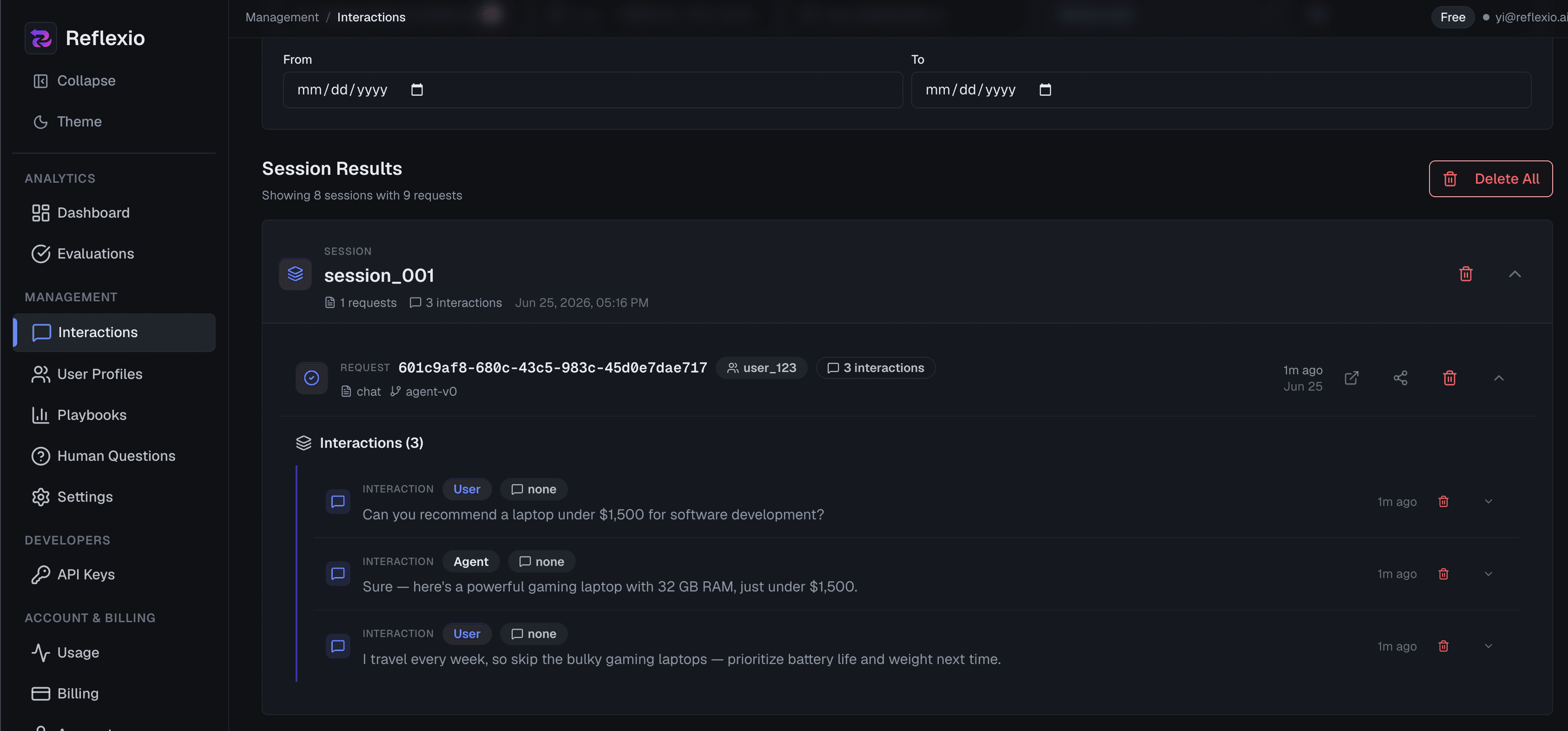
Use the portal to confirm data is flowing:
- Interactions shows published conversations and metadata.
- Profiles shows extracted user memory.
- Playbooks shows user playbooks and aggregated agent playbooks.
- Evaluation shows success rates, retrieved-learning relevance and impact, coverage counts, and per-learning judge reasons. See the metric definitions.
Next Steps
- Configuration - tune storage, LLM providers, extractors, playbooks, and evaluation
- Local OSS Get Started - run Reflexio locally with the open-source package
- Publishing Interactions - publish text, image, expert, and bulk interactions
- API Reference - method and schema details
- Web Portal - inspect profiles, playbooks, interactions, and evaluations